LingQ Review 2026: The Ultimate Guide After 6+ Years of Daily Use
Updated
This post contains affiliate links. If you buy through one of them, I may earn a commission at no extra cost to you. See Full Affiliate Disclaimer.
Table of Contents
- 1. My LingQ Story: From Pimsleur to Reading Daily
- 2. What LingQ Actually is (and How it Works)
- 3. LingQ’s Biggest Secret Strength: it Creates a Path
- 4. What I Still Love After 6+ Years
- 5. What Still Frustrates Me (Honest Cons)
- 6. Who Should Use LingQ (and Who Shouldn’t)
- 7. Pricing: Is it Worth it?
- 8. LingQ FAQs
- 9. Final Verdict
TL;DR
✓ The most long-term app I've tried — 6+ years of daily use and still going
✓ Works from day one — I started using it as a near-total beginner in both Spanish and Finnish
✓ Perfect for people who love learning through books, podcasts & YouTube videos — combined with motivating progress tracking for gamification
✓ Try LingQ Free (no credit card needed)
✓ Totally worth the money, and in my opinion a must for serious language learners
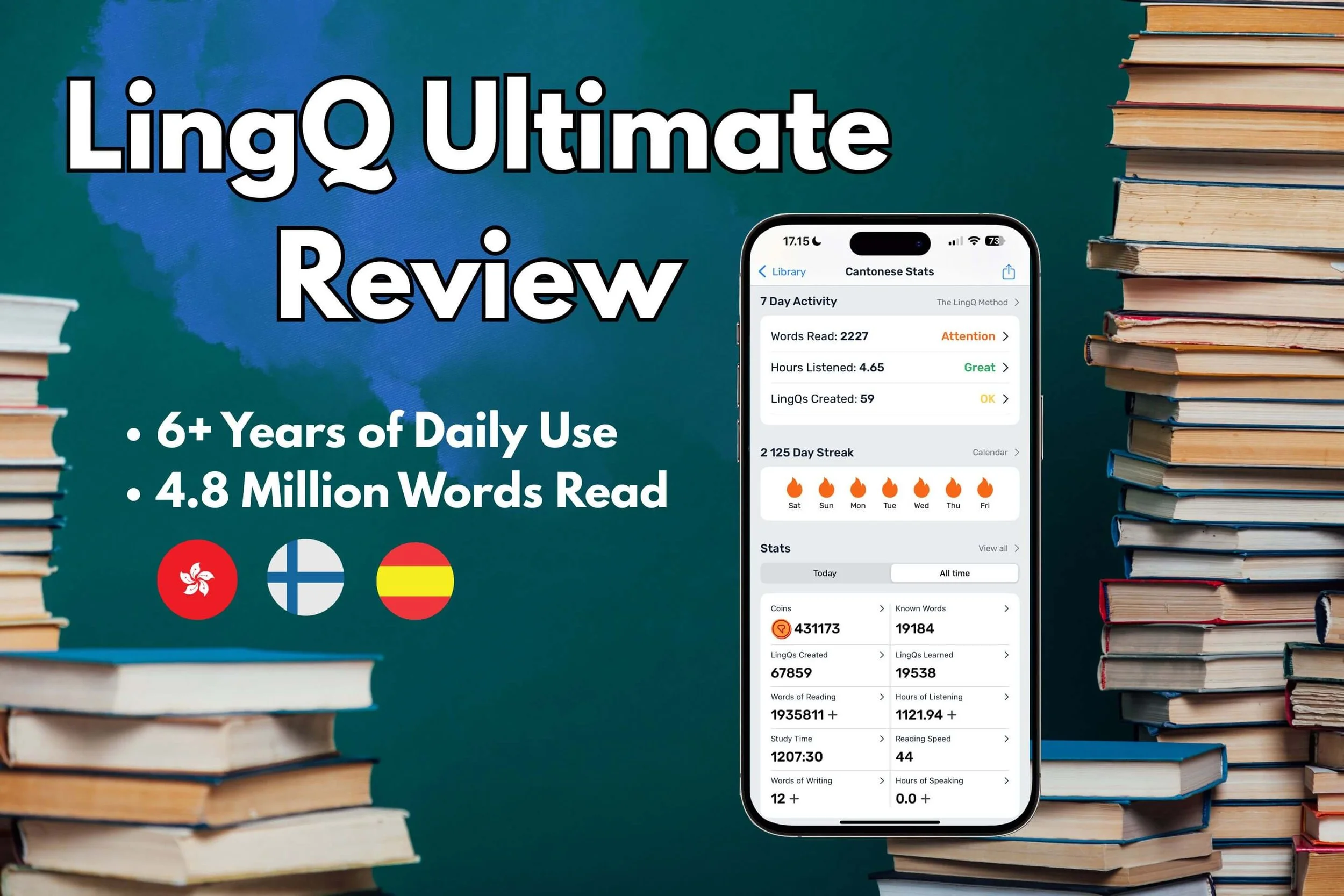
My LingQ Journey By The Numbers
Real data from 6+ years of daily use
6+ Years
Daily Usage
40-50+
Books Read
2,200+
Day Streak
3
Languages
Known Words by Language
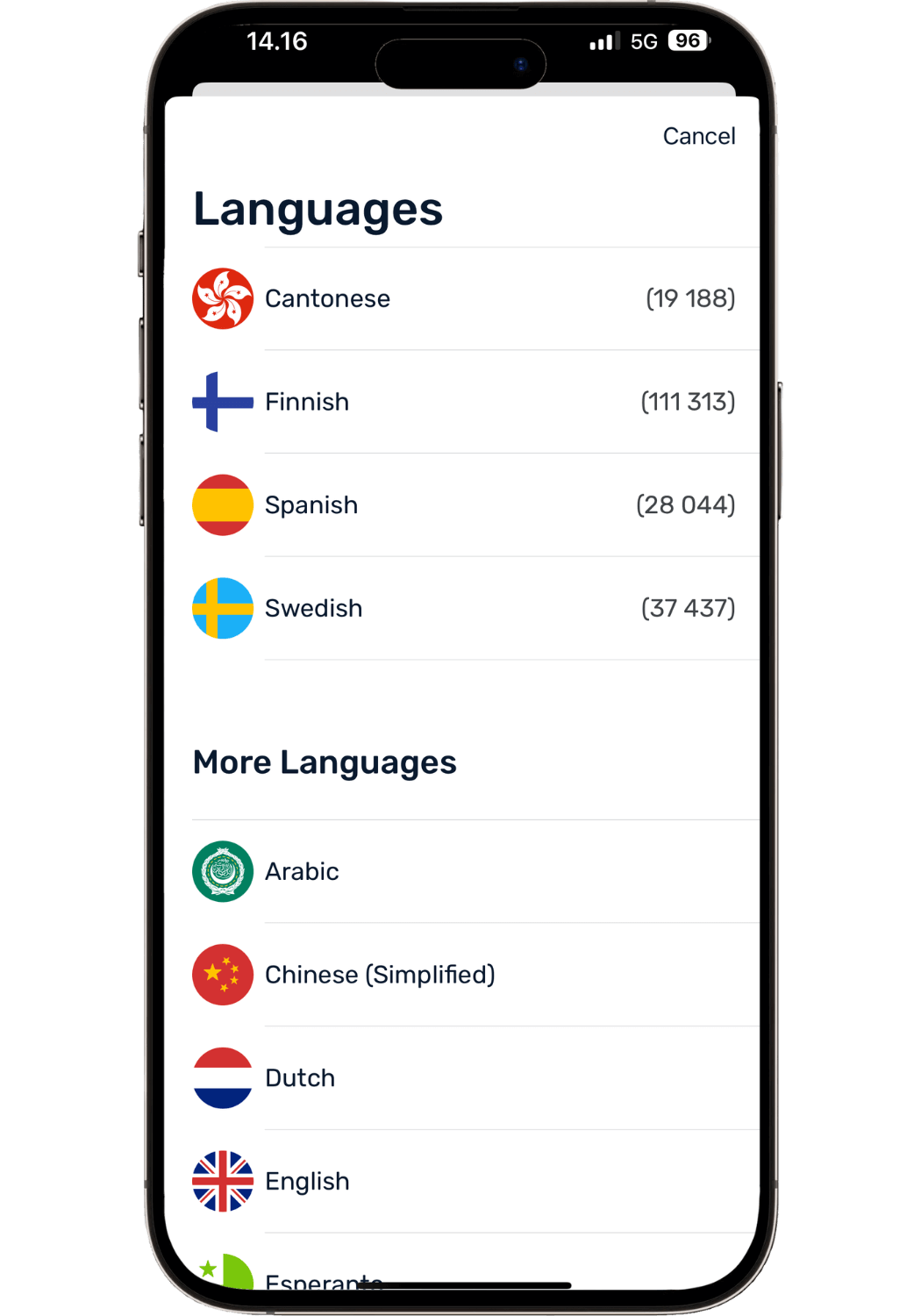
My known words by language. Known words varies a lot based on the grammatical nature of the language. (Swedish? It’s my wife learning my native language on the same account).
1. My LingQ Story: From Pimsleur to Reading Daily
I started using LingQ back in 2019. I had just finished Finnish Pimsleur and needed something that would take my Finnish from knowing a few basic phrases to real-life fluency—something that would work long-term but was still fun.
I started with some beginner content, clicking blue (unknown) words and watching my known word count go from 0 to 100, to 500 then eventually 10,000+ words in Finnish and beyond. Seeing that tangible progress was super motivating.
The turning point: After a few months I started reading my first real book—Steve Lukather’s (of Toto) autobiography in 🇫🇮 Finnish. It was very challenging but one of the most satisfying things I’ve ever done. Because I was like “hey, I’m reading actual real native content!” LingQ’s tools made it manageable and gave me visual confirmation of my progress.
Six months later, I added 🇭🇰 Cantonese. Honestly, I don't know how I would've learned to read in Chinese without LingQ. The motivating tracking system kept me going through the hard parts. Years later, I added 🇪🇸 Spanish as well.
Today, I function in these three languages in all situations—family dinners, doctor visits, job interviews, even making deep friendships in these languages. I owe most of that to LingQ being with me every single day for 6+ years across 3 languages.
Note: This LingQ review is based on 6+ years of daily use (literally thousands of hours)—not a 30-day trial.
2. What LingQ Actually is (and How it Works)
LingQ is a reading and listening tool that makes learning from native content actually doable—it makes content otherwise too difficult comprehensible.
Here's the core concept:
You read a text in your target language—a news article, podcast transcript, or ebook—and tap any word for instant definitions. You can choose from multiple dictionary sources, see AI-suggested translations, and even add your own custom definitions. That word gets saved as a "LingQ" and shows up highlighted whenever you encounter it again in any content.
The color-coding system:
Blue = word never seen before (new)
Yellow = learning (you've clicked it)
White = known
This visual system is incredibly motivating. You’ll literally watch pages transform from mostly blue to mostly white as you continue to read and improve. You can also see the percentage of new words before opening a lesson (34%, 10%, or 80% new). This can help you gauge if it's at the right level for you.
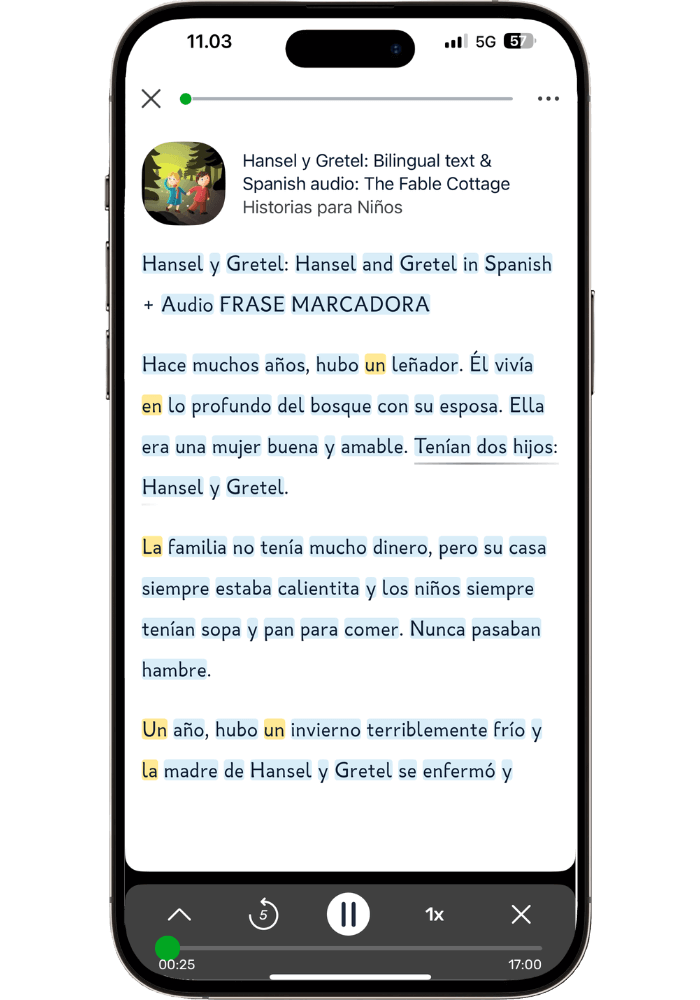
A beginner using LingQ to read and listen to a children’s story. Almost all blue words.
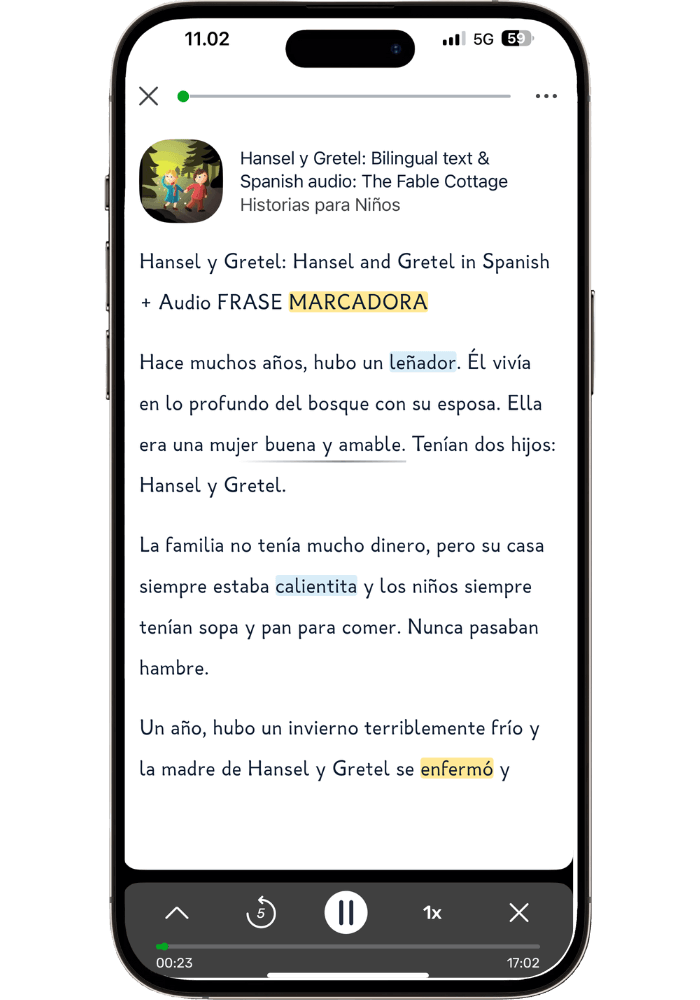
That same children’s story being read by a seasoned language learner and LingQ user. Mostly white words.
What makes LingQ unique:
✓ Your definitions travel - Save a word from a podcast, see your definitions pop up when it appears in a novel later
✓ Save phrases - Useful for expressions that only make sense together ("spill the beans", “piece of cake”)
✓ Multiple definitions - Add different meanings for words whose meaning change based on context
✓ Custom definitions - Write your own definitions that make sense to you
✓ Import Anything - Novels, news articles, YouTube videos, transcripts, blog posts, podcasts
Audio syncing: Upload audio + transcript and LingQ automatically syncs them. Or upload just audio and let LingQ transcribe it word for word via Whisper integration. Both work surprisingly well now (this used to be terrible, but they've massively upgraded it).
How content is organized: Courses = full books. Lessons = chapters. This keeps things manageable—you're never staring at an overwhelming wall of text.
→ For complete setup details, check out my LingQ setup guide: The Ultimate LingQ Settings Guide: Complete Setup Tutorial.
(no credit card needed)
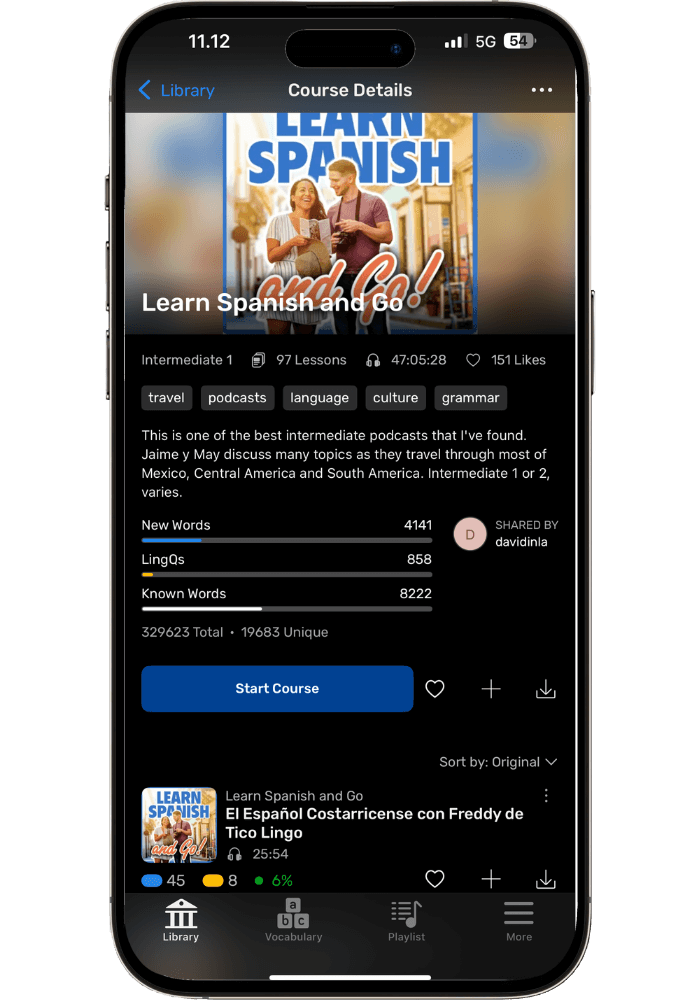
3. LingQ’s Biggest Secret Strength: it Creates a Path
Most language apps can work for a while. 30 days, 3 months, 6 months—then what? Most have a date where they will stop working. You either get bored, or you simply outgrow them. LingQ grows with you from beginner to advanced, which is extremely rare in a language app.
This is the most underrated thing about LingQ. Because starting a language is easy. But sticking with it past the honeymoon period? That's where everyone quits.
How LingQ solves this:
Clear daily goals - You know exactly when you're "done" (500 words read, 30 minutes listened)
Long-term tracking - Progress tracked over months and years, not just days. You get a learning timeline and history you can actually follow.
Milestone motivation - Hitting 1K → 5K → 10K → 30K known words creates tangible goals to move toward
Scales with your level - A short story is easier than a novel. An autobiography has simpler vocab than a fantasy book. The difficulty comes from what you choose to read and listen to.
Content hub - All your learning materials in one organized place (audio playlists, courses, books, YouTube videos, and other imported content)
Why this is so important: Language learning usually takes years, not months. Most people quit because progress feels invisible and the path forward is unclear. LingQ makes progress concrete and tangible.
My experience: The daily streak kept me going on days where I didn’t feel like learning. Playlists made organization easy. Milestones kept me motivated by giving me a goal to push toward and satisfaction when I reached them. Being able to import anything made it not even feel like learning.
After 6+ years, LingQ is the only language tool that's been with me every single day—because it never stopped working and bringing me results.
4. What I Still Love After 6+ Years
There are several reasons why I have stuck with LingQ so long. Other apps I might use for a season and for a certain purpose (such as a beginner app) but why is LingQ the one thing that has been with me every day for so long?
A. The "Bathroom/Coffee Shop" Flexibility
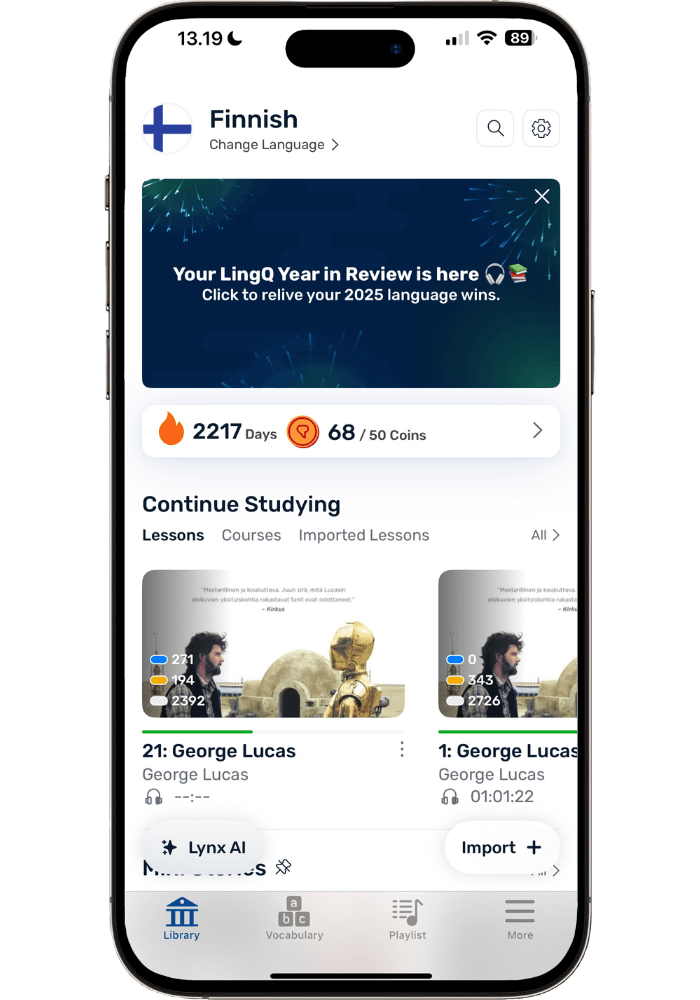
To stick with something long-term it needs to be stupidly easy to do. With LingQ, I can read one page while waiting in the car, read for 5 mins in the bathroom (come on, you know you bring your phone anyways!) or any other small gap during the day.
It bookmarks exactly where I left off in any lesson, so there’s no “where was I?” confusion. These short sessions add up by the end of the day, making it possible to hit goals even on busy days.
However, it's equally perfect for long, cozy reading sessions with coffee on Saturday morning or an evening cup of tea. That flexibility is rare and why it works so well.
B. Reading Books I Actually Want to Read
By far one of the best parts of LingQ: import anything.
Fantasy books, autobiographies, psychology books, Marie Kondo books on how to organize your house, news articles—the possibilities are infinite.
Whatever you’d want to read in English—read it in your target language.
When you're genuinely hooked on the content you’re reading, language learning becomes an afterthought. You're not studying—you're just reading something interesting and looking up words along the way. Learning simply becomes a by-product of immersing in something that you find interesting.
Some of my favorites across 40+ books:
7 Habits of Highly Effective people, by Stephen Covey (🇭🇰 Cantonese)
Deep Work, by Cal Newport (🇭🇰 Cantonese)
Steve Lukather autobiography (🇫🇮 Finnish - first book I ever read front to back in LingQ)
Atomic Habits, by James Clear (🇫🇮 Finnish)
Hunt, Gather, Parent - Michaeleen Doucleff (🇪🇸 Spanish, so great I read it in Finnish first and then Spanish)
Beyond books, I've used LingQ for YouTube videos, podcasts, news, TV show subtitles, The Bible, and various course content. Whenever I use a language course that has audio + transcripts I upload both to LingQ since it’s so convenient to study from there.
Tip: When someone recommends a good book, I check if it exists in any language I'm learning.
C. Natural Review (Just Go A→B)
Reading is like automatic spaced repetition. Like having a flashcards app like Anki built into the process of reading. Common words repeat naturally, so you don't need artificial reviews. Just keep turning pages, going from A to B.
I've noticed halfway through most books that they get significantly easier. You're familiar with the topic's vocabulary and the author's choice of words. Which means the natural review is working!
Options do exist: LingQ does have flashcards, cloze games, and end-of-lesson review. Personally, I've never used them in 6+ years. For me, reading more content is the review. But some people like the structured practice and the tools are there.
D. It’s My Personal Learning Hub
Since I can import my own content, LingQ has become a central hub for all my learning materials. It’s so convenient to have all the books, podcasts, YouTube videos, playlists, and course content organized in one place.
Here are some content examples (and why they work so well in LingQ):
Audio + text syncing: This used to be terrible; now it's shockingly good. When you upload both LingQ syncs them automatically—even if there's extra text on the pages that’s not in the audio, it recognizes it and smartly skips it.
Audio transcription: Upload an audio file and LingQ transcribes it via its Whisper integration. It’s highly accurate (though not 100%—use your own judgment if a word seems totally wrong for context). Perfect for podcasts.
Read & Listen in manageable chunks: In any content, you can use Sentence Mode—play just that sentence's audio. Perfect for practicing listening to tricky parts, or reading challenging passages.
YouTube videos: While this could be better (more on that in the cons section) it’s still heaps better than it used to be and now something I actually use. Sentence Mode is especially useful for going through videos line by line (→ Try out the YouTube feature for free here)
Importing books: Some ebooks need converting before uploading (slightly annoying, but easy once you learn it). See my → How to Read Books with LingQ: Complete Beginner's Guide for details.
Audio-only organization: Even for audio-only content without transcripts, I upload to LingQ for playlist organization, time-based goal tracking, and automatic bookmarking— it remembers exactly where I stopped whenever I return.
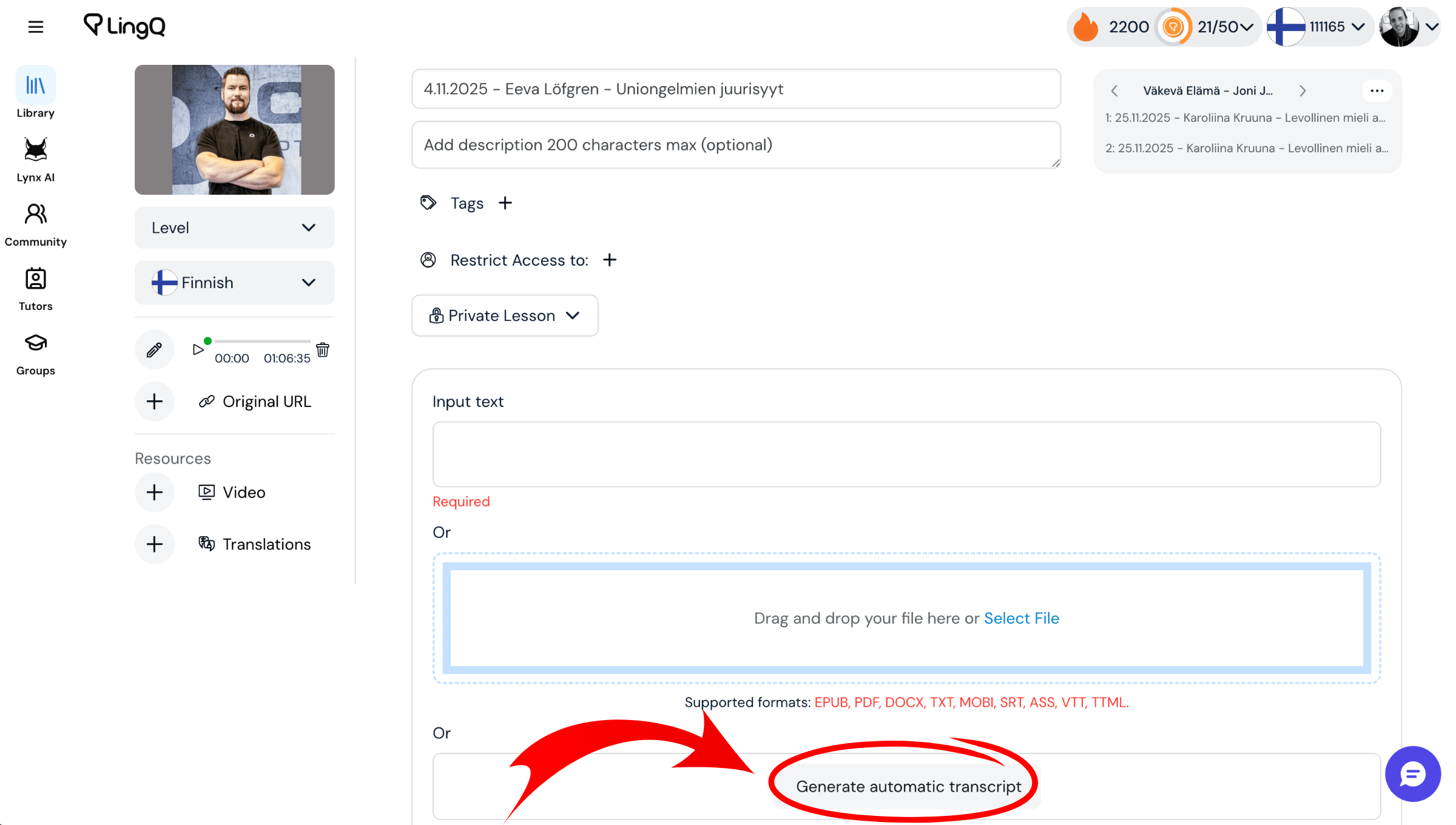
Creating your own learning content by generating a transcript from any audio (like a podcast episode) is easy with LingQ’s Whisper integration.
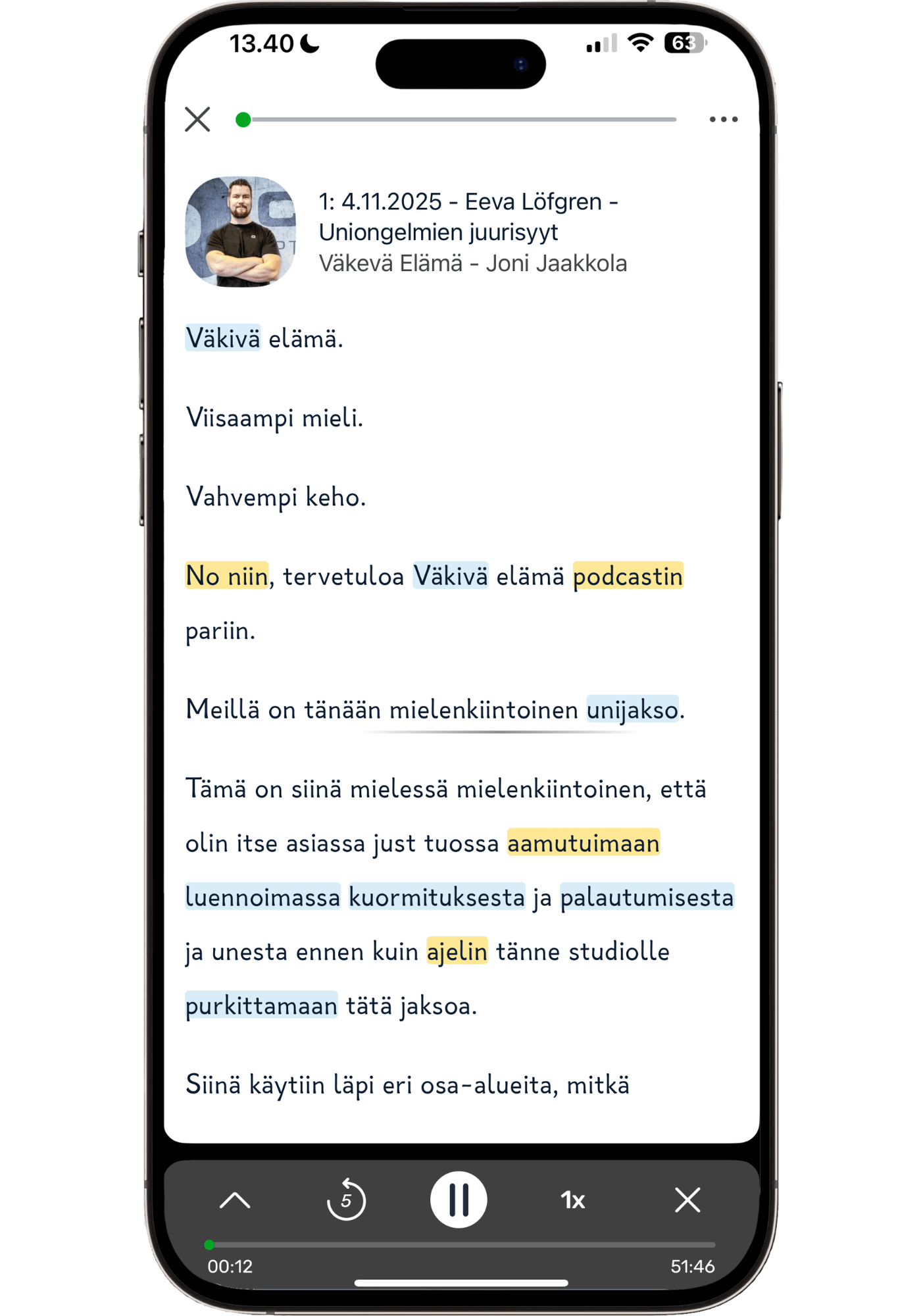
Auto-generated podcast transcript, highlighting words as spoken
E. The Smart Look-Up Features (Including AI Definitions)
When you save a word, your definition appears everywhere — YouTube videos, novels, articles. It builds your personal dictionary.
You can add multiple definitions for context (like "rose" can mean a flower — or the past tense of “rise”), save entire phrases (i.e. “barking up the wrong tree”) when they only make sense as a whole, and even add your own definitions and notes.
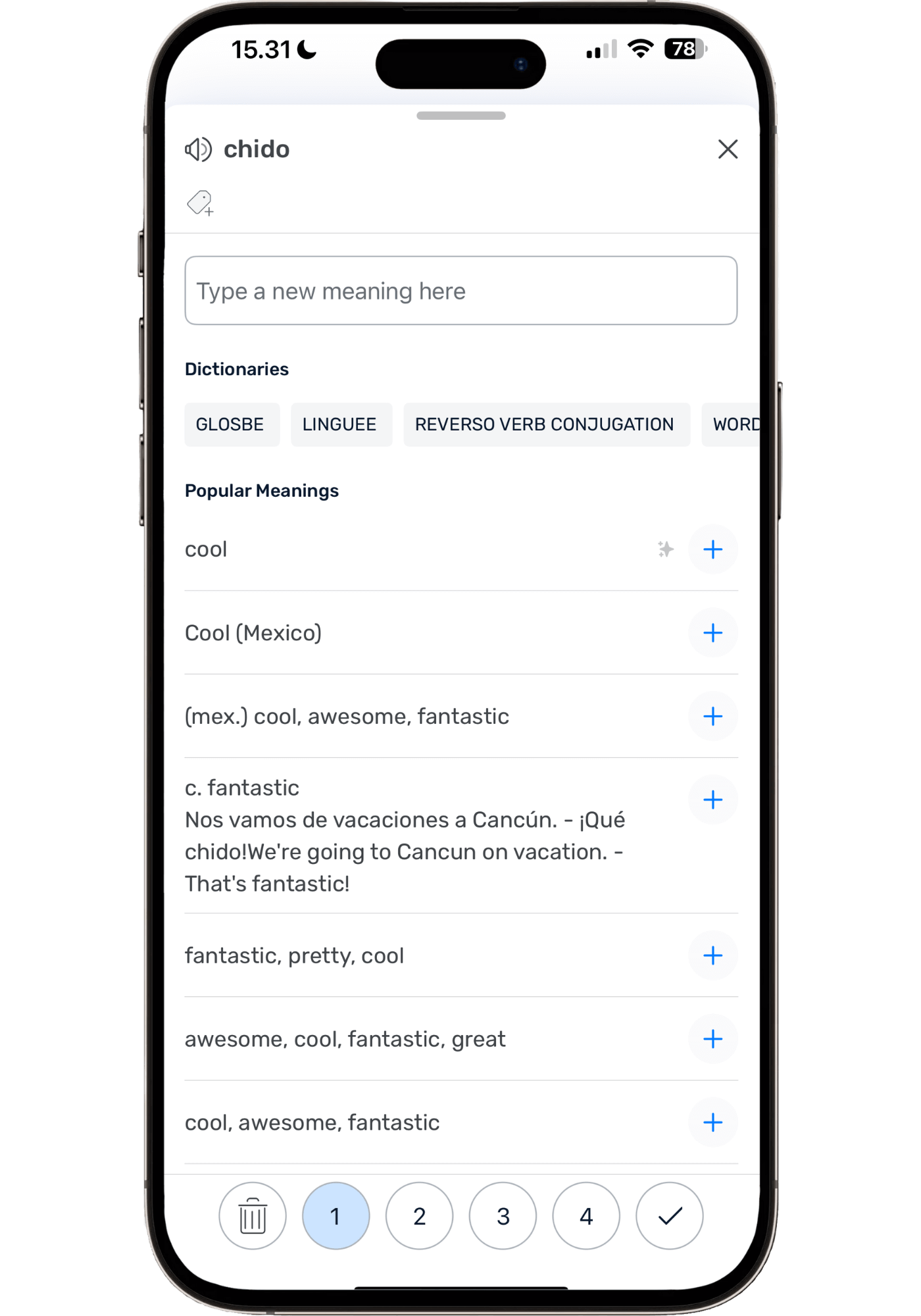
LingQ's pop-up dictionary showing dictionary & user-submitted definitions, and AI suggestions (the one with ✨ symbol)
AI definitions: LingQ now suggests context-aware definitions via AI. It’s accurate 95% of the time in my experience. Not only that, but you can click the yellow fox to get more of a conceptual definition and explanation based on its surrounding context. Super useful! Helps me finally understand tricky words, like those ending particles in Cantonese.
Tip: If definitions don't make sense, translate the whole sentence or use Sentence Mode's "Translate Sentence" feature for context-specific meanings. Still doesn’t make sense? Re-generate sentence translation for an alternative translation. Or use the ‘Explain This’ feature shown below:
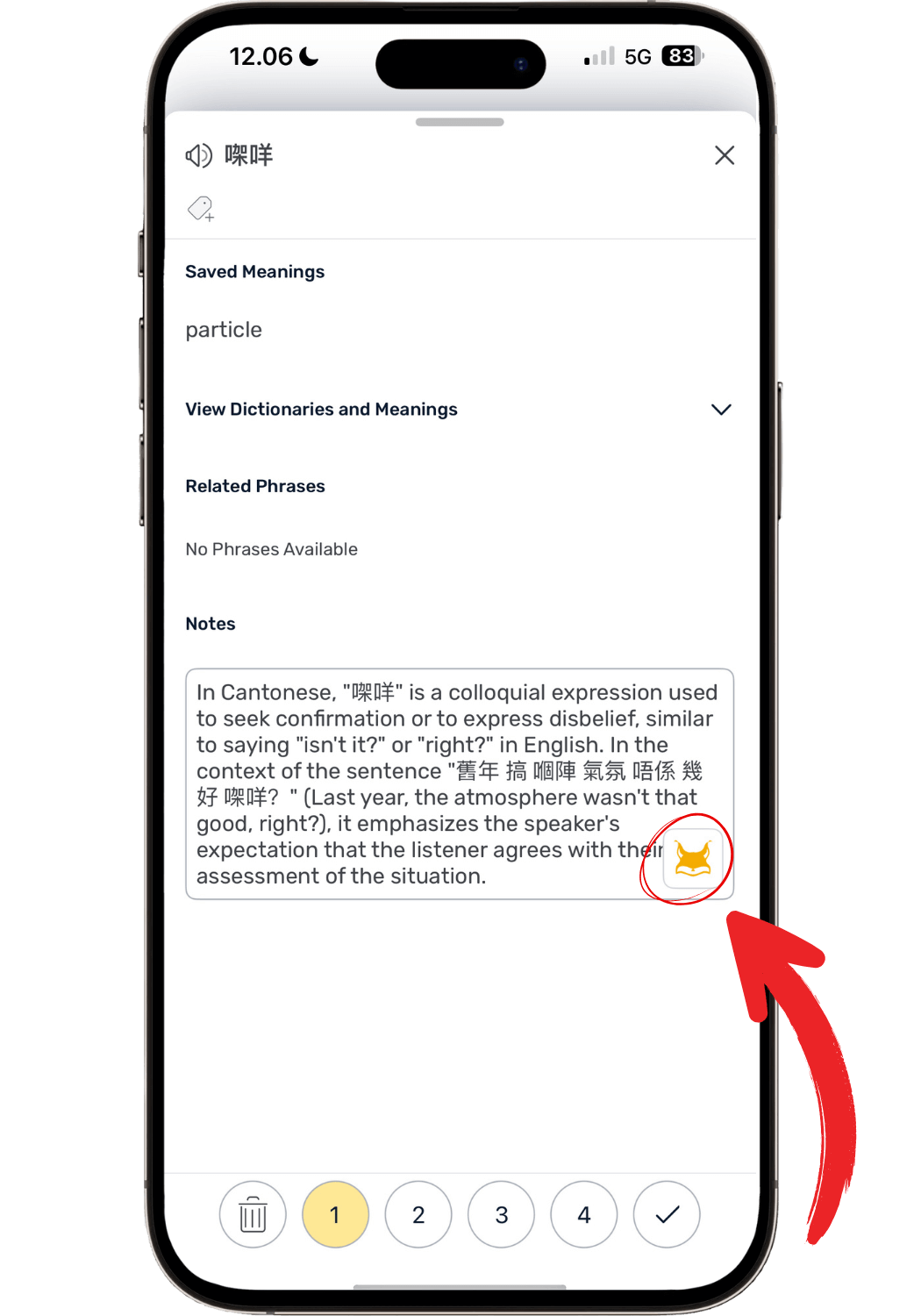
The new ‘Explain This’ AI feature helps give conceptual definitions of words based on their context.
F. Listening Goals & Playlists
Setting daily listening goals has been super key for my progress. It pushes you to put the time in even when you don’t feel like it.
Another reason why I like having my listening content organized in LingQ—it tracks how many minutes I have listened. You’ll know exactly when you’ve reached your 30, 60 or 120 minute daily listening goal.
The playlists are handy for listening when I’m doing house chores since it just keeps playing. Plus, you can activate a rolling transcript while listening for reference if you need.
5. What Still Frustrates Me (Honest Cons)
Even though I attribute a large part of my language learning success to LingQ, there are still things I wish would be better. Some, such as the once seriously dated interface, have been fixed.
Here are the ones I have noticed and experienced through the years that are still there.
Note (July 2026): LingQ has shipped a run of updates recently, and some features have landed on Android before iOS. I'm on iOS, so I haven't been able to test those yet and can't tell you whether they fix the problems below. The iOS release is expected soon and I'll update this section once I've used it properly. Everything below reflects the iOS and web experience as of now.
A. The YouTube Problem (My Biggest Issue)
LingQ is able to import YouTube videos so that you can use their instant pop-up dictionary and color-coding with the YouTube subtitles. This could be a massive feature but right now it’s a bit “meh”.
On desktop: You can import any video that has ‘CC’ subtitles — great. A small window with the video is shown in the LingQ lesson + the transcript. However, since the video is always covering at least part of the subtitles you have to constantly move this window around when watching. It’s better than it used to be (you could only listen—not watch—while clicking words) but still less than ideal.
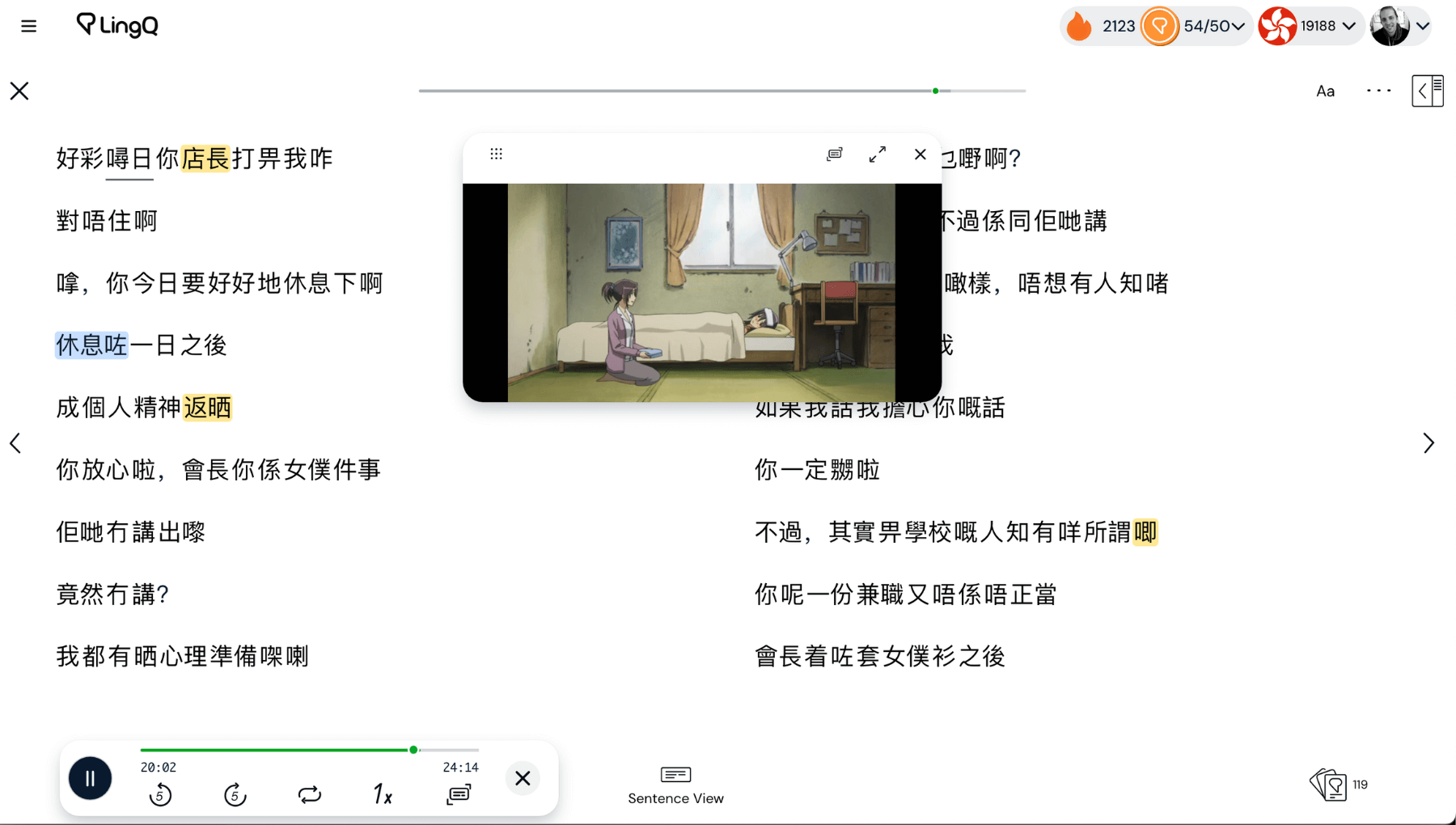
On the phone app: You can watch and read the subtitles in a flowing format at the same time. This looks nice but there’s no way of clicking the subtitles when watching. So there’s really not much point watching it in LingQ vs. just in the YouTube video with ‘CC’ subs turned on.
You can, however, watch and interact with the transcript in ‘Sentence Mode’—where you go sentence by sentence. This was previously not possible and it works quite well—you can read the transcript and re-listen to tricky sentences as much as you want. I just wish I could interact with the transcript the same way when playing the video in a “rolling transcript mode”.
It’s honestly so close to being amazing but just not quite there yet. The ultimate would be to use LingQ’s lookup tools directly in a YouTube video in horizontal mode, but if I could click on the subtitles in the flowing mode I would be super stoked—it would be a game-changer.
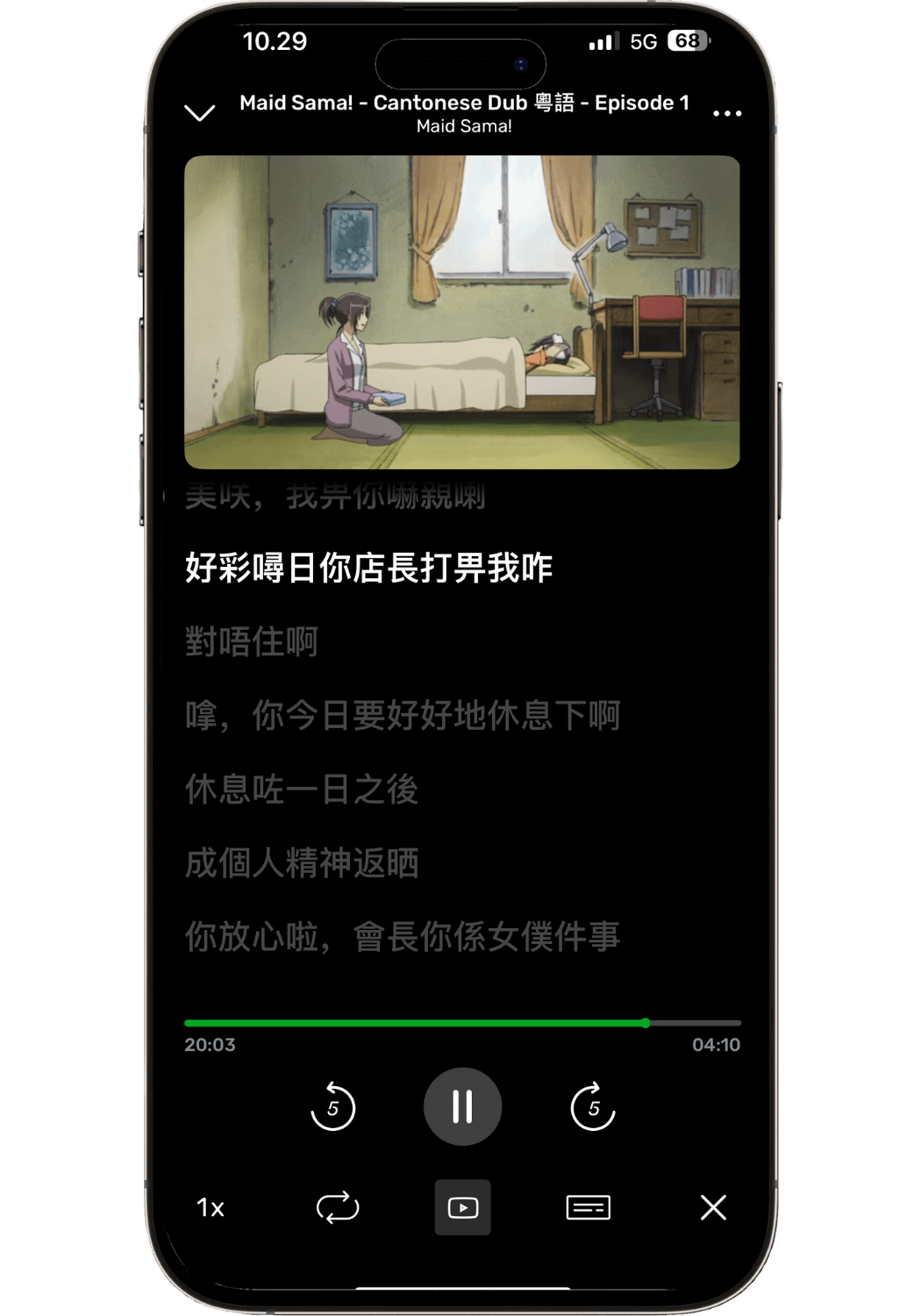
Though it looks nice, you currently can’t look up words while in “rolling transcript mode”.
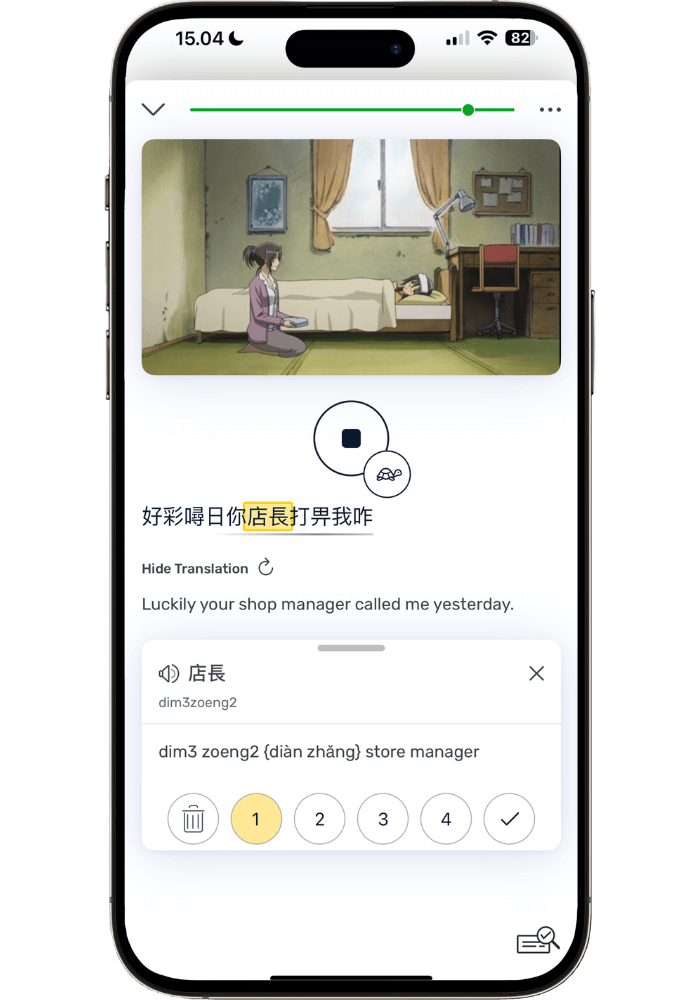
When in ‘Sentence Mode’ you can watch and interact with the transcript at the same time—highly useful.
B. Learning Curve
LingQ has a lot of features and settings. While this is great for flexibility and customization it increases the learning curve. There are still features I’m discovering and learning to use (which to be fair is partly because new features are being added.)
The biggest obstacle for most is the setup— lots of different customizations and it’s difficult to know how they actually influence the LingQ experience, which can be significant.
That’s why I created a blog post dedicated to getting you setup with the ideal LingQ settings, so you don’t have to figure it out (see The Ultimate LingQ Settings Guide: Complete Setup Tutorial for easy-to-copy setup.)
People who want extreme simplicity might find it a bit frustrating to learn to use LingQ. Though I will say that my wife—who can’t stand complicated apps—has used LingQ successfully for years. I basically just told her: “here are the features you need, ignore the rest” and then I handle all the importing of e-books for her.
C. Search/Organization Issues
Database search could be better. There is a search function but even though I search for the right thing it doesn’t always show up in the search. I find myself having to scroll through my database (or use cmd + f) to find what I need.
After some trial and error I realized I had to just pick the right filter (what course, who shared it — i.e. me.) This definitely has room for improvement.
D. Language-Specific Issues (Word Parsing)
For languages like Spanish and Finnish the transcripts LingQ generates work well. However, sometimes a sentence is cut off in the middle. So you can’t get a full sentence translation of it without manually editing the sentence (which I find too tedious to bother doing)
Parsing: For Cantonese, the parsing of characters is quite often incorrect. It’s not every sentence but it’s often enough that you have to get used to using workarounds. Words might have characters attached that don’t belong, so the dictionary says ‘no definition was found’. AI will still give a context-based definition but it can be confusing for people who are just starting to read in Chinese.
Workaround: Deleting the extra character solves this. But the problem is you might not know which characters belong together and which don’t. To solve this, copy-paste the characters in an app called Pleco (parses more correctly than LingQ).
I’ve gotten used to this but it does add another layer to your learning process. I wish LingQ could somehow connect their dictionary/parsing to Pleco as that would probably solve most of the parsing issues.
Cantonese audio transcription: The Cantonese Whisper-integration works well for auto-creating transcripts based on audio. However, it creates it in Standard Written Chinese rather than spoken Cantonese. Not ideal but still useful. However, this is not a LingQ issue but an issue for Cantonese tools in general.
Despite these drawbacks LingQ is still the best app for reading Chinese that I have found. I honestly don’t even know how I would have ever learned to read actual Chinese books if it wasn’t for LingQ. It just requires some manual adjustments and extra steps that other languages don’t.
E. Listening Tracking
For some reason LingQ counts listening not in minutes (like with reading) but 0,00. So 30 mins is 0,5 hours. This is a bit confusing and I have no idea why it doesn’t just show minutes. It would make it a lot clearer instead of having to decipher it.
Also, I wish there was a button that loops any lesson audio. Right now you have to manually replay it if you want to repeatedly listen to the same clip.
My take:
These are real issues, but none of them have been dealbreakers for me. You just need to learn some workarounds to make it work. Chances are LingQ will improve some of these features in the near future as they have throughout their existence.
6. Who Should Use LingQ (and Who Shouldn’t)
After having used LingQ for 6+ years — having had many people ask about it and several of my close friends either tried it or used it long term — I have developed quite a good feel for who will like it and who won’t.
Perfect for
- Those serious about reaching fluency and high comprehension
- Readers — if you love reading, you'll love LingQ
- Anyone who wants to import their own content
- People who want a tool that stays useful for years, not weeks
- Independent learners who like building their own path
- Complete beginners through to advanced
- Visual people — the stats and streak tracking are motivating
Not ideal for
- People who need a structured curriculum rather than a flexible immersion tool
- People who hate reading — it's fundamentally a reading app
- Casual learners just after travel phrases
- Anyone wanting explicit grammar instruction (they do have grammar guides, but that's not the core)
🎯 Want to see if LingQ works for you?
7. Pricing: Is it Worth it?
After having spent $700-800 on LingQ here’s my take: totally worth it for serious language learners. In fact, I consider it a language learning essential.
LingQ offers three tiers of plans: Free (limited), Premium, and Premium Plus.
What it Costs
LingQ Premium
$119.99/year ($10/mo)
$215.76/2-year ($8.99/mo)
$14.99/month
LingQ Premium Plus:
$269.99/year ($22.50/mo)
$29.99/month
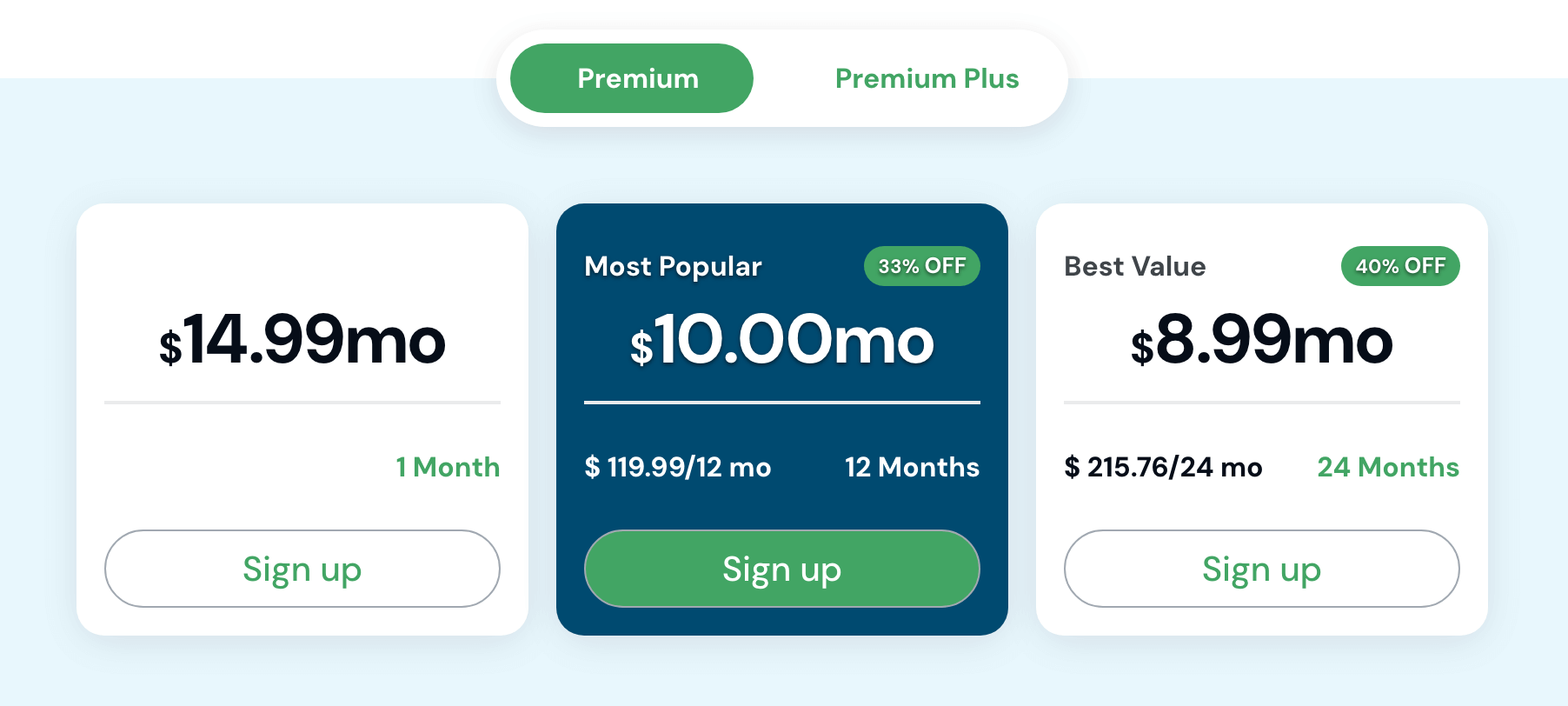
LingQ Premium pricing - from LingQ’s official website
Premium includes:
Unlimited saved words
Import anything
Full translations
600 minutes of monthly audio transcription
Inworld text-to-speech voices
Lynx standard chat mode
A conversational AI tutor to interact with about the lessons— get grammar help, discuss content, and practice speaking/writing, etc.
Stats tracking
Offline access
All languages
Premium Plus: Worth the Extra Money?
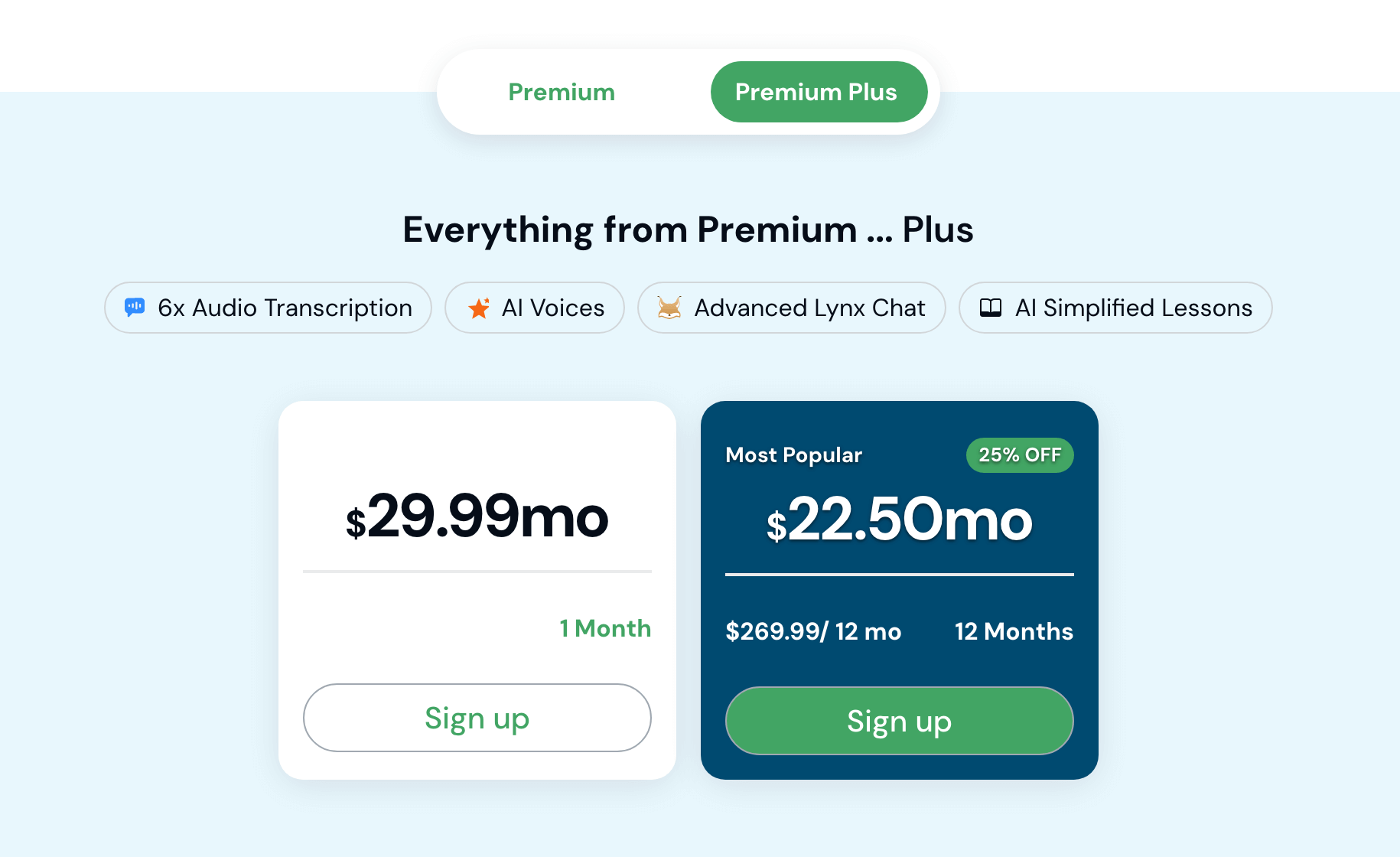
LingQ Premium Plus pricing - from LingQ’s official website
Premium Plus adds:
The Main upgrade:
Eleven Labs Text-to-Speech voices - industry-leading, significantly more natural-sounding than standard voices
Other Premium Plus Features:
6x audio transcription (3,600 min/month vs. 600)
AI-simplified lessons
Advanced Lynx AI tutor modes
Who Should Consider Premium Plus?
✅ Upgrade if you:
Want to create natural-sounding audiobook versions of your reading material
Need more than 600 min/month of audio transcription
Want the advanced AI features
❌ Stick with Premium if you:
Mainly read without audio
Use native audio content (podcasts, audiobooks)
Don't need advanced AI features
My Honest Take
I've used regular Premium for my entire six-year journey. LingQ gave me a month of free access to Premium Plus so I could test it properly, and at the end of it I decided to stick with regular Premium.
The Eleven Labs voices are seriously excellent — if you want to generate listenable audio for books that have no audiobook version, that alone might justify the upgrade. But I don’t currently use the voices enough to pay the extra $150 a year, and 600 minutes of transcription a month has always been plenty. I haven't used the Lynx AI tutor much though, so I can't tell you whether that changes things.
My recommendation
Start with regular Premium. It's what I've used successfully for 6+ years to learn three languages.
Premium Plus has some genuinely impressive features (especially those Eleven Labs voices), but unless you have a specific need for them then regular Premium will be enough for most learners. You can always upgrade to Premium Plus later if you feel you need it.
Pro tip: If you do want to upgrade to Premium Plus—you can do so anytime without losing money.
For example: Buy Premium for 1 year → Use it for 6 months → Upgrade to Premium Plus → Your unused 6 months gets credited automatically.
The Real Value
Over my 6 years, I've spent $700-800 on LingQ. In return, I've:
Read 40-50 books across 3 languages
Reached fluency in Finnish (now function in all life situations)
Built skills to read books in Chinese with ease
Gained conversational fluency in Spanish
Spent thousands of hours learning with genuine enjoyment
That’s life-changing for less than $1,000 total.
But only if you actually use it: Otherwise it’s money wasted.
For me: it’s the best $100+/year I spend.
A free LingQ account caps you at 20 saved words — less than a page of reading. My link gives you 120, so you can actually test the thing that makes LingQ work. It also takes 5% off annual plans.
(no credit card required)
8. LingQ FAQs
Is LingQ good for beginners?
Yes — and I say that as someone who started on day 2 of Spanish, and after about 30 Pimsleur lessons in Finnish. Neither was past A1.
You just use it differently at the start. You're not reading novels yet, but you're building toward it. Use LingQ's own beginner content, or — if your course comes with audio and transcripts — import that instead. I'm learning Korean right now and I've imported the audio and transcripts from the course I'm using. Having everything organized in playlists, the transcript synced to the audio, and sentence mode for replaying the bits that trip me up is seriously useful before I've read a single book.
Other beginners have told me the same thing: importing their course into LingQ and watching the color-coding shift from blue to white is what made progress feel real.
I do like a more structured beginner course running alongside, and I use one in every new language I start. But I use LingQ alongside those from the beginning. There's no reason to wait.
If you want ideas for a beginner course to run alongside it, here are my current picks — most of them cover a lot of languages, not just Spanish.
How long does it take to see results with LingQ?
Depends what you mean by results — and that's not a dodge, because LingQ produces a few different kinds at very different speeds.
Straight away, you'll watch pages go from completely blue to yellow as you save words. That's not fluency, but it's the first time progress becomes something you can see, and it's what keeps you coming back.
Within a few months, content that felt impossible becomes manageable. I started LingQ in Finnish after about 30 Pimsleur lessons and read my first full book — a musician's autobiography — a few months later. It was hard and I clicked on a lot of words, but I finished it. Everything got easier after that — and the same thing happened again with my first book in Chinese.
After a year or more is where it compounds. My Finnish known-word count is now past 111,000, and I can use the language everywhere — family dinners, doctor's appointments, job interviews.
The honest answer: LingQ isn't fast, and nothing that gets you to real fluency is. What it is, is a tool that still works in year six. That's much rarer than being fast.
How can I try LingQ for free?
You can sign up for a free account — no credit card needed. My link gets you a bigger trial than their own site does: 120 saved words instead of 20, so you can actually test the thing that makes LingQ work. 🇺🇦 Ukrainian is completely free on LingQ with all Premium features.
Does LingQ teach grammar?
It doesn’t teach grammar explicitly but relies on learning a language in context to acquire the grammar that way. Though they do offer grammar guides for many languages that can be used as reference.
What's the best way to use LingQ?
Find content that interests you, immerse in it every day, and enjoy the process without over-analyzing (see my post How to Read Books with LingQ: Complete Beginner's Guide for more tips)
Is LingQ good for learning multiple languages?
Totally! One of the best parts about LingQ is you get access to all 51+ languages on any subscription.
9. Final Verdict
LingQ has been the single most impactful tool in my language learning journey. Other apps I've found useful for specific purposes, but LingQ I use constantly across all my languages. I’ve learned three languages with it as my backbone. It’s always part of my daily routine and I have no plans to stop. Honestly, I don't know how I'd have the patience to work through a whole book in a foreign language without it — or how I'd even make that practical.
I also tend to use LingQ for whatever course and material I’m going through — importing the audio and text for listening on-the go, convenient listening and reading at the same time, looping tricky sentences, and easy lookups of unknown words.
What makes LingQ work so well:
Learning is genuinely enjoyable, never feels like a chore
Makes progress visible when it feels invisible
Provides endless variety (different books, podcasts, videos) without learning feeling fragmented
Clear path: read A → B and click on all the blue words
Easy to follow daily goals and track when you’ve hit them
Is it perfect? No. YouTube integration needs work, Chinese parsing has issues, and the learning curve exists.
Is it worth it? For casual learners and those who don’t like reading, probably not. But if you’re serious about long-term language learning, you like reading, and clear progress tracking — LingQ is a must.
Six years, three languages, and more than 2,200 days later, this is still the one app I open every single day. If you want to see why, my link gets you 120 saved words instead of 20 to try it properly, plus 5% off annual plans.
Posts to help you get started:
Further LingQ reading:
