Langua vs Speak: Which AI Speaking App Is Right for You?
Updated
What's new: updated for Langua's new guided path (My Path), and verified the language counts for both.
This post contains affiliate links. If you buy through one of them, I may earn a commission at no extra cost to you. Some of the products I write about are also provided to me for free. See Full Affiliate Disclaimer.
Table of Contents
- Why Compare Langua and Speak?
- First Impressions and Design
- The Structured Learning Experience — Speak's Superpower
- The Conversation Experience — Langua's Superpower
- Reviewing Mistakes — The Real Battleground
- For Beginners — Who Does It Better?
- Speech Recognition and Pronunciation
- How Each App Handled a 3-Hour Drive to IKEA
- Languages and Dialects
- Which App Will You Still Be Using in a Year?
- Pricing Comparison
- Final Thoughts — Who Is Each App For?
- FAQ
I've been using Langua for over a year and a half. It's been my go-to for Spanish and Finnish AI speaking practice, and I've written extensively about it on this blog.
I had known about Speak for quite a while, and I was curious to try it. But to be honest, I wasn’t expecting much. I figured it would be a polished-looking app but without a lot of substance — sort of like a Langua light.
Well, I was right about the first one but completely wrong on the second.
Speak turned out to be not just well-designed, but genuinely effective in ways I didn't see coming. And after using both apps every single day for the past six weeks, I can say with confidence that they're both excellent — but for completely different reasons.
This post is my full breakdown of how Langua and Speak compare across everything that matters: structure, conversations, feedback, beginner experience, pronunciation, hands-free use, pricing, and more.
If you're wondering which one is right for you, you're in the right place.
Why Compare Langua and Speak?
Speak vs Langua is actually one of the most interesting AI language learning app comparisons for me. Not because one clearly wins, but because both really impressed me — and this is my honest review of how they compare. This became obvious to me when I tested several AI apps for my Best AI speaking Apps roundup as these two were the standouts.
If you're trying to decide between Langua and Speak (or wondering whether you should switch from one to the other) the answer really depends on how you want to work on your speaking skills. It depends on your level, your preferences, your goals, and what's going to keep you motivated long enough to actually get fluent.
Because at the end of the day, the most important thing these apps do is the same: they get you speaking out loud. A lot. And giving you feedback as you go. But that’s pretty much where the common ground ends.
The clearest way to put the difference: Speak is a speaking trainer. Langua is a conversation partner. Even Speak's Free Chats are scenario-based and goal-driven — short, targeted exchanges with tasks to complete, not open-ended talk. That's not a criticism, it's exactly what makes it so effective at drilling patterns in. But if you're picturing an app you can just chat with about anything, that's Langua.
Watch Me Use Both Apps (Mistakes and All)
Here's a short video of me using both apps in real sessions.
The Speak clip shows the full workflow: drill → Q&A → roleplay. I make a mistake during the roleplay and you'll see how Speak generates custom sentences to target it (I'll break this down in the Speak's Superpower section below).
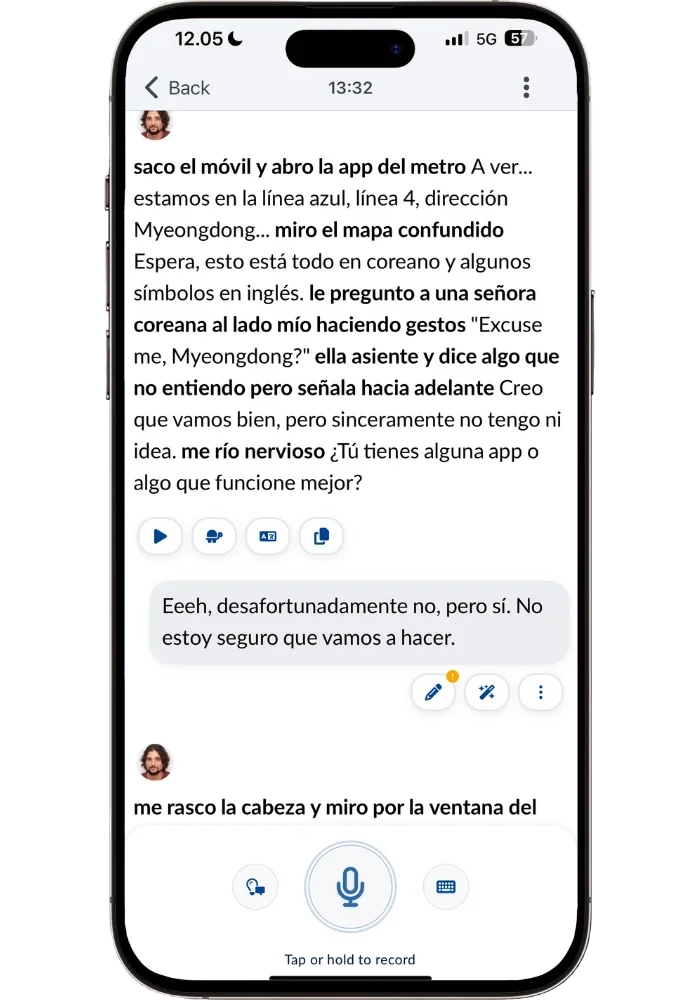
The Langua clip is from my ongoing Spanish conversation exploring Seoul with a fellow traveler named Alejandro. You'll see our back-and-forth, me saving a phrase that made me laugh, and how Langua handles mistakes in the middle of a conversation (this is the same scenario I walk through in the Langua's Superpower section). I'm showing quite a few of the tools in the video— but you can also just have a freeform conversation without touching any of it.
First Impressions and Design
Design might seem like a minor thing, but it’s actually huge. It dictates the whole experience and feel of using an app. It’s also one of those things that comes down to personal preference — some prefer bold colors and playful visuals, others prefer a clean, minimalistic approach.
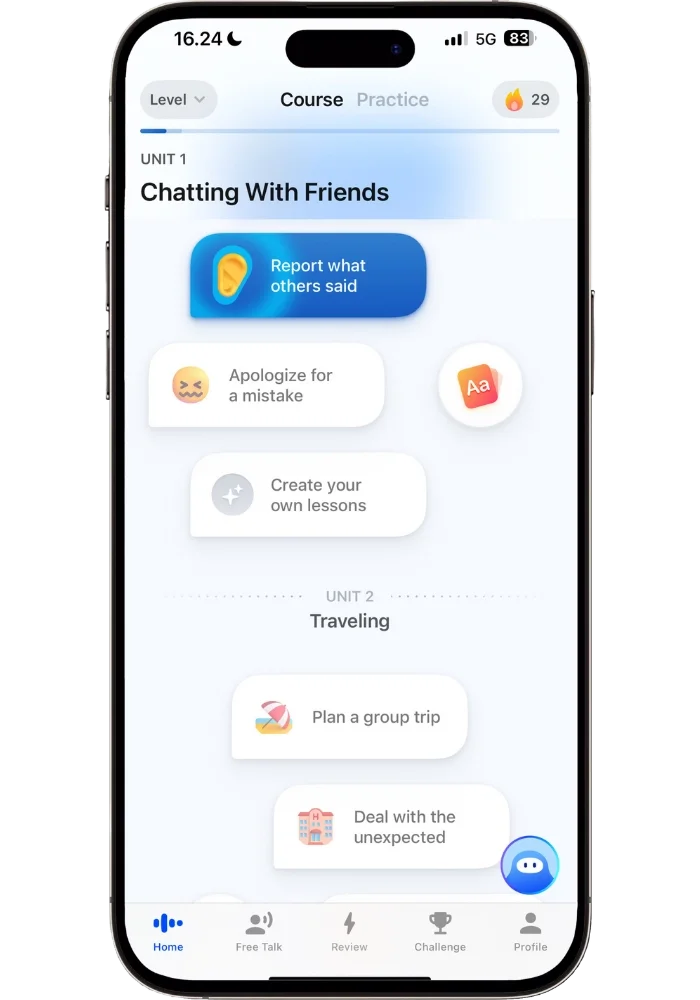
Both Speak and Langua lean heavily toward the professional, clean, and minimalistic side. Though Speak adds a bit more visual flair — subtle animations, color highlights, and optional cartoon characters for the Free Talks.
Both apps look great, but Speak edges it out for me. It’s in the little details — how the icons flow, the color-highlighting, the satisfying little sound when you get a sentence correct. It all adds up to an experience that feels polished and smooth in a way that's hard to describe until you use it. It’s reinforcing without being distracting, and it feels refreshing to use — like drinking a cold drink on a hot sunny day. It's gamified just enough to feel motivating without being childish — you see your XP, climb the leaderboard, and level up, but it never feels like Duolingo.
Speak
Langua
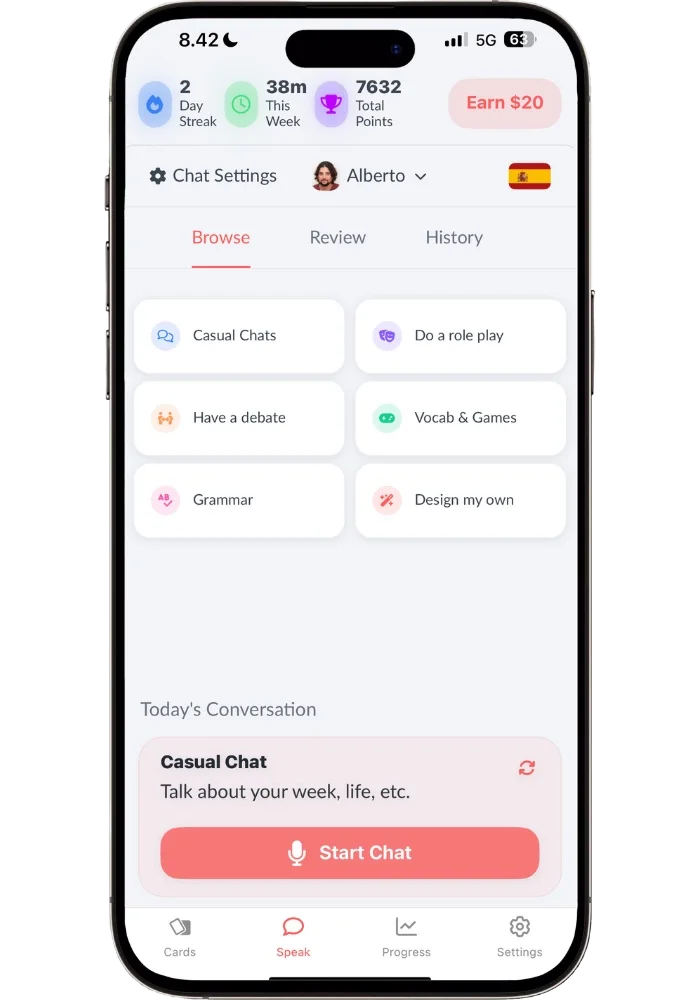
Langua is still a great-looking app with a clean, no-clutter design where everything is easy to find and navigate. It feels more like a workspace than a game — which is actually fitting, since Langua is as much of a tool as it is a guided course. You get a small green checkmark or orange indicator after each message showing whether you made mistakes. Mistakes are crossed out and corrections are in bold — subtle but effective. Langua also has gamification (you get points for messages and flashcard reviews, plus a leaderboard) but it's a lighter touch than Speak.
The Structured Learning Experience — Speak's Superpower
There are so many different options we have for language learning activities that it can be overwhelming to know what to actually do. What is the most effective use of your time? It’s a valid question — but for many people choice paralysis sets in and they end up doing nothing. Which is the worst thing you can do for your learning.
This is where Speak’s superpower lies. It's the antidote to "I don't know what to practice!" A lot of apps provide structure, but they give you activities that don’t move the needle. Speak gives you structure without sacrificing language learning effectiveness.
How Speak is Organized
Speak organizes everything into units built around real-life themes like "Plan a group trip" or "At the restaurant." Each unit contains several lesson sets that follow the same simple but powerful flow:
Speaking Drill → You hear sentences with a particular grammatical pattern, repeat them out loud, and get instant feedback from speech recognition. After a few reps, you’ll hear them in English with increasingly more words covered so you have to recall them from memory. This is where the muscle memory programming happens.
Tutor Q&A → Now you use those phrases in a short conversational setting. You're prompted with questions and expected to respond using what you just drilled — using those exact phrases in context, though there's leeway to say things slightly differently.
Roleplay → This is where you get more freedom. You're given a scenario with three tasks to complete, but how you express yourself is up to you (though you can click the lamp icon if you’re stuck for suggestions). These conversations are still short — a few minutes — but they‘re still a great way to practice.
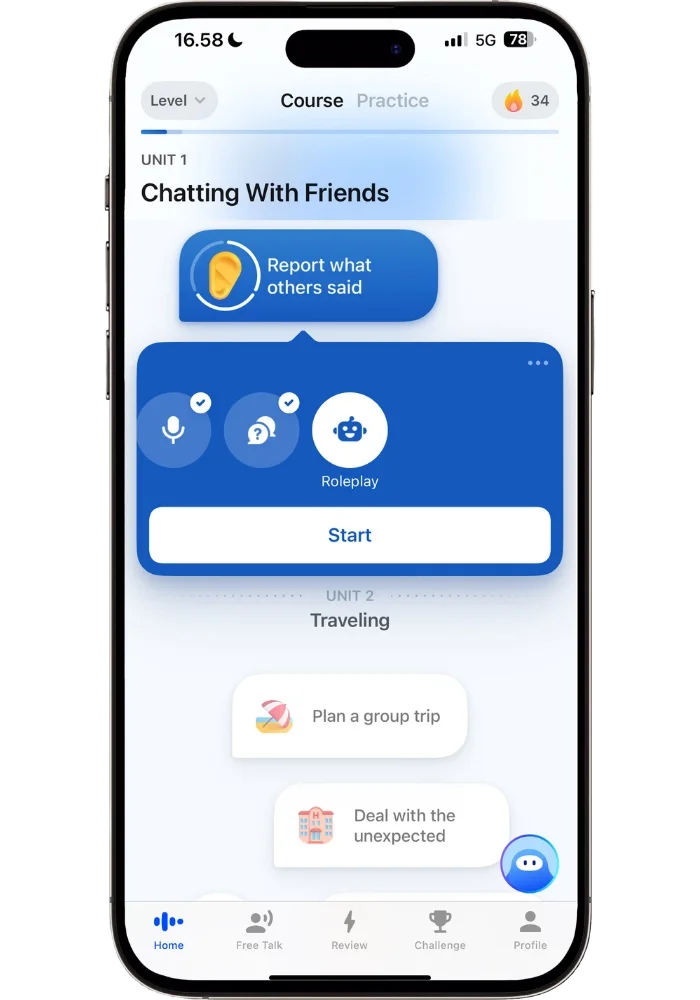
Custom Sentences → If you made mistakes in Roleplay, Speak generates targeted drill sentences based on those exact errors. I'll show you exactly how this works with a real example from one of my own learning sessions in the Reviewing Mistakes section below.
There's also a Speak Tutor (the cute avatar in the right bottom corner) where you can ask grammar questions and create custom lessons for things you want to practice — like having a pocket tutor available anytime. It can even help you build a weekly learning routine if you need help structuring your language practice.
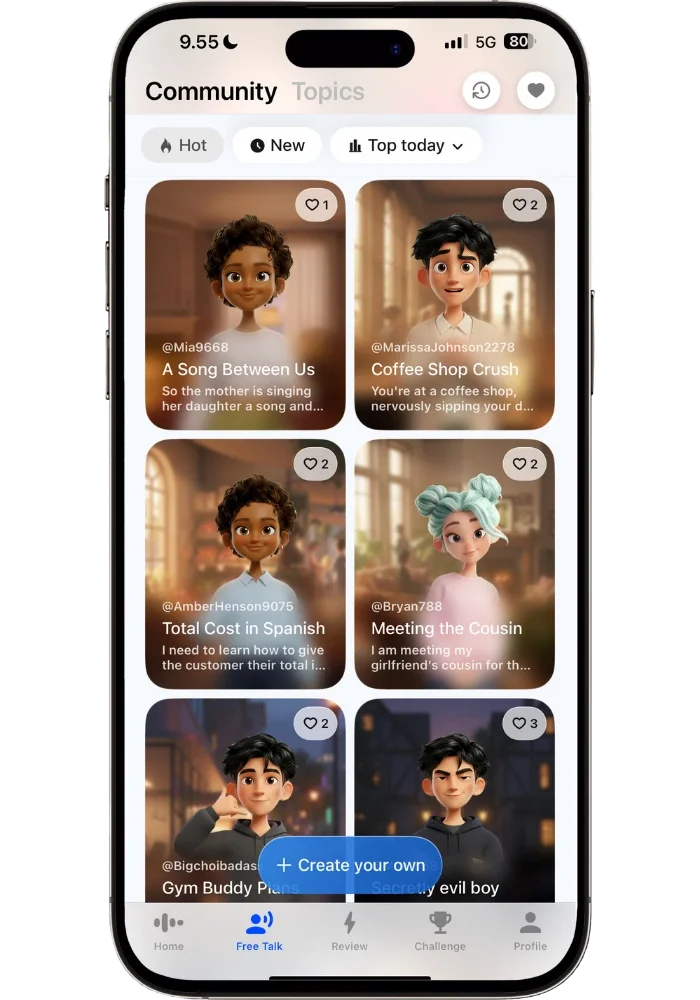
For beginners, each lesson starts with an interactive video lesson first, featuring a real presenter — which I'll cover in the beginner section. Outside the structured path, there's a "Free Talk" mode with short scenario-based conversations (like 'Ordering an Uber to the Airport’, ‘Coffee Shop Crush’ etc.), community-created prompts, and “Create your own lessons” which, after a brief interview, will generate personalized sentences to help you learn to talk about different areas of your life.
The format is predictable — and that's actually the point. You always know what to expect, you settle into a rhythm, and there's zero decision fatigue. The content changes with every unit, and the personalized sentences keep things fresh.
Free Talk — Even the free talk has structure. The conversations are short and are more about practicing specific scenarios than having long, in-depth conversations. There's also a clever design choice here: Speak gives you 6 scenarios per level, and you have to complete all of them to unlock the next 6. They could have just left all scenarios open from the start. But by gating them, you're incentivized to actually finish each set — just like clearing levels in a mobile game, except you're making real language gains. What’s great is that you end up practicing scenarios you'd never have chosen on your own, expanding your speaking ability. You have like 90 of these, and the Community scenarios (what other users have created) are being added constantly, so you won’t run out of things to talk about.
The Conversation Experience — Langua's Superpower
After testing several of the best AI speaking apps on the market, Langua is in a league of its own when it comes to immersive conversation experience, depth, and creativity.
Everything from the voice quality, the use of local colloquial slang, the vocabulary saving system, the in-chat feedback tools, the post-chat feedback reports, the multitude of chat options, and the ability to create your own scenarios — it all adds up to something no other AI speaking app can match. It's a true pocket tutor, conversation partner, and scenario simulator all in one.
How Langua is Organized
For most of the time I’ve used it, Langua was organized entirely around freedom. It had a library of things you could do, but no real structure to them. That changed with My Path — a guided sequence that adapts as you go, mixing different conversation topics with grammar work and reviews of vocabulary you’ve picked up along the way.
The difference from Speak is that Langua’s path is optional. You can follow it when you want direction, or ignore it completely and open a conversation about whatever you feel like. Speak hands you your practice session ready to go, while Langua opens up the world to highly customized learning — and now there’s that structured path if you want one.
There are also a lot of different ideas for free chats — such as “Today’s Conversation” where you can choose a roleplay scenario of the day, or keep generating new ones until you find one you like. Or you can have a casual chat to just talk about anything, or ask grammar questions like you would with a language tutor.
The most powerful one, however, is in the free chats or so called “Casual Chats”. You basically talk about anything and what sets Langua apart is that it truly feels like a real conversation with someone. If you ask the AI tutor what it's doing right now, it won't just say 'I'm here to help you practice.' It'll say something like it's sitting at a café watching the rain, just finished a run by the river, or trying to decide between two restaurants for dinner tonight — and then ask what you think.
What’s cool is that these conversations get automatically saved and you can go resume them whenever you want to. So if a conversation is particularly engaging, you can easily stretch it out for many days or as long as you’d like.
My South Korean adventure with a Spanish traveler
This becomes even more interesting when you use the “Design my own” option — it lets you make any prompt you want. I recently did this in Spanish and decided to come up with an engaging scenario in a city I’ve been dreaming to travel to.
I turned on dictation on my phone and spoke the instructions into it. I simply said something along the lines of: “I want you to come up with a character who is a fellow male traveler that I end up bumping into on the streets of South Korea. And that this person would have a personality and opinions of his own…” and so on.
This ended up being one of my favorite AI conversations ever. It was such an immersive experience of exploring the streets of Seoul, South Korea — trying to find the right subway, exploring side streets, themed coffee shops, and discussing our favorite Korean StarCraft players over a cup of coffee. Everything about it just made me feel like I ‘was there’.
In fact, it was so engaging that it was one of the things that sparked me really taking learning Korean seriously after 3 months of coasting (I referenced this exact Langua chat in this post).
And actually, this conversation is still going on — I’m just picking it up where I left off the day before (we currently just entered the mall where the StarCraft tournament we’re attending is about to take place, with a planned post-match coffee hangout somewhere afterwards)
What I love about it is not only how engaging the scenario is, but what a convenient and effective way it is to learn Spanish (I use it for Finnish too and it’s amazing). I can click to see corrections with options for deeper explanations, I can save new vocabulary and phrases for later review (flashcards, AI stories, weaved into chats, etc.) Not only can I lookup and save individual words, which I use quite a bit — but also select any number of words to get a translation of a whole phrase, like this one:
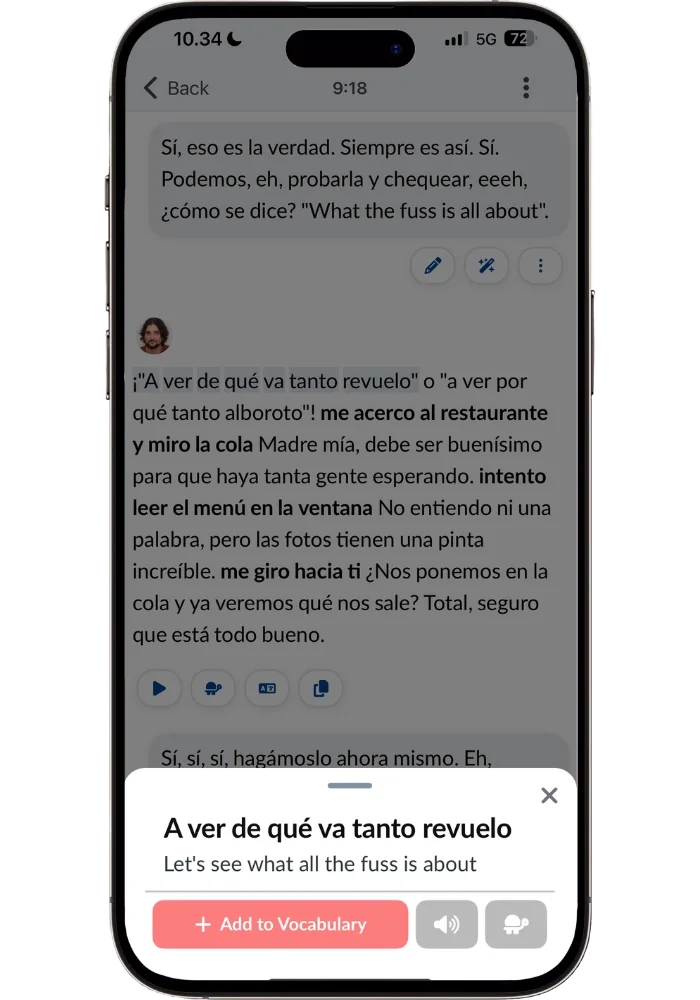
This is helpful since expressions like these only make sense to save as a set phrase.
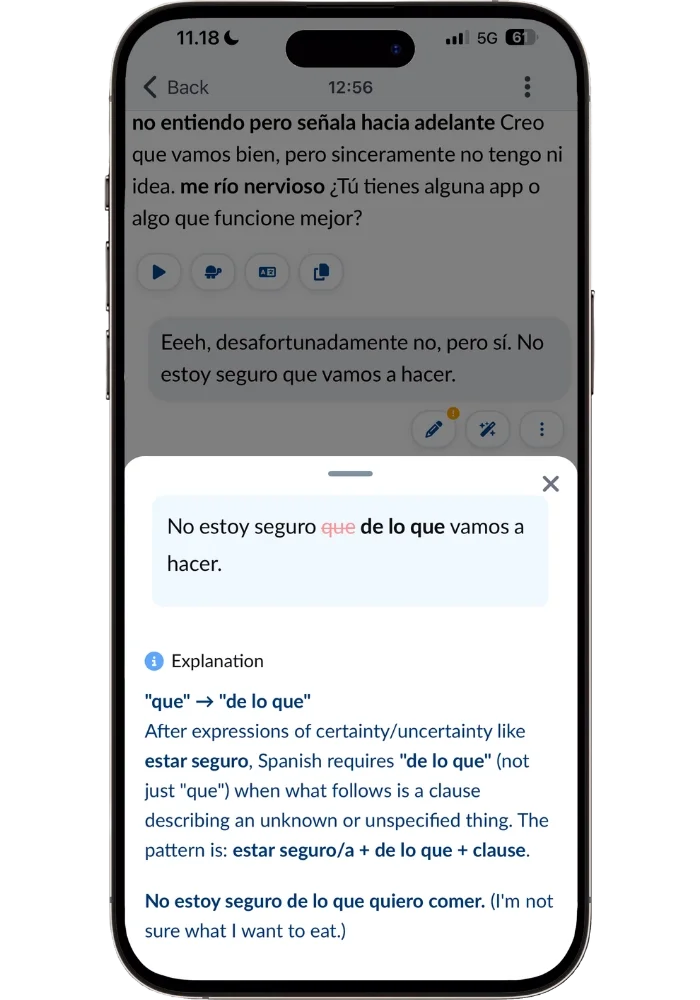
Mistakes are crossed out and the correct wording highlighted in bold — making it very easy to see. The “Explain this feedback” further explains the why behind this correction in a clear way, including examples. Langua does this better than most apps, as some of them are hard to read and get a quick overview. But the clear structure and smart use of bold text makes it easy to see.
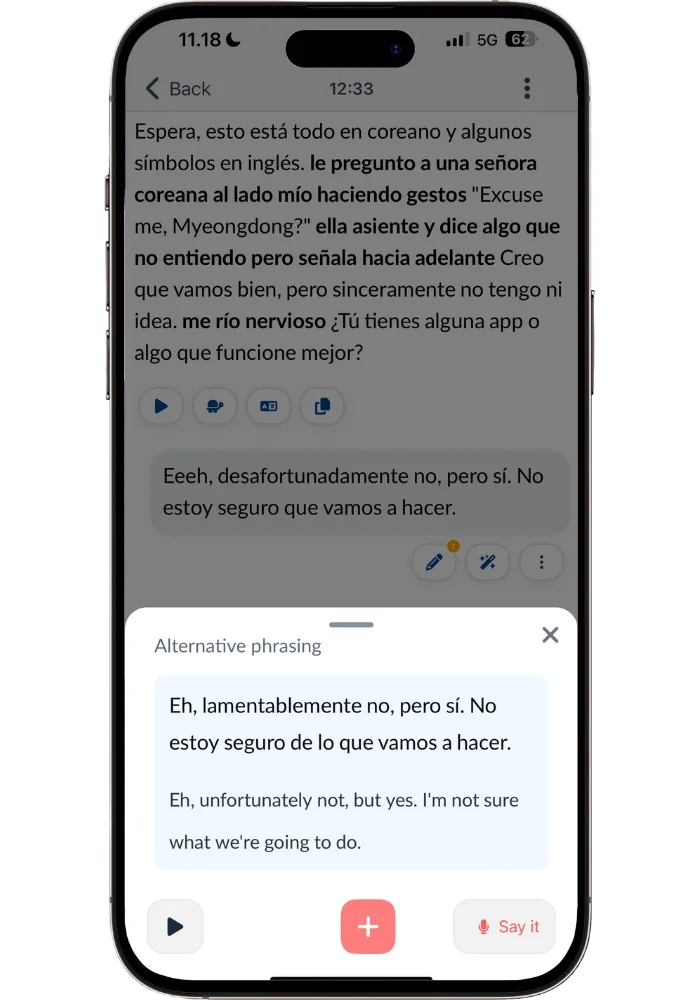
I can even get an alternative way of phrasing what I tried to communicate (and try to say it out loud, which I did in the video), which will either help you sound more natural or just broaden your ability to express yourself.
This vocabulary saving system is one of Langua's biggest differentiators from Speak. Speak teaches vocabulary in the context of full sentences and patterns, which is excellent for fluency. But Langua lets you actively build a personal vocabulary library — save any word or phrase, then review it through spaced repetition flashcards, AI-generated stories that use your saved words, or have them naturally weaved into your future conversations. For developing a rich, broad vocabulary, this is the more powerful approach.
You can also throw in English words when you're stuck — the AI will naturally give you the Spanish equivalent without breaking the conversation flow.
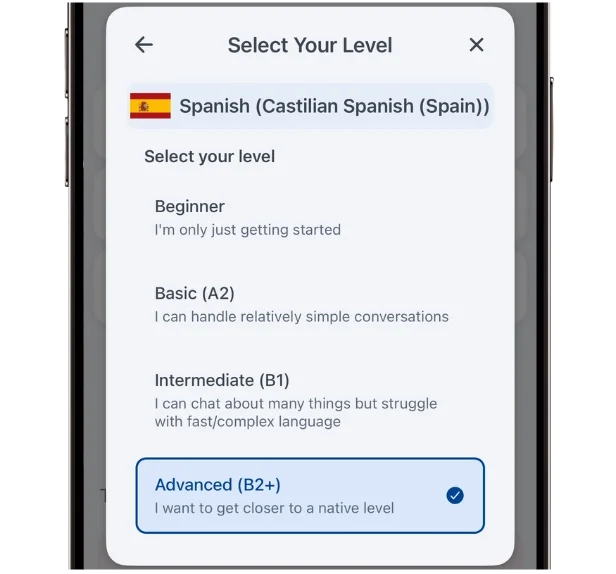
One thing to note: my conversations have a lot of slang because I have the level set to the highest of four options (Advanced B2+). Langua lets you choose your level and the AI adapts accordingly — at beginner level it'll give you hints and suggestions for what to say, while at the highest level it speaks the way a native would with their friends.
There are also a bunch of in-chat settings you can customize — hiding the transcript, auto-send timing, how you receive corrections — so you can tailor the conversation flow to exactly how you want your speaking practice to look like.
Langua doesn't correct you or explain grammar unless you ask it to — which means you can just focus on speaking without the constant interruptions that make other AI apps feel like a classroom. If you want corrections, you tell the AI how you'd like to receive them. If you don't, you just talk.
Reviewing Mistakes — The Real Battleground
This is where the two apps differ the most — because they take completely different approaches to the same goal: helping you improve your speaking by fixing your mistakes.
Let me take you through some personal examples from my own language study using both apps.
Speak — How it Targeted my “me agradezco por tu ayuda” mistake
When you go through Speak’s drill → Tutor Q&A → Roleplay flow — the last one is where it gets interesting for cleaning up your mistakes.
Here’s an example of what it looked like from my own learning journey:
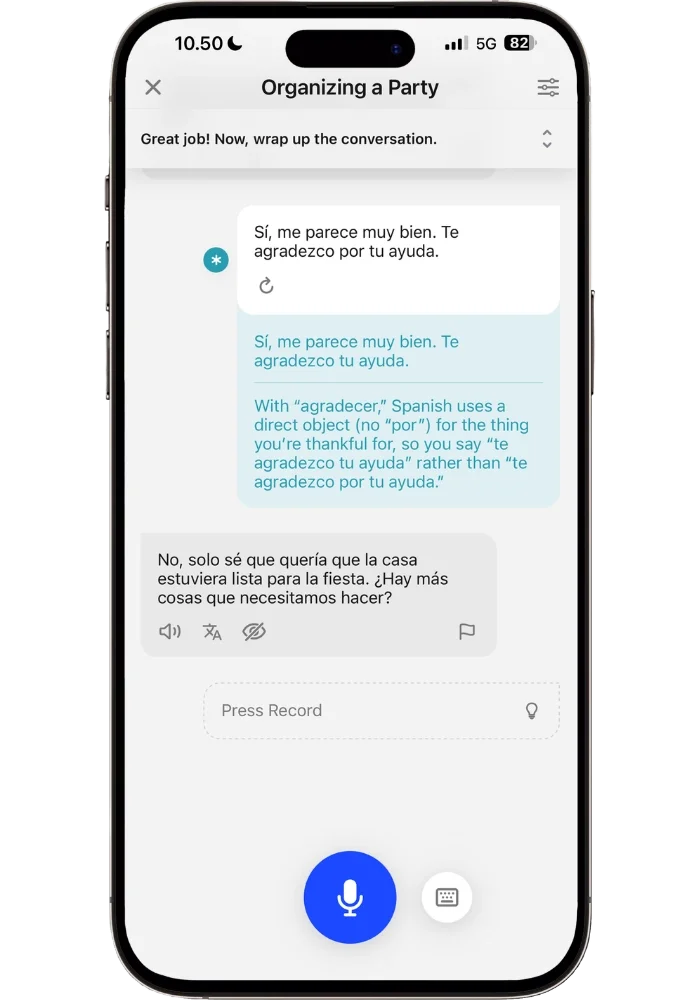
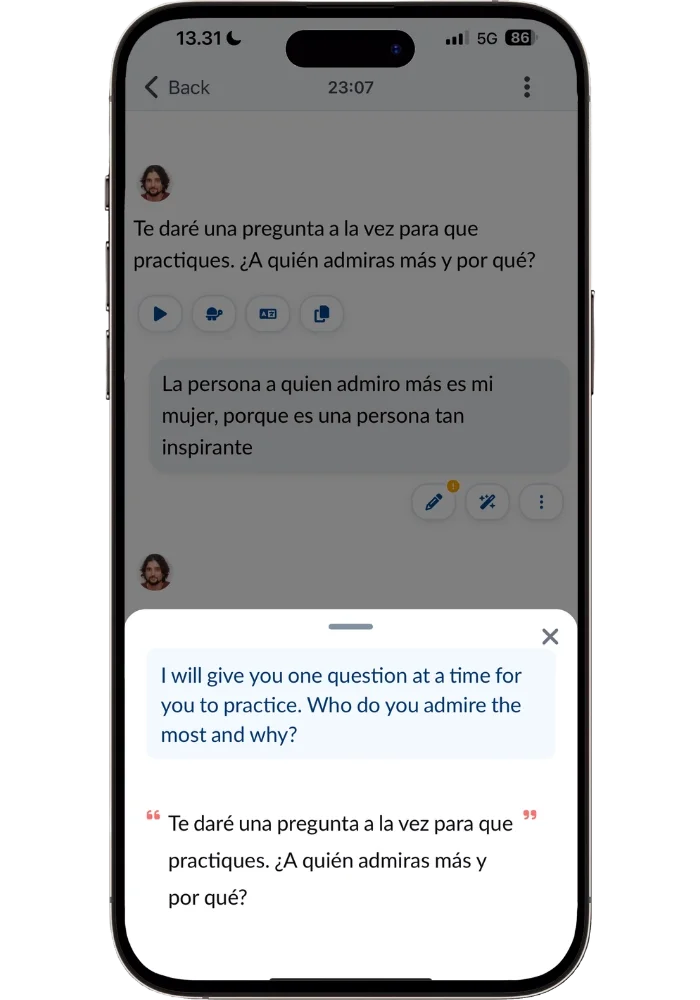
The particular roleplay activity was about ‘Organizing a Party’ at my fictional sister’s house. In it, I said 'te agradezco por tu ayuda' — but in Spanish, ‘agradecer’ (‘to thank’) doesn’t need 'por' in this context. Speak caught it immediately and as I clicked on the * icon to see what the mistake was it explained why.
After the roleplay, it created customized material to target this mistake. It took the exact sentence I said:
‘Te agradezco por tu ayuda’ and made it into the correct version → ‘Te agradezco tu ayuda’ including the whole sentence I said for full context.
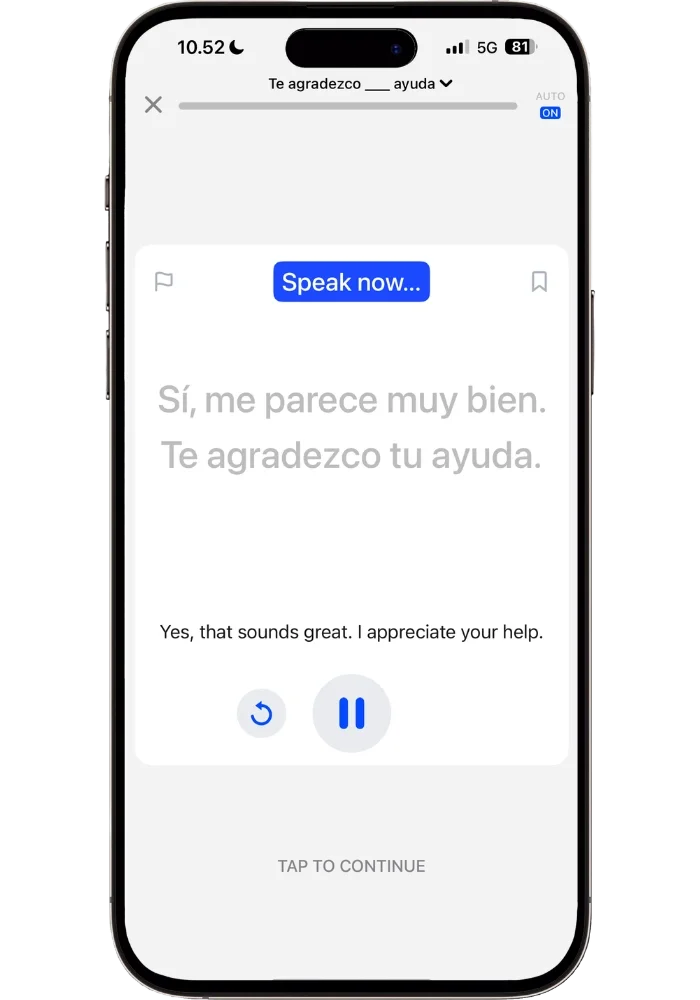
What’s so great about this is that it’s not random content — it’s taking things you are trying to say, and then correcting it, giving you a structured way of practicing it. Which will be super useful since you’re likely to say this again. This is how you build muscle memory of correct patterns, improving your speaking and making you sound more natural.
Not only this, but it also creates similar sentences using the same grammatical structure:
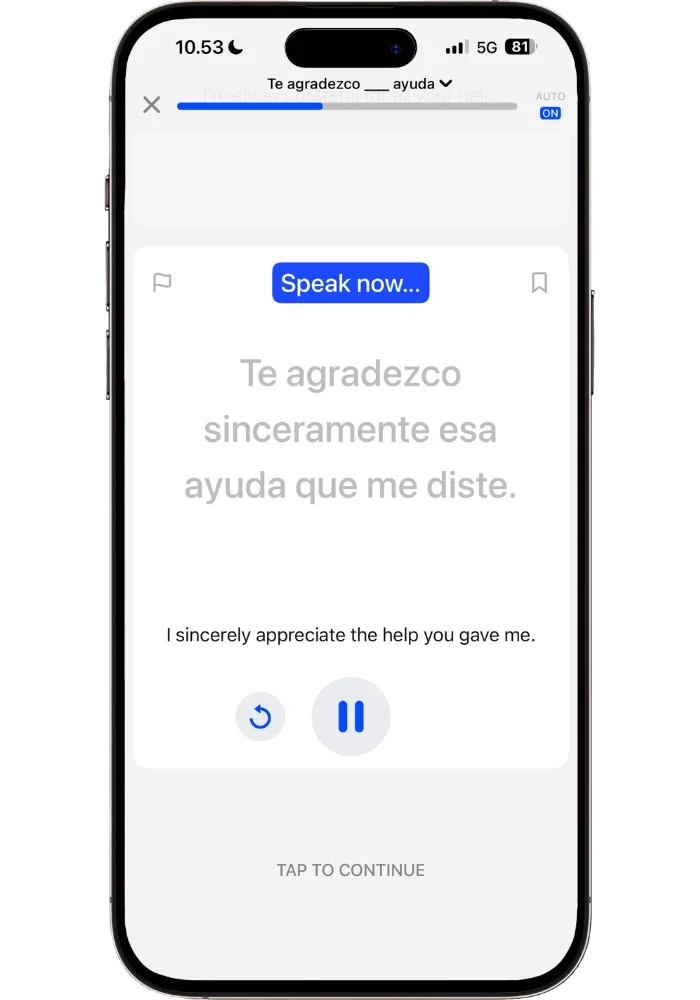
This way, you not only practice the original sentence but the overall concept behind the mistake — so you can become fluent using it in other contexts.
Smart Review — A Brilliant Feature
Speak lets you do dedicated Smart Review sessions (about 10 minutes each) where new concepts you’re learning are added for you to drill. A mastery score is given to each concept based on how much you have used it or reviewed it. The brilliant part about it is that any activity on the app can increase these scores — not just dedicated review sessions. So if you happen to use a grammar pattern correctly during a Free Talk conversation at a coffee shop, your mastery score for that concept goes up. This means you're not wasting time reviewing things you've already gotten good at. A truly brilliant feature.
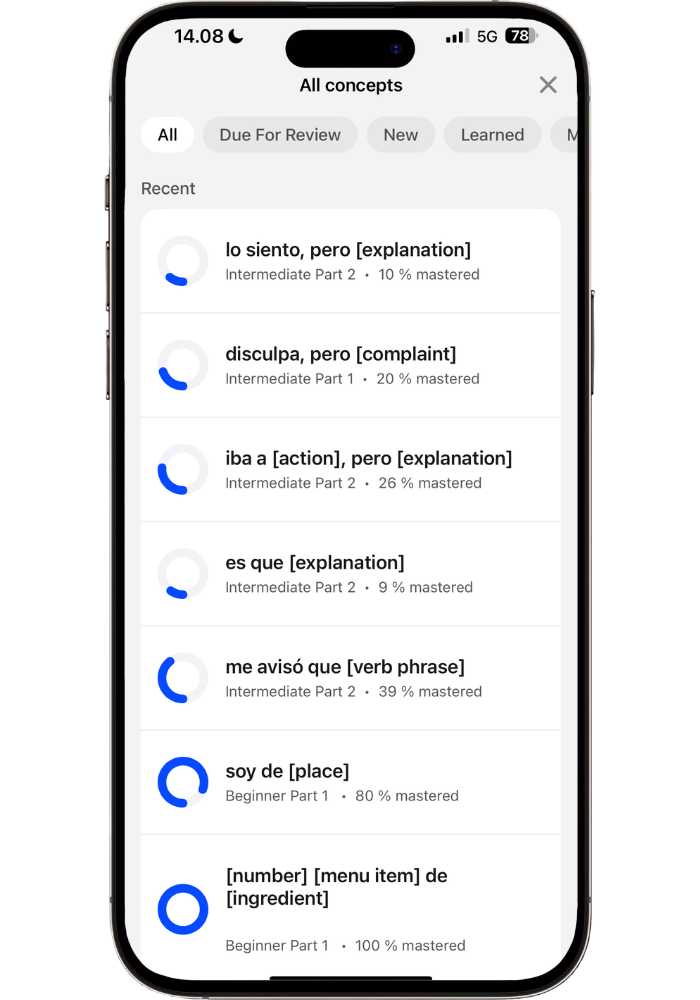
This is exactly the type of gamification that actually works — because it incentivizes you to increase your mastery scores, and that progress directly translates to being able to use these patterns comfortably when speaking. The score isn't just a number — it's a reflection of real skill. And getting each concept from 9% to 100% feels like completing a quest in an RPG — except the experience points are actual real language skills.
Langua — a multitude of ‘frequent mistakes’ review options
Langua also lets you review your most frequent mistakes. They show up under the tab “review” where you’ll see certain areas where you’ve made frequent mistakes, such as “ser vs. estar” in Spanish or verbs that need “a” added to them, and so on.
Beyond the Review tab, Langua catches mistakes in real time during conversations. You can click on any message you've sent to see exactly what was wrong and tap "Explain this feedback" for a deeper breakdown of the grammar rule and examples. So you have three layers of mistake review: real-time corrections during the chat, the post-chat feedback report (covered in my Langua review), and the dedicated Review tab for your most frequent grammar mistakes. You can also tell the AI tutor to give you spoken corrections too if you prefer (though I don’t recommend you tell it to correct all your mistakes — that quickly gets frustrating.)
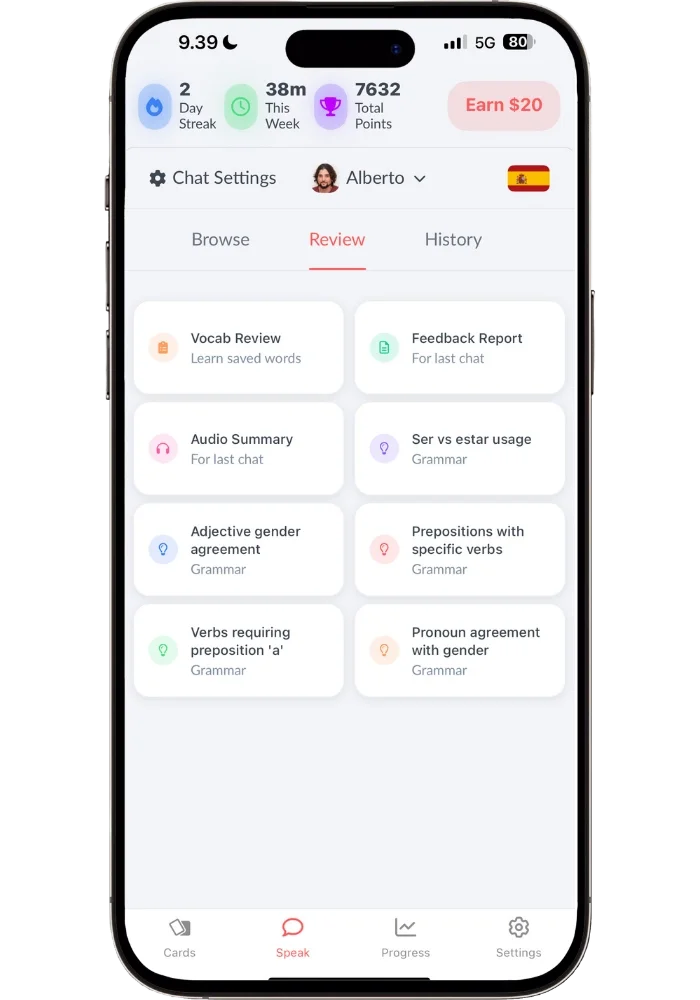
There are multiple ways of reviewing your frequent mistakes — multiple choice questions, fill in the blanks, or translating exercises. I like “Ask me open-ended questions” as the AI tutor will then ask different questions that force you to use this grammar point, and then gives you feedback in between these whether you said it correctly or made a mistake somewhere.
Langua also lets you review saved vocabulary through flashcards, AI-generated stories, and more (covered in my full Langua platform guide).
Summing it up: Speak automatically creates targeted drill sentences based on your exact mistakes — and tracks your mastery across everything you do on the app — you don't have to do anything. Langua gives you more freedom in how you review, with multiple exercise types plus the ability to save new vocabulary to flashcards, reviewing them in multiple ways.
For Beginners — Who Does It Better?
When I tested 5 of the top AI speaking apps, Speak came out as the clear winner for beginners — and Langua came out second. So this comparison between the top two is especially interesting.
Speak
In Speak, the learning flow for beginner levels is slightly different than at the intermediate levels:
Video Lesson → Speaking Drill → Vocab Builder → Tutor Q&A.
The video lessons are 2–3 minutes with a real presenter who is genuinely entertaining and fun (not cheesy like most courses) while still clear and no-nonsense.
In the video lessons you learn new phrases and get the structure behind those explained (i.e. learning grammar in context). You’re then prompted to speak these phrases out loud, with speech recognition checking if you got it right. This makes the video lessons interactive and not just passive watching.
These new phrases are reviewed through different angles in the ‘Speaking Drill’. Followed by Vocab Builder that takes these sentences but introduces new vocabulary in the same topic area, using similar structures. It then ends with a Tutor Q&A that lets you try using what you’ve learned in a very simple, short conversational setting. It’s a very effective flow that just works.
I also love that you get full sentences from day one (which I’m a big believer in), tons of repetition so the vocab and speaking patterns actually stick, and the pace adapts to your level. Even for me, as an upper intermediate Spanish learner, the beginner lessons flow felt enjoyable because it moved at my speed.
The biggest strength is that everything follows the clear progression. You just go A → B through the different sets of lessons in the different units.
Once you hit the pre-intermediate, video lessons are replaced by AI lessons that are also excellent. The whole beginner experience just feels right.
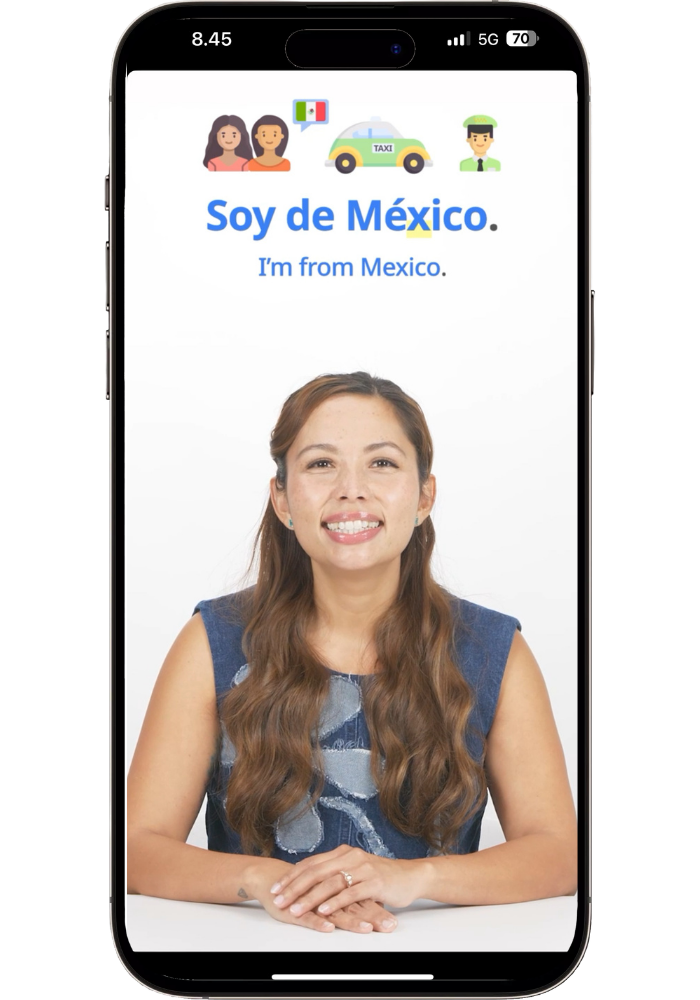
Learn new phrases through Speak's charming video hosts.
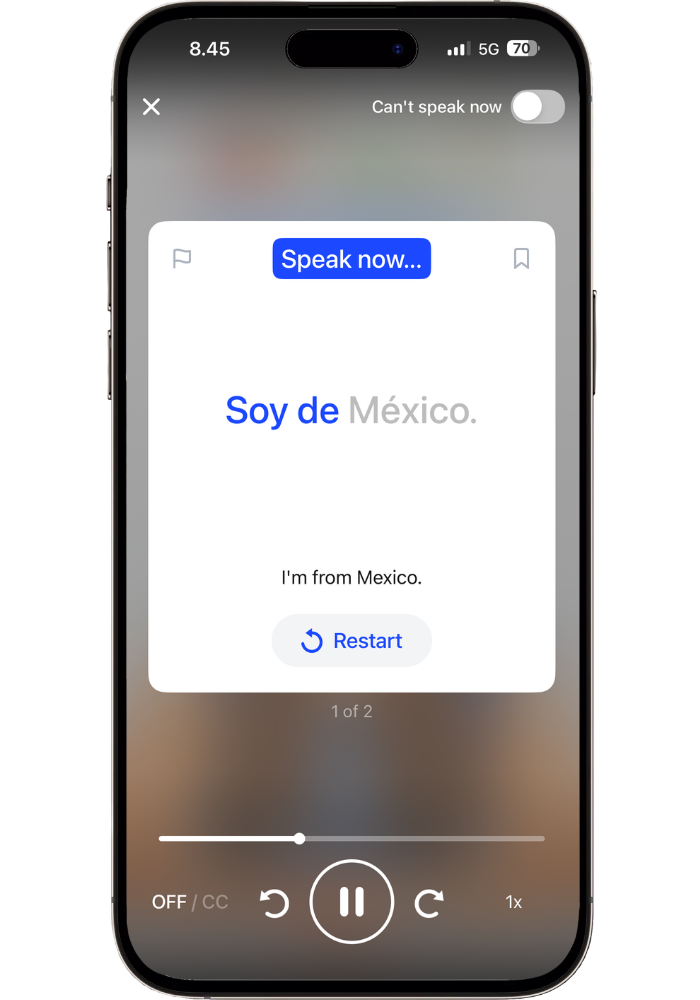
Then speak them out loud — speech recognition checks that you got it right.
Out of all the beginner courses I’ve tried (and I’ve tried a lot) these hosts are by far the best I’ve ever come across. It makes for an uplifting experience that feels encouraging and fun, without feeling fake.
Langua
Langua has a beginner’s course with 40 structured lessons — but the course looks very different from Speak’s. Instead of video lessons and drills, it's more like having a back-and-forth with a patient tutor who adapts to you in the moment. You can ask questions, request things to be repeated slower, or ask for phrases to be broken down — and the AI responds naturally without breaking the lesson flow. It’s guided, but with a lot of room for flexibility.
The vocabulary saving is super helpful as you save any new words and review them between lessons.
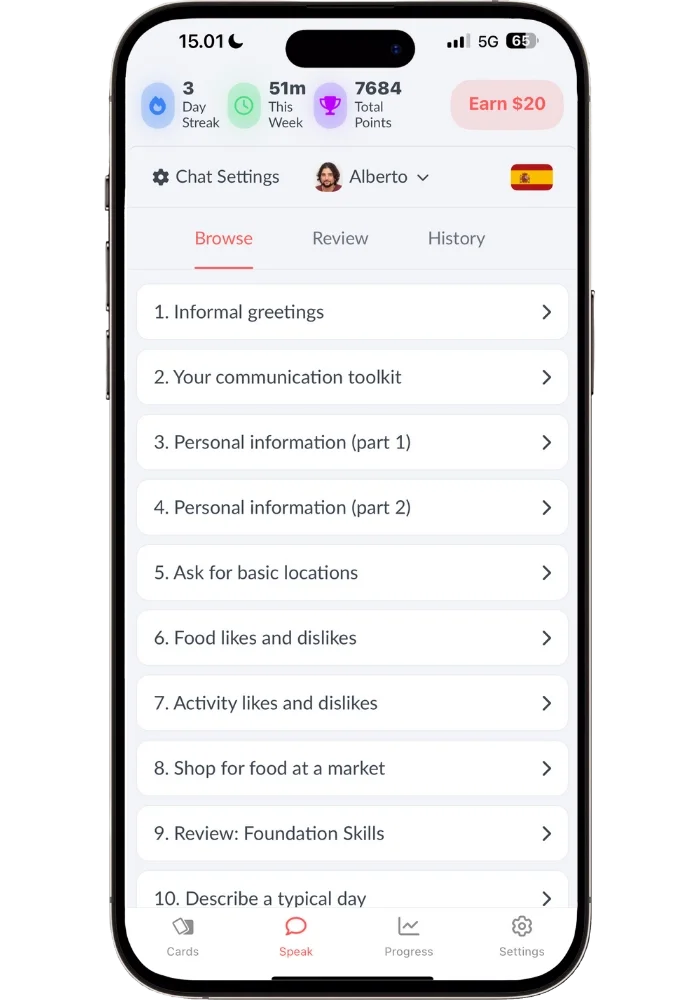
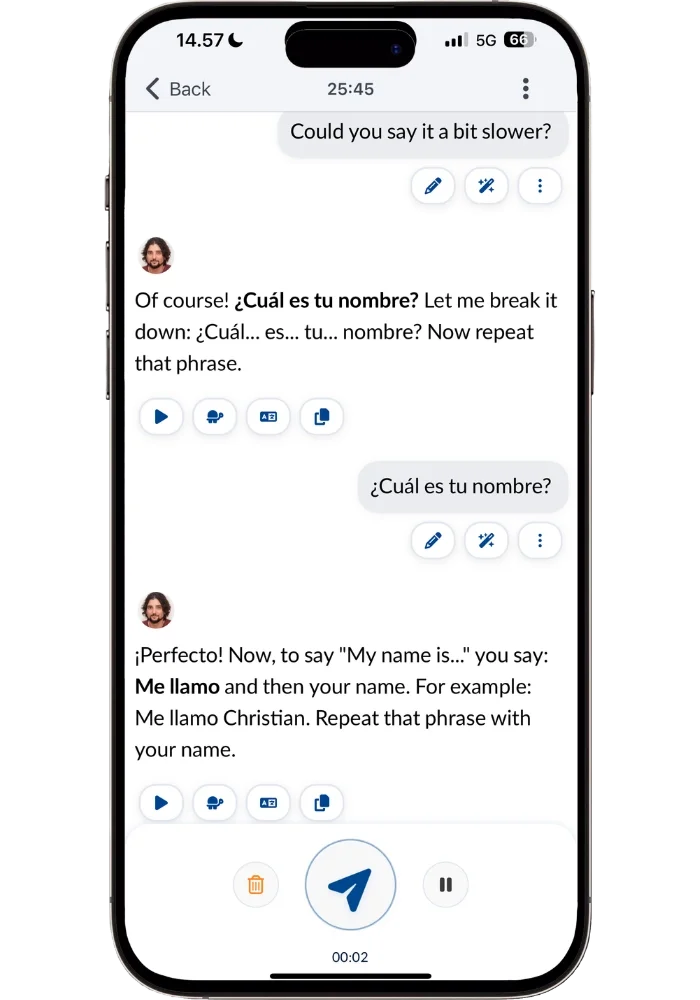
For regular “talk about anything” conversations, there’s also guided beginner mode. This gives you suggested answers to help you respond. The AI tutors will also adapt the language based on what level you set it to, which varies greatly — from shorter and simpler structures, to complex sentences using everyday slang on the highest setting.
Update: Langua also has My Path now, which is a structured flow of conversations, vocab review, and other activities that runs alongside the beginner course (or instead of it if you prefer) and evolves as you go. It’s very new so I’ll have to test it more before I can give you a more detailed breakdown — but Langua’s free account lets you look at it yourself before committing.
Summing it up: Langua is the second-best beginner experience I’ve tested across all the AI speaking apps, which says a lot. It used to ask more of you — you had to decide what to practice — but the added My Path changes that. What Speak still has is the more refined progression: video lessons with a real presenter, drills that build on each other, and a clear A to B route through all of it. For a beginner who wants to be told exactly what to do next, that’s still where I’d start.
For a deeper look at Speak's beginner experience specifically — including the lesson flow, how it handles both Spanish and Japanese, and the five things Speak gets right that most other beginner apps don't — see my full Speak review. And if you'd like to see what it looked like for me to learn Japanese with it from scratch, I wrote up the full 90-day journey (3-minute video included).
Speech Recognition and Pronunciation
When it comes to speech recognition accuracy, Langua is more precise while Speak is more forgiving. Langua picks up everything — including filler sounds like "eh" and truncated sentences — and transcribes them faithfully. Speak gives you more leeway, which can be both a pro and a con depending on what you're looking for.
Although, I pronounced "vivo" with too much of a "b" sound and Speak flagged it, thinking I said "bebo." Once I softened it slightly it accepted it — so it does catch pronunciation differences when they change the meaning. But other times I might use the masculine form when it should be feminine — and still get marked correct. I find this a pro honestly, since getting masculine/feminine wrong literally happens all the time in Spanish. And since you hear it said the right way after you automatically go: “oh yeah, I should have said feminine instead” which feels like a much better way to correct it than getting flagged for a mistake all the time.
What’s great about Speak’s speech recognition is that the words you said correctly are highlighted, so you see which ones you didn’t say correctly. That way you can correct the sentence afterwards by for example filling in the last word correctly. So it doesn’t give you wrong right away — you have the opportunity to self-correct if you didn’t say it right. This is very helpful as this happens to me all the time: I’ll say something and make a mistake, and then right away realize it and then self-correct. This makes it a very smooth learning flow with Speak.
Langua transcribing everything just like you said it gives you valuable feedback — it helps you clean up your speaking. If you for example see that you constantly say “eh” in between words (I totally do this and I’m trying to quit hah) Langua helps you become aware of those kinds of details in a way Speak does not.
Improving pronunciation and accent
For pronunciation improvement specifically, Langua has the edge for me. I actually used it to eliminate a specific E/Ä vowel mistake I had been making in Finnish for over 5 years — it caught a subtle difference that I didn't even realize I was getting wrong (you can read the full story here — how Langua helped me discover the mistake, and the targeted drill I used in the app to fix it). It'll also notice things like pronouncing a single consonant when it should be doubled, which can be quite subtle but makes a real difference in some languages.
That said, Speak does offer elective pronunciation courses for certain languages. Spanish, for example, has "The Sounds of Spanish" which walks you through all the sounds that make up Spanish pronunciation — a nice addition that Langua doesn't have.
Both let you listen back to your messages — but Speak only in the drills, not the conversations. Langua lets you replay every single message. That said, Speak's shorter drill sentences actually make it easier to focus on individual sounds and compare your pronunciation against the AI voice.
Voice quality
As for voice quality, Langua has the most natural-sounding voices of any AI speaking app I've tested — and it's not close. Speak's voices are accurate enough for drills but voice quality varies — the Q&A’s and roleplays sound more robotic. The voices sound more natural in the Free Talk scenarios, though still audibly AI.
That said, voice quality in Langua varies between voice models — some have natural breathing, some don't, and some are more dynamic than others. But they all sound natural.
I made a full voice quality ranking with a short 46 second video with audio samples in the Voice Comparison section of my Top 5 AI speaking apps comparison where you can hear the difference.
How Each App Handled a 3-Hour Drive to IKEA
One of the things I wanted to try was how well each of them handled being used while driving. The great news is that you can use both of them hands-free. Or, pretty much hands-free, with some caveats. I put this to the ultimate test on a several-hour drive from Finland to IKEA in Sweden, using each app for 30 minutes back to back.
Speak — The drills and Smart Review sessions worked perfectly for driving. That’s because you just listen to a sentence, repeat it, and hear the satisfying "bling" when you get it right. Each review session is about 10 minutes, and you get into a great flow. I did notice that headphones worked better than car speakers — without them, the speech recognition occasionally marked correct answers as wrong.
Longer sentences are trickier since you can't look at the screen, so you’ll get more of them wrong, but shorter and easier ones you can blast through effortlessly. The role-play conversations or Free Talks are harder to do hands-free since you need to press 'send' after each message.
Langua — Langua has a fully hands-free "call mode" where you can interrupt the AI, but I used regular message mode with auto-record turned on. I turned off auto-send so it wouldn't fire off messages before I was ready — that way I could take as long as I needed to think. The only manual step was pressing send, which was easy with my phone in a holder. This is when I created the prompt where I'd bump into a fellow traveler in South Korea.
We ended up exploring the streets together looking for a library-themed coffee shop, ordering coffee, and talking about life. It was such an immersive experience that I had a smile on my face the whole time, driving through the snowy Finnish landscape while mentally wandering the streets of Seoul. One minor bug — Langua didn't record a message once so I had to redo it. Annoying after sending a long message, but it rarely happens — and the second attempt was clearer than the first anyway so it worked out (note: I have since this experience noticed the smoothness has improved a lot in Langua).
The contrast: Speak turned drive time into efficient drill practice. Langua turned it into an adventure. Both made a long drive productive, just in very different ways.
Languages and Dialects
Speak covers fewer languages than Langua, and uses a standard dialect for each — like standard Latin American Spanish, for example. So if you care about learning the specific way people speak in Argentina vs. Mexico vs. Spain, that's not what Speak is built for.
Langua currently offers 24 languages and the dialect diversity is where it really shines. You can choose voices from specific regions — Argentina, Colombia, Peru, Chile, Mexico, Spain, even Uruguay — and each one can use authentic local slang and expressions. The Argentinian voice used "re" before everything just like a real Argentinian would, and a Mexican voice told me one of my expressions sounded "very Spanish from Spain."
If dialect variety matters to you, this one isn't even close. And that goes for AI language learning apps in general, not just these two.
Which App Will You Still Be Using in a Year?
There’s also another important question that we need to cover: how long will each app actually be useful to you?
Speak is built around a path, and paths have an end. That's not a criticism — it’s just how it’s designed. You work through the units, drill the patterns, clean up your mistakes, and build a strong speaking foundation. How much content you get depends on the language:
• Spanish — Beginner to Advanced + The Sounds of Spanish elective
• English — Beginner to Advanced + English for travel & English for business
• French — Beginner to Advanced
• Italian — Beginner to Upper Intermediate
• Japanese — Beginner to Upper Intermediate + Hiragana Course
• Korean — Beginner to Intermediate + Hangul Course
• Mandarin Chinese — Beginner to Intermediate
I actually put this to the test in Japanese — 90 days from zero, filmed every session, which took me through three of twelve levels at about seven minutes a day.
To give you an idea — Korean alone has roughly 130 lesson categories with 400–500 individual lessons. At 1–2 per day, that's easily a year's worth of content, not counting Smart Reviews, Free Talk scenarios, or content generated for you by the AI tutor — which in essence has no cap. So the content itself isn't really what runs out. It's more that at some point you'll want longer, less predictable, more life-like conversations. And that's where the path ends and the open road begins.
That said, I actually love that Speak has a finish line. There's something satisfying about the idea of being able to master all the concepts, see your scores hit 100%, and feel like you've genuinely completed it — like beating the final boss in a video game. It gives language learning a sense of closure that you rarely get.
Langua doesn't have an end point — and that's equally powerful in a different way. I've been using this AI speaking app for more than 1.5 years, and I feel like I've only scratched the surface. You will never run out of content or things to talk about.
Every conversation can go somewhere completely new — a different dialect, a different scenario, a different personality. A beginner can use guided mode and get help with every sentence. An advanced learner can have a 30-minute conversation entirely in Argentinian slang. It scales with you until you're so fluent that you simply don't need it anymore — which for most learners is years away.
The way I think about it: Speak is a course you use for a season to build and sharpen your skills. Langua is a tool that stays with you for the long haul and helps you reach the highest levels of fluency.
Pricing Comparison
Both apps offer a 7-day free trial, so you can test either one risk-free before committing.
Speak keeps it simple with two annual plans — no monthly option. Langua gives you more flexibility with both monthly and annual billing.
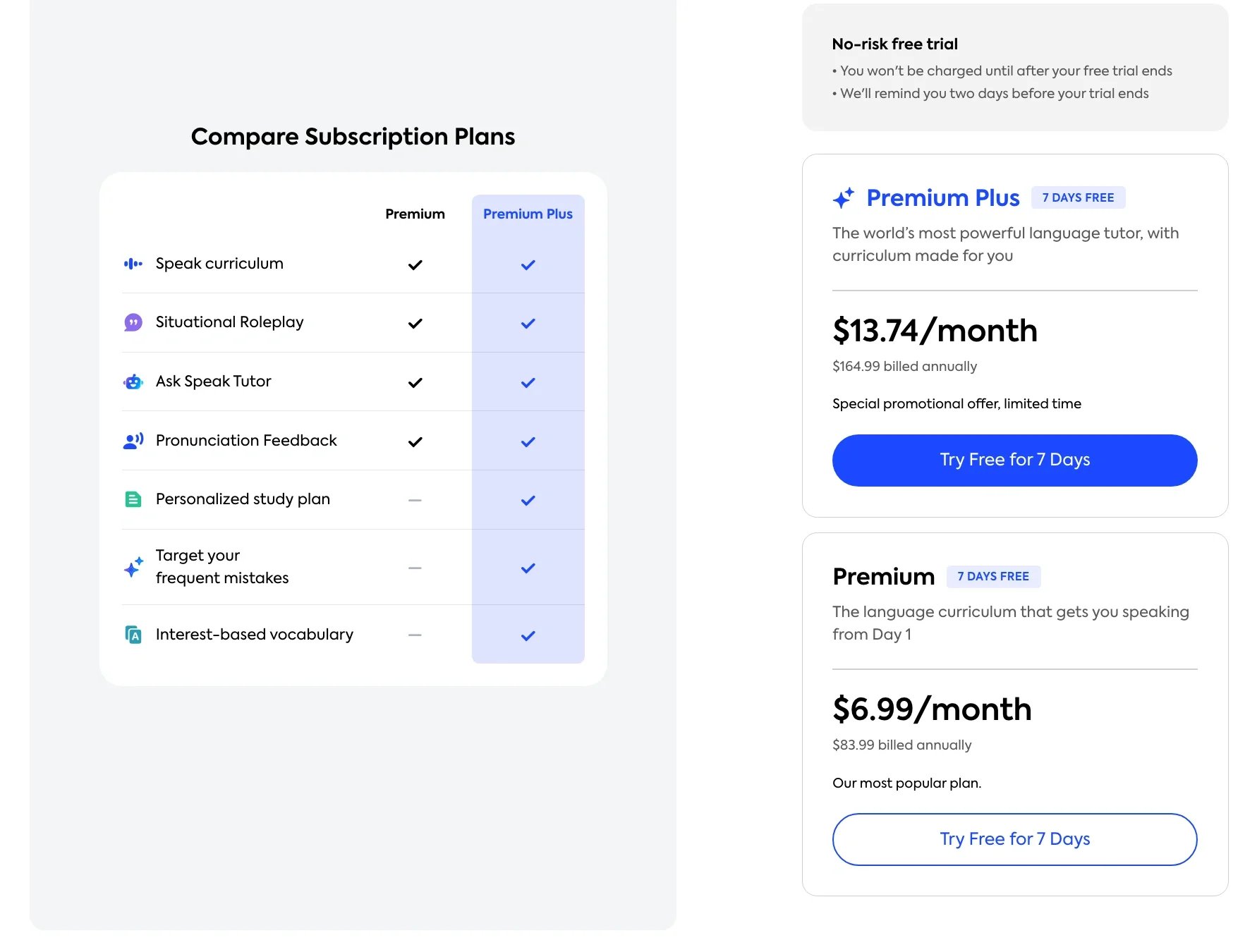
Speak offers two tiers: Premium at $6.99/month ($83.99 billed annually) and Premium Plus at $13.74/month ($164.99 billed annually).
Premium gives you the full Speak curriculum, roleplays, Free Talks, and pronunciation feedback — at $7/month, it's an incredible deal.
Premium Plus adds a personalized study plan, targeted practice for your frequent mistakes, and interest-based vocabulary — creating a more customized experience.
Either way, Premium is a strong starting point and you can always upgrade later. Both plans include access to all available languages.
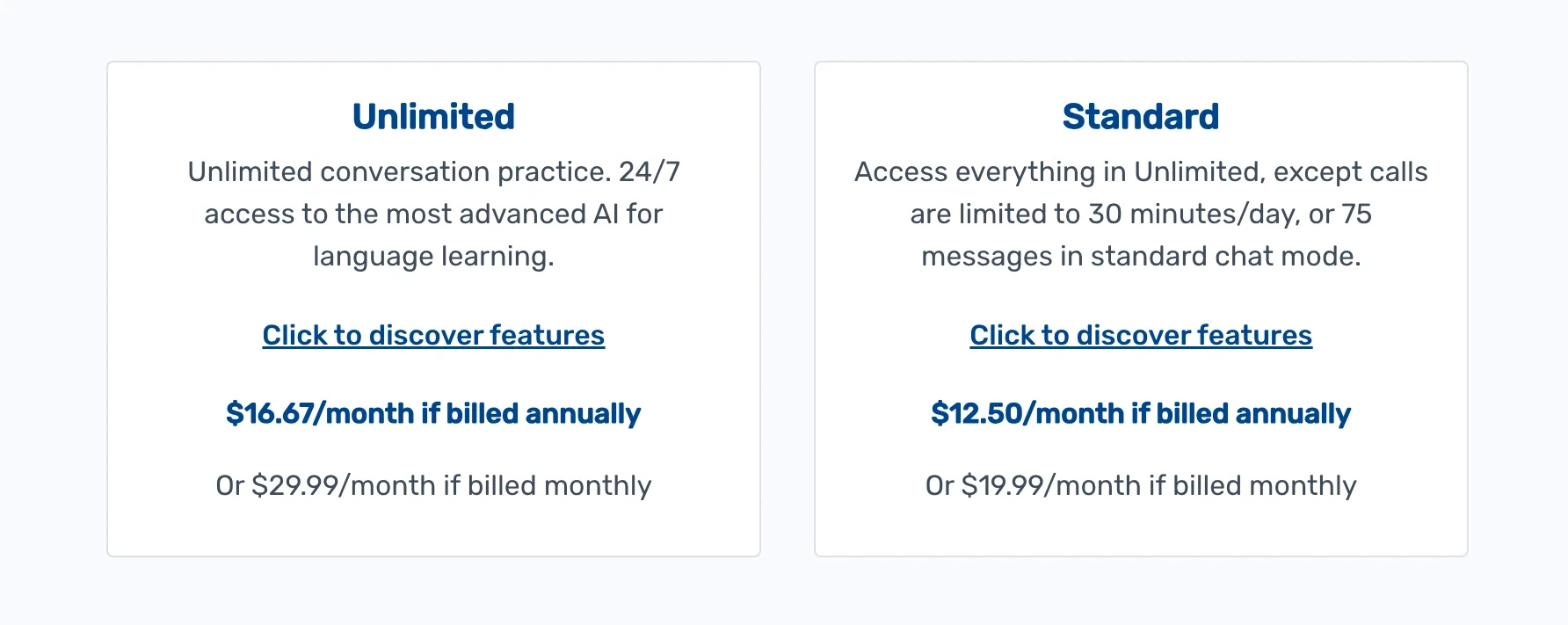
Langua also offers two tiers: Standard plan at $12.50/month billed annually ($149.99/year) or $19.99/month, and an Unlimited plan at $16.67/month billed annually ($199.99/year) or $29.99/month.
The main difference is that Standard limits you to 30 minutes of AI calls per day (or 75 messages in chat mode), while Unlimited gives you 24/7 access with no caps.
However, my code LINGTUITIVE20 takes 20% off Langua's annual plans, bringing the Unlimited plan down to $159.99/year (which is actually cheaper than Speak's Premium Plus at $164.99.) At that price, the Standard plan barely makes sense — for just $10 more you get unlimited conversations instead of a daily cap.
(Note: The LINGTUITIVE20 code works through Langua's website, not the app. You only need the web version for the payment — after that, you can use the app as normal.)
So which plan makes sense for you?
If budget is the priority, Speak Premium at $83.99/year is hard to beat — under $7/month for a polished, effective speaking app that doesn't feel like a budget option at all. Though the personalization and targeting of mistakes at Premium Plus ($164.99/year) is great once you get past the beginner levels.
For Langua, the Unlimited annual plan with LINGTUITIVE20 for $159.99/year is a no-brainer. And if you're not ready to commit to a full year, Langua's monthly plans let you try it first — though the annual plan with the code is 55% cheaper than paying monthly.
Use code LINGTUITIVE20 for 20% off Langua's annual Unlimited plan (apply on web version)
Final Thoughts — Who is Each App For?
Langua does all the things I wish Speak did, and Speak does all the things I wish Langua did. So for me, it's not an either/or — it's about what I want to work on, and how I want to practice, in that moment.
If you're a beginner who wants a clear, structured path that's genuinely effective but still adapts to you — Speak is the one. The video lessons, the drill-based repetition, and the step-by-step progression and clever gamification aspects make it the best beginner experience I've come across in any AI speaking app (and beginner courses overall). It's also excellent for intermediate learners who want to clean up their grammar and build speaking fluency through drilling natural patterns into muscle memory. It's an app you easily get hooked on — you just open it up, blast through a few sentences, and before you know it you've done a full session without it ever feeling like work.
If you're intermediate to advanced and want the freedom to have deep, authentic conversation practice — Langua is the best AI speaking app there is — the voice quality, dialect variety, vocabulary saving, and in-depth feedback tools create a complete ecosystem for serious learners. And if you’re a beginner who’d rather learn through conversation than drills, Langua works great for that. Especially now that My Path gives you a track to follow, so you still have that structure. And you still have the open conversations whenever you’d rather just talk.
Or you can do what I do — use both. Speak for the structured, drill-based practice that sharpens your accuracy. Langua for the freeform conversations that build your confidence and fluency. One is bite-sized, the other one is immersive. They complement each other perfectly. And in many ways, Speak is a great on-ramp to Langua as well — start with Speak for the foundation → move on to to Langua to become more conversational
That said, Langua offers many more languages so it might be that Speak isn’t even an option for you.
One more thing worth noting: Langua is available on both phone and desktop, while Speak is phone-only. If practicing on your computer matters to you, that could be a deciding factor.
Use code LINGTUITIVE20 for 20% off Langua's annual Unlimited plan (apply on web version)
Still Not Sure?
If you're torn between the two — or if you're learning a language Speak doesn't cover — I built a quiz that matches you to the right app based on your language, level and how you like to practice. You can find it in my Top 5 AI Speaking Apps comparison, alongside the full breakdown of the other three.
FAQ
Can I use Speak and Langua together?
Absolutely — this is what I do. Speak for structured pattern drilling and targeted mistake practice — I just open the app and follow the path without having to think about what to do. Langua for immersive, freeform conversations where I get lost in engaging scenarios while picking up colloquial vocabulary along the way.
Which is better for Spanish specifically?
For the clearest, most refined learning path from beginner through advanced — Speak. It’s brilliant for training the building blocks of speaking and step-by-step building up to conversation. For actual conversation practice with dialect variety, full creative freedom (though now also with a more flexible structured path) and learning to keep up with natives — Langua. They're honestly both excellent for Spanish.
Do either of them teach grammar?
Not in a traditional "here's a grammar lesson" way. Speak weaves grammar into the phrases you learn and drill, so you absorb it through patterns rather than rules. Langua has targeted grammar exercises and lets you ask grammar questions mid-conversation. Both also have a pocket tutor feature where you can ask any question and get targeted practice on the spot.
Can I use Speak or Langua completely hands-free?
Speak's video lessons, drills and Smart Review sessions work great for driving. The conversations require more screen interaction, so they're less ideal behind the wheel. Langua's conversations work really well for driving. You can enable auto-record and auto-send, but I prefer sending manually since it sometimes sends before I'm finished. There’s also a “call mode” which is completely handsfree that lets you interrupt the AI even like in a regular conversation.
Does Langua have structured lessons?
Yes. Alongside the 40-lesson beginner course, Langua now has My Path — a guided route that mixes conversation with grammar work and vocabulary review, and adapts as you go rather than running a fixed sequence. It's new, so I'll have more to say once I've spent longer with it — but it gives Langua the structure it was missing.
Does Speak offer open-ended conversations?
Not in the way Langua does. All of Speak's conversations are built around specific scenarios with tasks to complete. You can't really deviate or jump between topics freely. It's designed for targeted, shorter practice rather than in-depth conversation.
Which has better speech recognition?
Langua is more precise — it catches subtle pronunciation differences and transcribes filler sounds. Speak is more forgiving, which is great for beginners but means it might miss smaller errors. Both are excellent overall.
Which one is better at improving your accent?
Both let you listen back to yourself — Speak in the drills, Langua in all conversations. Speak's bite-sized drill format makes it easy to compare your pronunciation against the native speaker sentence by sentence. Langua's longer messages let you notice overall tendencies in your speaking. For self-correction, both work well. But Langua is better at flagging mistakes you might not be aware of — I used it to fix a vowel mistake in Finnish that I'd been making for 5.5 years (I wrote about it here).
Can I use these apps on my computer?
Langua has both a web version and a phone app. Speak is phone-only.
How much time do I need per day?
Even 10–15 minutes daily will give you real results with either app if you're consistent. Speak's structured lessons make it easy to fit a quick session into a busy day. Langua conversations can go as long as you want — I've had 30-minute sessions without realizing it. Both apps let you pause and resume exactly where you left off, so you can do shorter sessions whenever you have time.
I tested exactly this — 90 days of Japanese from scratch at around seven minutes a day, and documented what that actually got me (including a short video from my real sessions).
Which Plan Should I Get?
On a Tight Budget? → Speak Premium ($83.99/year)
Want the Full experience? → Speak Premium Plus ($164.99/year) OR Langua Unlimited ($159.99/year with code LINGTUITIVE20 for 20% off).
Both Speak and Langua offer 7-day free trials with all the features available. Langua has a free plan (no credit card needed) where you can use flashcards, AI stories, and even try a brief AI conversation for free:
Use code LINGTUITIVE20 for 20% off Langua's annual Unlimited plan (apply on web version)
Related Posts:
I Tested the Top 5 AI Speaking Apps for Several Weeks — Here's What I Found
Langua AI Tutor Review: Best AI Language Learning App for Speaking Fluency?
Everything You Need to Know About Langua: Complete AI Language Learning Platform Guide
The Language I Spoke Wrong for 5 Years (and How I Finally Fixed it)
9 Reasons AI Is the Fastest Way to Improve Your Speaking Fluency
