Updated
What's new: refreshed throughout after six more months with these apps, retested Univerbal and Talkpal as a Korean beginner, and added an FAQ, a list of what each app has changed, and Langua's new correction modes.

This post contains affiliate links. If you buy through one of them, I may earn a commission at no extra cost to you. Some of the products I write about are also provided to me for free. See Full Affiliate Disclaimer.
Table of Contents
- The Five Apps I Tested
- What Does It Actually Feel Like to Talk?
- Do They Actually Fix Your Mistakes?
- How Much Guidance Do You Want?
- Which AI App Has the Most Realistic Voice?
- Complete Beginners: Which App Should You Start With?
- What Happens After the Conversation Ends?
- My Verdict: What Each App Does Best
- My Honest Recommendation
- Which App is Right For You? — Take the Quiz!
- FAQ
- Final Thoughts
With so many AI speaking apps available right now, it can be truly hard to know which one to pick. So I didn't spend a week with each. I've been using Langua for over two years in three languages, Speak daily for over 200 days across four languages, and Praktika since February in two languages, with well over 50 lessons completed. Talkpal and Univerbal I've used for several weeks each, in several languages. Here's what each one actually does, and which one is right for you.
The short answer: Langua is the best overall for most learners. Its voices sound the most human and its conversations feel the most natural of any app I’ve tried, especially in call mode, where you can talk hands-free and even interrupt the AI like on a real phone call. You can just open it and chat, or shape a conversation around exactly what you want to practice, and its guided path is the only one here that builds itself from your own chats. It’s the one AI app you won’t outgrow.
Complete beginner? Start with Speak. It's a speaking trainer rather than a conversation partner: interactive video lessons with a real teacher, drills, and short targeted AI exchanges that build the patterns and confidence you need before free conversation. It's the best beginner app I've used, as long as it offers your language (it covers English, Spanish, French, Italian, Chinese (Mandarin), Japanese, and Korean).
Praktika is the other one I'd point you to if you’re looking for an AI teacher where you show up for daily lessons. Univerbal and Talkpal have strengths that I’ll come to: a gamified mission-based routine, and 130+ languages, including rare ones I haven’t seen any other app offer.
Not sure which one? Scroll down to take the AI App quiz, or read on for the full comparison.
The Five Apps I Tested
Langua — the Deep Conversation Partner
Speak — the Muscle-Memory Machine
Praktika — the Daily Teacher Avatar
Univerbal — the Daily Mission Runner
Talkpal — the 130+ Language All-Rounder
Worth saying up front: these five aren't really competing for the same job. A conversation partner, a drill machine that plays like a game, an avatar teacher, a mission plan, and a 130-language all-rounder are very different tools — so where I rank them, it's category by category. The best conversation partner isn't the best drill coach, and the right one for you depends on what you actually want.
How I Tested Them
To stay consistent, I mainly tested these AI language learning apps in Spanish — I converse quite well in it but still make plenty of mistakes, which lets me properly test how each one handles corrections and feedback.
If you're specifically learning Spanish, I went even deeper — comparing these apps for Spanish dialects, grammar, and voice in my best Spanish AI apps breakdown, where Talkpal didn't make the cut.
I also tested all five in Korean, where I'm still a beginner, to see what each is like from zero — and in Cantonese and Finnish for the ones that offer them.
I tested more apps than made it into this post, and I've kept trying new ones since. None has been good enough to outdo any of these five yet — when one does, I'll change the post.
I've also stayed with all five long enough to watch them change. Where an app has shipped something significant since I first tested it, I've mentioned it and updated this post.
What's changed in the past six months:
Langua added My Path (a guided route), optional long-term memory of facts about you, audio and text imports to chat about, saving words by voice in call mode, and a choice of correction modes.
Speak added an AI tutor you can ask questions inside drills and Q&A lessons, end-of-unit skill checks, and elective courses. It keeps adding new units, and it launched Mandarin.
Praktika added hands-free messaging in fullscreen mode (messages send automatically after a pause), tap-to-translate, and three new languages.
Talkpal expanded from 80+ to 130+ languages (some in beta). The app itself works the same way it did.
Univerbal: no major changes I noticed in my latest sessions.
Of the five, Langua and Speak have changed the most.
Which AI Speaking App Is Best for Learning English?
I'm testing these as an English speaker learning other languages — but every one of them works in the other direction too. All five let you set a different base language and learn English from the one you set.
- Langua — learn English through any of the 24 languages it speaks. Translations go much wider, covering Yiddish, Basque, Burmese, Sinhala and plenty of other rare ones.
- Speak — a dedicated English course taught in clear, simple English, with 14 base languages including Polish, German, Japanese and Korean. It's their deepest course.
- Praktika — will teach you in another language too, including some it doesn't offer as languages to learn.
- Talkpal and Univerbal — both let you learn English through any language they support.
If you're learning English: Speak is the one I'd start with — the English course is the deepest they've built, and it's taught in your own language. Once you can hold a conversation, Langua is where you'll get the most natural practice.
How the 5 Apps Compare
Ranked by category from months of hands-on testing
Not sure which app is right for you? Skip to the quiz →
What Does It Actually Feel Like to Talk?
To test the conversation depth and experience, I chose the same conversation topic across all five apps — talking about my first trip to Hong Kong. But I also had conversations about many other topics over the months of testing.
Praktika and Langua offered by far the most conversation depth, with Langua being the clear winner.
Praktika was the first one I tried, and it was surprisingly engaging. At first I thought the animated avatars would be weird, but they weren’t (only in fullscreen mode can it be a little awkward — but it depends heavily on the avatar). It asked engaging follow-up questions, sharing personal stories about the topic back. The particular avatar was really funny and made me laugh out loud with its humor and delivery. It tied back to things I had said and made jokes about them — such as “learning 4 languages at the same time is like Starcraft in expert mode!” — which made it feel personal and entertaining. Light and fun conversation, but still enough depth to be engaging.
Langua had by far the deepest and most immersive conversation — giving me vivid, personal responses, sharing its own experiences of going to Barcelona as a child, interesting observations about Hong Kong, as well as thoughtful follow-up questions. The whole conversation felt like talking to someone I knew and there was always this sense that the conversation could go in any direction, making it feel much more realistic. In other Langua conversations, I've had exchanges that went for multiple days because they were so engaging — something possible in Langua since it saves full conversation history, whereas in Praktika it’s not since you have to restart a conversation you have left.
The response time between messages feels slightly longer with Langua than the other apps, and occasionally a message won't send at all and you have to repeat yourself — a minor frustration in an otherwise incredible experience, and it happens rarely. In call mode, Langua responds very fast and you can have a back and forth conversation and even interrupt the AI — Langua is the only one that lets you do this which makes chats feel even more life-like. You can even tell it to save words to your vocab deck for you while chatting, without having to press any buttons. With Praktika I wish I could just press the respond button, instead of having to press-hold and drag it upwards — a minor complaint. Plus, if you click to put the AI avatar in fullscreen mode, you can speak hands-free as your messages will auto send after a few seconds of silence. You can’t interrupt the AI tutor like in Langua though.
Both apps also did well when I mixed in other languages. With Praktika, we ended up talking about my experience learning Korean. It picked up a Korean phrase I said to it and then showed me how to say the equivalent phrase in Spanish. Langua naturally reflected back English words in Spanish, making filling in holes in vocabulary seamless in an engaging conversation.
Speak and Talkpal offered the least conversation depth when talking about my trip to Hong Kong. Speak felt more like answering questions than having a back and forth conversation. After a while the AI just decided the conversation was over so there was no way to go very deep. Despite this, it’s actually one of my favorites out of the five apps (more on that soon), but it’s not exactly built for this kind of free talk but rather practicing shorter, targeted exchanges.
Talkpal actually asked similar follow-up questions to Praktika, but it didn’t share its own opinions unless I specifically asked for them. Still decent conversation but not nearly as deep and engaging as Langua or Praktika.
Univerbal was somewhere in the middle of the five apps. It let me choose the settings for the conversation, so I picked an airplane, which generated a picture of the scene adding a nice immersive touch that set the scene. The conversation was not as engaging as Langua or Praktika but still solid. After having had multiple conversations I have discovered that it depends a lot on the topic — I have had food conversations that felt a bit unnatural and forced, but music conversations that were incredibly engaging. Early on, audio recording would sometimes stop working mid-conversation. I haven’t run into it in my recent sessions, though those were shorter. That said, I did like Univerbal’s slower pace, allowing for a more relaxed and contemplative conversation approach.
One thing worth noting: all five apps let you mix English with your target language mid-conversation, but some handle it better than others. Langua and Praktika were the most accurate at detecting switches. Speak took a different approach — translating English words directly into Spanish in your transcript rather than transcribing the English.
Do They Actually Fix Your Mistakes?
Getting feedback is one of the key ways to improve speaking — and it's where using AI for language learning really shines.
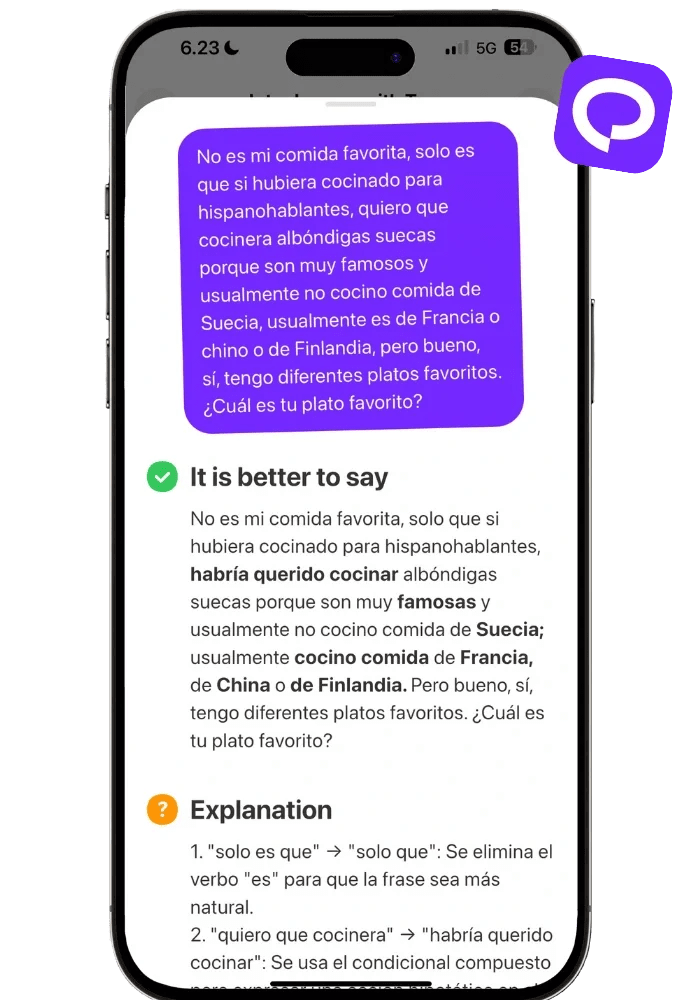
All of them gave feedback on my mistakes in quite similar fashion — highlighting corrected words in bold, crossing out mistakes with strikethrough, or simply providing a corrected version underneath:
Langua

Speak

Praktika
Univerbal

Talkpal

All of them do a good job of providing feedback, though I found Talkpal’s lack of highlighting the corrections harder to scan. Especially when it only corrected one letter in one word (as seen above). Univerbal’s “pling” sound when saying a sentence correctly was a nice and non-intrusive touch that brought both encouragement and gamification to speaking correctly. Praktika’s written feedback was good but didn’t indicate whether my message contained a mistake or not (you have to click to see). Langua and Speak both had a small symbol next to the message to indicate whether what you said was correct or contained a mistake — making it easy to know right away. Out of the five, I preferred Speak’s short and easy-to-read corrections, and Langua’s clear feedback that gave helpful examples.
Univerbal and Langua also share a somewhat similar feature:
If you make a mistake, Univerbal creates a corrected version — you can then choose to read this out-loud and highlights the words as you speak to give a confirmation that you successfully said it correctly. A nice way to reinforce good habits by not focusing on the mistakes but instead training your muscle memory to speak correctly. Though I found Univerbal would sometimes struggle to register my words properly (though these types of things happen in all of the apps from time to time.)
Langua also lets you do this, but it’s called “alternative phrasing” — meaning that even for correct messages you can learn a different way of saying it. You can choose to speak these out loud as well and getting an indicator for when you said correctly.
Langua also lets you choose how you’re corrected. There are five modes: off, text corrections under your messages, implicit, explicit, or being asked to repeat the correction out loud. Implicit is the one I’d recommend for keeping a conversation flowing. Instead of stopping to point out the error, the tutor folds the correct form into its reply — say “yesterday I went to store,” and it might answer “oh, you went to the store yesterday?” Good teachers do this instinctively, and I haven’t seen another app offer it as a setting.
Keeping Track of Mistakes Post-Chat
Univerbal and Speak are the only apps that keep track of your mistakes outside of conversations.
Univerbal auto-collects your mistakes in a specific tab — giving you awareness and a chance to review them.
Speak has by far the deepest system for mistakes (available on Premium Plus) — it generates custom content to target your mistakes. Not only will you get a corrected version of your actual sentence, but similar sentences to really drill that pattern in other contexts. Speak keeps track of this across ALL activity in the app, whether drills, coffee shop conversations, etc. So just by saying something correctly multiple times your score will increase. A smart way of making sure you’re not having to drill mistakes that are no longer a struggle. And it’s motivating that everything in the apps counts toward this progress tracking.
Talkpal and Praktika both offer pronunciation scores — and neither is reliable. Langua and Speak take a better approach: they record your messages so you can listen back and self-evaluate.
How Much Guidance Do You Want?
This is where the apps differ most: how much do you want to be told what to do? An open world, or a linear path? Some sit firmly at one end, some do both.
Both Speak and Univerbal provide daily study plans based on your interests, but they do it in a bit different ways.
When it comes to structure, Speak provides the clearest practice path: Practice sentence structures through speaking drills → use them in a Q&A-flows and role-play conversations → get specific sentences based on your mistakes → get customized sentences based on AI interviews with you. It’s predictable, yet clear and easy to follow. What makes it stand out compared to the other apps is how easy this plan is to follow — you just open up the app and follow the steps laid out. Even at the end of a busy day, I’m still able to do some Speak because of how little it demands from me.
Univerbal creates a study plan based on your chosen interest areas (food, tech, travel, etc.) with different units and “missions” to complete in each. A progress bar tells you when you’re done with the specific mission and you can do three activities: Conversations (which is the recommended activity), Exercises, or Vocabulary to complete them.
For each conversation, it creates a scenario with three tasks to complete — which are basically questions to ask the person you’re talking to.
Seeing this bar in-chat gives a clear visual representation of when you’re ready to move on in otherwise quite open-ended conversations — I like this because it can sometimes feel a bit like an endless conversation that never ends (which can be good or bad) and it adds that gamified “level up” aspect to it.
Though sometimes the tasks ended up being basically asking exactly the same questions that the AI was asking me, which felt like I had to force those questions into the conversation.
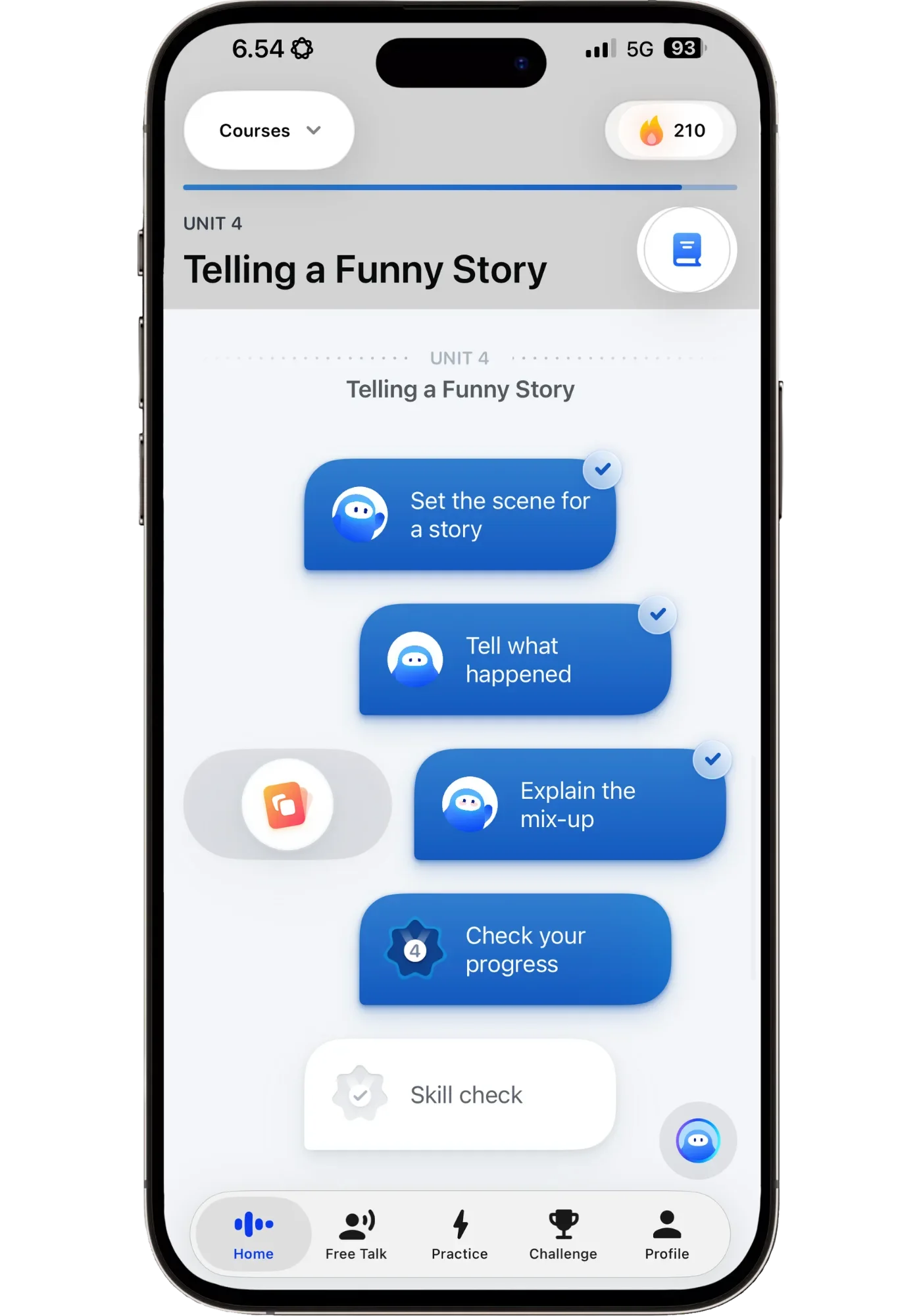
Speak’s path builds each lesson on the one before, ending every unit with a skill check.
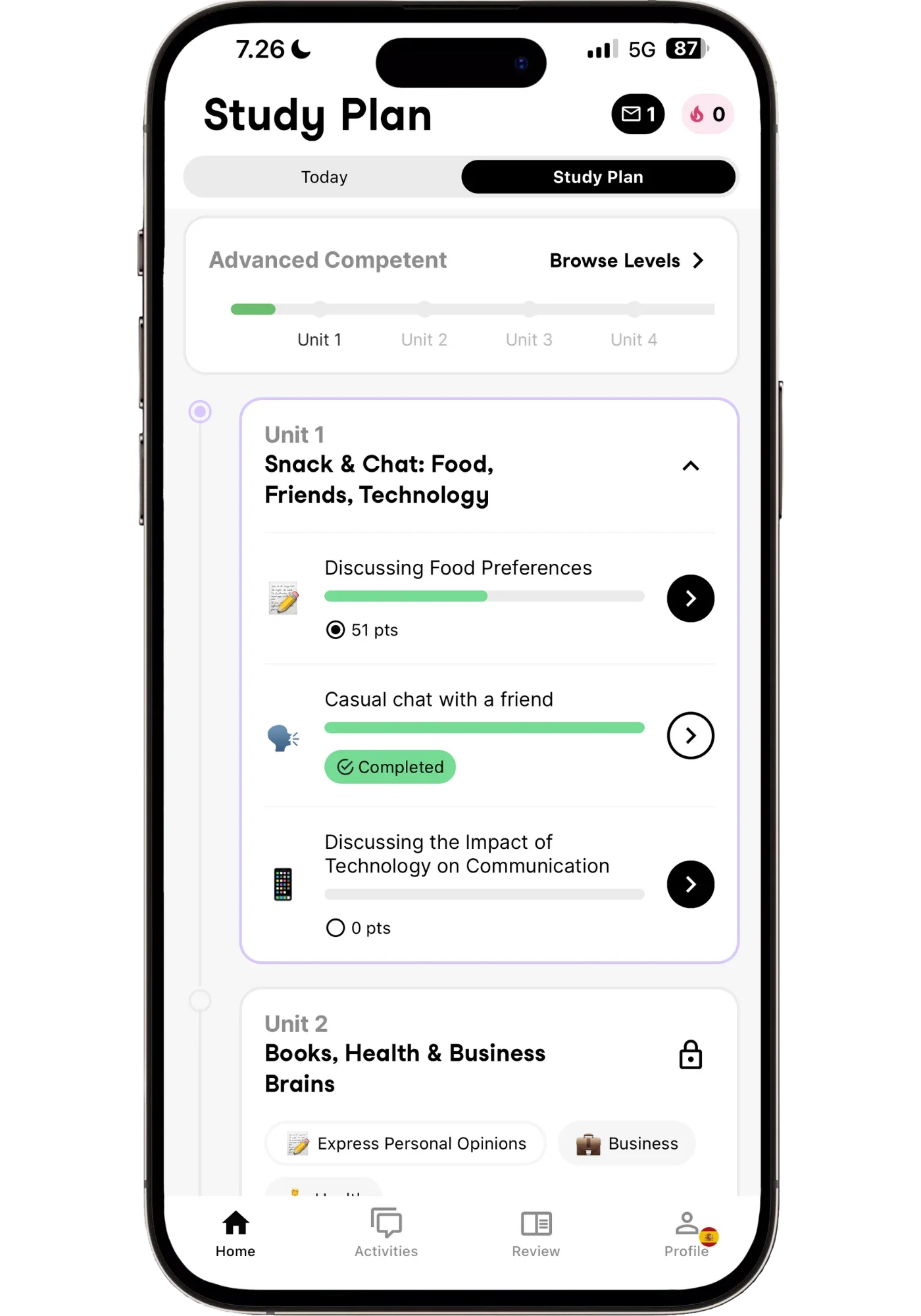
Univerbal’s study plan: finish a unit’s missions to unlock the next one.
Praktika creates a daily lesson plan about different topics that also includes some meta-learning topics (such as ‘speed reading’). It creates a custom plan based on your topics of interest and had by far the most in-depth onboarding out of all the apps. However, the intermediate plan felt too easy for me initially. Even though the lessons were fully in Spanish they were about simple greetings that an intermediate will already know. Having said that, the lessons are customizable so I just told the AI tutor it was too easy and it adapted. After a few lessons, they became more engaging and more appropriate to my level. The classroom approach was enjoyable and interesting though I’m personally more of a free talk kinda guy.
Talkpal also has a structure you can follow but it’s not customized. It follows the order of introducing new vocab → practice it → have a role-play conversation about the topic. It’s very repetitive and the way it introduces new vocab with matching words with pictures feels too Duolingo-practicing-without-really-learning-effectively for my taste. They have recently added so-called “professional courses” about specific topics such as “Business” or “Medicine”, which are essentially more of the same thing. It does however provide plenty of practice activities such as speaking to historical characters (Mozart, Jane Austen, and the likes), describing pictures, role-play activities, etc.
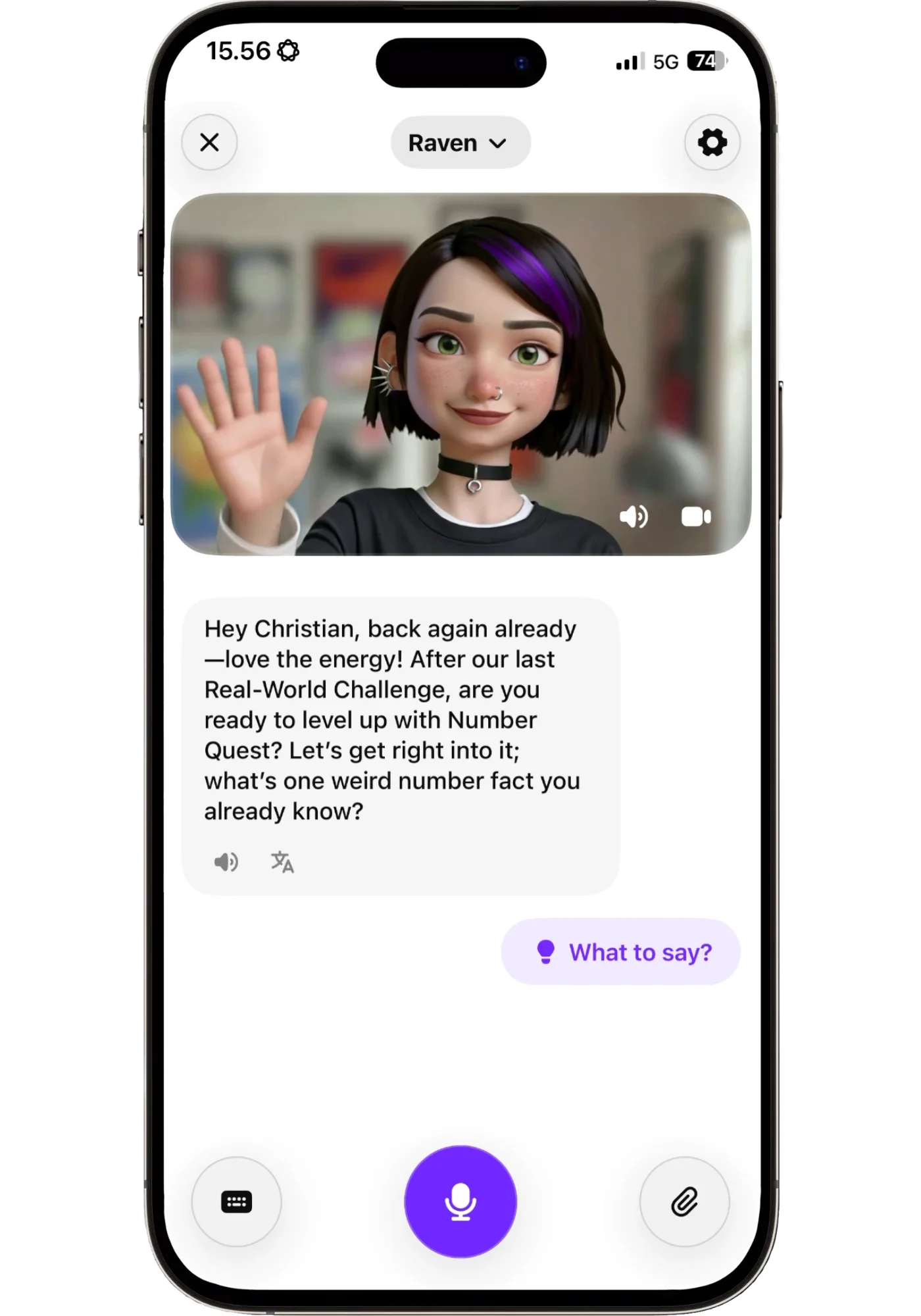
Praktika’s structure comes from the tutor: Raven picks today’s lesson and remembers where we left off.
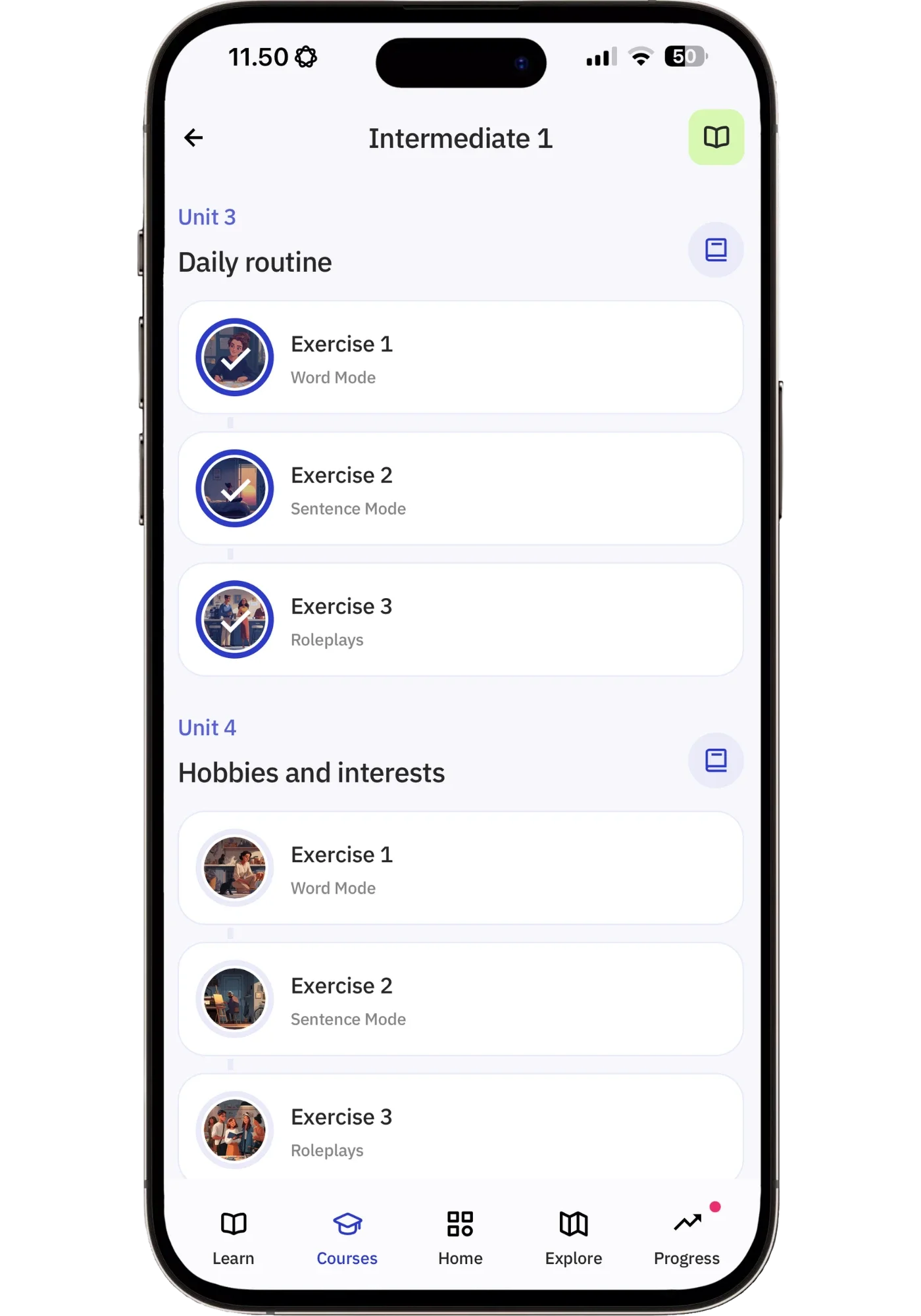
Every Talkpal unit follows the same pattern: words, then sentences, then a roleplay or guided dialogue.
Langua used to be the odd one out here — total freedom, no path at all. That flexibility was its greatest strength, but on a tired day when you just wanted to be told what to do, also its greatest weakness.
That's no longer the case. Langua now has ‘My Path’, and it isn't just a queue of conversations: it mixes in grammar work and reviews vocabulary you've picked up along the way. The plans of all the other apps are pre-built, whereas Langua’s is the only one that evolves and adapts as you go based on what you’ve actually talked about, the mistakes you’ve made, and words you’ve saved. It once brought up a topic I'd discussed months earlier and built on it — something no other app here does.
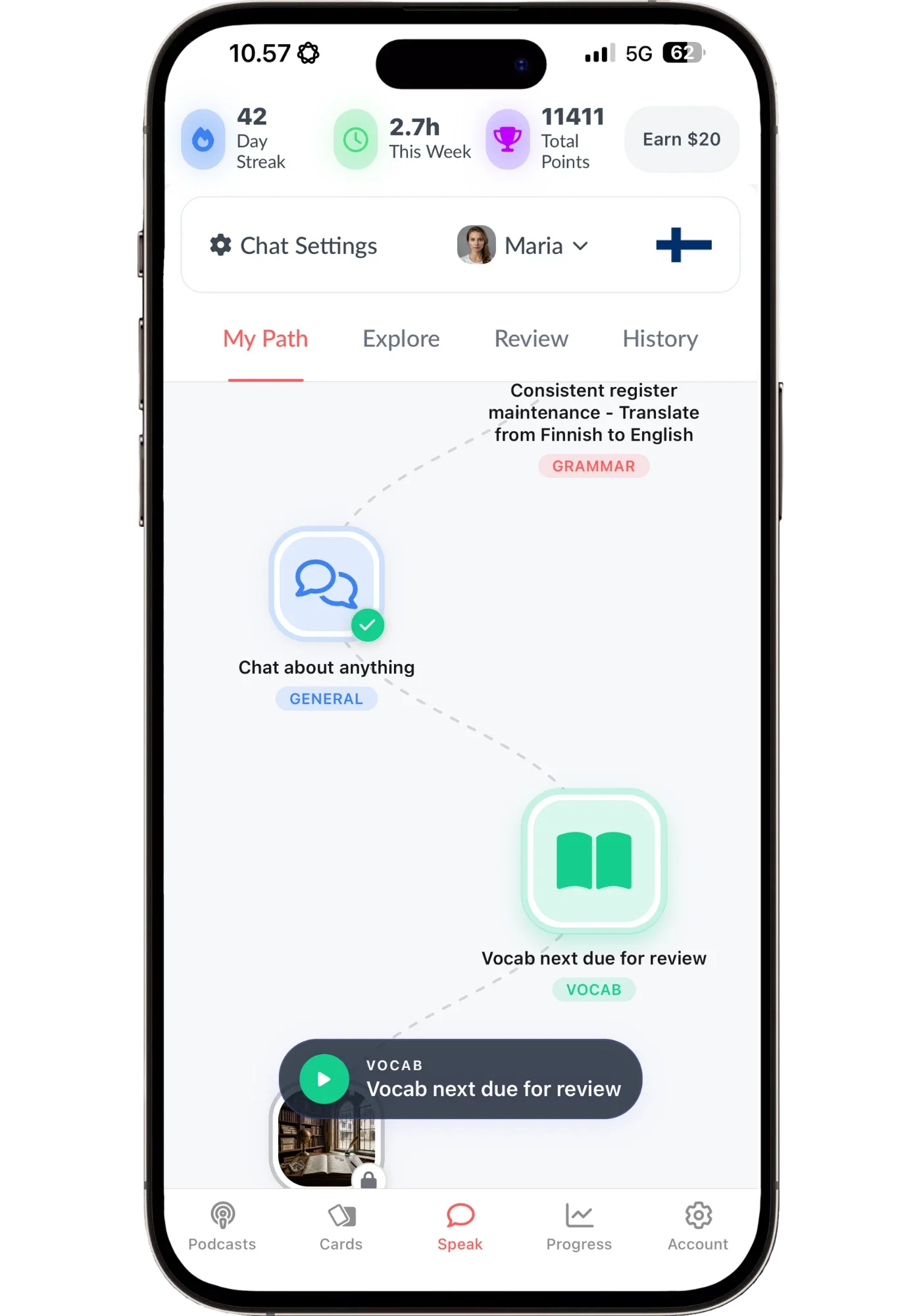
My Path mixes conversation, your interests, grammar and vocab review, built from your own chats and mistakes.
Speak is still the winner for structure — because the path is the easiest to follow. It builds step-by-step on what you learned before in a way that never makes the jump to learn the next thing too steep. You never feel like you’re out of your depth. It doesn’t adapt as you go the way Langua does, but it features lessons customized to you and will prioritize reviews based on your frequent mistakes.
Univerbal's mission system is fun for motivation, like finishing a path in Zelda. Praktika offers a guided classroom approach with creative lesson variety. Langua now covers both ends: My Path when you want direction, and the deepest freeform ecosystem here — conversations, flashcards, AI stories, custom prompts — when you don't.
One thing that made a big difference: telling the app what you need. When I asked Praktika and Langua for more repetition, or to skip something that wasn't useful, both adjusted immediately. Univerbal was the exception. When I asked it to say only the Korean sentence, it only partly adjusted, even after I asked twice.
Which AI App Has the Most Realistic Voice?
Do they sound like a real person? Or do they sound unnatural and robotic?
Before I tell you what I think — here's what all five actually sound like, back to back in a short video I made. Judge for yourself, then see if you heard what I heard.
Voice Comparisons Video (46 seconds)
What I Heard, App by App
Speak I found good but a bit inconsistent. The AI sometimes sounded quite good and sometimes very robotic. I also personally thought that Korean was considerably better than Spanish in the AI chats (in the drills they were similar).
Univerbal was decent but uneven. One of the European Spanish voices was noticeably robotic, while the Mexican voices were much better, though still clear it’s AI. Talkpal was okay but the most unpredictable. The Cantonese voices would sometimes switch between male and a female voices mid-message. Works, but nothing impressive.
Praktika was the biggest surprise for me. The voice quality was great and I found one of the Spanish voices to have especially a nice flow. They have a lot of avatars to choose from and each have their own personality and way of speaking, making each one feel more alive.
When it comes to voice quality, Langua is in a league of its own. No other app can touch it. The rhythm, intonation, the inhales between sentences, and quality — it’s hard to tell that it’s not a human.
Here are my voice quality rankings:
#1 Langua — Most human-like
#2 Praktika — High quality
#3 Speak — Good to robotic
#4 Univerbal — Decent but more robotic and uneven in quality (varies greatly between dialects)
#5 Talkpal — Unpredictable and more unnatural. Will sometimes go in and out of a female and male voice.
Langua is the clear #1 and Praktika the clear #2. Praktika has more of a cartoonish feel to it (which is not a criticism but just an observation) while Langua has more of a deep, immersive feel. These are the only ones I’d consider to be quality listening input.
That said, each app does different things. So for an app like Langua which focuses heavily on really deep conversation, high quality voices become much more important. While for Speak, which focuses more on drills, fixing mistakes, and short exchanges it’s good enough for what it needs.
Voice quality matters more than most people realize — if it sounds robotic, it's not training your ear for real conversations nearly as much. On that note, only Langua, Speak, and Univerbal let you hide the transcript entirely, turning conversations into actual listening practice.
Complete Beginners: Which App Should You Start With?
To get a feel for these apps as a beginner, I tried them all in Korean — a language I was 2.5 months into when I first tested them, and about ten months into now.
The first one I tried was Univerbal, and it's clearly the weakest of the five for beginners. I went back to it recently in Korean to double-check, and it was the same: you're dropped into a conversation with missions that need vocabulary a beginner doesn't have yet. The English tutor is a handy backup, but its Korean is only in hangul, with no romanization and no way to tap a word to hear it — which makes it tough for a beginner. After 20 minutes I stopped. Doesn’t mean it’s a bad app, just the wrong one for this stage: from around low intermediate, the missions become its strength.
Talkpal's beginner course follows the same pattern in every language. You get a new word with a picture, then see it in a sentence and say it out loud. Next there’s a Duolingo-style exercise where you click words into the right order, and finally a guided role-play where it says a line and you repeat it. It works, but new words don't get repeated enough for a beginner, while every unit follows the exact same pattern — so the format gets repetitive even though the words don't.
It also doesn't add lesson types for the language you're learning, like tone practice or a grammar focus, the way Speak does. So I wouldn't make it your main learning tool as a beginner. The exception is a language nobody else offers: then you work with what you've got, and that's exactly where Talkpal shines.
Praktika follows a classroom-style approach, and at first I wasn't impressed with it for beginners — there wasn't enough repetition for phrases to stick, some Korean grammar examples didn't illustrate what they were trying to teach, and I didn't care for the quiz-style questions ("when would you use this word?"). But after several more weeks of beginner Korean, I came around to liking it a lot. The lessons have real variety and creativity, and once I started directing them — asking for more repetition, skipping what I didn't find useful — they became very enjoyable and useful. And while some lessons were really useful on their own, I realized one of their biggest strengths is that they work as a starting point: they lead to questions and detours, and the detours were where the best learning happened.
So Praktika is a great choice for beginners if you enjoy a daily lesson format. The one thing to watch is the teacher-student dynamic. It can be a real positive, but it's always there, which, more than with the other apps, sometimes means you end up learning about the language rather than using it. That said, once I told the tutor what I needed, it became much more effective.
Langua had a much more no-nonsense approach and better Korean voice quality. Short, clear explanations made it more efficient than Praktika, which I felt explained a bit too much at times. The AI tutor also gave solid language learning advice when I asked how best to remember vocab: “review it the next day, but don't worry too much, since you'll eventually learn it through enough exposure”. That's better advice than most language apps give, and it shows it's built by people who understand how language learning works.
But the key thing is that you can save words and phrases and review them between lessons, which is what's helping the Korean I'm learning stick. There are 40 guided beginner lessons per language — enough to build a foundation, but not to reach a conversational level. After that, you can carry on with My Path, which builds itself from your own learning and interests as you go.
When it comes to beginner material, Speak is undoubtedly the star of the show. In fact, it’s the best beginner app I’ve ever tried. It features very well-made video lessons with a real teacher — professional yet friendly and encouraging: exactly what you need as a beginner. Where it gets interesting is in the interactive element — you’re not just watching videos, you’re participating. When learning new phrases you’ll be prompted to speak them out loud, which is verified by speech recognition. This is exactly the type of interactive ingredient that’s lacking from most beginner courses. It keeps you from zoning out by passively watching and instead keeps you actually engaged in the learning.

The Speak app’s beginner course introduces new vocab and grammar through professional video lessons that are easy to follow.

You also participate in the lessons and speak these phrases out loud — the app checks if you said it correctly.
Unlike all the other AI apps, Speak gives you tons of repetition through drills, Q&A convos, and short role-plays adding slight variations, to make sure that the vocab and patterns really stick. And as a beginner, you really need this — Speak was the only one that automatically provided this.
Speak also keeps track of your mistakes and creates targeted drills to fix them. So while the beginner course follows a structured format, it also gives extra repetition of the specific things that are giving you trouble, since that’s going to be different from person to person. It's like a combination of Pimsleur, Rocket Languages, and Glossika all in one — but with AI customization, deeper features, and a better experience.
I've used it as a beginner in Korean, Japanese, Mandarin, and even some French, and the quality holds up across all of them. Korean is weaker than some of the other courses, with a few gaps, but it's still very good, and its teacher might be my favorite on the whole app. Each course is also built around what that particular language needs, targeting its unique challenges.
For more on my Japanese Speak journey from zero: see my 90-day Japanese review, where I filmed every session — if you want to see what it looks like day by day in a challenging language.
I even tried the beginner course for Spanish, and to my surprise, even though I’m at an upper intermediate level, I found it highly enjoyable. Most beginner courses put me to sleep. Speak didn’t. Why? Because it moves at your own pace. Need to take it slow? Take as much time as you want. Already know the vocab? Blast through the drills. In fact, it was useful to circle back and fill in some gaps in my Spanish.
So for beginners, it’s Speak by a big margin — as long as it offers your language.
Langua and Praktika are close to each other, and which one you'll prefer depends on what you're after. Praktika has an encouraging vibe, and meeting the same avatar every day gives a sense of continuity — you want to open it just to see what today's lesson is. Langua edges it out because it's more to the point, which makes it more efficient for actually learning to speak. Saving and reviewing vocab between lessons helps phrases stick, and it's the rare app you can use from beginner all the way to advanced, so you'll never need to switch to something else.
Rankings for complete beginners:
What Happens After the Conversation Ends?
General 'what you did well' summaries aren't very helpful — what matters is whether the app actually helps you practice and fix specific mistakes.
The top ones for review vocab were Langua and Speak — two apps that do this quite differently.
Langua features a very deep review system — save any word/phrase to flashcards, multiple review methods (flashcards, weave into conversation, AI stories), audio and written feedback reports with cultural tidbits, and outside vocab import.
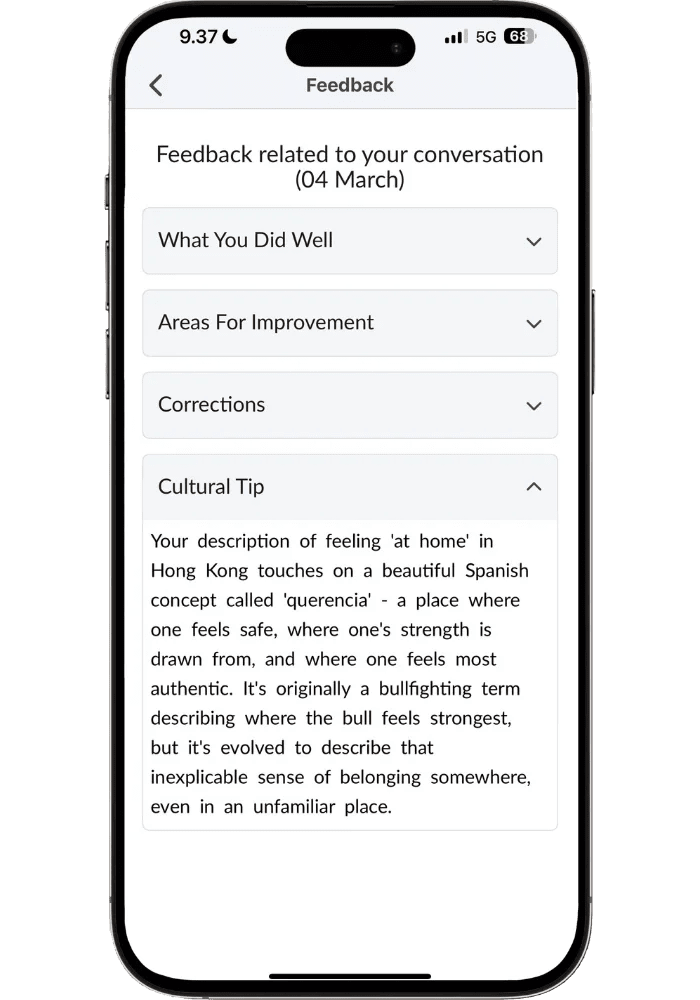
Langua’s written report ends with a cultural tip — here, “querencia,” the feeling of being at home even in an unfamiliar place.
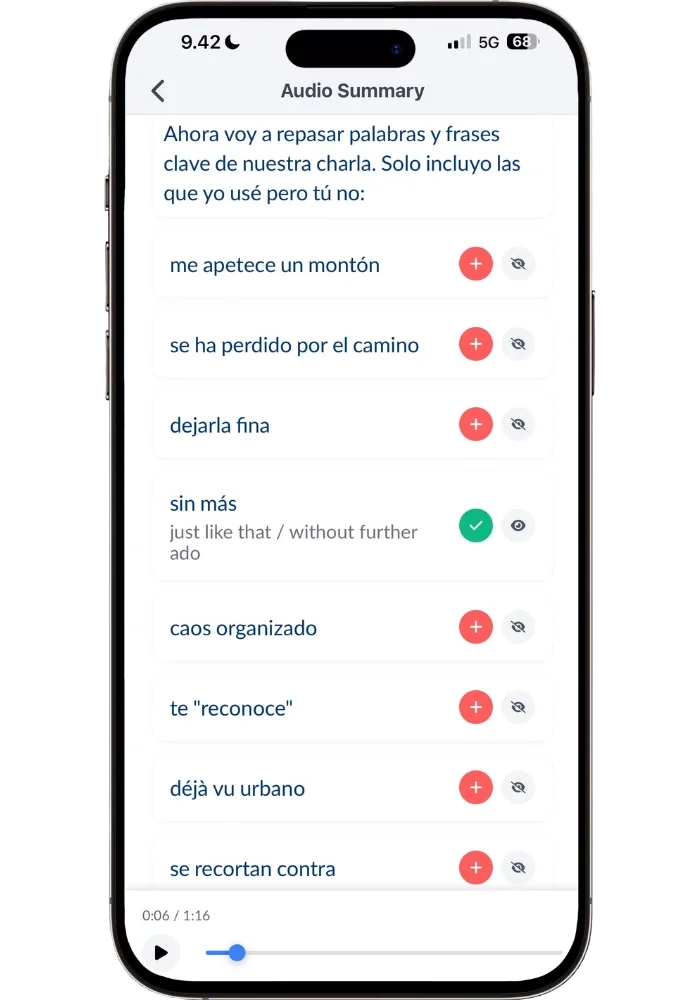
The audio summary picks out relevant new phrases, ready to save to your flashcards with one tap.
Speak generates new sentences with patterns targeted to your mistakes. If you made a Subjunctive mistake in Spanish, you’ll get the correct sentence plus other similar sentences to practice this. This makes review effective since it’s targeted to what you need to work on the most (a Premium Plus feature.)
Talkpal has no way of reviewing vocab. Neither has Praktika, though the difference is that you can save words and even complete phrases to your dictionary in Praktika. I wish there was a convenient way to review them though. I even asked the AI tutor if I could review my words but he just said “I don’t have access to your dictionary for review, but that’s a good idea for the app!” — indeed! :D
Univerbal has neatly organized lists of your words — saved words, looked up words, mistakes, and relevant suggestions. Individual and multiple words (as part of a phrase) can be saved. You can review your words by “fill in the blank” or translate from English. I like that you can just speak them instead of having to type. Though some of the mistakes saved were “half sentences” that felt a bit awkward — it didn’t always provide enough context to know what the mistake actually was.
My Verdict: What Each App Does Best
By now, you’ve probably gotten an idea that these apps are all quite different — with different strengths for different people. Here’s a breakdown of what each is best for, and their pricing (in USD, but pricing may vary by region).
Note: All of the apps give you access to all their languages, which is perfect if you’re learning multiple. All five also work in reverse — learn, for example, English using another language as your base.

Langua — Best Overall AI Speaking App
⭐ Top PickLangua does the core of this job better than anything else here: the deepest and most real-feeling conversations, the most human voices, post-lesson feedback reports, and the most ways to review what you've learned. It also covers dialects nobody else does — Colombian, Peruvian, Chilean, even Uruguayan Spanish, not just Castilian and Mexican.
It's the only app with a proper call mode — fully hands-free, and you can interrupt the tutor mid-sentence like on a real phone call. Say "save that word" mid-call and it goes straight to your flashcards, no buttons.
Around that sits the deepest toolbox of the five: videos & podcasts with clickable transcripts, custom prompts for specific practice or creative scenarios, AI stories built from your saved words, flashcards, conversations around text and audio you import, and a memory of facts about you that you can see and edit. None of it is required — you can open the app and just talk and it does free conversation better than any other app. And since My Path arrived, you can follow a guided route instead, one that adapts to what you've talked about, the mistakes you've made, and the words you've saved.
That range and usefulness is why it's my top pick: it's the one app here you won't outgrow. It works from your first lesson, and at an advanced level it's still the best conversation partner I've found.
Free trial: 7 days (annual) or 5 days (monthly). Free plan also available — no credit card required.
Pricing: $19.99–$29.99/month | $149.99–$199.99/year
Lingtuitive discount: Use code for 20% off the annual Unlimited plan ($199.99 → $159.99).
The code works on the website, not the app, but you can use the app normally after purchase.
Want more depth? Two years of using it went into my full Langua review, and I compare it directly with Speak in Langua vs Speak.
Speak — Best for Structured Practice and Beginners
🎯 Best for BeginnersSpeak offers structured practice that not only brings results but is seriously hard to put down. It’s by far the best beginner app I’ve used. It has a progression that builds smartly on what you just learned, so you never feel lost.
But it doesn’t sacrifice effectiveness — the method just works: top-quality video lessons you participate in, smart drills, and short, targeted AI chats that use what you've just learned. What floored me most is how Speak tracks your mastery of different concepts and creates custom practice sentences targeting your weak areas.
You get tons of reps of useful sentences in slightly different ways — which is exactly how you develop intuitive grammar (and expressing yourself accurately and fluently). Most of the practice can be done hands-free, making it great for driving, cooking, or commuting. It's also one of the best-designed apps I've ever used.
Speak makes it so easy to open it and do a lesson, so you can still do it when you’re tired at the end of a long, busy day. There's a reason I've been using it daily in Spanish and Korean, as well as a good chunk of the Japanese course plus some of the Mandarin one just for fun.
Free trial: 7 days
Pricing: $83.99/year (Premium) | $164.99/year (Premium Plus)
Want more depth? My full Speak review covers 209 days across four languages — or see what starting a language from zero actually looks like in my 90-day Japanese experiment.

Praktika — Best for an Engaging AI Lesson Experience
Praktika surprised me, and the longer I've used it, the more I've come to like it. Behind the avatars (less awkward than you'd expect) are AI tutors with high-quality voices, fast conversation flow, and enough depth to keep things interesting without feeling overwhelming.
What keeps me coming back is the tutor itself. Meeting the same one every day, with a light, encouraging vibe and a memory of things you've told it, starts to feel a bit like checking in with a favorite character in a game — you're curious what today's lesson will be. That makes it easy to open, which is half the battle with any daily habit. Creative lesson ideas (like ‘speed reading’) keep it fresh, making it the ideal app if you want daily AI-led lessons on a path rather than just open conversation.
It’s also the cheapest first year of any paid plan here right now — 50% off your first payment brings the annual plan to $59.99 — and it doesn’t feel like a budget app at all. If you want the lowest price on an AI app that still feels polished and well-made, this is the one I’d point you to.
Free trial: Not offered through my link at the moment — you get 50% off your first payment instead.
Pricing: $17.99/month | $47.99/3 months | $119.99/year
Lingtuitive discount: 50% off your first payment applies automatically through my link, no code needed (annual: $119.99 → $59.99).
Want more depth? Well over 50 lessons went into my in-depth Praktika review — including the things I don't like.

Univerbal — Best for a Mission-Based Daily Routine
Univerbal has a truly unique gamified missions approach. It creates a lesson plan based on your interests, giving you scenarios with specific tasks to complete in each conversation. Lessons are organized in units, giving you a clear learning path while also providing variety. The progress bar showing how close you are to completing each mission gives a gamified structure and end point that open-ended conversations often lack.
A slower-paced app with a cozy, low-stress vibe, perfect for slow Sunday afternoons. It's not for complete beginners, but from around low intermediate, if you like gamified conversations with clear goals, this is where it shines.
Free trial: 2 days (no credit card required)
Pricing: $14.90/month | $39.90/three months | $120/year
Lingtuitive discount: Use code for 10% off the yearly plan ($120 → $108).

Talkpal — Best for Rare Languages
By far the most available languages of any AI app — over 130 (some still in beta), including Cantonese, Georgian, Catalan, Welsh, and dozens of others that no competitor offers (so excited it has Cantonese — been waiting a long time for an app that offers it!). If you're learning a less common language, this might be your only AI speaking option. It provides many options for practicing — a structured path, describing pictures, speaking with historical characters (Mozart, Jane Austen, and the likes), and daily fresh activities when you need ideas.
It also has the most generous free plan here — 10 minutes of AI chat a day, with no time limit — and if you upgrade, the code below takes 25% off the 1-year and 2-year plans.
Free trial: 14 days, plus a free plan (10 minutes of AI chat a day, limited features)
Pricing: $19.99/month | $119.99/year | $149.99/2 years
Lingtuitive discount: Use code for 25% off the 1-year and 2-year plans (1 year: $119.99 → $89.99 · 2 years: $149.99 → $112.49).
The code works on the website, not the app — add it at checkout, then use the app as normal.
Want more depth? I used it daily for Cantonese for over two weeks in my Talkpal Cantonese review.
My Honest Recommendation
If I had to pick just one AI speaking app, it would be Langua. It's the one I wouldn't want to be without. The natural conversations, voice quality, feedback, and vocab saving system are in a league of their own. The chats always feel fresh and it's the closest thing to practicing with a real human I've ever found in an app. Nothing else comes close. It has done wonders for my Spanish and Finnish.
That said, Speak has impressed me enough that I've added it to my daily routine alongside Langua. What makes Speak special isn't just that it's a great beginner app (though it’s actually the best beginner app I've ever experienced). It's how refined that structured practice is. You follow the path, and the app targets your weak areas automatically through smart review drills. You just pick up your phone and the app handles what you need to practice — no friction, no decisions about what to do next.
For me, Langua and Speak have become complements, not competitors — Langua for natural conversation, Speak for structured daily reps. I use both (for more on how I use them, I break down the full comparison in my Langua vs Speak comparison).
Keep in mind though: Speak currently only supports 7 languages. If you're learning a language Speak doesn't offer yet, Langua covers many more — or if you’re learning a rarer language, Talkpal supports 130+ languages. You can also take the quiz below to match you with the right app for your preferences and the language you’re learning.
And if you’re learning Spanish specifically, I have a dedicated deep-dive — the best Spanish AI apps — covering dialects, Spanish grammar, and which one fits your level and learning style.
Which App is Right For You? — Take the Quiz!
One thing worth saying before you take it: Langua comes up a lot, because it's simply the clear winner in most areas. But "best overall" and "best for you" aren't the same thing — if you’d rather have lessons than free conversation, Praktika may well be your answer.
Which AI Speaking App
Is Right For You?
FAQ
Which AI speaking app is best?
For most people, Langua. It has the most natural voices, the deepest conversations, the most useful feedback and vocab review, and the only proper call mode — fully hands-free, and you can interrupt mid-sentence the way you would on a real phone call. My Path is also the only guided route here that evolves with you rather than being set from the start. If you're a complete beginner, though, Speak is my #1 — it's by far the easiest way I've found to start a new language without sacrificing effectiveness.
Which one is best for a complete beginner?
Speak, if it offers your language. It's the rare app that's both easy to stick with while still being effective — the drills play like a game, with scores and that satisfying sound when you get it right, and the repetition makes what you learn stick. It's the only reason I'm learning Mandarin on the side for fun. If you'd rather learn through conversation than drills, Langua and Praktika are nearly tied. Praktika is more fun if you like a daily-lesson format, but you'll need to steer it to keep it effective. Langua edges it out for me: the beginner course is to-the-point, you can review saved vocab between lessons, and it scales further than anything here — you won't outgrow it until you're fluent.
Can I use these to learn English?
Yes. All five support English, and it's among the best-served languages on every one of them.
Do they have structure, or is it just open conversation?
Speak and Univerbal are structured — a path, lessons, missions — with Speak the most structured and Univerbal giving you more freedom within the structure (how you complete the missions). Praktika has daily lessons with an AI teacher — the lessons are chosen for you, but flexible once you're in them. Langua used to lack structure, but added My Path — a guided route that mixes conversation with grammar and vocabulary review, and the only path that evolves with you as you go. Talkpal has structure, but it's the weakest of the five — its strength is the number of activity types and languages to choose from.
Is the better voice quality actually worth paying for?
If you care about it, then yes. Plus, natural voices also train your ear for real speech more than something robotic which makes it better for listening practice. But if you're only using the app to produce language and you'll get your listening elsewhere, then it matters less, and the cheaper options become perfectly reasonable.
Can I practice hands-free?
Four of the five. Langua does it best with its unique call mode — you can interrupt just like in a real conversation. Speak works really well for the drills and lessons. Praktika works if you put the avatar in fullscreen, which sends your messages automatically after a pause. Univerbal also has a very similar feature that enables auto-sending messages. Talkpal is the one that doesn’t currently have hands-free mode.
What if my language isn't on the list?
Talkpal probably has it. It supports 130+ languages, including ones nobody else touches — Amharic, Welsh, Georgian, even Latin and Esperanto.
Is there a free AI speaking app?
Two of them have free plans with no time limit. Talkpal’s free plan gives you 10 minutes of AI chat a day, and Langua’s free plan (no credit card needed) includes a short AI chat and its immersion features. Univerbal has a 2-day free trial with no credit card needed, and Speak has a 7-day free trial. Praktika doesn’t offer a trial through my link, but you get 50% off your first payment instead, applied automatically with no code needed. The app store version has a 7-day free trial, but without the discount, so you’d need a new account later to get it.
Is there a discount code?
For four of them, yes. LING20 gets you 20% off Langua's annual Unlimited plan (the older code LINGTUITIVE20 still works too). LINGTUITIVE gets you 25% off Talkpal’s 1-year and 2-year plans and 10% off Univerbal’s yearly plan. Praktika’s discount is 50% off your first payment, applied automatically through my link, no code needed. Speak is the only one without a discount. These are affiliate codes — I earn a commission if you use them, at no extra cost to you.
Do I need more than one?
No. Pick the one that matches how you want to practice and give it two or three months. Jumping around between different apps makes it harder to stay consistent. That said, some apps lend themselves better to being combined. For example, I use Langua for conversational practice in Spanish and Speak for drilling natural phrasing and grammar patterns. I use both alongside each other for Korean too. They are two completely different apps that do very different things, so I find they have much less overlap than some other combinations would have.
Final Thoughts
No single app does everything perfectly — but between these five, there's something for every type of learner.
I use Langua and Speak together as my daily core. The others are ones I‘d reach for in specific situations: Praktika for a guided language lesson with a light vibe, Univerbal for a relaxed Sunday afternoon session, and Talkpal for the rare languages nothing else covers (I'm especially thankful for its Cantonese support).
The real thing that matters isn't which app you pick — it's that you pick one and use it daily. AI speaking practice is genuinely one of the fastest ways to improve your speaking fluency, and all five of these apps can get you there. Pick the one that resonates with you, commit to it, and you'll see real progress.
If you're still on the fence, take the quiz above — it'll match you with the right app for your specific learning style.
