What My First Lingopie Korean Session Actually Looked Like
Updated
What's new: added a video walkthrough of this session at the bottom of the post.
This post contains affiliate links. If you buy through one of them, I may earn a commission at no extra cost to you. Some of the products I write about are also provided to me for free. See Full Affiliate Disclaimer.
Last updated: June 2, 2026 — added a video walkthrough of this session at the bottom of this post.
Table of Contents
- Where I'm at with Korean (and Why Lingopie)
- Before Pressing Play
- The Session Itself
- A Jigsaw Puzzle, Not a Checklist
- My Second Session — What Changed the Next Day
- Should You Try Lingopie for Korean (or Your Language)?
- Want to See How This Fits Into a Daily Routine?
- See the Session in Action (Video Walkthrough)
- FAQ
A few weeks ago I wrote about why I’m finally getting serious about Korean. One of the tools I mentioned wanting to add to my routine was Lingopie. Today, I finally sat down for my first session.
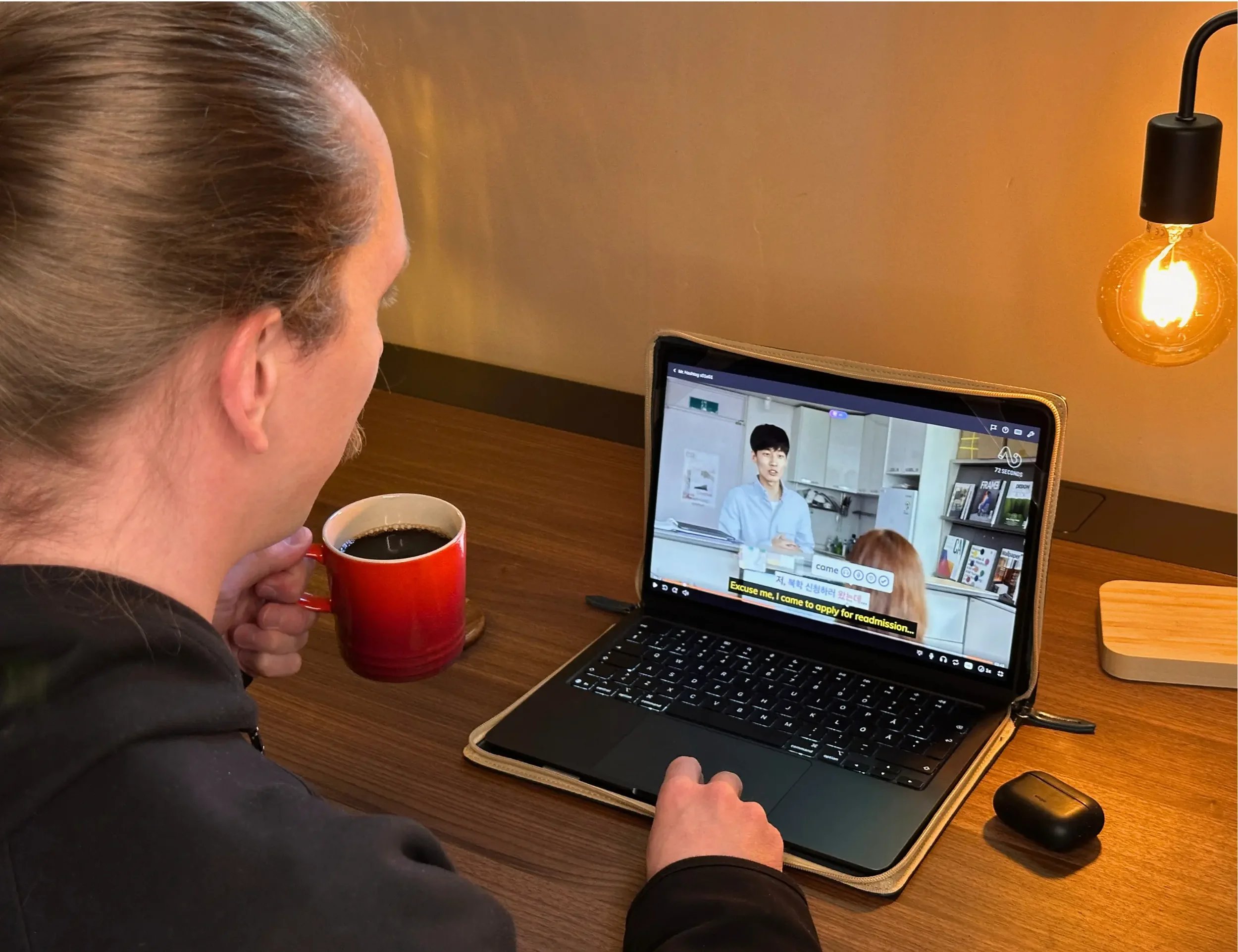
This post walks you through exactly what this session looked like: what content I picked, how I worked through it, and the thinking behind each choice. It’s a window into how a beginner can use the platform — what to do, what to skip, and what to expect (there’s also a video walkthrough of my first session at the end of the post).
One thing you'll see throughout: learning a language from native TV shows looks a lot more like assembling a jigsaw puzzle than climbing a staircase or checking things off a list in a linear fashion. This more intuitive approach will help you get more out of the platform — and from learning with TV shows in general, especially as a beginner.
Where I'm at with Korean (and Why Lingopie)
I started learning Korean about 4.5 months ago, and I just finished Rocket Languages a few days ago — which gave me a foundation in Korean grammar, the politeness/formality system, vocab, and speaking.
I also just started using Speak for Korean (see my full Speak beginner rundown), which is an app that I absolutely love. It's super effective for developing speaking — it trains you to intuitively speak sentences with the right structure. I use it in three languages now. So I’ve got the Korean speaking part covered.
Though it does develop listening somewhat, Speak isn’t exactly built for improving listening comprehension. Especially not when you’re trying to understand native media. And a huge part of why I’m actually learning Korean is to understand Korean dramas, comedies, and pro StarCraft commentary (oh, yes!). The natural way to train this is to learn from real TV shows — but watching Korean dramas raw, without subtitles, right now would mostly just be gibberish.
I already know how powerful using TV shows can be. I experienced this firsthand when I used Disney+ to take my Cantonese Listening from 60% to 90% this past year. With Korean, I wanted to use a similar method since it was both effective and a ton of fun. I had Lingopie in my sights from day one of learning Korean — there’s no manual setup (like I had to do with Cantonese, since it’s not available on Lingopie), everything works out of the box, and the interface is a pleasure to use.
Before Pressing Play
Before we hit play, there are two quick things worth spending a few minutes on: picking the right show, and getting the settings and keyboard shortcuts dialed in. Both will make our learning session that much smoother.
Choosing What to Watch (Why I Picked "Mr. Hashtag")
As I mentioned in I've Been Learning Korean for Months. Here's Why I'm Finally Getting Serious, I had already browsed and saved shows to my Korean Lingopie watchlist. So when I finally sat down today, I just opened the list and picked something.
I wanted to choose short-form content that was 2-3 minutes long, since that’s much more manageable as a beginner than 20-40 minute dramas. I also love lighthearted comedy, so I scrolled through a few options and landed on Mr. Hashtag — a Korean web series with 3-minute episodes.

Mr. Hashtag — the Korean comedy web series I picked for my first Lingopie session. 3-minute episodes are perfect for a beginner like me.
I didn’t overthink my choice. It’s going to be challenging no matter what — that’s the point! The show was labeled intermediate — above my current level — but the short episode length and my watching strategy would take care of that. Besides, if it wasn't a good fit I could just switch to a different show.
Settings & Keyboard Shortcuts
I first checked the Learning Modes panel. They'd added a few options since I last used it, which was nice — but nothing overwhelming. That's what I like about Lingopie. It has the settings you need without drowning you in endless tweaking.
I switched auto-save from "automatic" to manual ("click + icon"), so I could choose which words go to my deck instead of everything I clicked on. I also set the English subtitles to display alongside the Korean rather than only on hover — I can toggle them on/off anyways.
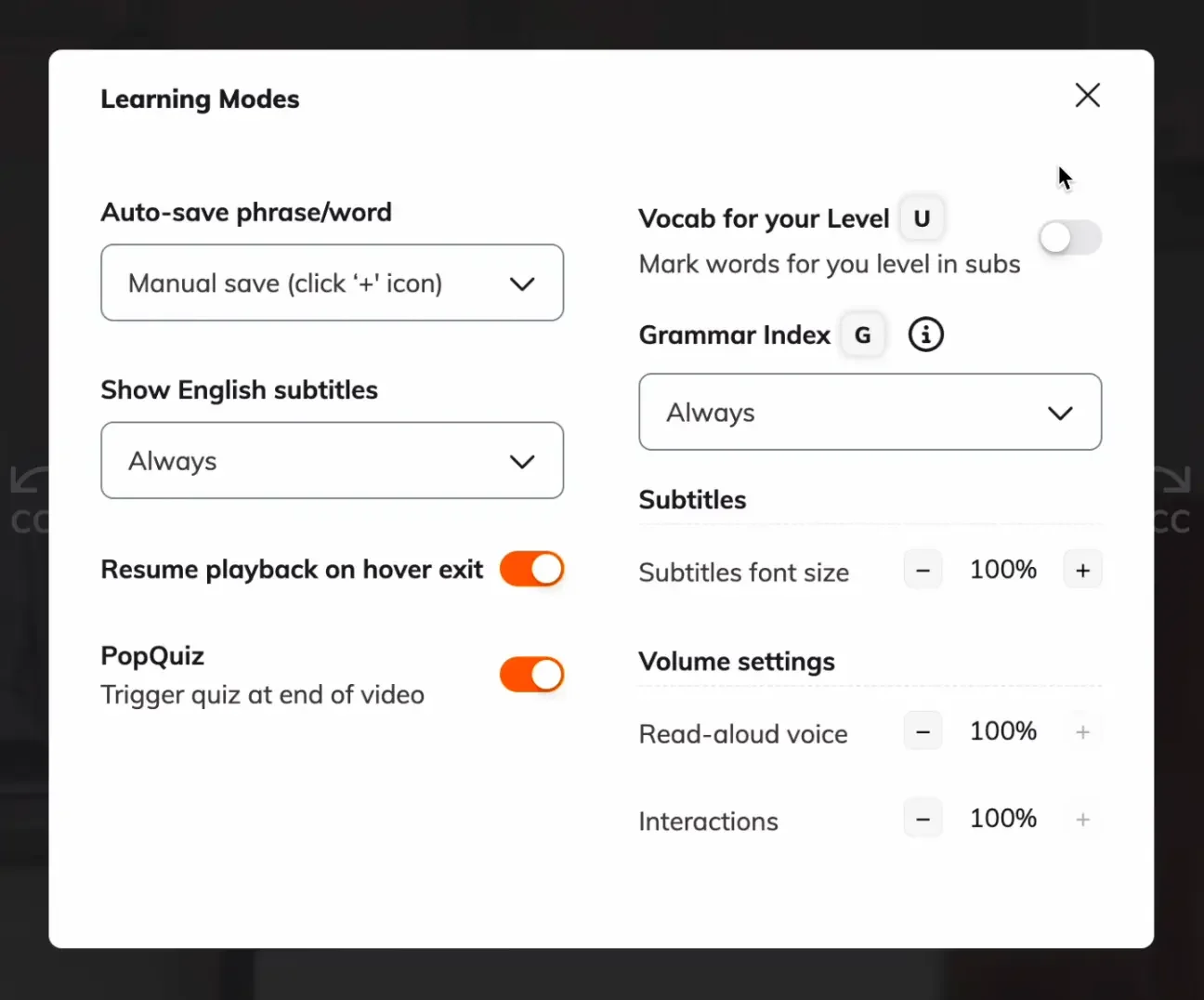
The Learning Modes panel. I switched auto-save to manual so I could choose which words to save myself.
Then I checked the keyboard shortcuts — which had also received some useful updates. You don’t need to memorize all of them — just learn a few and add more as you go. They're very intuitive, and once you're using them, the workflow gets noticeably smoother.
The ones I use the most are spacebar (play/pause), arrow keys (jump between subtitles), and D (toggle dual subtitles on/off). I ended up discovering some other highly useful ones that I added later (more on that in my second session) but these were a great starting point.
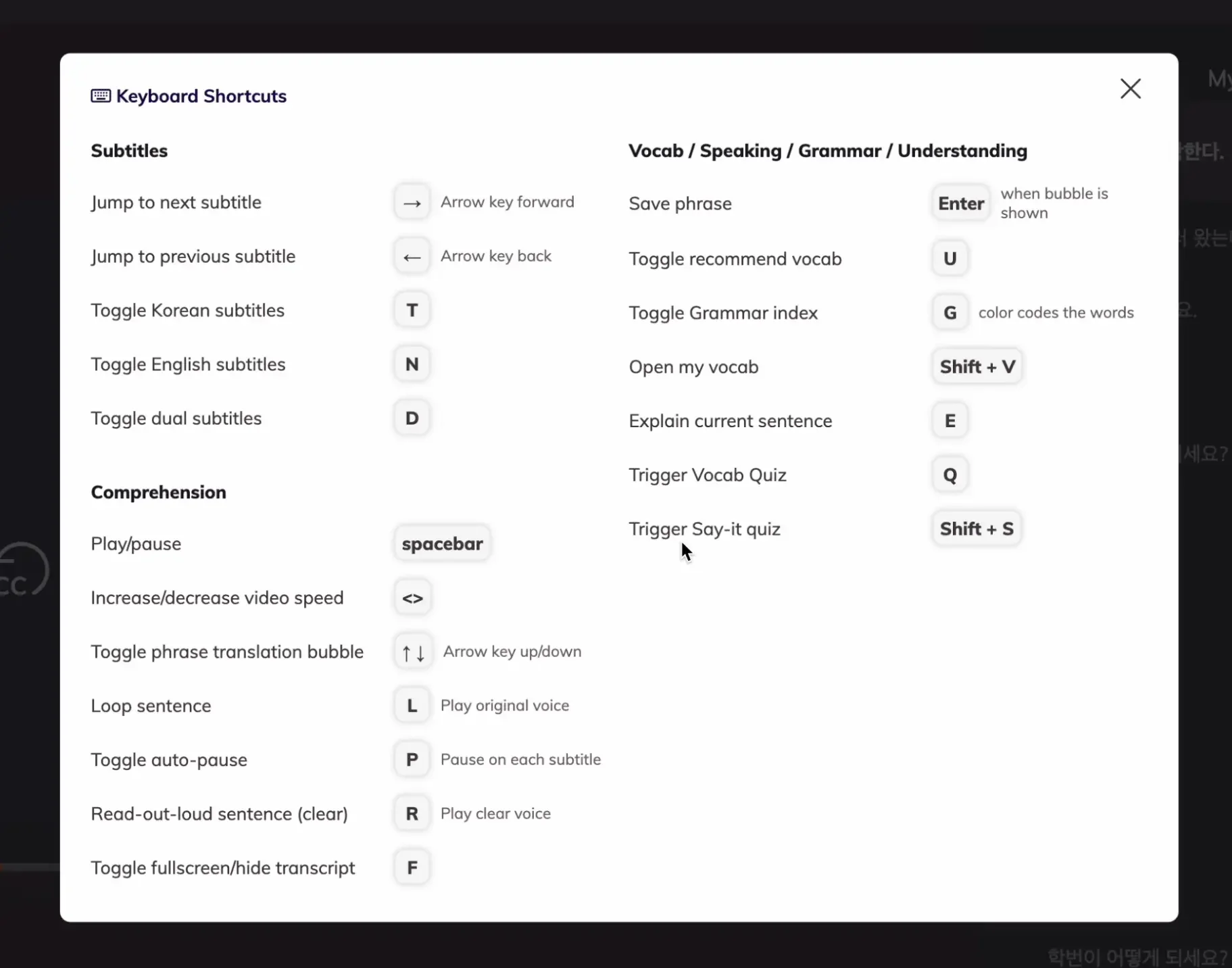
The full Lingopie keyboard shortcuts panel. I'd recommend skimming this before your first session — even just learning a few makes the workflow much smoother.
The Session Itself
Here's where the actual learning starts. My approach to a new episode is quite simple: watch it twice.
First, I watch it raw without subtitles the whole way through — no stopping or looking up words. This is to get a feel for the show, check the level (switch shows if necessary), and see if I can pick up any words.
Then I watch it again, but going much slower — using all the tools to decipher the lines of dialogue.
First Watch — No Subtitles, Just 'Freeflow' Listening
Watching without subtitles and without stopping, I understood, what, maybe 5-10%? This was expected. I was able to pick up some phrases and vocab that I had learned from Rocket Languages, which was nice — but most just went over my head and sounded like a jumbled mess.
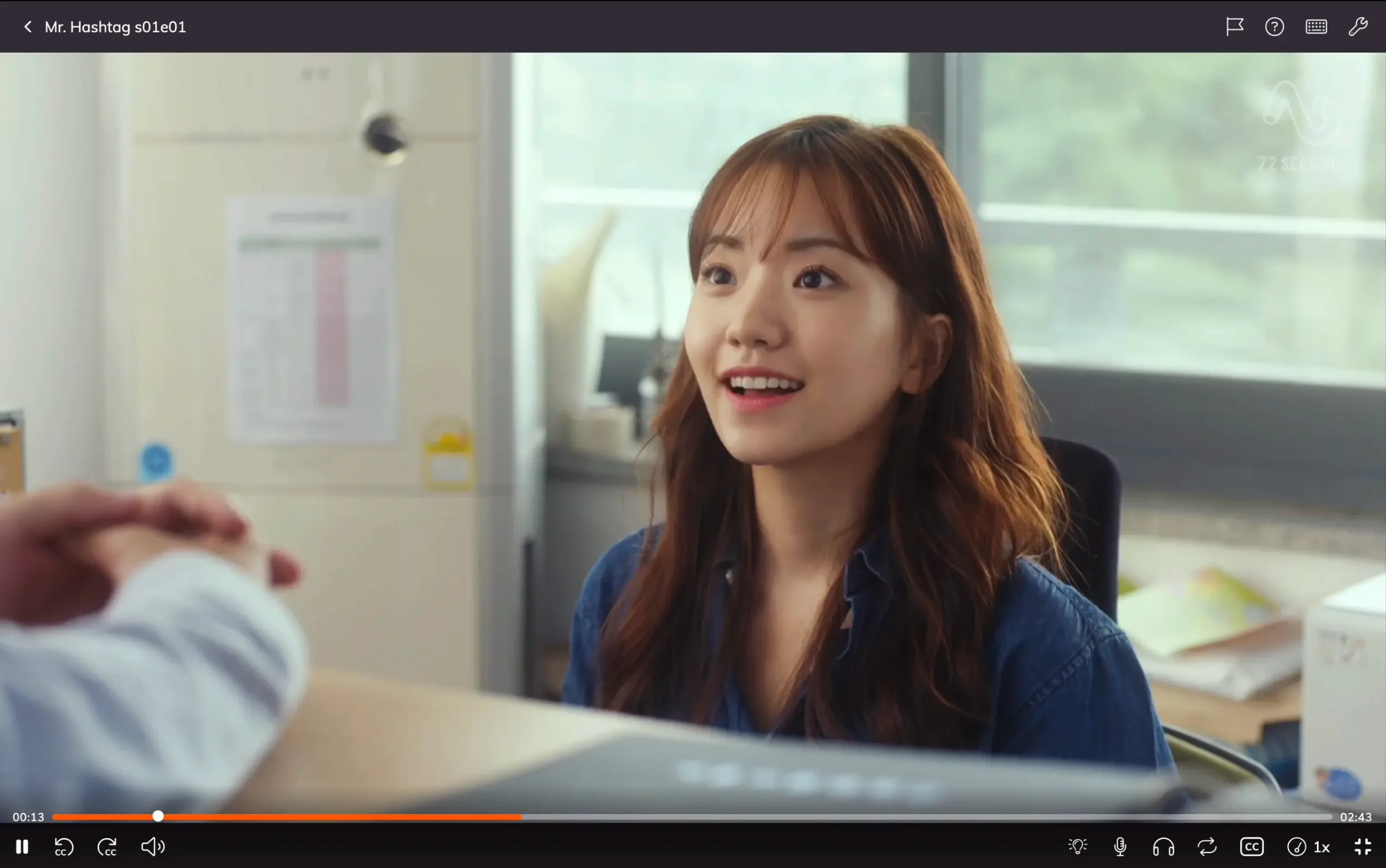
The first watch with subtitles off. The point isn't to understand everything (or much at all) — it's to train your ears and serve as a benchmark.
To me, that’s actually an exciting feeling — because I know that as I work through it these sounds will eventually be matched with meaning. That’s what we’ll work on next. The first watch is not about trying really hard to understand, but just letting the language wash over you. I just relaxed, picked up what I could, and ignored what I couldn't.
Two things this first pass does:
It tells you if the show is at the right level. If it’s full of very long sentences and it’s hard to pick out any of it then you might consider switching shows. And of course, if the TV show doesn’t actually interest you then go ahead and pick something else. It doesn’t have to be the most interesting thing you’ve ever watched — just engaging enough that you’ll enjoy working with it.
It gives you a benchmark. Without that 'before' moment there's no 'after' — and that contrast is actually important for motivation. Once you've worked through the episode in detail, coming back to a freeflow rewatch days or weeks later shows you exactly how much you’ve learned.
Second Watch — Subtitles On, But Strategically
This is where we slow down and really dig in. I went back to the start and watched again, this time using all the different tools: going line by line, re-listening to each sentence multiple times, looking up words, saving vocabulary, using Text to Speech to add clarity, and the AI features when I needed them.
I had auto-pause turned on, which stops the video at the end of each subtitle. This lets you take your time with the material — replay, save key words and expressions, or keep going. It lets you work through the episode at your own pace, sentence by sentence.
The important thing: don’t leave subtitles on the whole time. It’s tempting — they help us understand — but the goal is to tune our ears into hearing the language. Because chances are, you’ve watched shows in your target language with English subtitles already — and how much have you learned doing that? Probably not much. That’s because when subtitles are always on, our eyes focus on reading and our ears tune out.
I’m able to ignore subtitles, so I left them on a lot — but if you know you can't, just turn them off and try to stretch your ears as much as you can. Just use the subtitles to verify what you heard and then turn them off again. Having only target subtitles is fine at this stage as they are helpful to match what you hear, but no subtitles give you the best pure listening practice. The D key is helpful to quick toggle subs on/off.
The show had real Korean, not textbook language. And listening to fast, slurred, and connected speech is a real challenge for our ears to parse. I had to re-listen to sentences multiple times to train my ear to pick out and hear the syllables. The 🎧 icon helped give a clear reading of a word. I'd listen to that, then replay the original line with the clean version fresh in my mind, trying to pick out where that word was in the sentence.
When a sentence had a word or grammar pattern I didn't understand, I used Explain AI — Lingopie's AI feature that gives you contextual explanations of words and grammar in plain English.
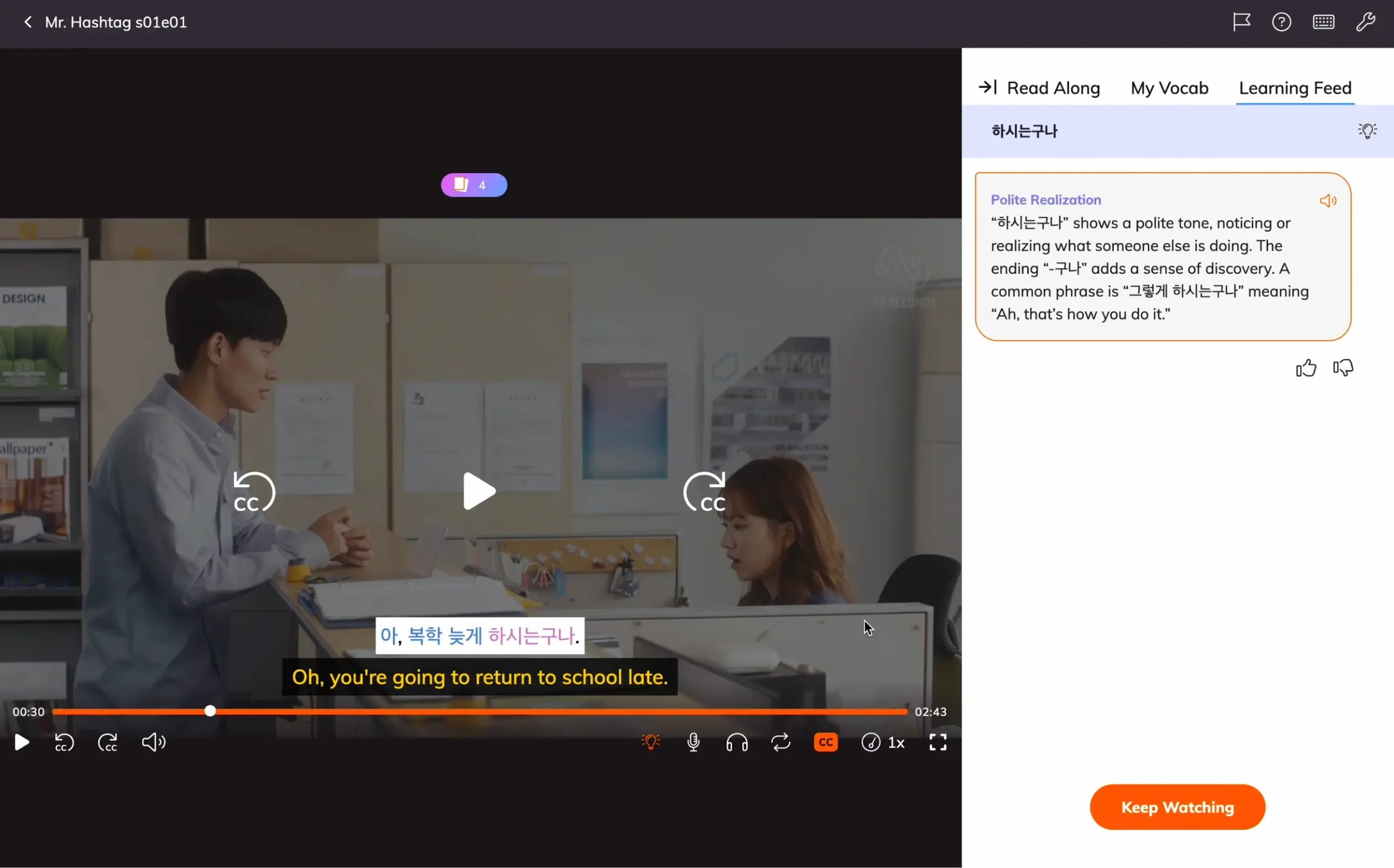
The Explain AI feature gives contextual grammar and cultural explanations as you watch — here it's explaining the polite "-구나" (‘guna’) ending.
One thing I'd love to see: a single-button replay for the current sentence. Right now, replaying means using the left/right arrow keys to skip back and forward. It works, but having this would streamline the workflow even more. Especially since I often replay sentences 2 or 3 times.
Saving Words — What I Save, What I Skip
When you're a beginner watching native content, you'll hit dozens of unfamiliar words in a single 3-minute episode. So it makes sense to save them all, right? “Ennnh!” (*game show buzzer*) Wrong answer. Try again.
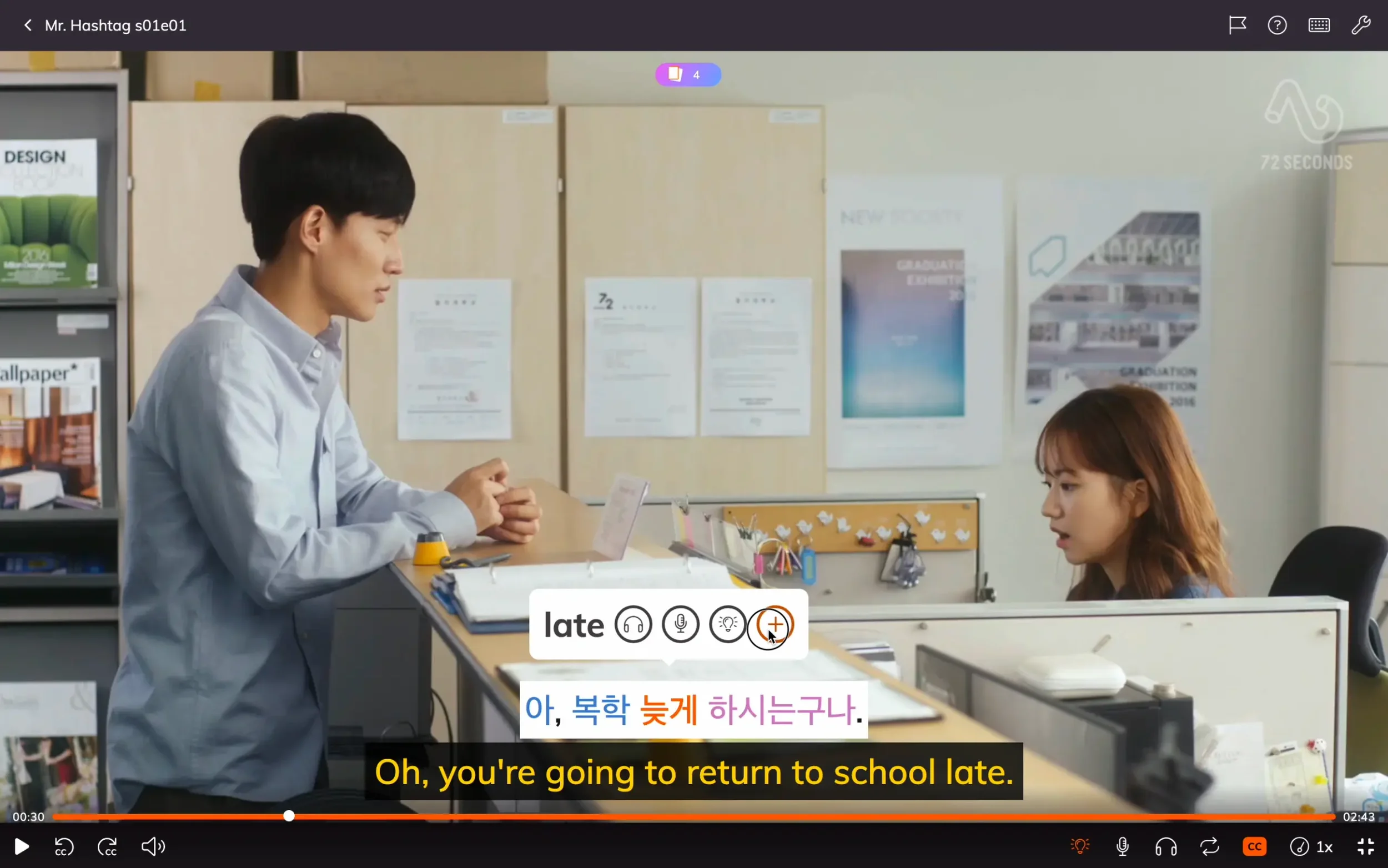
Clicking on and saving 늦게 (neutge / late) — exactly the kind of word worth saving. Super common words like "and" or "because" I tend to skip since they’ll show up so often. You’ll learn them from exposure alone.
This is when the “gotta catch ‘em all” Pokémon slogan doesn’t apply (it does long term, but not short term) — that gets overwhelming fast.
Here’s the filter I use:
Save: Words you don't already know that are meaningful for the sentence — like "important," "came", "late”. The types of words that unlock the meaning of a line, even when there are still other unfamiliar words in it.
Skip: High-frequency function words like "and," "because," "too." You'll learn these naturally by just watching — no flashcard reviews needed. Skipping them keeps your deck leaner and more manageable.
Skip (for now): Words and grammar patterns that feel too complicated. If you find yourself staring at an expression and it makes you feel tired or overwhelmed, that's a good indicator to skip it. These will become easier to learn later, once you've built up more vocabulary — they'll turn into low-hanging fruit on a future watch down the line.

Lingopie also recognizes full phrases, not just individual words. Having the romanization (imeil juso jom alryeojuseyo) turned on helps if you're still learning Hangul.
The goal isn’t getting to 100% comprehension. It’s progress. If you raise your understanding from 10% to 30% on a single episode, that’s a big win right there. Understanding one piece of content better spills over to understanding other content better too.
Don’t worry about understanding all the grammar yet. That unlocks later once you have enough vocabulary for the patterns to become visible. Right now, you’re mostly just gathering words and expanding the vocabulary you recognize.
The 10x Ratio — Why 30 Minutes on a 3-Minute Episode Is Fine
Between the two watches, re-listening, word saves, Explain AI lookups, and vocab reviews — I spent about 47 minutes on a 3-minute episode.
That might sound like a lot, but it really isn't.
The 3-minute episode is just the content. The 30-45 minute session is where the learning happens. It’s when you go deep with the material and extract it. So just take your time, replay sentences, save key words, and let it feel relaxing in the midst of the challenge. At some point, you just move on. You don't need to try to learn every word from every episode. Words and patterns will reappear in future episodes, and you'll get natural spaced repetition just by continuing to watch. The review games help tie it all together.
The Pop Quiz — A Surprise That Made Me Smile
At the end of each episode, Lingopie offers a Pop Quiz based on the words you saved. These are honestly excellent and brought a smile to my face the first time they popped up.
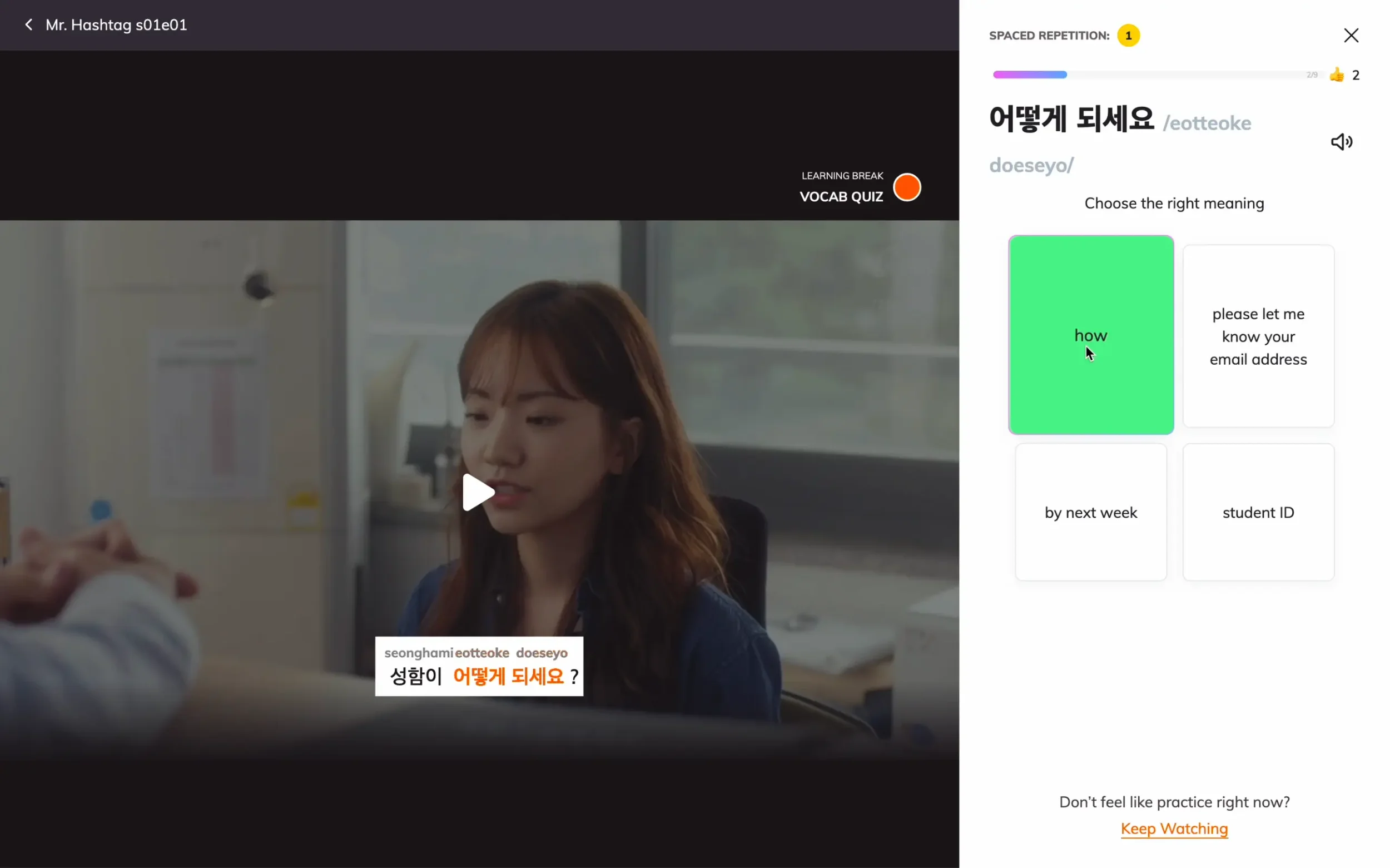
The end-of-episode pop quiz. You hear the target word, hear (and see) it in scene context on the left, and pick the meaning on the right. Simple, but effective.
Here's how it works: a TTS voice speaks your saved word, the scene where it appeared plays on the left, and you pick from four English meanings on the right.
The order is really what makes it effective: you hear the target word first, in isolation, which primes your ears. Then you see and hear this word in the context it was found (the actual scene). That combination of priming + context + recall is exactly the kind of thing that makes vocabulary eventually stick.

Get a word right enough times and Lingopie schedules it for review in 4 days using spaced repetition. The word 늦게 (neutge / late) here is the same one I saved earlier.
These pop quizzes are also a great way to prime yourself with vocab before watching: do the quiz first, then watch the episode with all the vocabulary fresh in your mind, trying to notice it in context.
Small note: the Pop Quiz uses whatever subtitle settings you had on when you started it (subtitles on/off, romanization on/off), but can’t be toggled during it.
A Jigsaw Puzzle, Not a Checklist
By now, you’ve probably noticed something about the learning approach: it’s not linear.
Many people think learning a language is like checking things off a list or climbing a staircase: master step one, move on to step two, then step three, and so on. It’s how textbooks and a lot of courses organize content, but it’s not how the brain learns a language from real input.
Real language learning looks a lot more like assembling a jigsaw puzzle. You'll see one piece appear in the middle, two more in the top right, one in the bottom left. The picture doesn't form left to right or top to bottom. It forms everywhere at once, slowly, in patterns you can't fully predict or control. You just gotta roll with it and trust the process.
That's why a beginner Lingopie session can feel chaotic — and why that's totally fine. You're not failing because you didn't master sentence one before moving to sentence two. You're simply collecting pieces. Some pieces will fit immediately. Some will sit on the table until later sessions, when more surrounding pieces show up and suddenly they click into place.
What we're doing here is training our ears to hear where words start and end. That's the first thing. After that, it's about identifying what the words mean. And don't be surprised if it takes hearing a word many times before it sticks.
The structure should be in how you approach your sessions — pick a show, watch twice, save selectively, review, watch again. But you can’t force the actual learning to be linear. That’s a much more intuitive and random process. You only keep showing up, day after day — letting the picture form. Becoming clearer and clearer.
My Second Session — What Changed the Next Day
The next morning, I came back to the same episode. The first session was partly about discovery, but during the second session my workflow started to really come together. A few things stood out:
The E key — Audio Word Explanations
Hover over a word and hit the “E” key. This triggers an audio explanation of this word. It’s the same thing as the Explain AI side panel, but with audio only. I found this very useful as it doesn’t break the flow — you don’t have to shift your focus to read something on the side. You just hit “E”, listen, and continue. The one thing I'd love to see: explanations tied only to the actual sentence context, rather than general definitions and examples. But even as a general explanation, this is one of the most useful keyboard shortcuts in the app.
The R key — Clean TTS of the full sentence
The "R" shortcut plays a clean text-to-speech reading of the current sentence. I used this constantly in my second session, and it's now one of my favorite Lingopie features. Here’s why: Real spoken Korean (any language, really) is full of skipped vowels, swallowed endings, mumbled words, and fast connected speech. That’s the whole reason native content is hard. A clean TTS is the opposite: every syllable articulated, no reductions, and normal pacing.
So when you listen to the TTS, then listen to the original line, you often go "oh, that's what they were saying." The TTS gives you a clean template to match against the messy, real version. For beginners who can't yet parse fast connected speech, this is a huge unlock.
The freeflow rewatch — pieces clicking into place
The first thing I did on Day 2 was do Pop Quiz. This let me prime my mind with all the vocab I’d saved from the episode. I then rewatched it the whole way through without subtitles. The improvement was noticeable. I still missed plenty of words, but I was now able to pick out words like 'pretty,' 'smile,' 'left,' 'right,' and 'student ID' — words that on day one sounded like a jumbled mess.
Sometimes I’d catch one or two words in a sentence. Sometimes zero. But that’s how the jigsaw puzzle of comprehension works: the pieces don’t appear in order — they show up in unpredictable spots in different sentences, but slowly the picture starts to form.
Should You Try Lingopie for Korean (or Your Language)?
Lingopie is definitely the platform I’d recommend for anyone who wants to use TV shows to learn languages. It’s especially helpful for beginners who feel intimidated by native content. Everything is already built in: dual-language subtitles, instant word lookups and word saves, AI explanations of any word, end-of-episode Pop Quiz, and spaced repetition. No setup, no friction, intuitive from the first session.
But here's the best part: it feels like watching TV. That sounds obvious, but it isn't. Most language tools turn watching into studying — switch tabs to look something up, fight the interface, and the magic of watching TV disappears. Lingopie keeps you in the show. The features are seamless enough that they disappear, and you're left doing the one thing that actually builds listening comprehension: enjoying real content in your target language.
Lingopie also just launched a Chrome extension that brings the same tools to any Netflix show. It's currently available for Spanish, French, Italian, and German — Korean isn't supported yet, but I'd expect it to be before long. In the meantime, there’s plenty in the Korean Lingopie catalog to work with (I’m excited to work my way through different shows).
If you'd like to try it, Lingtuitive readers get an extra 10% off all plans, and there's a 7-day free trial so you can test it before committing.
The 3-month plan is great for testing, and the lifetime plan is worth considering if you're going to use it heavily — you’ll lock in the current price (which won't stay this low forever), and you get all current and future languages plus all feature updates.
Want to See How This Fits Into a Daily Routine?
This post showed you one Lingopie session — which sits inside a broader daily practice that includes other tools, other languages, and other inputs.
If you'd like to see what that looks like, I put together my Daily Learning Stack — a free guide to the tools and routine I use across all five languages I'm currently learning.
See the Session in Action (Video Walkthrough)
Here's my first 47-minute session condensed down to 8 minutes. Watch it in full, skim, or use the chapter navigations to jump to specific moments.
FAQ
Do I need to know the Korean alphabet first?
No, all subtitles have romanization so it’s not a requirement to know Hangul. That said, Hangul is surprisingly quick to learn even though it takes some time to read it effortlessly. I do recommend learning it at least alongside. That way, you can improve your Korean reading by just using Lingopie and interacting with the subtitles (like I’m currently doing).
Can I do this on mobile?
Yes, and this is one of the best things about Lingopie — how smooth the experience is between devices. That said, the desktop version has tools (like Explain AI) and you can use keyboard shortcuts for a very smooth experience when you’re saving vocab. For example, on phone you automatically save words that you click on to your review deck. On desktop, you can choose. That’s just one example, and toggling on/off subtitles is a lot more convenient on desktop. Though the portability of phone is unbeatable.
How often should I have sessions like this?
I recommend using it daily (or at least 3-4x a week) for at least 15-30 minutes. That way, you see clear results in your comprehension over the next few weeks. The more you do, the faster the results. You just have to manage not burning out so that it keeps being fun and engaging. Expect some days to feel slow and like you’re not learning. If you still keep at it, you’ll reap the results.
What if I'm an intermediate, not a beginner?
Then Lingopie is actually even more ideal, since the sweet-spot for using it is around intermediate. You’ll recognize more vocabulary and have even more options for what you can watch comfortably.
