Practicing Cantonese With Talkpal AI — Does It Actually Work?
Published
This post contains affiliate links. If you buy through one of them, I may earn a commission at no extra cost to you. Some of the products I write about are also provided to me for free. See Full Affiliate Disclaimer.
Several weeks ago, I found myself in IKEA in Sweden. I was about to pick up some plants for my office when I heard a familiar language spoken next to me — Cantonese. ‘你哋係咪香港人?’ (‘are you guys from Hong Kong?`) was my natural response. What followed was a 15-20 min conversation with some tourists from Hong Kong. As always, they were shocked that a Swedish guy could speak Cantonese. They even invited me to hang out and grab something to eat next time I’m in Hong Kong.
It was a really pleasant conversation, and I was stoked at how easily I could understand them. This happened because of my Cantonese listening comprehension focus the past year (which I wrote about in my post How I Improved My Cantonese Listening (60% → 90%) Using Disney+). Since I hadn’t spoken Cantonese in a while, the contrast was even more obvious — my comprehension had taken a real leap, but my speaking had not (which makes sense, since what you spend your time on is what grows).
That was the problem. While I could still manage in conversation, the words didn't come as quickly as they used to. I had to throw in English words, and as soon as they said the Cantonese equivalent I'd think, "yes, of course! — How could I forget?" My flow was also lacking. That's not as big a deal in some languages, but in Cantonese it really matters — Hong Kongers speak fast and don't wait around for no one. The conversation needs to flow, otherwise they may switch to English (which one of them did. The others stayed in Cantonese).
After this experience, I wanted to see if I could get my Cantonese speaking chops back, and even improve them, by using a Cantonese AI app. I'd tried Talkpal to practice Cantonese with AI before but only briefly, so I decided to use it daily to see whether it could improve my speaking.
Talkpal is one of the apps I featured in my post I Tested the Top 5 AI Speaking Apps for Several Weeks — Here's What I Found. It's solid and better than many other AI speaking apps I've tried, but of those five, it came out the weakest.
However, it has one big advantage over all of them: it actually supports Cantonese. So right now, Talkpal is the most established way I know of to practice Cantonese speaking with AI and having actual conversations (if you want to skip ahead and try it, here's a 14-day free trial).
I used Talkpal daily for over two weeks — which is enough to test the main features and get a good sense of it, especially since I've tested plenty of AI speaking apps in multiple languages. However, this isn't a full deep-dive review, but it should serve as a practical Talkpal review for Cantonese learners specifically — with enough information to decide if it's worth your time.
What Talkpal Is
Talkpal is an app that supports more languages than any other AI speaking app I know (80+ languages). We're talking Welsh, Hungarian, Kazakh, Maori, Kannada — and, of course, Cantonese. In fact, it's the most polished Cantonese speaking app I've come across and one of the very few that even offers the language.
For Cantonese, there are two voices: one male and one female. Both are okay but still audibly AI, and not close to the level of apps like Langua. The male voice sounds more robotic, while the female voice is the more natural-sounding one.
What makes it especially useful as a Cantonese language app is that it mostly uses colloquial Cantonese rather than Standard Written Chinese. That means: whenever you have a few minutes, you can pick up your phone, start a chat or call, and practice actual spoken Cantonese.
You can also enable jyutping if you're not yet comfortable reading Chinese characters.
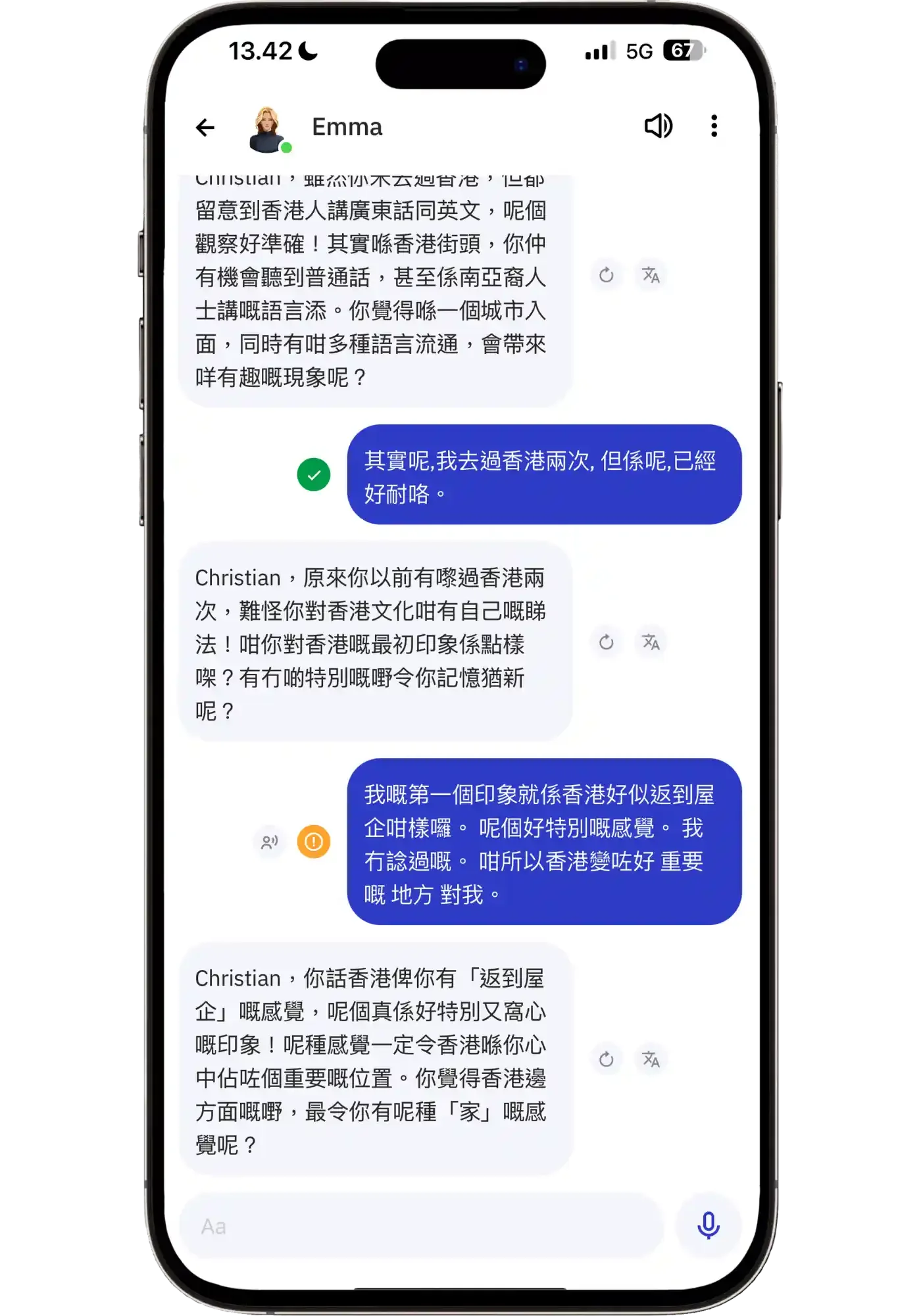
Regular chat mode, with ✅ showing if your message had no mistakes, or 🟠 if there’s something to be corrected.
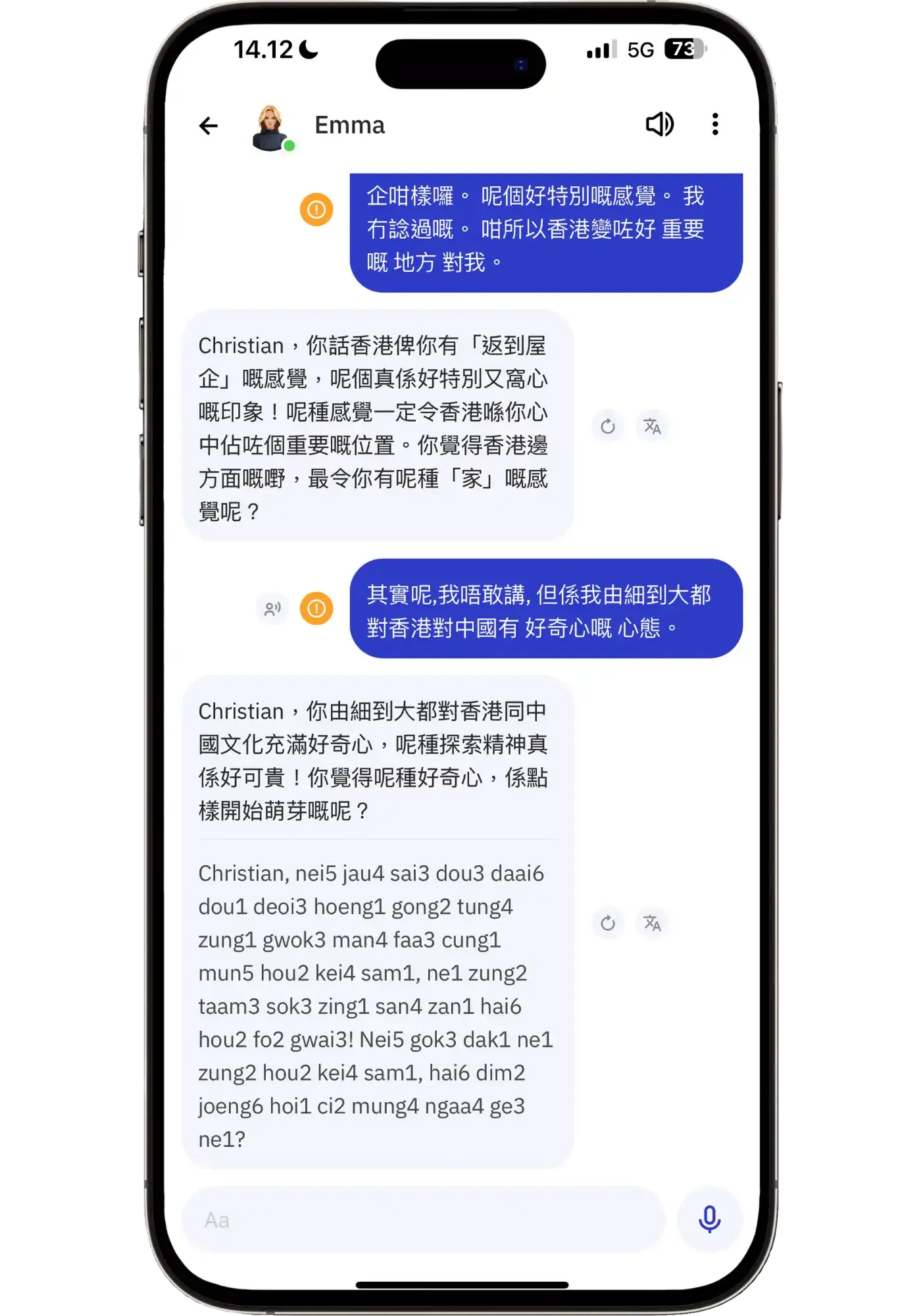
Jyutping enabled in chat. Mostly accurate, though I've spotted occasional tone errors, so beginners should verify tones with Pleco if they want to be sure.
The Features Worth Knowing About
Talkpal features a wide variety of ways to do Cantonese conversation practice. You can have a regular chat, use Call Mode (which feels more like a phone call), do roleplays, debates, or describe pictures — all while getting feedback and improve your ability to express yourself in the language. You can even talk to historical characters like Cleopatra, Edgar Allan Poe, or Leonardo da Vinci.
For lower-level Cantonese learners, there are options such as structured beginner courses, a guided Sentence Mode, and Dialogue Mode (which gives you pre-scripted conversations to practice). You can also build basic vocabulary through word decks.
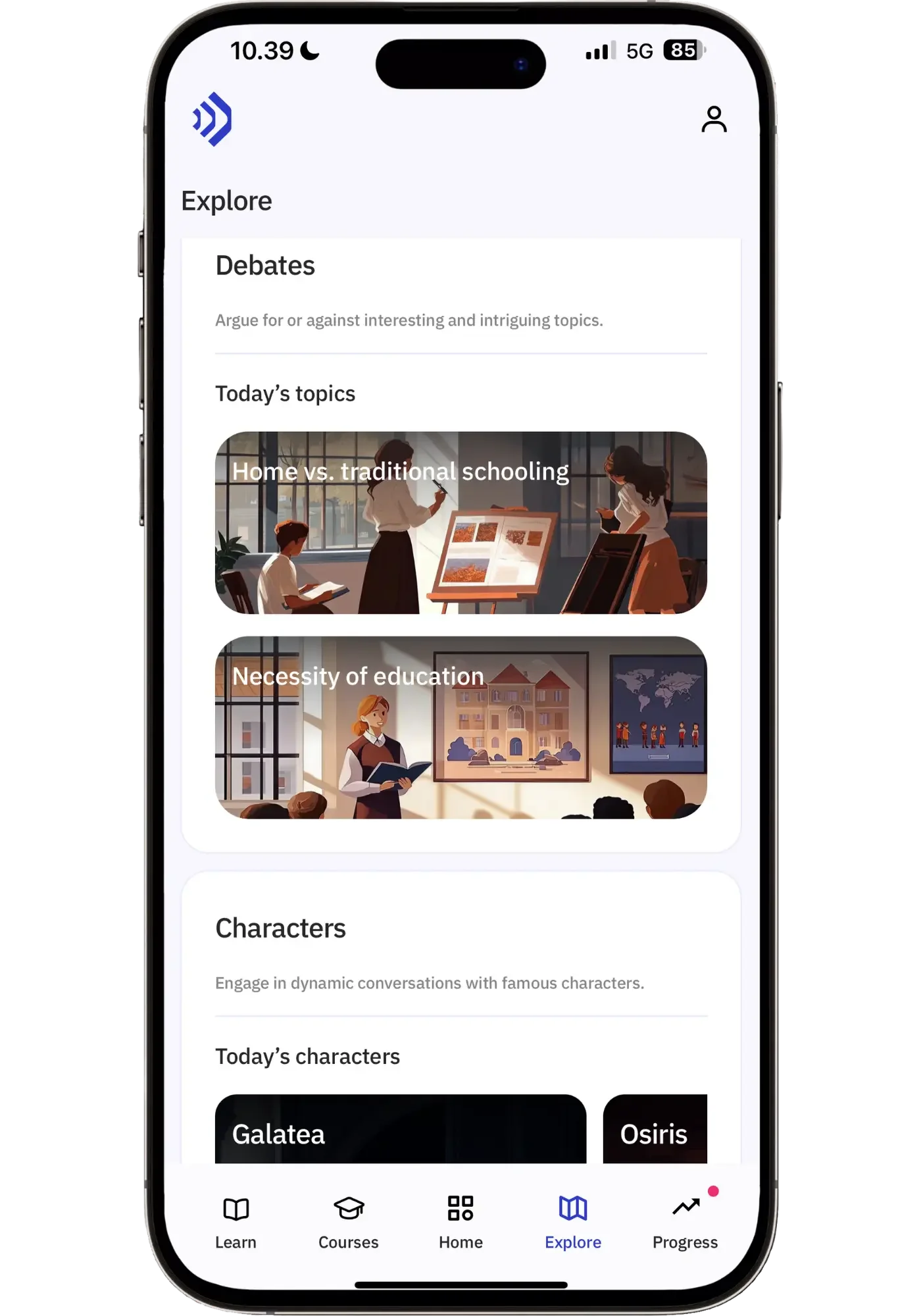
The Explore page is where things get interesting though. It serves you up with daily activity suggestions that rotate each day — talking to specific characters (like Moses), roleplay scenarios like buying shoes or meeting your mother-in-law, debates like "homeschooling vs. traditional schooling," and Dialogue Mode prompts like planning a shopping spree or making new friends.
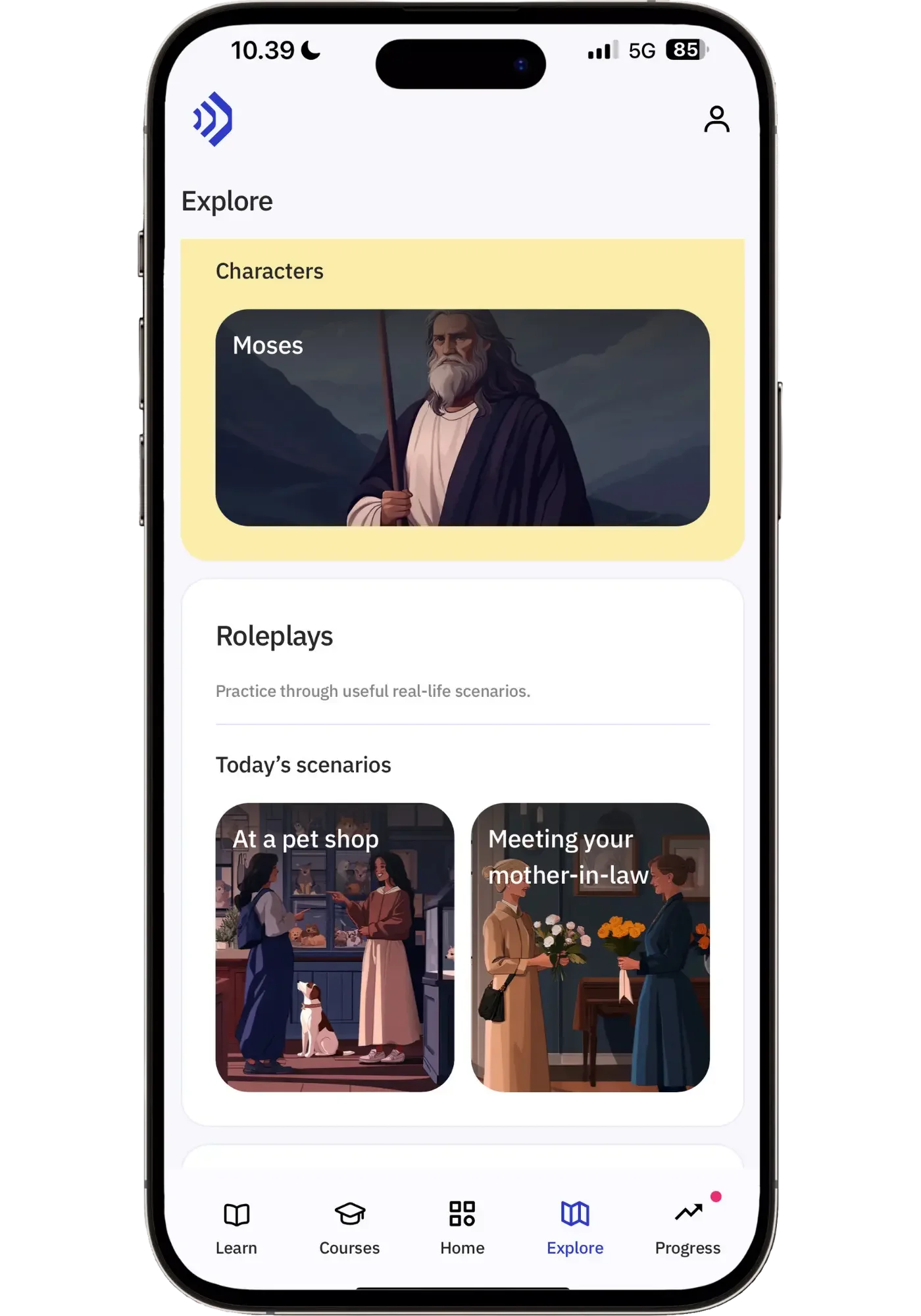
Higher levels also include structured courses, but with more advanced vocabulary. There are also daily streaks, achievements, and levels to gamify the experience.
What It Does Well
The Explore Page is probably my favorite thing about Talkpal. While I enjoy free chats, sometimes, after a few of them it can be tough to know what to talk about. The explore page solves that in a nice way — I found that fresh suggestions every day pushed me to have chats and scenarios talking about things I otherwise wouldn’t think of. I ended up shopping for a suit for a cocktail party, doing a roleplay with a university guidance counselor, and having a debate about homeschooling — things I wouldn’t necessarily come up with on my own.
The debates are a really fun way to stretch your speaking. They push you to express opinions about something you care about, or even just playfully argue a position you don't actually hold just for the sake of practice. I'll admit, it got my juices flowing a bit more in a way regular chats didn't. It helped me express myself more confidently — you naturally start sounding more like a passionate Hong Konger who throws in their 啦 (laa1) and 㗎啫 (gaa3 ze1) final particles that drive your point home with a sense of assertiveness, and make you sound like a local.
Call Mode was one of the modes I used the most. Even though it isn't all that different from regular Chat Mode in practice, it just feels more immersive — the ringtone at the start, the way the transcript stays hidden until you tap it, and the overall layout make it feel like an actual phone call. Small details like this matter more than you’d think for the actual experience.


I also appreciated how quickly Talkpal responds in chat — it made it easy to keep the flow going. And whenever a message is hard to understand, you can replay it once or twice, tap to see the Chinese characters and translation. The AI speaks pretty much at native Hong Kong speed, so being able to replay messages 2-3 times is helpful, since Cantonese is quite challenging to parse at full speed. So this doubles as solid listening practice as well.
Photo Mode is another standout that I actually haven’t seen in another AI app. You see a picture and try to describe what's in it, speaking for as long as you want (max 2 minutes). If you don't know a word, you can just ask the AI for it in English. Afterward, you get a score from 0-100. You can then retry, incorporating the new vocabulary you just learned. It's an excellent way to fill vocabulary gaps and actually start using it right away for your second run-through.

My first attempt — throwing in English words when I couldn’t remember them in Cantonese

My second attempt — incorporate some of the words I just learned from the AI feedback
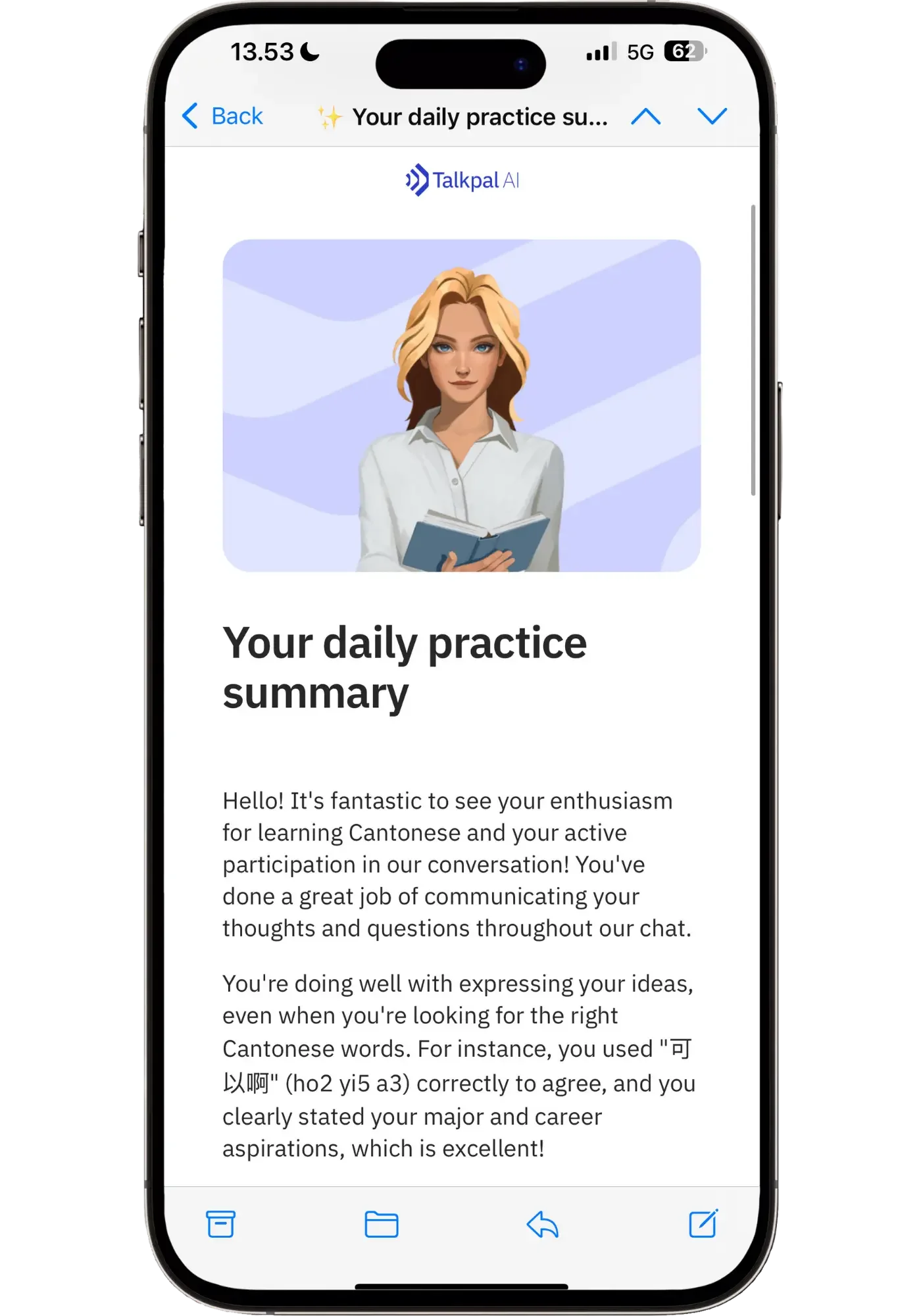
Daily emails are something I usually don't like, but Talkpal's are actually good. Each one gives you a bit of encouragement, some feedback on what you said and how you could have phrased it differently. It’s a nice refresher of what you talked about that day. They're optional and can be toggled off in settings if they're not your thing.
Affordable pricing. Talkpal is one of the most affordable AI speaking apps out there, with pricing ranging from $14.99/month to $89.99/year. You can also get an additional 25% off annual plans using code LINGTUITIVE (works on both 12-month and 24-month plans), which shaves off a good chunk of the price. The 14-day free trial is also longer than most AI apps, giving you a good amount of time to decide if it's a fit for you:
Honest Limitations
There are several things to like about Talkpal, but it falls short in several areas that apps like Langua and Speak do excellently (read my comparison of the two here).
❌ The structured courses are weak: Each unit teaches 5 words through a picture and a sample sentence, then has you match Cantonese words to English translations, then has you repeat sentences containing those words, and finally ends with a roleplay activity (which is the most useful part). The problem is that every unit, from beginner to advanced, follows the exact same format. There's no variation, no thoughtful progression, and it gets old fast. Compare that to Speak's beginner courses (I did a full walkthrough of Speak in Spanish and Japanese), which actually takes into account the difficulty of the language and build progressively in a way that makes sense. Then again, Speak doesn't have Cantonese — so Talkpal wins here by default.
❌ Transcription inaccuracies. Talkpal sometimes didn’t transcribe what I said accurately. It worked better when I spoke clearly and almost over-articulated, but it would still miss words at times. Other times, it got it right without me making a conscious effort so it’s quite uneven in this regard. Interestingly enough, the conversations themselves still flowed fine — the AI usually figured out what I meant even when the transcription was off.
Here's an example of feedback that wasn't actually correct. I clearly said 人工智能 (artificial intelligence), but the app transcribed it incorrectly and then 'corrected' me on something I actually said right. That’s why I recommend mostly ignoring the feedback and treating the app more as a speaking partner:

The transcription issues could partly be due to me not pronouncing accurately, but I don't think so — Hong Kongers have an easy time understanding me and often give me compliments on my pronunciation. And apps like Langua transcribe me very accurately even when I speak quickly and don't enunciate very carefully. It's possible that this is a Cantonese-specific issue, though, since other languages have far more AI training data behind them.
❌ Jyutping has occasional tone errors. Jyutping romanization is helpful for learners not yet comfortable reading Chinese characters, and it's mostly accurate. But I've spotted occasional tone errors — for example, 好奇心 (curiosity) was rendered as hou2 kei4 sam1 when the correct reading is hou3 kei4 sam1. These can be frustrating for beginners since wrong tones can be challenging to unlearn once they stick (though not impossible or anything). Advanced learners can spot and ignore these, but beginners should double-check tones with Pleco rather than fully trusting the jyutping here.
❌ Feedback is too strict. Even though I've been learning Cantonese for over 8 years and speak it quite well, I rarely got a ✅ on my message unless it was short and spoken slowly with extra clarity. Talkpal seems to flag things as mistakes unless your sentence is perfectly constructed — which isn't even how native speakers talk (mid-sentence rephrasing and word swaps are normal). So I'd suggest mostly ignoring the feedback button unless you're actually curious about a specific thing you said.
❌ Shallow follow-ups. When I'd talk about something, I'd often get a response like "That's great. What other movies do you like?" instead of going deeper into what I'd just said. You can tell the AI you'd like to talk more deeply about something and it will comply, but I wish this happened more naturally without having to do so. It does sometimes ask great follow-up questions — it's just uneven.
❌ No vocab saving or pop-up dictionary. This is a big one, and honestly my #1 complaint with the app. There's no way to save individual words or expressions. You can tap to see a translation of the whole message, but being able to save specific words for flashcard review (or just export them as a list) would be gold. Instead, I had to manually copy words into Pleco to see the definitions and pronunciation. It works, but it's not nearly as smooth as it could be. I did save vocab though through a workaround, which I’ll share in the How to Use It to See Actual Results in Your Cantonese section.
Who It's For
Intermediate-to-advanced learners wanting daily speaking practice without having to book lessons or finding a speaking partner. Talkpal lets you have a quick chat or call whenever you have a few minutes, and it's a great way to practice expressing yourself without anyone judging your speaking. It builds the daily speaking muscle that's otherwise hard to do.
Beginners who want speaking practice on the side. I wouldn’t recommend Talkpal as your only resource as a beginner, but it can be a useful supplement to whatever course or resource you’re currently using. That said, us Cantonese learners often have to work with what we've got — there are rarely enough resources at the right level. If I was starting Cantonese from scratch today, I'd use Talkpal alongside my main course. Even at an early stage, it'd be a great way to practice simple speaking and do some of the beginner activities. So if you’re a beginner, don't be afraid to dive in — it’s what we have to do when learning Cantonese anyways.
Learners who want to build vocabulary in specific topics. The AI is flexible and lets you talk about anything, so it's especially useful if you want to expand vocabulary in a specific area — work, hobbies, family, current events, anything.
Heritage speakers who feel rusty. If you understand Cantonese well but don't feel confident speaking, Talkpal is a great low-pressure way to get those speaking muscles going again.
For context: I'm currently mostly focused on developing my Cantonese listening comprehension, so I used Talkpal 5-15 minutes a day. That was enough to start seeing real improvement in my speaking flow and confidence, though continued use would develop it even more of course.
Who it's not for
The most obvious one: if you're strongly AI-averse, this isn't the tool for you. Beyond that, I wouldn't strongly recommend Talkpal as a beginner's primary tool. I think it’s best paired with other resources so that you can hear more natural Cantonese being spoken than what these AI voices offer.
If accurate and more natural feedback is what you're looking for, your best bet is booking lessons with a teacher on iTalki or LanguaTalk. I’ve generally found human-led lessons much more encouraging in this regard, and Talkpal's feedback eventually became more frustrating than helpful.
Check out my Best Cantonese Apps, Courses and Tools for Intermediates for more suggestions. Or if you’re a beginner, see How I Learned Cantonese From Scratch.
How to Use It to See Actual Results in Your Cantonese Speaking
Do it when your mind is the freshest: Some people are morning people, some people are night owls. I’m a morning person — that’s when my brain is the sharpest. So I found that doing my Cantonese Talkpal sessions earlier in the day was much more productive. For you, an evening session with a cup of tea on the couch might work better. Either way, speaking takes a lot of brain capacity, so do it when your energy is best.
Vary your conversations. It's easy to fall into a rut and talk about the same things over and over. While that's fine and actually helpful when you want to practice a certain topic, it's good to mix it up. Different topics and scenarios build a richer vocabulary and the confidence to use Cantonese in any conversation or situation you find yourself in. It also indirectly improves your comprehension over time by exposing you to unfamiliar vocabulary. The Explore page is great for getting this variety since it gives you fresh ideas daily.
Save new vocabulary and review it. AI speaking practice is a great way to expand your vocabulary, because you'll constantly try to say something, realize you don't know the word, and get the AI to tell you how to say it. That's high-value vocabulary since you’re likely to actually use it in your real-life conversations. I'd suggest copy-pasting those words to a Google Sheet (along with the full sentence you found them in) so you can either store them as a reference or import them into Anki for review (which is what I recommend). You can do this as you chat, though it breaks the flow since you have to leave Talkpal — or you can do it after the conversation by scrolling back through the messages and mining the vocabulary.
To make this easy to do, I created a Google Sheet template for all your new Cantonese vocabulary — you can use this template for words you encounter in Talkpal or elsewhere:
Get my free Cantonese Vocab Template
A simple Google Sheet to turn your Talkpal sessions into Anki flashcards. Includes 13 example entries from my real chats, full setup instructions (including what note type to download — and how to batch import them to Anki), and my sentence mining tips for Cantonese learners.
You'll also be added to my weekly email list where I share language learning tips, reviews, seasonal promos, blog updates, and personal stories from my language learning journey. Unsubscribe anytime.
Final Thoughts
For a long time, I was looking for an app that lets you learn Cantonese with AI. But there wasn’t one. So I’m very excited that there’s finally one to practice colloquial spoken Cantonese with.
Talkpal offers many ways to practice Cantonese with AI. Its varied chat modes and scenarios make it a bit of a jack-of-all-trades for AI practice. Its shortcomings are real compared to the very top AI apps, but it's still solidly in the top 5 of the AI apps I've tried (see my full AI apps comparison). So if you want to learn Cantonese with AI in a way that focuses on actual speaking, Talkpal is one I’d recommend you to try.
If I had a trip to Hong Kong coming up — or any opportunity where I'd be speaking a lot of Cantonese — I'd use Talkpal as my Cantonese AI tutor every day to get my speaking chops up. Even 10-15 minutes daily can give you fast progress in flow and confidence. But for accurate feedback and truly natural conversations, I'd pair it with sessions with an online Cantonese teacher or speaking partner. That said, there’s nothing that stops you from doing both. Combining AI practice with human practice is a time-efficient and economical way to take your Cantonese spoken fluency to the next level.
Talkpal offers a 14-day free trial on all plans, which should be enough time to decide if it's for you:
Use code LINGTUITIVE for 25% off annual plans
Works on 12-month and 24-month plans.
