Published
This post contains affiliate links. If you buy through one of them, I may earn a commission at no extra cost to you. See Full Affiliate Disclaimer.
Every week, I get emails about new language tools, especially AI language apps, and right now there are a lot of them. Many look great in the ads but don't look or work the same way in real life. Worse, a lot of them seem thrown together without any real thought or language-learning method behind them. They might look good, or even be fun to use, but they won't do much for your language skills.
A few stand out, though. Copycat Cafe asked me to take a look, and at first I didn't jump on it, because I already had my hands full with the other apps I was testing.
But something about it intrigued me, especially the copying approach it gets its name from. When I finally tried it, it was the first app in about six months that made me think, "Wow, there's really something here."
Now, four weeks later, I've used it every single day. It's pushed my upper-intermediate (B2) Spanish forward in exactly the ways my speaking needed: cleaner pronunciation, better speaking flow, and correct grammar that comes out on its own, without having to think about it.
It's become part of my morning routine, usually the first thing I do when I sit down in my office. I spend 15 to 25 minutes on it with my morning coffee. The calm, warm feel of the app fits that perfectly. It's something I look forward to every morning, and I often want to keep going longer than I have time for. Even better, it's pushing my Spanish forward in a way that's both effective and fun.
In the past four weeks, I've failed a lot of review cards, discovered things about Spanish pronunciation I'd never noticed, and started hearing new grammar patterns come out of my mouth on intuition, without even thinking.
This review starts with my story of using it, then gets into how it works, who it's for, pricing, and the things I don't like.
Disclosure: Copycat Cafe reached out to me and gave me access to test the app, and I earn a commission if you sign up through my link, at no extra cost to you. Everything here is my honest experience. I'm still using it daily, so I'll keep updating this review as I go.
In short
Copycat Cafe is a structured trainer for the two things that make the biggest difference in how fluent you sound: pronunciation, and grammar you can actually use when you speak.
- Best for: intermediate learners who've outgrown beginner apps and still freeze when speaking. It starts at A1, so beginners can use it too.
- How it works: watch a short dialogue, copy it out loud, use it in a chat, then review.
- Languages: French, Spanish (Latin America and Spain), Italian and German.
- Price: $174 a year, with a 7-day free trial. Code LING20 takes 20% off.
52% off Copycat Cafe
52% off your first year with my code LING20, then 40% off every year for as long as you stay
7-day free trial still applies · 30-day money-back guarantee
Table of Contents
- My first month with Copycat Cafe
- How Copycat Cafe works
- What it does best: pronunciation and grammar you can actually use
- The pronunciation score: a guide, not a grade
- Who it's for (and how it compares to other apps)
- How to get the most out of it
- Pros and cons
- Price: is Copycat Cafe worth it?
- My verdict
- FAQ
My first month with Copycat Cafe
I’ve now used Copycat every day for about a month in Spanish. What follows is my journey with some of the moments that stand out, with screenshots and short video clips from my own sessions.
Why I said yes to this one
Copycat Cafe first emailed me back a few months ago. I'd heard of them, and I was somewhat intrigued by it, but I didn't jump on it right away. I already had my hands full of all the apps I was using and testing, and wasn’t necessarily looking for another one.
But I was still curious about this copy-approach as it sounded different than the other apps out there. A lot of AI language apps pile on features without a clear idea of how people actually learn to speak. Copycat Cafe had one method, and it was right there in the name: you learn to speak by copying native speakers, the same way you learned your first language as a child. You get short explanations along the way so that each activity is clear, which is something I appreciate, but the core is listening closely and copying what you hear.
Copycat Cafe even has its own 7 rules, starting with "copying isn't cheating," and these 7 explain the method very well and line up closely with how I think about language learning. Nobody sounds natural by inventing their own sentences from scratch. You sound natural by copying how people actually say things. So about a month ago, I finally started.
Day 1: an app that knows what it's doing
My first impression was the design. It's probably some of the best I've seen in a language app: a chill, cozy, coffee-shop feel, minimal without feeling empty or bare, and a little cat called Copy who explains each activity and tells you what to do next. Definitely a good fit for me as far as aesthetics.
Calm and minimal, with Copy the cat keeping you company.
It took me a day or two to see how all the parts fit together, but Copy's short spoken tutorials are very clear. After that, I always knew what I was supposed to do next.
The second thing I noticed was the voices. They're some of the best AI voices I've heard in any app, on par with Langua's, and they have real regional character. Some of the lines in my Latin American Spanish course sounded exactly like my friend from Mexico, down to the way he pronounces and phrases things. When you're learning by copying, that matters a lot: you can only sound as good as the voice you're copying. Before Copycat Cafe, I'd been using Speak to work on my pronunciation, and it worked quite okay. But copying voices that sound truly native has taken my pronunciation deeper than before, so I found Copycat Cafe much more effective for improving it.
The pattern that clicked
On day 3, I did a lesson built around a structure I've always found tricky in Spanish: si tuviera... haría, as in "if I had more time, I would..."
The dialogue used that pattern again and again, but never in exactly the same way. Different verbs, different situations, slightly different wording each time. It wasn't the blunt repetition of drilling one sentence. It was the same principle from a lot of angles.
I listened to the dialogue three times. Then I had a short chat with Copy, who asked me about my own life, and I found myself saying things like "si tuviera más tiempo, aprendería otro idioma" (“if I had more time, I’d learn another language” — as if four wasn’t enough). The feedback was short and on point, not the kind of long, draining correction that I find too many AI apps have. Instead it’s things like “a tiny upgrade” with just one short piece of feedback to make it matter. A progress bar at the top showed how much of the conversation was left, so it felt like a mission with a clear finish line rather than an endless chat.
That lesson showed me what this app does differently. Fixing one sentence after you make a mistake doesn’t automatically help you master the pattern behind it. Using the same pattern across many different kinds of sentences does. Once you really own a structure, you can just swap in new words.
Learning to copy a native speaker
The copying step became the part I enjoyed most, and the part that taught me the most about my own pronunciation.
Early on, I got a score of 50 on the word te. I’m like: “four and a half years into Spanish and I can’t even say te correctly?!” And when I listened again, I could hear that the native speaker said it a little straighter, with more emphasis, while mine was soft and didn't really sound Spanish. I copied his version and the score jumped. Small thing, but I wouldn’t have noticed it on my own without the score and the recording.
Other times the score didn’t help. I got stuck in the 70s on jefe no matter what I tried, and the app didn't tell me why. This is why you should always trust your ears more than the number (more on the score below).
Copying closely also made me notice things I'd never paid attention to. To make conozco sound authentically Mexican, I needed to close my mouth a little more. Strong r sounds came out better with more airflow instead of forcing them. And in words like traído, I found that saying it almost like "taraído," but fast, made the r flow more easily. Later, apart from the app, I learned that native speakers really do this: linguists call it a svarabhakti vowel, a tiny vowel sound between the consonant and the tapped r. I found it on my own just by copying.
The biggest realization was that what breaks your flow usually isn't single sounds, it's combinations. No dejes que te was hard for me to say smoothly, so I repeated that phrase until it ran together. Good pronunciation is about weaving everything together, and this is a great tool for cleaning up exactly those spots.
I’ve always cared a lot about pronunciation, but I’ve honestly never aimed for a native accent in Spanish. Now, a bit to my own surprise, I'm actually working on it. Mostly because it just makes speaking more fun.
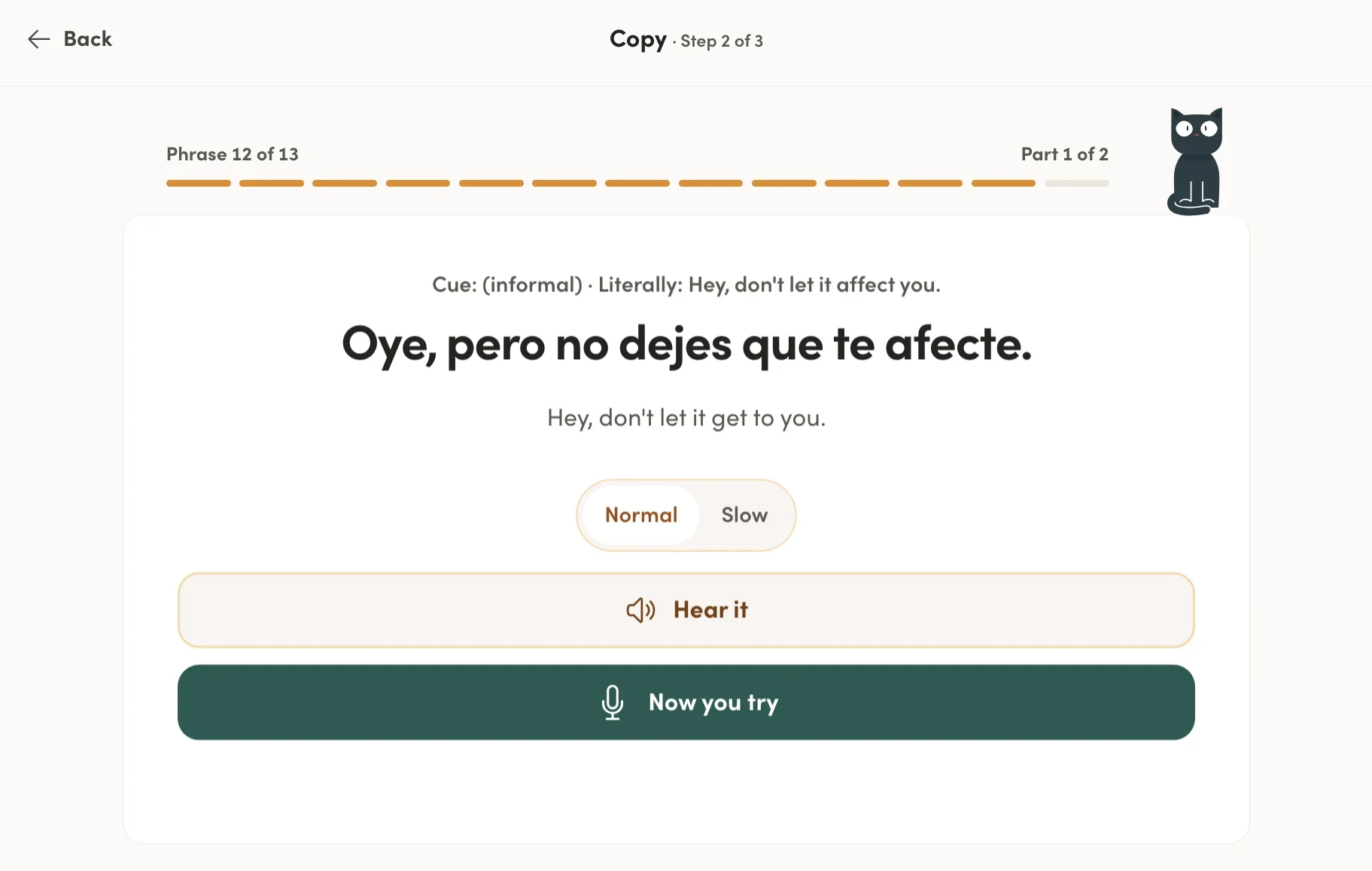
‘No dejes que te’ was hard to say smoothly, so I copied it until it ran together. Still need more practice on this one until it just flows effortlessly.
The day I failed 10 out of 11
Copycat Cafe saves the sentences you copy into a review queue, and on November 10 my reviews went badly. I got about 10 out of 11 cards wrong.
Most of my mistakes were with hubiera and habría. They go in different parts of the sentence: hubiera goes in the “if” part (si hubieras elegido, “if you had chosen”), and habría usually goes in the result (habría pasado, “would have happened”). The lessons had started flipping sentences around so the result came first (“do you ever think about what would have happened if you’d chosen a different career?”), and I kept mixing them up. On the card below, I even put habrías in the “if” part.
It could have been frustrating. But I knew this is exactly how it's supposed to work. Every card you miss comes back sooner. If you keep failing a sentence, it keeps showing up, giving you extra reps, until one day you say it right without thinking.
If you take one thing from this review, take this: you have to be willing to fail reps. A lot of them. Some days, you’ll even get most of them wrong. That’s not a sign it isn’t working. It’s part of the process.
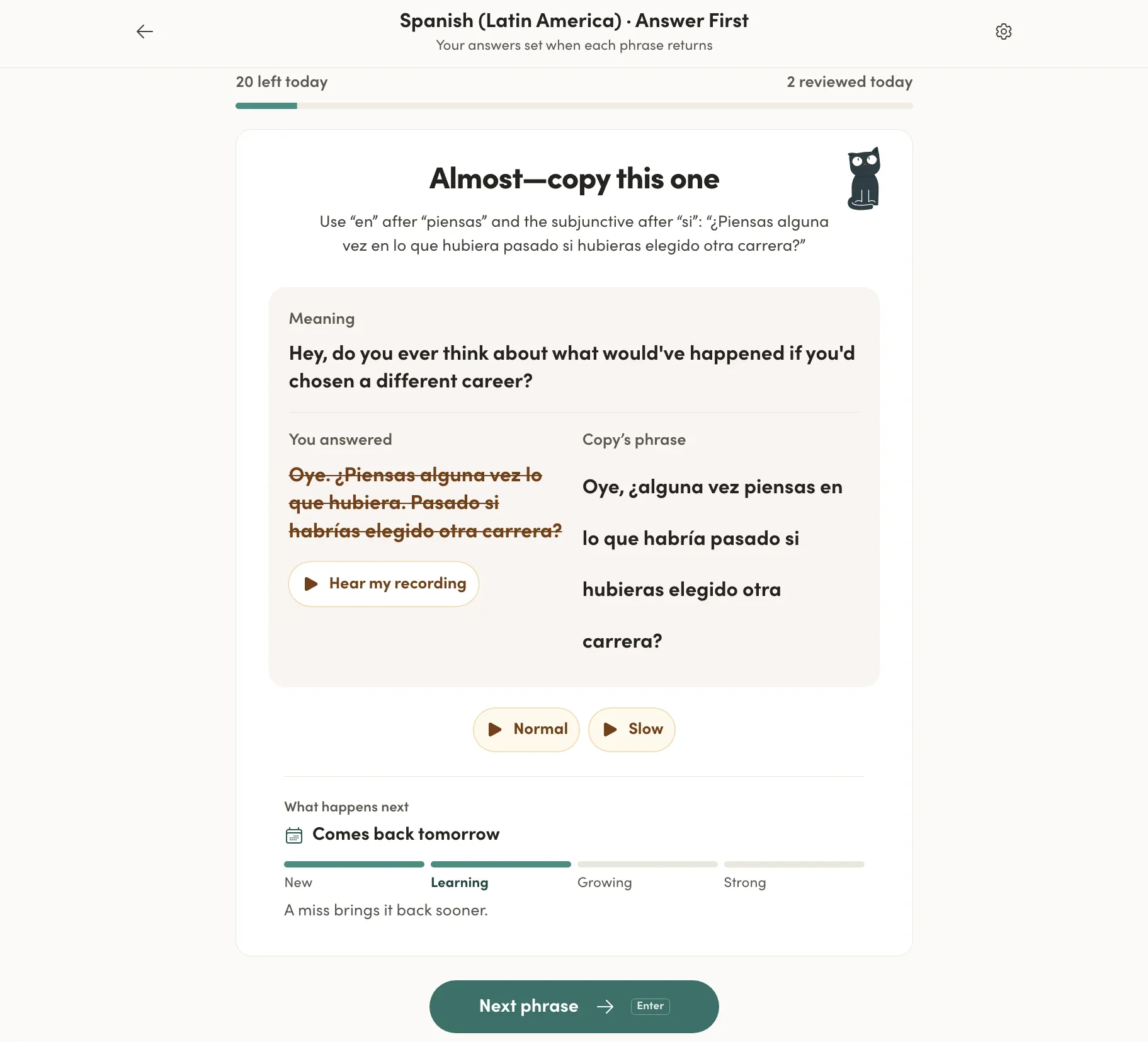
Day 22: I mistakenly swapped ‘hubiera’ and ‘habría’ (and forgot the en after piensas).
The next morning
The next day, the result-first sentence I'd failed came out right: ¿alguna vez piensas en lo que habría pasado si hubieras elegido otra carrera? So did the one about earning twice as much but never meeting my wife, using habría in both halves this time instead of forcing in a hubiera. A day later, distinta (not distinto) came out right too.
Three cards, three overnight turnarounds. After failing them and seeing the same structures over and over in different contexts, they were starting to come out naturally. It really did feel like the app was programming my speech.
Day 22: “Almost.” Day 23: “That works.” Same card, the next morning.
When it started showing up in conversation
The real test isn't the app, though. It's whether any of this shows up when you're actually talking.
About two weeks in, I tried Copycat Cafe's Call mode for the first time and had an 11-minute voice conversation. I noticed some of the patterns I'd been copying starting to come out on their own. I felt more confident, and my grammar felt a little cleaner.
I want to be honest about what that means, though. Pronunciation and using correct grammar structures take a long time, and four weeks of any app won't change how you speak overnight. What I notice is a slow, steady shift: structures I used to have to think about are starting to come out by themselves, and speaking feels a bit easier than it did a month ago, even outside the app.
I'll keep using it and update this review with how things look after a few months. But so far, it's been one of the most enjoyable and effective things I've added to my Spanish routine in quite some time.
How Copycat Cafe works
Every lesson is built around one short, natural dialogue between two people, and each dialogue focuses on a pattern or structure, like talking about hypotheticals or telling a story that happened in the past. You work through it in three steps: Watch, Copy and Chat. Then a review system keeps bringing the sentences back so they stick.
There are 200 lessons per language, from A1 (complete beginner) to B2 (upper intermediate). The dialogues are often genuinely funny. One B2 lesson, "The Conspiracy Theorist," had me laughing while I was copying it, which makes a big difference when you're listening to the same lines several times.
The team writes the dialogues like little sitcom scenes. They’d still teach you something if they were dull, but because they’re entertaining, they’re much more fun to hear again and again, and that makes all the repetition feel easy.
Copycat Cafe is a web app, not an App Store download. It works in your browser on a laptop or phone, and you can add it to your phone's home screen so it opens like an app. (Here's how to do that in under a minute.)
Step 1: Watch
You start each lesson by listening. I usually play the whole dialogue first to get the story, then go through it line by line. You can also see which grammar point the lesson focuses on.
For each line, you hear it and rebuild it by tapping the words in the right order. Honestly, it's my least favorite exercise in the app. I'm not a fan of puzzle-style tasks. But this one I’m fine with because I understand why it's there: it forces you to notice word order purely by listening, and when you get a word in the wrong place, you have to listen again until you hear it. In many languages, including Spanish, word order is a big part of sounding natural.
Listen, then rebuild each line by tapping the words in order.
When you finish, you get a short grammar note that points out what’s worth noticing in the dialogue. For example, in a lesson where two friends imagine how life would have been if they’d never moved to Mexico, it explains how si no hubiera venido, probablemente seguiría... (“if I hadn’t come, I’d probably still be...”) uses an imagined past to picture a different present.
I love that these are just short and to the point. Just enough explanation to know what to pay attention to, then back to the language.
Note: this one is quite advanced, since it’s from B2, the highest level. Beginner lessons have much simpler patterns.
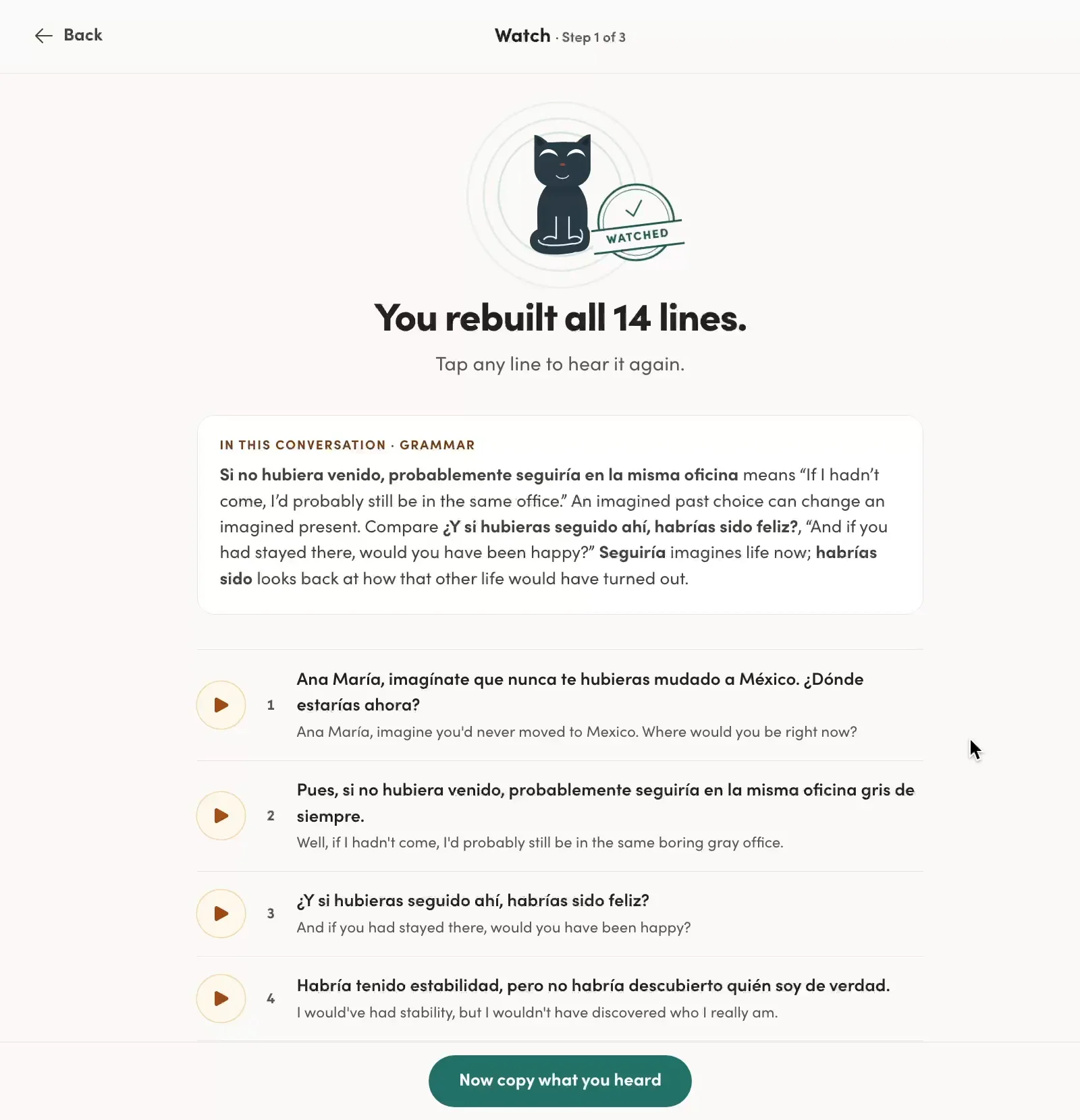
After Watch, a short grammar note shows what to notice in the dialogue.
Step 2: Copy
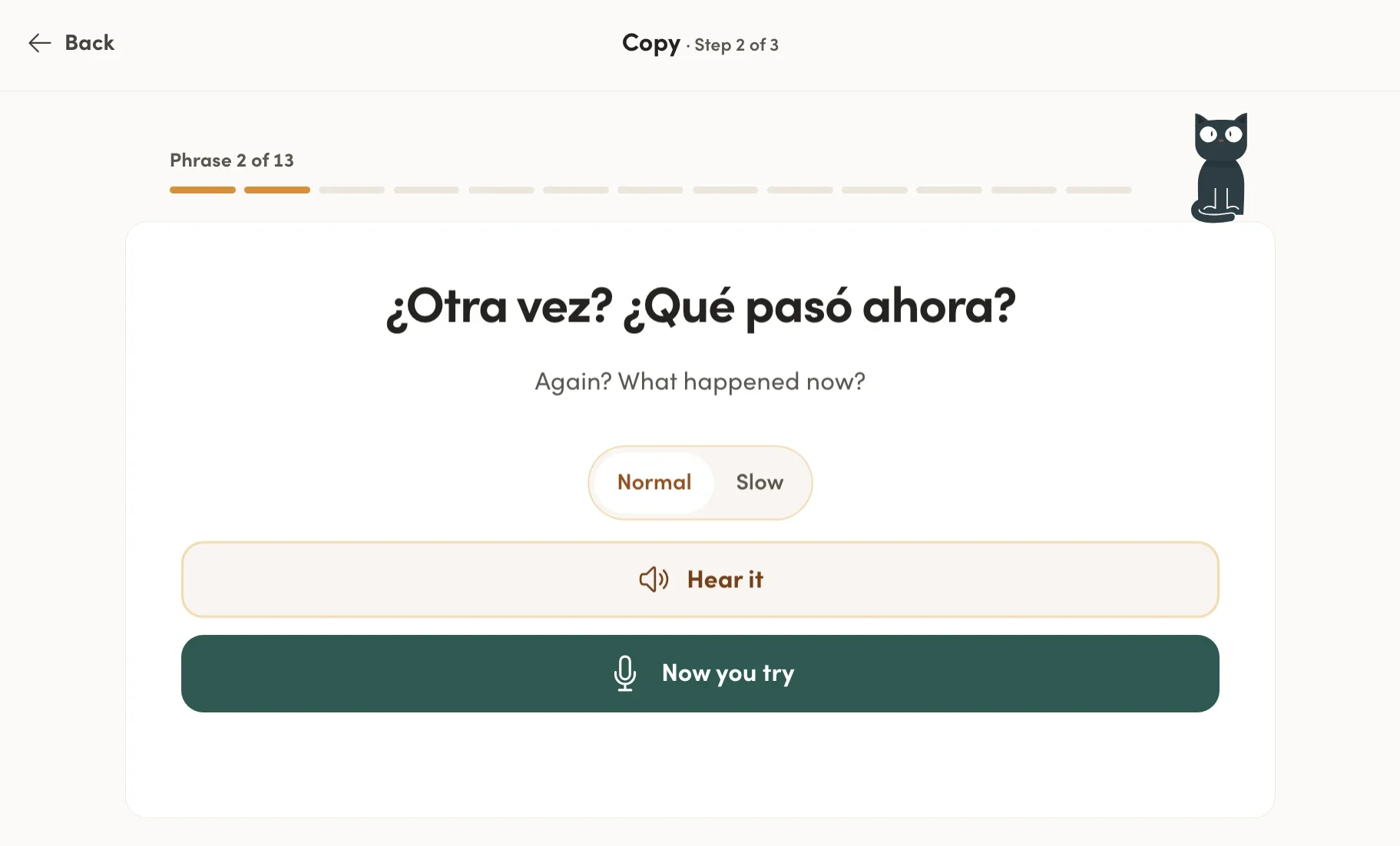
This is the heart of the app. You hear a line, at normal speed or slowed down, and say it out loud, copying the speaker as closely as you can.
What’s great is that the slow version is a real, naturally slow recording, not the normal audio stretched out. Many apps just slow down the original clip, which works but sounds unnatural. Here the slow version still sounds like a person, so you can still copy it. I use it for sentences that I struggle to say at full speed, or if I want to hear a little clearer what certain sound combinations sound like.
After you record, you get a score for each word and an overall score. You can replay the native audio and your own recording to compare. Sometimes you also get a specific tip, like "an extra /w/ sound was detected between 'pasó' and 'ahora.'" Comparing full sentences by ear was the most valuable feedback for me.
Hear it, copy it, see your scores, then compare your version with the native one.
If one word scores low, you can tap it. Copy plays your take, tells you which sound wasn’t clear, and gives you another word with the same sound to practice. When revisáramos scored 91, it suggested caro to practice the same sound.
Tap a low-scoring word, and Copy gives you another word with the same sound to practice.
Step 3: Chat
Next, you have a short roleplay chat with Copy, where the goal is to use the lesson's pattern in your own words. It's not a script. You talk about your own life, or play a role in the scenario, and try to use the structures you've just copied.
A few things make this work better than most AI chats:
A clear finish line. A progress bar shows how far through the conversation you are, so you're completing a short mission, not chatting endlessly.
Stick to the script, or go in a different direction. You can recreate the conversation you just heard, take it in a new direction, or make it completely your own by talking about your own life.
Help when you freeze. Tap the lightbulb and you get several suggested replies, depending on where you want the conversation to go. You can borrow the idea and say it your own way, or copy a phrase directly.
Stuck? Tap the lightbulb, pick a direction, and say it your own way.
Light, smart corrections. It fixes what's worth fixing, often with a tiny note like "remember it's feminine here," gives you an option that makes it sound a bit more natural, or simply tells you "well said." It doesn't bury you in corrections.
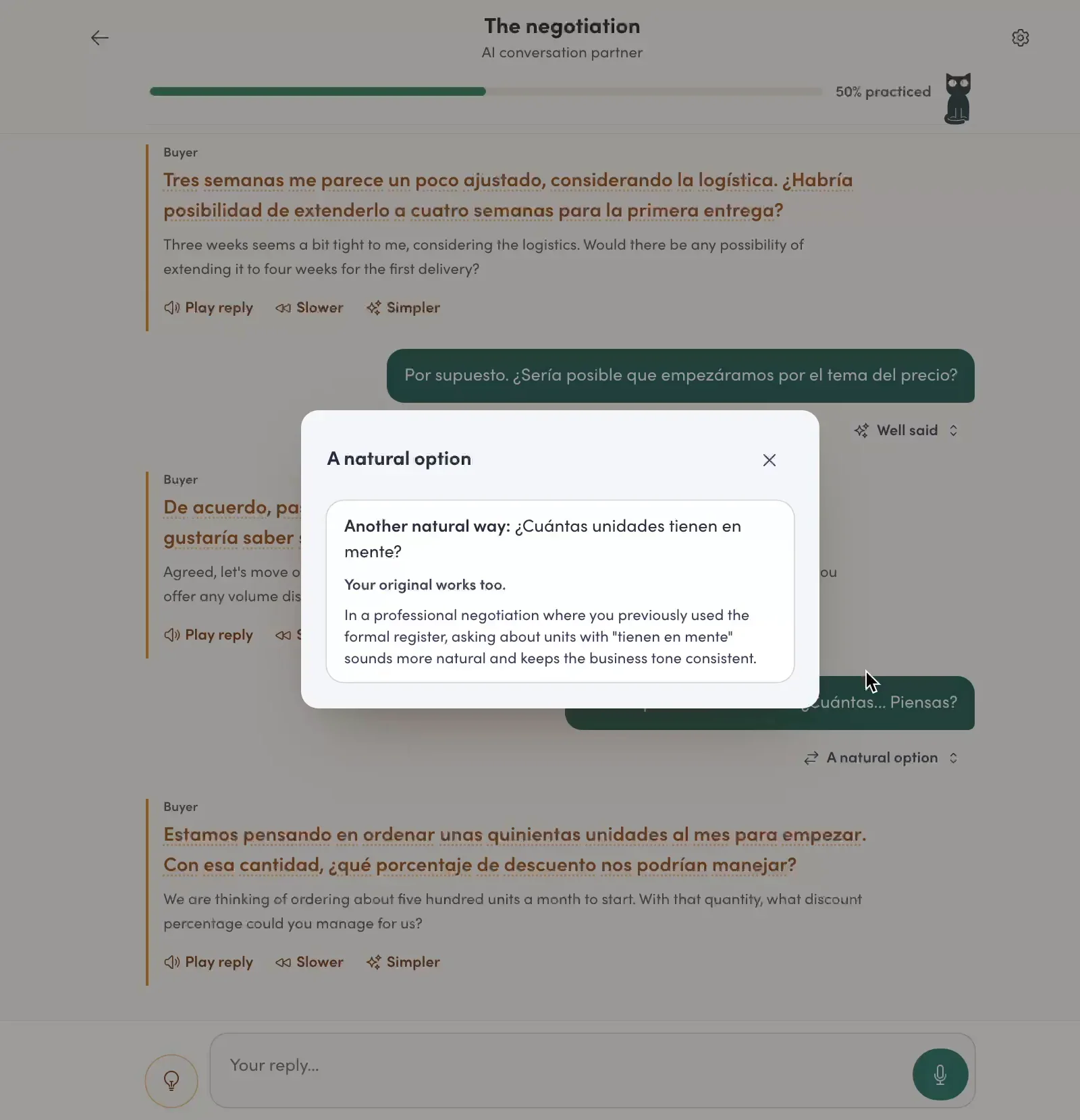
My reply worked, and it showed me a more natural way to say it.
Review: where it all sticks
Every sentence you copy goes into your review queue. In the mode I use (and the one Copycat recommends), you see the sentence in English and say it in Spanish (or whichever language you’re learning). When the Spanish structure works differently from English, there's a small hint of what the sentence says literally, which is often just enough to make you realize, "Oh right, Spanish says it this way."
Then one of two things happens:
"That works." You said it right, or said it differently but still correctly. If your version differs, it explains the nuance. Once I said sin ni siquiera pensar instead of sin pensarlo, and it accepted it and explained that ni siquiera makes "even" explicit. It's a nice way to pick up the finer nuances of the language, based on things you said yourself.
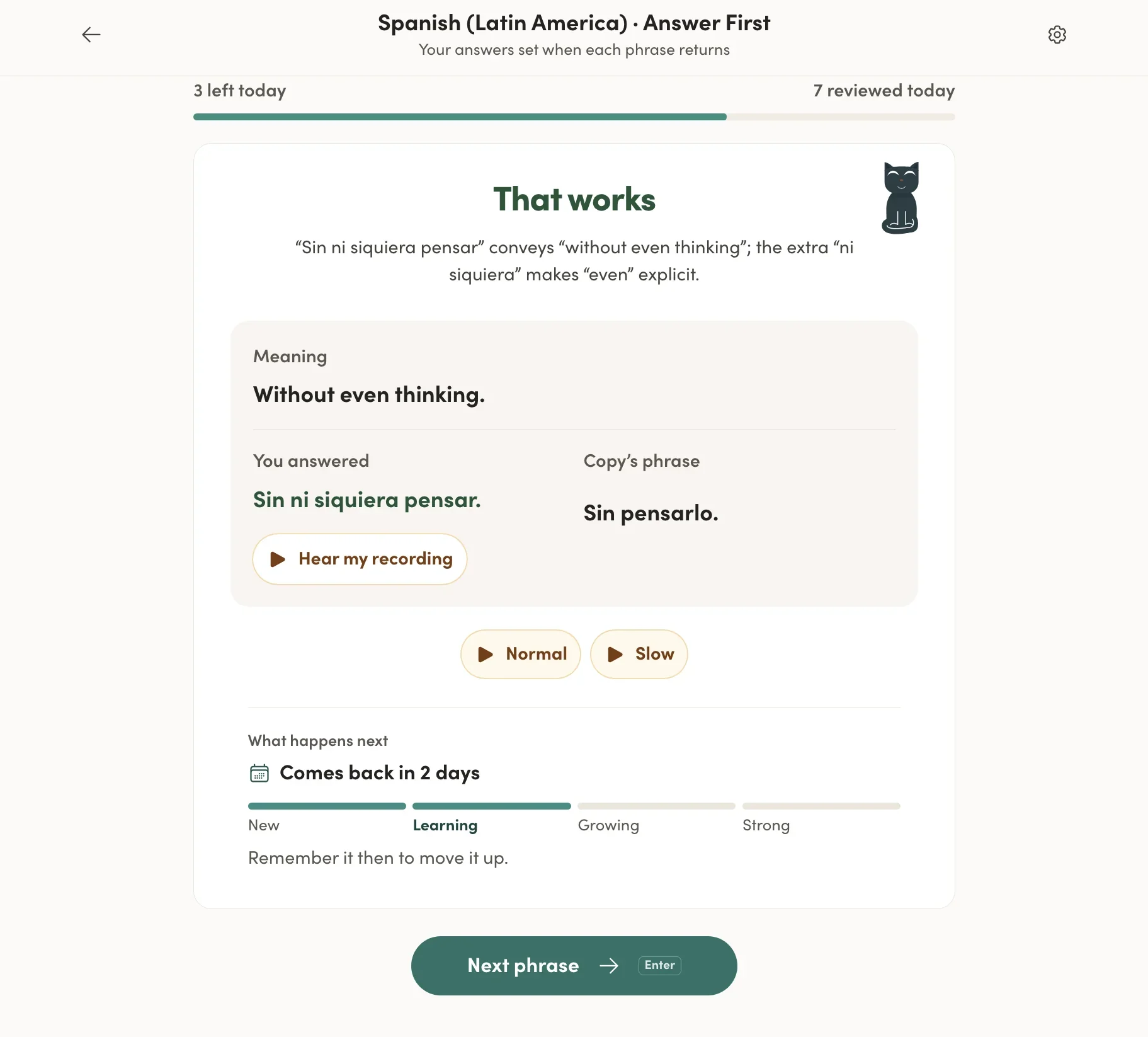
My answer was different from Copy’s, but correct, and it explained the nuance.
"Almost, copy this one." It shows what you said crossed out, explains what went wrong in one or two plain sentences, and has you copy the correct version.
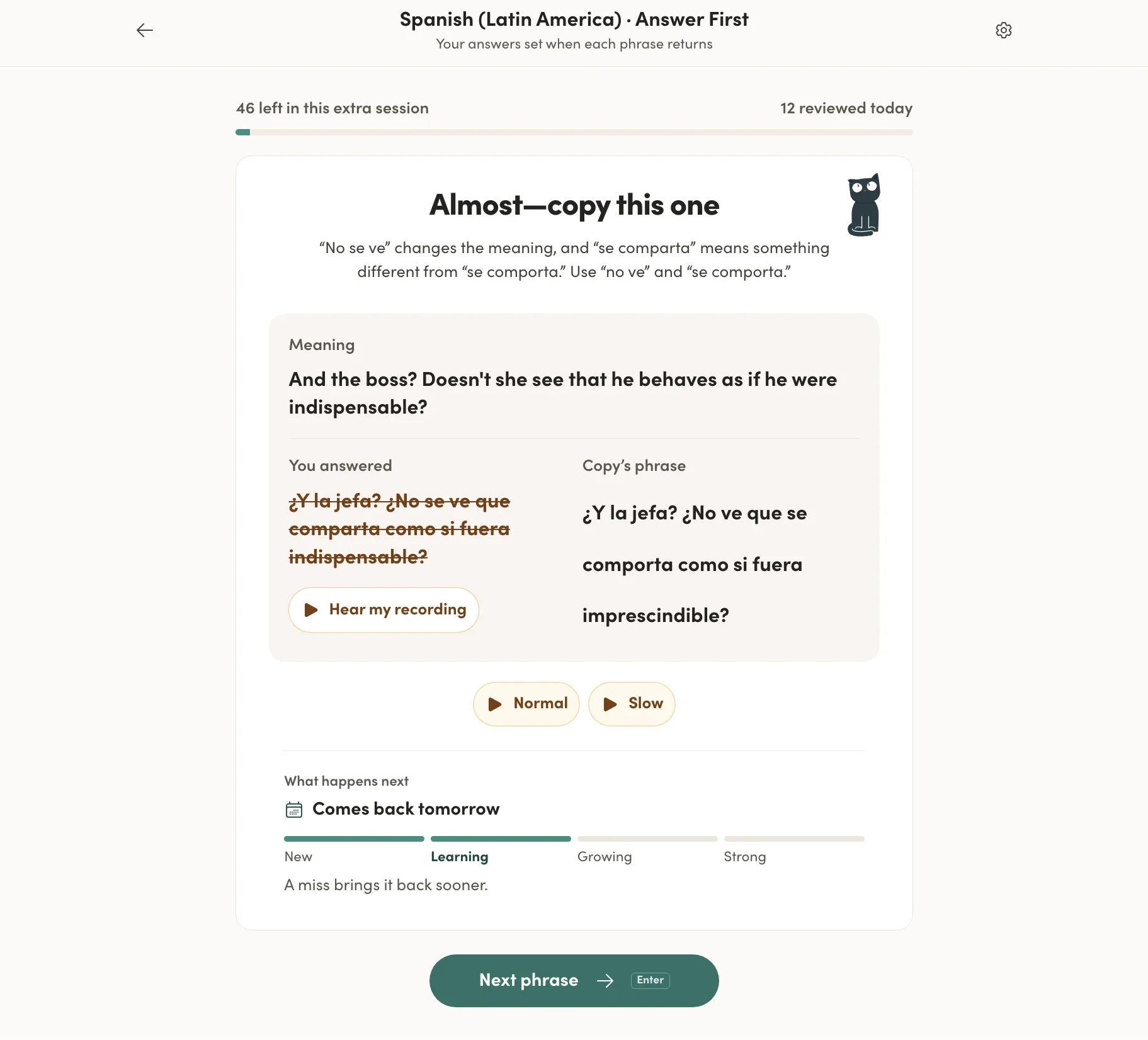
A clear, short explanation, and the card comes back tomorrow when I get another crack at it.
At the bottom of every card, you can see when it will come back and how far it is from "New" to "Strong." A mistake brings it back sooner. I love that you can see this. It makes the system feel purposeful, and it's exactly why the sentences I struggled with started coming out right.
You get a daily set (10 cards a day is an easy minimum to keep up, even on busy days), and you can do extra sessions if you want more.
One thing to know: the queue grows. Every lesson adds new phrases, and every card you miss comes back the next day. If you keep starting new lessons and only do 10 reviews a day, the backlog piles up. After four weeks, I had more than 150 phrases due.
That's not a problem in itself. You can keep doing your daily set and you'll get to them eventually. But a card that was supposed to come back tomorrow works best if you actually see it tomorrow, not a week later. So I'm now taking a few days to do only reviews before I start the next lesson. The reviews are where the phrases really stick, so it's time well spent. And when you start rattling off correct sentences one after another, it’s a very satisfying feeling.
Some words in Copy’s version are dotted. Tap one and you get its meaning, a short note, and where else it shows up in your lessons. When I tapped chilaquiles, I got a little culture note about the Mexican breakfast dish. I like that.
The only thing I wish I could do is tap Copy the cat mid-review to ask a question about the sentence I’m working on, like Speak’s AI tutor lets you do mid-drill. You can ask grammar questions in Free Chat, but not right there on the card.
Tap a dotted word for its meaning, a culture note and where else it shows up.
Audio Practice (hands-free)
There's also Audio Practice, an extra mode that doesn't affect your review schedule, but helps you review the phrases when you can’t sit down to practice them.
You hear the English, try to say it in Spanish, then hear the Spanish and copy it out loud. Or you just listen. It works hands-free, so you can do it while washing dishes, walking, or driving.
If you've used Glossika, the idea will feel familiar. The difference is that here, it's one part of a bigger system, with lessons, copying, and chat. With Glossika, it’s basically the whole thing.
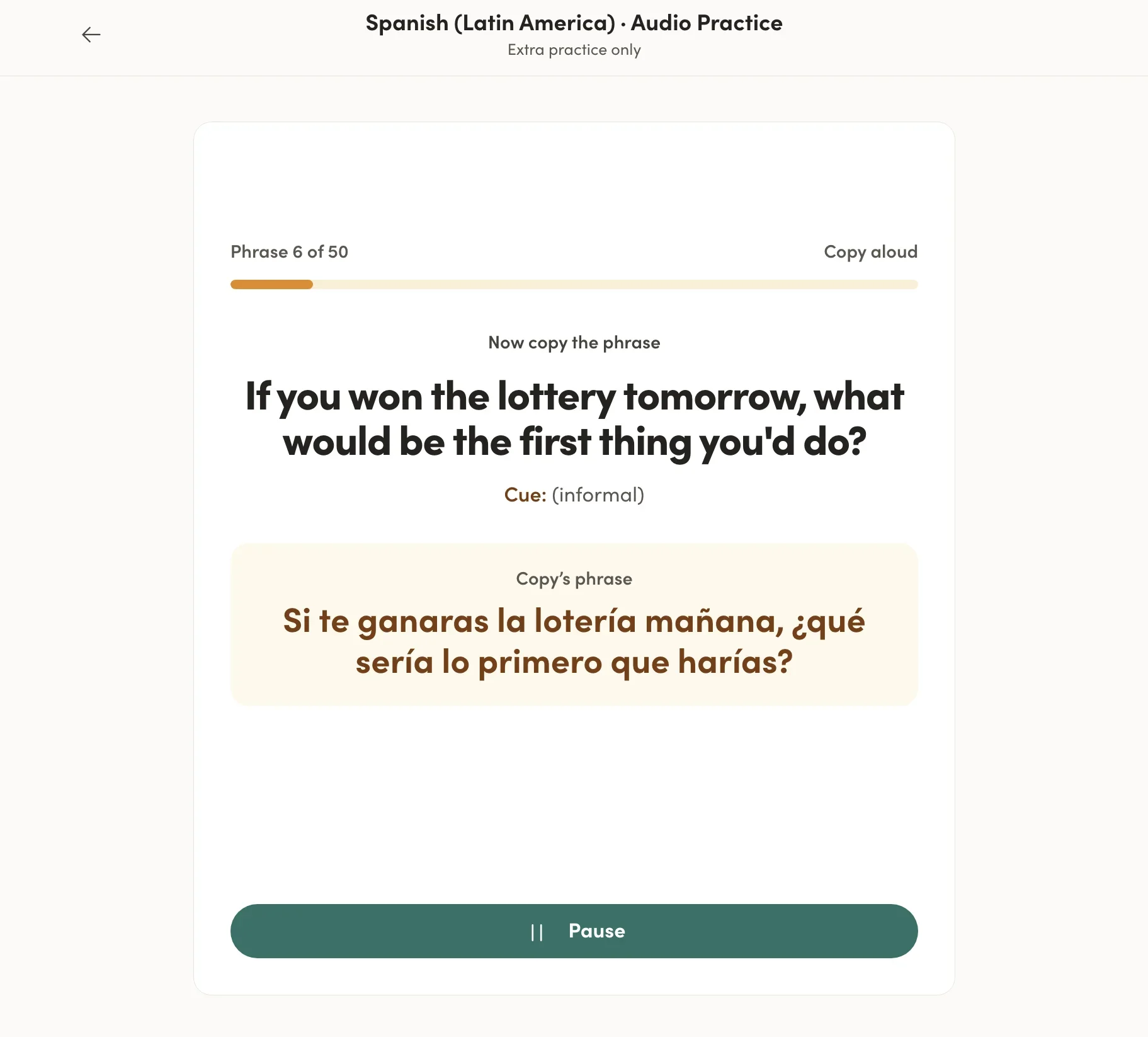
Hear the English, say it in Spanish, then hear the answer. Or just listen. No hands needed.
Free chat and Call mode
Outside the lessons, you can chat with Copy by text (up to 1,000 messages a day) or talk out loud in Call mode (up to 30 minutes a day).
At first, I saw this as a nice bonus: a general AI chat next to the real training. Then, while taking screenshots for this review, I found out it’s a lot more than that.
When you open Free Chat, you choose how you want to practice. You can just talk, talk about your day, role-play a situation like a phone call or a job interview, or get help with a grammar point. But the part that got me excited is “From your learning.” You can pick any lesson, or a handful of the phrases in your review queue, and Copy builds the conversation around them.
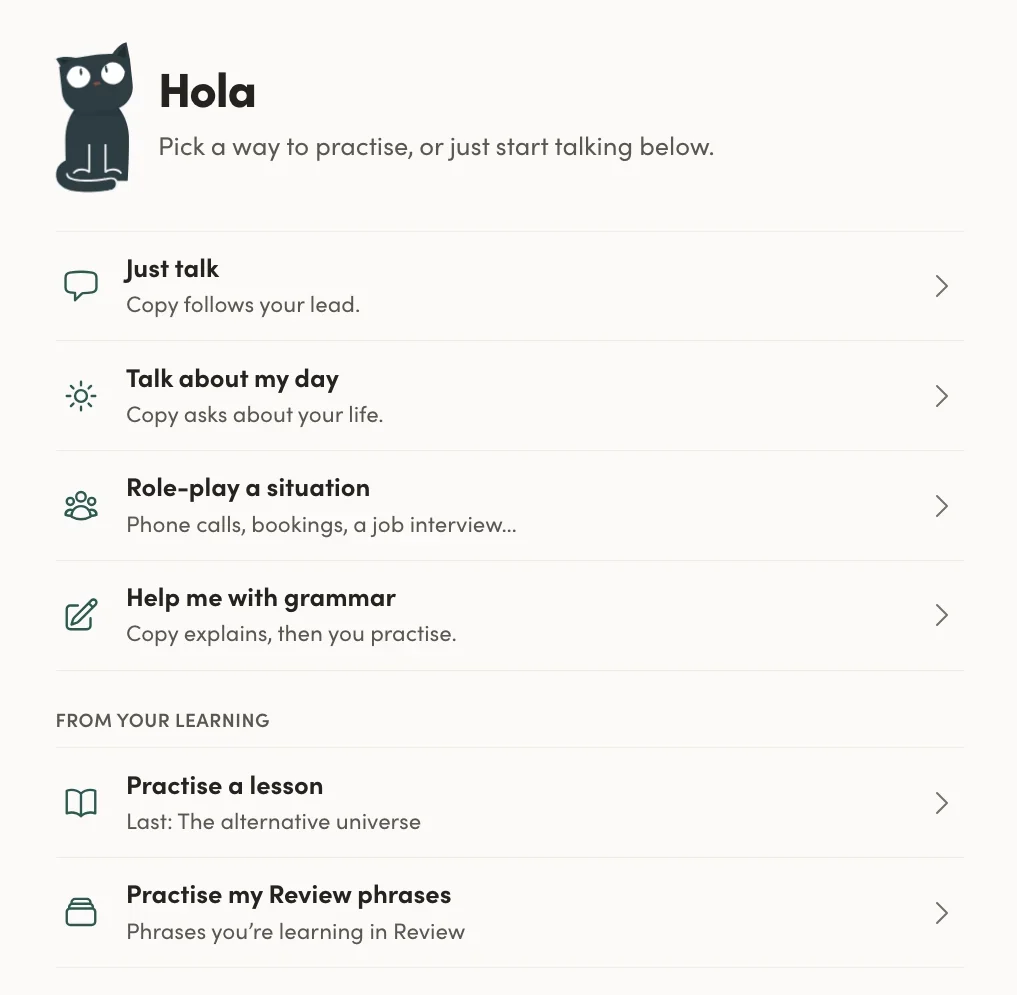
Free Chat lets you build a conversation around any lesson or your review phrases.
I picked my latest lesson, “The alternative universe,” about how life would be different if you’d made other choices. In Call mode, we ended up talking about what would have happened if I’d never started playing the drums, how drumming has influenced my guitar playing, and what I’d be doing if I hadn’t played so much music. Copy figured I’d probably have started learning languages earlier and asked which one. Suddenly I was using the exact hubiera and habría structures from the lesson, about my own life.
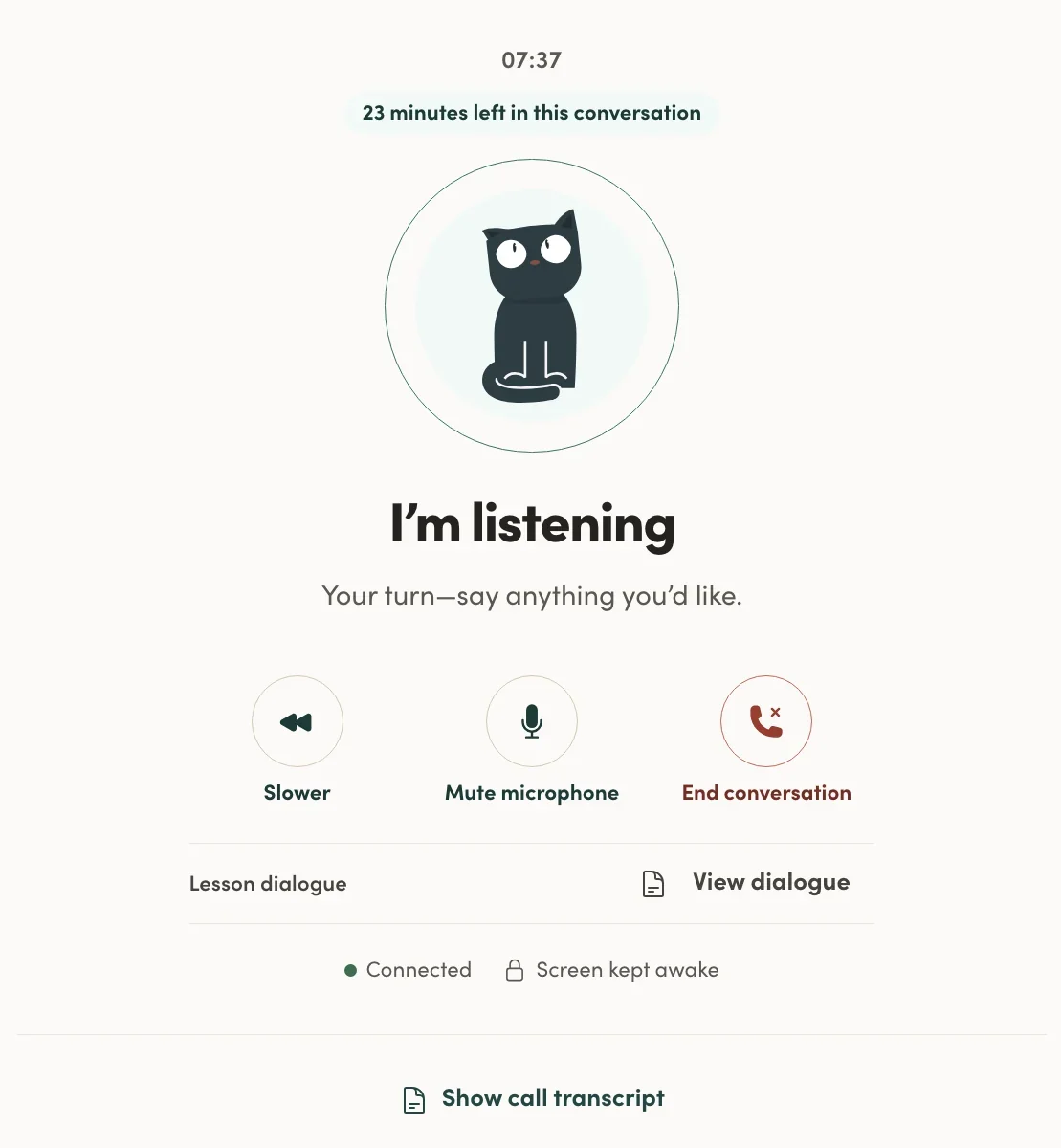
Call mode: a real-time voice conversation with Copy, with the transcript hidden by default.
That’s what makes it so useful. It’s not a script, but it’s not a completely open chat either. You practice the patterns from your lessons in a real conversation and turn them into sentences you’ll actually say. You do have to steer Copy a little. For example, I had to ask it to correct me, but when I did, it gave me a cleaner version of what I’d just said.
Call mode itself surprised me too. The voice is natural, the replies come super fast, and there’s no transcript on screen by default, so you actually have to listen and ask for clarification like in a real conversation. You can turn the transcript on if you need it, and save it afterward. If you prefer typing, the same options work in text chat, with corrections as you go.
To be honest, I’ve only used these guided chats a few times so far, so I’ll spend more time with them over the coming weeks and update this section. But from what I’ve seen, they connect your lessons to real conversation in a way that makes the patterns your own.
One wish: I’d love to save the sentences I come up with in these chats and add them to my review queue, like I do with my own mistakes in Langua. Not a must, just something I kept thinking about.
For long, open-ended conversation, Langua is still my favorite. But for practicing what you’re learning in the lessons, these guided chats are a great fit.
What it does best: pronunciation and grammar you can actually use
To sound fluent, you need a few things. Pronunciation is a big one, because when your pronunciation is clean, speaking gets easier, and you naturally speak faster and with more confidence. The other is being able to produce correct, natural sentences on the spot: the right word order, the right tenses, the way a native would phrase it.
That's what Copycat Cafe trains. A few things stood out to me:
It expands your range of expression. In conversation, most of us say the same things in the same way, over and over. Copycat Cafe adds new tools to your toolbox. You come out of each lesson with new ways to express an idea, and over time you’ll sound more sophisticated, more correct and more natural.
It's pattern-based, not phrase-based. In Speak's AI chats, for example, you're usually given tasks like asking a specific question, which is great for beginners but leads toward set phrases. Copycat Cafe gives you a type of idea to express (like a hypothetical) and lets you say it however you want. That prepares you much better for real, free conversation, especially at intermediate and advanced levels.
It calibrates when a certain pattern applies. This one surprised me. After drilling si hubiera... habría, I started forcing it onto everything. Then a review card about two possible outcomes ("I would have earned twice as much, but I wouldn't have met my wife") showed me that both halves needed habría. It's not just drilling a pattern. It's teaching you where it fits and where it doesn't.
Day 22: I forced in a hubiera. Day 23: habría in both halves.
It fixes flow, not just sounds. The things that make you stumble are usually combinations of sounds, not single sounds. Copying a phrase until it runs smoothly clears up exactly those spots that break up the flow.
Nobody wants to practice grammar. Everybody wants to speak naturally. Copycat Cafe is the rare app that gets you the second by sneaking in the first.
The pronunciation score: a guide, not a grade
Every word you copy gets a score from 0 to 100, and I went from skeptical to finding it useful, with some caveats.
Where it helps:
It flags sounds you can't hear yourself. My soft te scored 50; once I copied the native version properly, it jumped.
Sometimes it gives a precise tip, like the extra /w/ sound between two words.
It rewards a clean take. When I listen closely and really copy the speaker, I can get 100 on every word in a sentence. Especially if it’s one that’s not too long.
When I listened again to a sentence and copied more closely, I usually got a higher score, and it actually sounded better when I played it back too. So it does track real improvement.
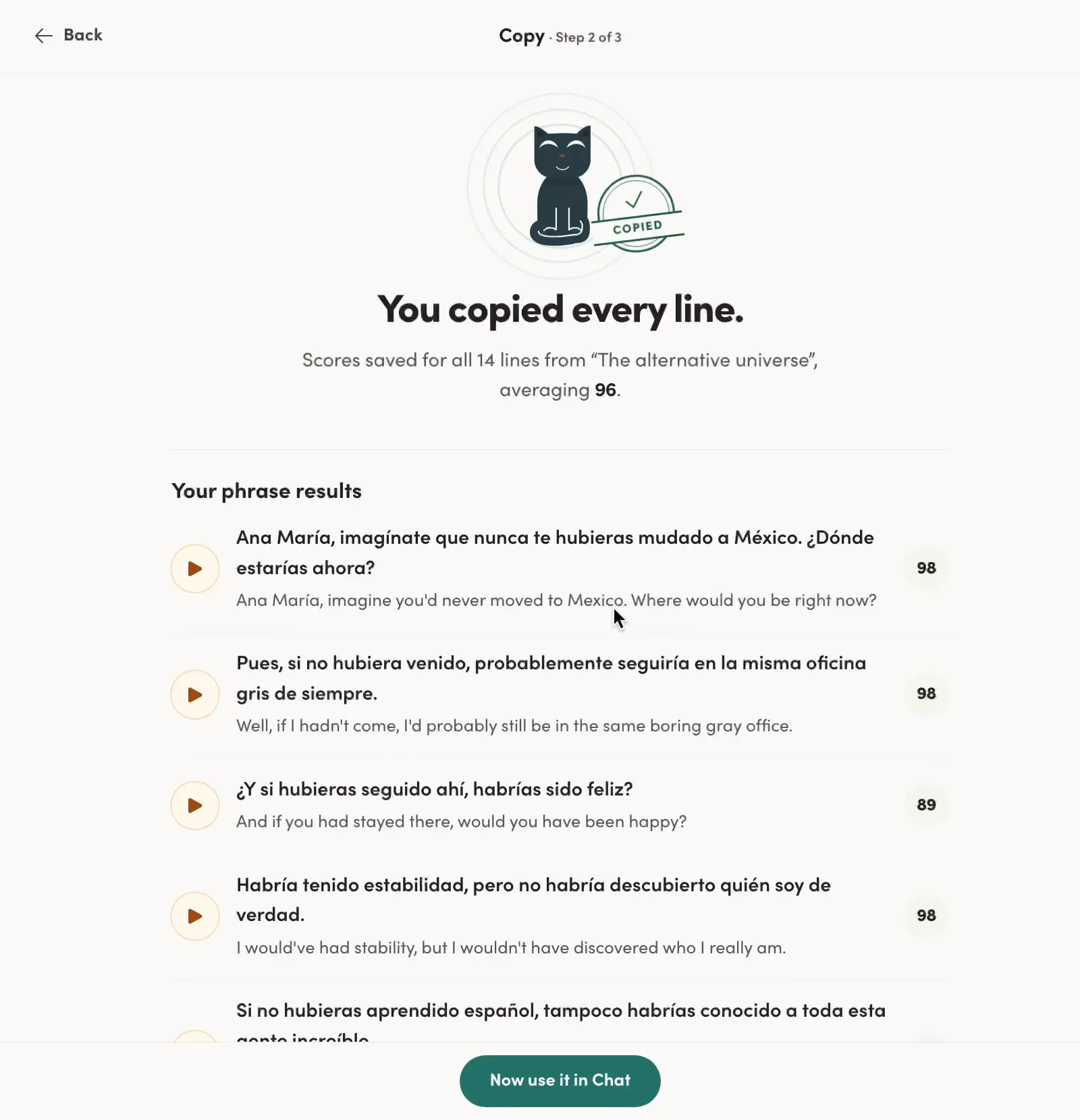
After four weeks of copying closely: all 14 lines of a B2 lesson, averaging 96.
Where it falls short:
It can't always tell you why a word scores low. I never figured out why it thought my jefe pronunciation was off.
It can be generous at the top. I've had 100s on words where I could still hear I wasn't quite matching the native speaker.
I couldn't hear the extra /w/ it flagged, so even the specific tips aren't always convincing.
In review, the transcription sometimes “fixes” what you said into the correct version (I said afecta, it heard afecte), so you can get marked right when you weren’t. It still worked for me, since I knew I’d made the mistake and could just copy the correct version. But if you don’t catch it yourself, it can slip through, so I’d prefer it to transcribe with less steering to the correct version.
My take: the score isn't proof on its own, but it has real value. High scores plus the improvement you can feel are more convincing than either one alone. The most important feedback is the replay button. Listen to your full sentence, then the native one, and trust your ears over the number. You can't outsource pronunciation to anyone else, let alone an app. It comes from awareness, and Copycat Cafe trains that awareness better than almost anything I've used.
Who it's for (and how it compares to other apps)
Copycat Cafe is especially good for intermediate learners who can get by in conversation but want to sound more correct, more natural and more confident. Structured speaking practice at the upper-intermediate level is surprisingly hard to find, and this fills that gap exceptionally well.
It's also a great fit if you:
Want a clear daily routine, without having to plan anything.
Care about pronunciation and want to sound less foreign.
Get overwhelmed by AI tutors that correct everything at once.
Learn French, Spanish (Latin American or Spain), Italian or German. Those are the only courses at the moment.
How it fits with other apps I use and recommend:
Speak is still the easiest way to start speaking as a beginner (see my Speak review for more). Copycat Cafe is where I'd go once Speak's set phrases start to feel limiting.
Langua is still my top pick for free conversation and the most complete all-round tool. Copycat Cafe doesn't replace it; it adds structured pattern and pronunciation training next to it. They also give you sentences in different ways. In Langua, I use a prompt that turns my own mistakes into sentences to practice by reviewing (it's in my Langua review), so I learn things I actually tried to say. Copycat Cafe serves you sentences you wouldn't have come up with yourself, which stretches how you express yourself, and you don't need to have a conversation first. I like both.
Glossika uses a similar idea of listening and repeating, but Copycat Cafe wraps it in lesson steps and chats rather than just reps, and the Audio Practice option is a lot like Glossika’s main mode. Glossika covers far more languages, though.
It's probably not for you if you mainly want open-ended conversation practice, need a language it doesn't offer, or want a native mobile app (it's a web app for now).
Copycat Cafe is now part of my daily language stack, the 9 apps I use most. Want to see the rest and how I use them? Grab the free guide:
Is it good for beginners?
I've mostly used Copycat Cafe as a B2 learner. I've also done a few sessions of French from zero, and so far it seems to work well, but I want to use it more before I give you the full picture. I'll update this section with how it works for a true beginner.
The lessons start at A1, and the lower levels look beginner-friendly. The first A2 lesson I tried, "From I worked to did you?", explains past-tense endings in a few clear sentences (trabajé, "I worked," vs. trabajó, "he worked") before you copy the dialogue.
For now, I think it can work well for beginners, though it really shines once you have some basics and want to clean up how you speak. Apps like Speak, with more game-like features, ask a bit less of you, which can make them easier to start with.
But starting with Copycat Cafe has real advantages. You build good pronunciation habits from day one, instead of fixing them later. And you get one method you can follow all the way to B2, instead of an app you’ll outgrow. If I’d started Spanish this way, I think my pronunciation would have been cleaner much earlier.
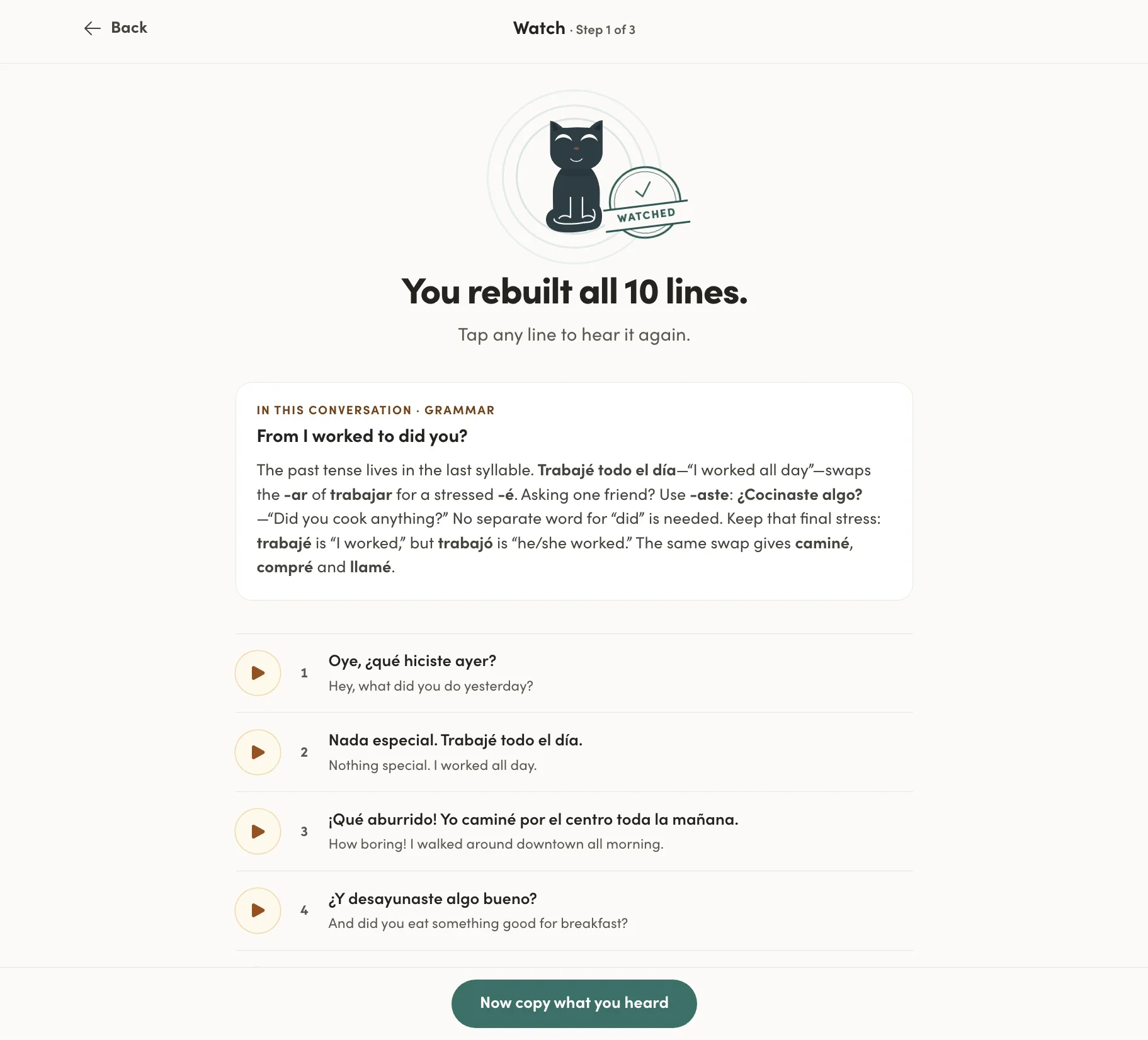
An A2 grammar note: a few clear sentences, then you copy the dialogue.
How to get the most out of it
Listen to the whole dialogue first. Get the overall picture before you go line by line.
Replay your recording and trust your ears. Compare your full sentence with the native one. The score is a guide, not a grade.
Work on one sound at a time. Don't chase 100 on every word. Pick the weakest one, copy it until it's automatic (my un went from 50 to 100), then move on.
Exaggerate a little. Play the native speaker. It’s fun, it helps you hear the difference, and it gets you closer to actually sounding like them.
Sit close to your microphone. Both times the review marked me right when I’d made a mistake, I was sitting a bit far from my laptop.
Be willing to fail reps. Some days you'll get most cards wrong. Those are the cards that come back, and that's where you learn.
Add it to your phone's home screen. It's not quite as smooth as a real app, but it’s close, and it's what I use for reviews on the go. Here's my step-by-step guide how to do it while we’re waiting for the app to be released. It only takes about a minute.
Revisit lower levels. Even at B2, an A2 or B1 lesson can fix a pattern you never fully mastered.
Catch up before you move on. This one’s optional, but I do recommend it: if your review queue gets long, take a few days of only reviews before starting a new lesson. That’s where the phrases really stick.
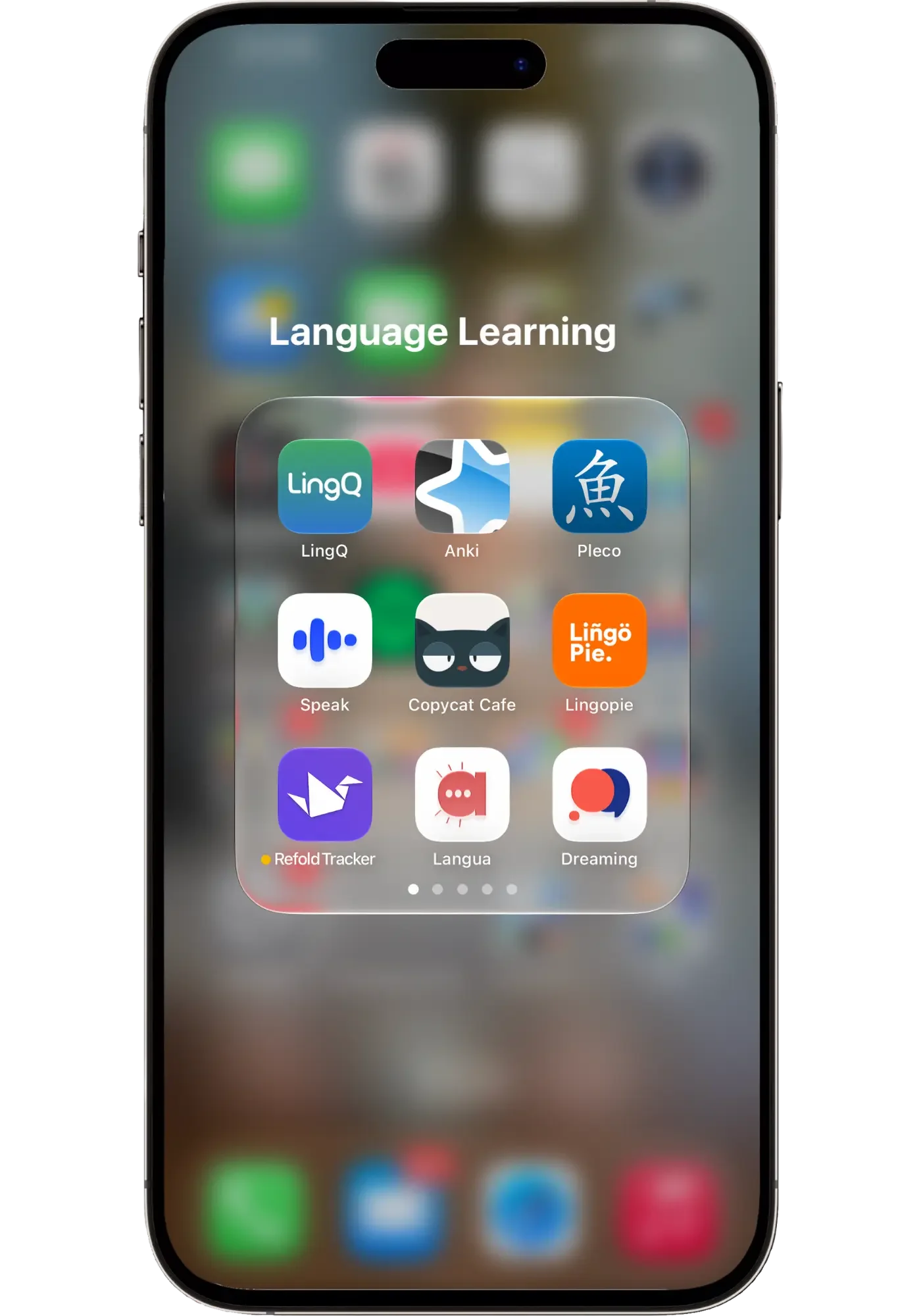
Copycat Cafe earned its spot on my home screen next to my favorite language apps.
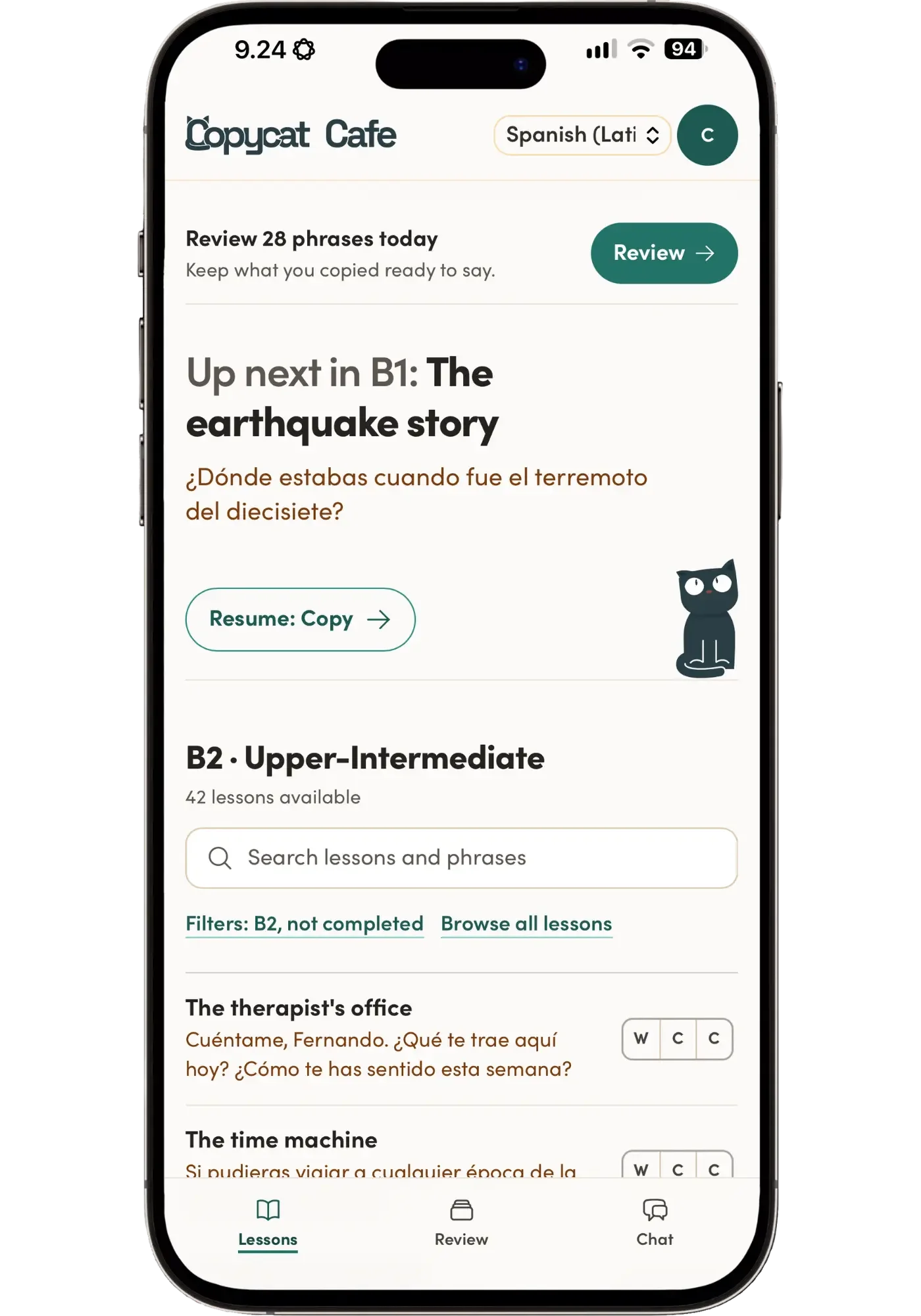
Opened from the icon, it looks and works a lot like an app.
Pros and cons
What I liked
- A well-thought-out method that actually works. Watch, Copy, Chat, Review. Each step has one job, and together they train exactly what they aim to train: moving a pattern from your ears into your own speech.
- You always know what to do next. Copy guides you through each lesson, so you just sit down and practice without planning anything.
- Natural voices, with real regional character. Easy and fun to copy, and the slow audio is recorded slowly, not stretched.
- Grammar you can use when you speak. You practice structures by saying them out loud, not by filling in blanks.
- Smart feedback, not nitpicky. Copy accepts valid alternatives and explains the nuance when you're close.
- You start hearing things you missed. Comparing my recording with the native one made me notice sounds in Spanish I'd never picked up before.
- Reviews that bring your mistakes back sooner. You see when each card comes back, and the ones you get wrong return faster.
- You never freeze in a chat. Tap the lightbulb for suggestions when you don't know what to say.
- Chats built around your lessons. Pick a lesson or a few of your review phrases, and practice them with Copy in a real conversation, by text or by voice.
- Hands-free practice. Audio Practice and Call mode let you practice on a walk.
- Entertaining, often funny dialogues. They make all the repetition enjoyable.
- A habit that's easy to keep. I do 15 to 25 minutes with my morning coffee, and I usually want to keep going even longer.
What could be better
- Web app only. There's no app in the App Store or Google Play yet, but you can make your own app icon on your home screen, and it works well (a dedicated phone app is said to be coming).
- Only five courses. French, Spanish (Latin America and Spain), Italian and German.
- Take the pronunciation score with a grain of salt. It isn't always explained, and the review transcription is sometimes too forgiving. Trust your ears.
- Not the main tool for free conversation. Call mode is fast and sounds great, but it's capped at 30 minutes a day and lacks vocab-saving features and post-chat feedback. If open-ended talking is what you want most, Langua is a better fit.
- Occasional audio slips. A handful of clips sounded a bit American, and a few had a mixed accent for the variety I chose.
- I'd love to ask Copy why, mid-review. Dotted words explain some key things, and you can ask grammar questions in Free Chat, but when a correction leaves me curious during review, I can't ask a quick follow-up question right there.
Price: is Copycat Cafe worth it?
52% off
52% off your first year with my code LING20, then 40% off every year for as long as you stay
Regular pricing
| Plan | Annual | Monthly |
|---|---|---|
| Personal1 learner | $174/year$14.50/month | $29/month |
| FamilyUp to 5 accounts | $240/year$20/month | $40/month |
☕ All five courses included: French, Latin American Spanish, Castilian Spanish, Italian and German. 7-day free trial, cancel in one click. 30-day money-back guarantee.
Prices in USD, before local taxes. Your exact price shows at checkout.
Monthly is $29, which adds up, so annual is the better deal: it costs half as much. This is also the kind of app that pays off when you use it consistently over months, not weeks. All plans include all five courses (French, Latin American Spanish, Castilian Spanish, Italian and German), 200 lessons per language, slow and normal-speed audio, word-by-word pronunciation scores, daily review, and Free Chat with Copy (up to 1,000 messages and 30 minutes of Call mode a day).
There's a 7-day free trial with full access. You can cancel in one click before it ends and you won't be charged. If you do pay and change your mind, you have 30 days after your first payment to ask for a full refund.
My discount: code LING20 gives you 20% off, and the 7-day trial still applies:
Personal annual: $174 → $139.20
Family annual: $240 → $192
Black Friday 2026: from November 15 to December 1, Copycat Cafe’s 40% sale stacks with my code, for 52% off your first year. Even better, Copycat’s 40% stays every time you renew, for as long as you stay subscribed:
Personal annual: $174 → $83.52 for the first year, then $104.40 a year
Family annual: $240 → $115.20 for the first year, then $144 a year
Is it worth it? At $174 a year, Personal works out to under 50 cents a day, less than a single lesson with a tutor each month. If you'll actually use it most days, I think it's very good value, especially for upper-beginner to intermediate learners who want structured speaking practice to improve their spoken fluency. If you're not sure, the free trial is long enough to do a full lesson cycle and a few days of reviews. And during Black Friday, it’s $83.52 for the first year, about 23 cents a day.
My verdict
Copycat Cafe is the most enjoyable and effective new speaking tool I've tried in more than six months. It doesn't try to do everything. It does one thing, training you to speak like a native by copying one, and it does it very well.
After four weeks of almost daily use, my Spanish pronunciation feels easier, structures I used to get wrong are starting to come out right, and I've noticed new patterns showing up in my real conversations. It's also simply pleasant to use: 15 to 25 minutes with a coffee, and I usually want to keep going.
One thing I appreciate more and more: the feedback never overwhelms you. Some AI apps flag every single mistake, which gets exhausting in about two minutes and makes you want to stop doing the very thing you came to practice. Copycat Cafe keeps it to one thing at a time, like a small note saying, "Just be aware of this next time." That's what makes it feel helpful instead of draining.
You can think of it as a course you simply follow, one that improves your pronunciation, grammar, natural speech patterns and fluency, and even teaches you some vocabulary along the way. And with the guided chats, you can take the patterns from each lesson straight into your own conversations.
What I also like is that it has an end. There’s a set number of lessons, and you can actually finish them. It’ll take a long time, but that gives you a real sense of accomplishment. From what I’ve seen so far, the lessons cover a lot of ground. If I work through all 50 B2 lessons, and maybe the 52 B1 lessons too, I think that’s most of the grammar and pattern practice I’ll need in Spanish to have serious command of the language. After that, it’s all about free conversation and just enjoying using the language with natives.
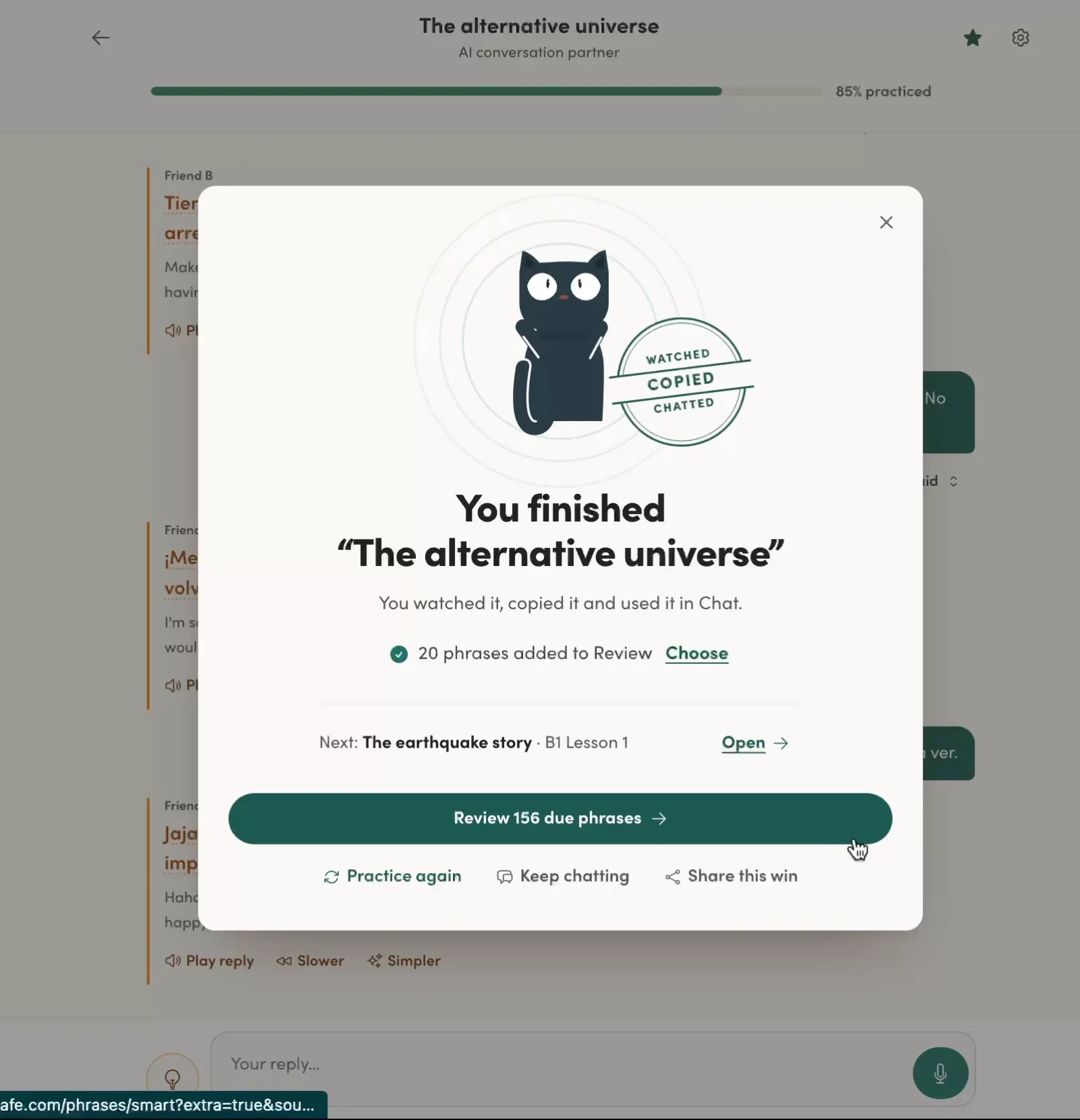
Watched, copied, chatted: one lesson done.
It's made by a married couple, Benjamin and Nur, who are clearly passionate about the method and product, and it shows. It feels like something made by people who wanted to create something special, and they have.
If you're a complete beginner, it can work, but you may find Speak an easier first step. And if you're mainly after free conversation, flexibility, and many more languages, I recommend Langua.
But if you’re an intermediate learner of French, Spanish, Italian or German and you want a structured way to clean up how you speak, both your pronunciation and your grammar, I highly recommend it.
I'm still using Copycat Cafe every day, I'm looking forward to continuing, and I'll update this review as I go. Now I'm off to make some coffee and do some copying.
52% off Copycat Cafe
52% off your first year with my code LING20, then 40% off every year for as long as you stay
7-day free trial still applies · 30-day money-back guarantee
FAQ
Is there a Copycat Cafe app?
Not yet in the App Store or Google Play. Copycat Cafe is a web app that works in your browser on a computer or phone. But you can easily make your own app icon for it on your phone's home screen, so it works like an app. Here's how. I personally prefer using it on my laptop.
Which languages does Copycat Cafe teach?
French, Spanish (Latin America), Spanish (Spain), Italian and German. One subscription includes all of them.
Is Copycat Cafe good for beginners?
It has lessons from A1, and the lower levels are beginner-friendly. In my experience, it's strongest for upper-beginner to intermediate learners who want to sound more natural, though this might change as I try more of the beginner content. If you're a complete beginner, I'd pair it with another resource for comprehension. My resources page has recommendations by language.
How long will Copycat Cafe last me?
A long time. I started at B2, the highest level, and after four weeks of almost daily use I'm 6 lessons in with 44 to go, doing 15 to 25 minutes on weekdays and just my daily reviews on weekends. If I keep this pace, it might very well last me a year, especially if I double back to do some of the B1 lessons too. With 200 lessons per language from A1 to B2, it'll last you a long time if you want to work through it all.
Can I choose between Latin American and Spain Spanish?
Yes. They're separate courses, both included in one subscription, and you can switch between them anytime.
How much time do I need each day?
About 15 to 25 minutes is enough for one or two lesson steps plus your reviews. On busy days, I just do my 10-ish reviews in 5 or so minutes, and it's the reviews that actually have the most impact.
Does Copycat Cafe really help with pronunciation?
Yes, if you use it actively. Copying native audio and comparing it with your own recording made me notice things I'd never heard before. Treat the score as a guide that points out things you might otherwise miss, but trust your ears the most. For each sentence, listen to your recording and Copycat's one after the other, and try to copy how they sound. It takes time, but I've already noticed a real difference, and speaking Spanish feels more fun because it feels more and more effortless.
Copycat Cafe vs. Langua: which should I get?
It depends on what you're after, because they do very different jobs. Langua is the best I've found for free conversation practice, and it has many more languages. Copycat Cafe is structured training for pronunciation and natural grammar. I use both, and they don't compete: right now I'm using Copycat Cafe for Spanish and Langua every day for Finnish and Korean (and Spanish whenever I just want to chat or practice something specific). So I'd pick Copycat Cafe for structured speaking practice, and Langua when you just want to talk, or want deeper practice tools and more flexibility.
Is there a free trial?
Yes, 7 days with full access. You need to enter a card, but you can cancel in one click, and there's a 30-day refund after your first payment.
Is there a Copycat Cafe discount code?
Yes. My code LING20 gives you 20% off your first payment ($139.20 instead of $174 for a year of Personal), and the 7-day free trial still applies. During Black Friday (November 15 to December 1), it stacks with Copycat Cafe's 40% sale for 52% off your first year: $83.52 instead of $174 for Personal. And the 40% stays every time you renew, so you'll pay $104.40 a year after that. You'll find the deal and my code in the card below.
52% off Copycat Cafe
52% off your first year with my code LING20, then 40% off every year for as long as you stay
7-day free trial still applies · 30-day money-back guarantee
