The Best Spanish AI Apps in 2026 (Tested Daily by a Real Learner)
Updated
What's new: added what you can try for free, refreshed Praktika's verdict, and updated my Speak testing period, Langua's discount code, and Praktika's current offer.
This post contains affiliate links. If you buy through one of them, I may earn a commission at no extra cost to you. Some of the products I write about are also provided to me for free. See Full Affiliate Disclaimer.
Table of Contents
- The Quick Verdict
- How to Choose the Right Spanish AI App
- The 4 Best Spanish AI Apps
- Langua — Best Overall
- Speak — Best Structured Trainer
- Praktika — Best AI Lesson Experience
- Univerbal — Best Mission-Based Routine
- Hear All Four Apps Side by Side
- Spanish Grammar Compared
- Which App Fits Your Situation
- Take the Quiz
- Frequently Asked Questions
- Final Thoughts
Recently, I had a Spanish conversation that I didn't expect would be the best I'd had in months. I built a custom scenario in Langua — meeting up with a teacher at a café in Spain, giving the teacher a fun and humorous personality. Usually we’re sending audio messages back and forth, which is the standard way AI apps work and great for taking your time. This time though, I decided to switch on “call mode” — a feature I hadn’t tried in a long time.
For the next 10 or so minutes I had a Spanish conversation full of humor and slang. I threw in English when I needed, and got clarifications by asking. And the best part — I didn’t need to press a single button. I just talked and she responded back with little delay. I could even interrupt if I didn’t want to wait for her to finish answering. I received helpful corrections on a grammar mistake I made and learned new words in the natural context of conversation. Toggling the transcript off stretched my listening skills and made it feel like a real phone call. It’s the closest thing to a real conversation that an AI app gets.
I've been a daily Spanish learner for over four years, and I've tested the top AI speaking apps on the market — not just for a session or two, but for weeks, months, and in one case (Langua) for years.
This post breaks down the four best AI apps for practicing Spanish conversation. After that café conversation, I'm more confident than ever about which one I'd pick if I could only keep one — but your situation will determine which one is right for you.
The Quick Verdict: Best AI Apps for Spanish in 2026
Each of these works as an AI Spanish tutor you can talk to any time — but no single one wins for every learner. Each of these four wins for a specific kind of person.
Here's the short version:

Langua
Best Overall for Spanish
Unmatched conversation depth, best vocab saving & review ecosystem (with audio + written post-chat feedback reports), the most authentic Spanish voices, and dialect options no other app offers — Mexican, Castilian, Argentinian, Colombian, Chilean, and more. The new My Path also gives you structured learning in a way that evolves and adapts to you.
From $149.99/year
Unlimited $199.99 → $159.99 (code LING20)

Speak
Best for Structured Spanish Practice
Incredibly effective, structured progression that's hard to put down — video lessons, drills, short conversations, and scenarios that build toward conversation bit by bit. By far the best for beginners, surprisingly valuable for intermediates filling in grammar gaps.
$83.99/year (Premium)
Read review ↓
Praktika
Best AI Lesson Experience
An engaging AI tutor with quality Spanish voices and a daily lesson you’ll look forward to — meeting the same tutor every day gives it a continuity no other app has. The cartoonish avatars won’t be for everyone, but the daily lesson habit is its real strength.
$119.99/year
50% off your first payment (annual: $119.99 → $59.99), applied automatically through my link.

Univerbal
Best Mission-Based Routine
Cozy, low-pressure vibe with a gamified mission system that adds direction to open-ended conversations with a custom path. Not the strongest in terms of voices, but the pacing and feel is unique.
$120/year
Code LINGTUITIVE → $108
If you want the full breakdown — voice quality, features, experience, grammar, and who each app fits — keep on reading!
How to Choose the Right Spanish AI App
Picking a Spanish AI app is trickier than it seems — which is probably why you're here. Before we get into the four apps, here are a few things that actually matter when choosing.
Why Spanish is Different (From Every Other Language You Can Learn With AI)
Spanish is in a unique spot for AI speaking apps because there's a lot to choose from — something that can't be said for less commonly learned languages like Finnish, Cantonese, Polish, or Hungarian. That's a luxury, but it also makes choosing harder than for any other language: which apps are actually worth your time, and which one fits your level, preferences, and goals?
Most AI apps default to a generic "Latin American Spanish" — which is fine to start with, since the dialects are mutually intelligible (mostly — Chile, anyone?). But that "standard" Spanish doesn't really exist in the real world. On the streets, people speak Colombian, Argentinian, Peruvian, Chilean, Castilian and other variants — these dialects have different grammar (vosotros estáis / ustedes están), words (suelo/piso), pronunciation (like the Argentinian "sh" for "ll" and "y"), intonation, and local slang. Only one of these apps lets you actually learn those specific varieties — which is helpful to know if that’s important to you.
For beginners, even intermediates, standard Spanish is usually fine. But if you're a heritage speaker, moving to a specific country, or learning your partner's dialect, this starts to matter a lot more.
How I Tested These Apps (For Spanish Specifically)
I've been a daily Spanish learner for over four years (currently around upper-intermediate — I have genuine friendships in Spanish but still have areas I want to improve), and Spanish is by far the language I've used most with AI apps. Langua I've used for over two years, and Speak every day for over 200 days. Praktika I've come back to in three separate rounds of daily use. Univerbal I’ve used across focused testing sessions over several weeks.
For each Spanish speaking practice app I looked at the same seven things — dialect options, voice quality, vocabulary saving/reviewing, feedback, pronunciation help, pros and cons, and who it's for — so you can compare them directly.
FYI: I’m an affiliate of all four apps. But that’s not why they made the list. They made it because, out of all the apps I’ve tried, these are the top ones for Spanish, and two of them have made a huge difference on my personal Spanish journey.
Why These Apps Feel So Different
Even though all of these apps’ main goal is to improve your spoken fluency, they all do it quite differently and offer very different experiences.
Some let you practice more open conversations and some are built around structure and completing certain tasks. None of these approaches are better or worse — it's more about how you’d prefer to practice, and each has its own benefits.
Roughly, from most freeform to most structured: Langua → Praktika → Univerbal → Speak
Worth knowing: Langua added a guided path called My Path in July 2026, so it now spans that whole range — giving you both freeform and structured options.
To find out more about the structure vs. freedom of each app, see the How Much Guidance Do You Want? section in my post where I Tested the Top 5 AI apps (not Spanish-specific). Also, the dedicated Langua and Speak sections in my post Langua vs. Speak highlight this.
The 4 Best Spanish AI Apps
Here are the four apps, reviewed in detail — in the order I'd rank them for most Spanish learners. Each one opens with a quick verdict, then digs into voice quality, dialects, feedback, and exactly who it's for.
Langua — Best Overall AI App for Spanish
⭐ Top PickThe best voices, the widest range of Spanish dialects, the most complete vocab and feedback system of any app — plus genuinely open, dynamic conversation no other app comes close to.
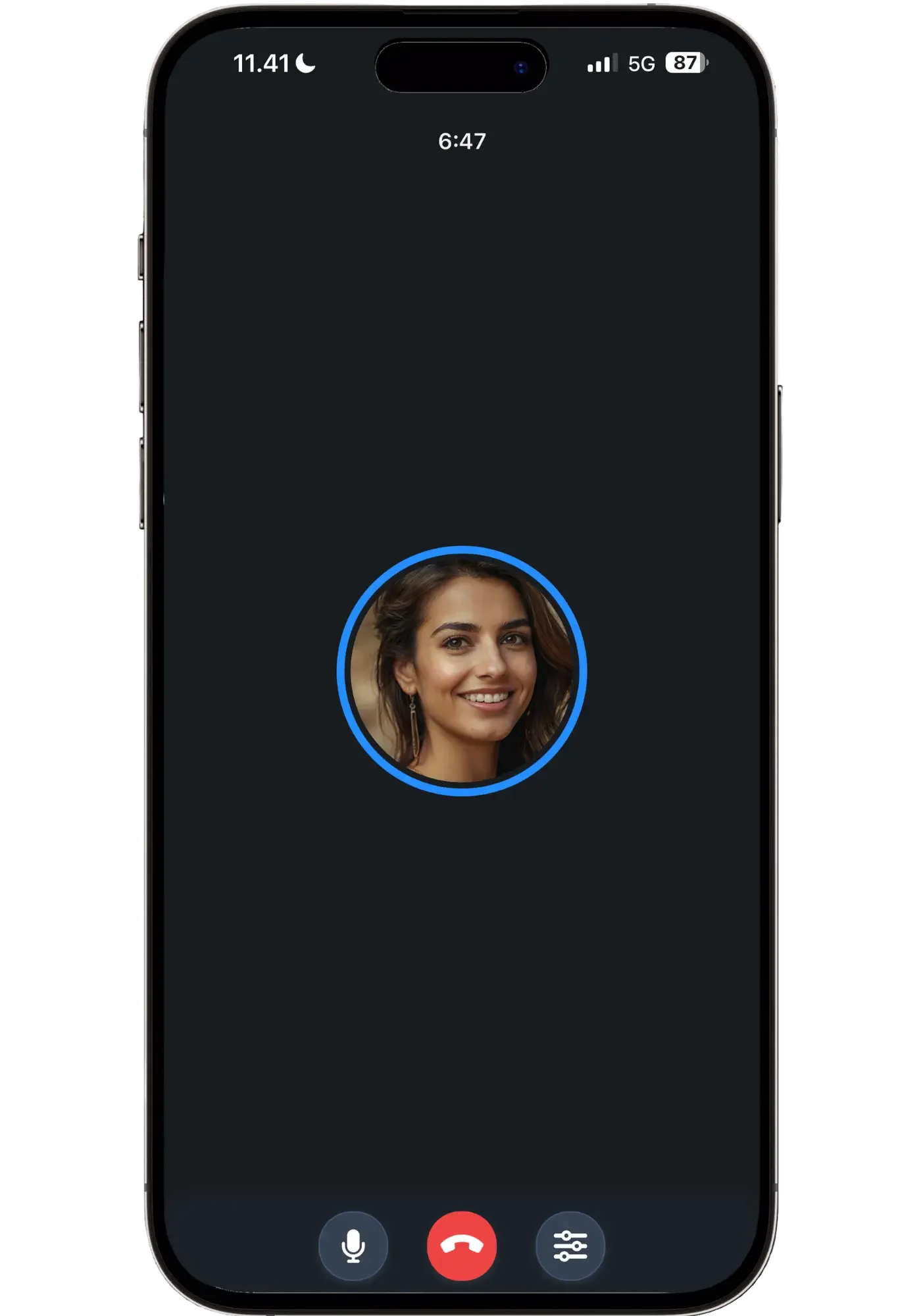
Langua's “call mode” turns practice into a real hands-free phone call — you talk, interrupt, and respond naturally without tapping anything. A feature no other app on the list has.
What sets Langua apart from all other AI apps is how natural the conversations feel — not just because the voices are the best of any AI app (which in itself is a big deal), but because the AI uses real dialects. You can even have it use regional slang, to learn how people in a specific country actually talk. Langua offers complete freedom for your conversations. You can create specific scenarios you can save and reuse — discussing your favorite Super Nintendo classics with a stranger on an airplane, or ordering food at a café in Buenos Aires — have debates, or just jump into a casual everyday conversation.
What makes it stand out is that it remembers facts about you from what you've talked about before. Not vaguely — there's a "Facts about you" panel where you can see exactly what it has picked up, add things yourself, or delete anything you'd rather it forgot. Mine had me down as having been to Seoul, which came from a roleplay rather than my actual life, and I could just fix it by editing it. But what’s so great about it is that the more you use Langua the more relevant to your life and interests the AI chats become.
It also asks intelligent follow-up questions that make conversations never feel predictable — this keeps it feeling fresh even after months (years in my case) of usage. You have this sense that the conversation can go in any direction at any point, though you’re still in control of how you want to learn.
The sheer convenience of call mode — where I can take a walk in the forest next to my house and have a hands-free conversation — is incredible. And if you prefer the regular chat mode that other AI apps have (sending messages back and forth, like on WhatsApp) then Langua works great in this mode too.
Dialect & Accent Options
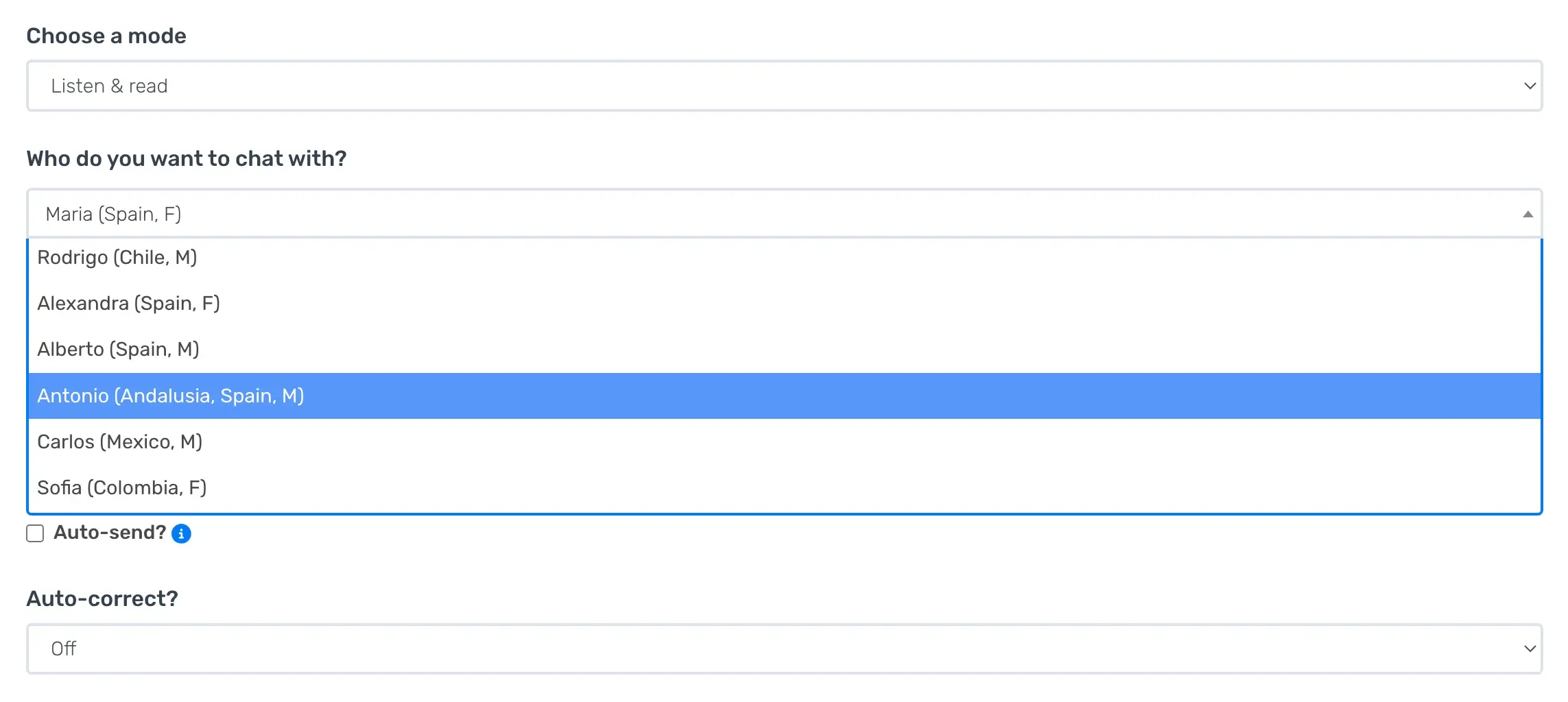
Currently, Langua offers 24 different AI voices, each with its own accent — most with more than one option (often a male and female version, sometimes more). Accents range from Mexico, Spain, Argentina, Colombia, Chile, Peru, and Uruguay, even a specifically Andalusian voice within Castilian Spanish. Some voices also have a slower version for when you want something that’s easier to follow.
No other AI app comes close to Langua on dialect and accent range.
Voice Quality
Langua uses ElevenLabs — the market leader — for its Spanish voices. Most other apps don't, because it's expensive, which is exactly why their voices don't reach this level. Langua pays for the best, and you can hear it. A friend’s native speaker boyfriend was so impressed when she was practicing with it that he snatched her phone and started talking to the AI himself.
The voices are natural to the point that they're hard to tell they’re not an actual human. They vary their delivery — shifting intonation, emphasis, and pace the way a real person does — far more than any other app, and they even breathe between phrases. I once had the voice Alberto shout "¡sí, por los pelos!" ("yes, just barely!") as we rushed to catch the subway in a Seoul roleplay scenario I’d set up — I'd never heard the AI do that before or since, but in that moment it was exactly right, and it showed me how dynamic the voices can be.
Vocabulary: Learning, Saving, and Reviewing
Langua has the best vocabulary ecosystem of any AI app. You can save anything from a chat for later review — not just single words, but whole phrases too. If the AI says "me toca las narices" (literally "it touches my noses," meaning "it annoys me"), you just mark it, get the translation, and save the whole expression — perfect for picking up slang expressions.
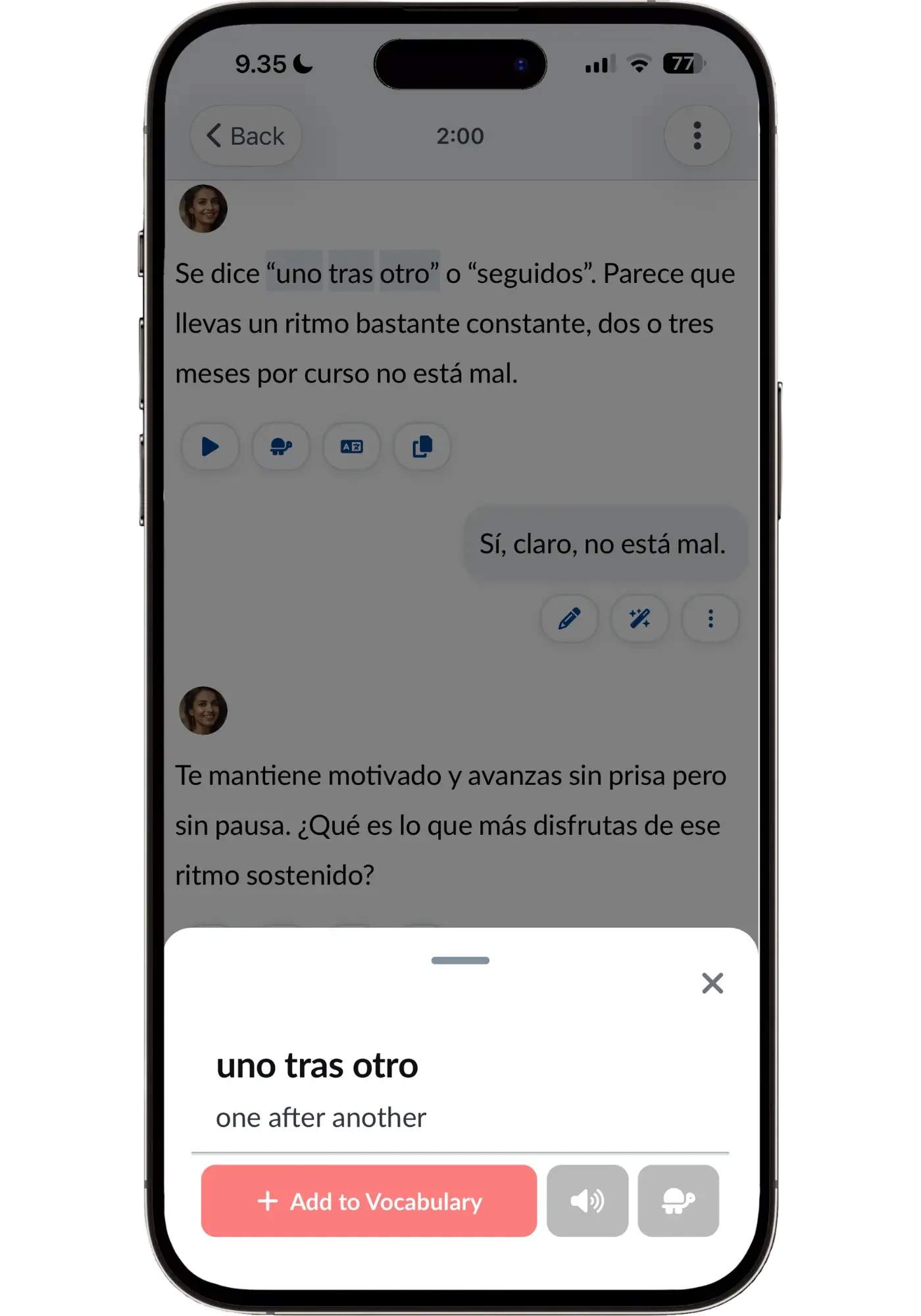
Langua lets you save whole phrases, not just single words — perfect for picking up expressions and slang.
You can then practice that vocabulary in different ways — flashcards, have the AI weave it into future conversations, drill it through games, or turn it into an AI-generated short story for on-the-go listening. I did the latter in a recent chat where we discussed Spanish dialects (and whether choosing one to focus on matters for Spanish learners): I used my most recently saved words, chose a genre (mystery), a humorous ending, and Langua created a 4-minute detective story about a mysteriously out-of-tune piano — which turned out to be a bunch of raccoons playing it at night.
Not award-winning, but a useful way to review new vocabulary in context while doing house chores or driving — especially since they are narrated by the same high quality voices as in the AI chats.
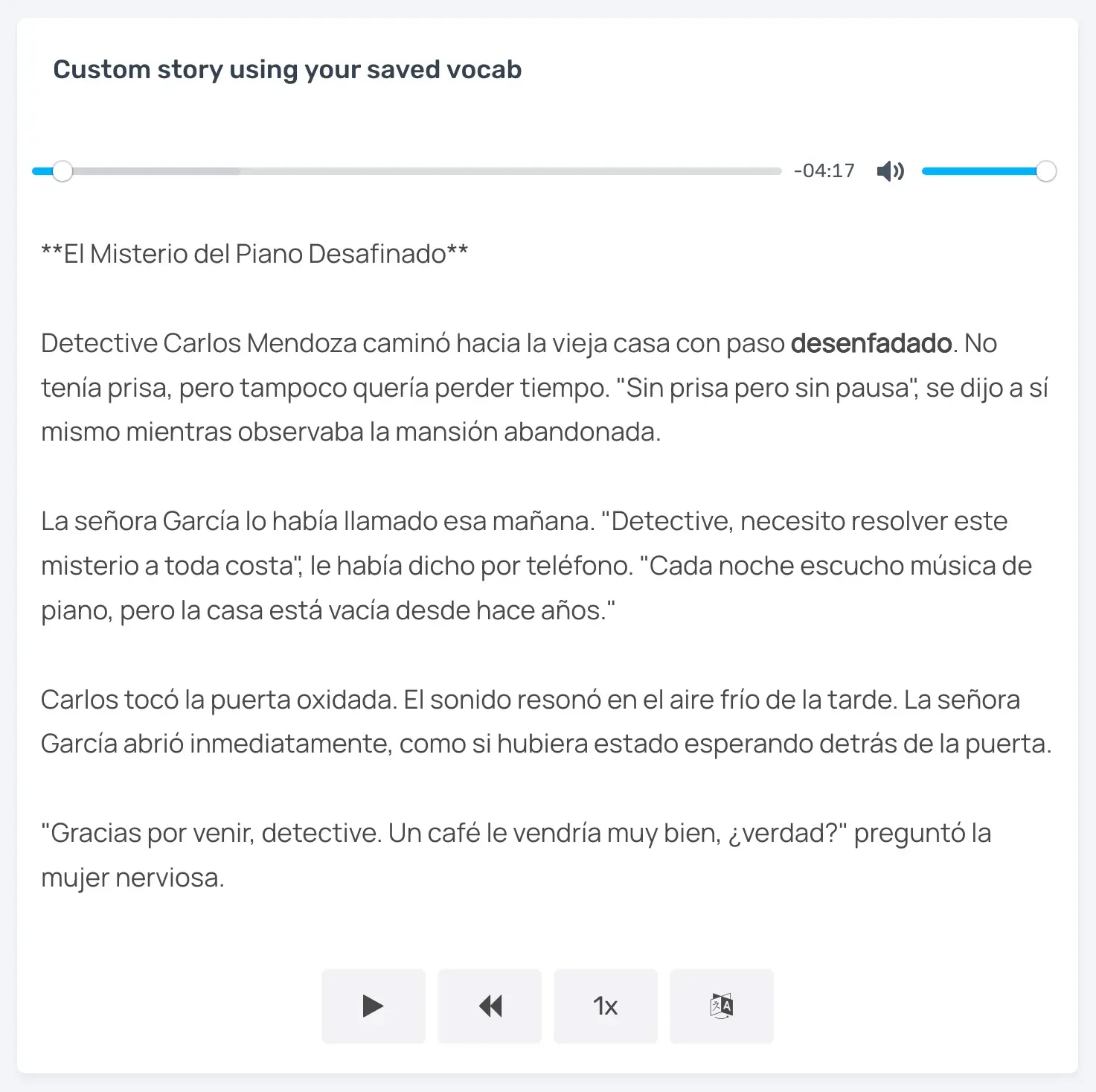
Langua turned my saved words into a detective story — you can see 'desenfadado' highlighted as it's read out loud, a word I'd saved in my last AI conversation.
How You Get Feedback
When it comes to feedback Langua is the deepest out of the apps. Every app lets you tap any message you spoke to see your mistakes highlighted with explanations, and Langua also has an "Alternative Phrasing" — your sentence said a different way, which is a useful way to expand beyond how you usually phrase things.
After a chat, Langua can generate two kinds of feedback reports — written and audio. The written one corrects things you said, notes what you did well, what to work on, and adds cultural context about your topic (often surprisingly accurate). The audio one is a 30–45 second spoken summary of your conversation in your chosen voice, plus a list of new words and expressions you can save — great for people who just want to talk and still capture useful vocab after the chats.
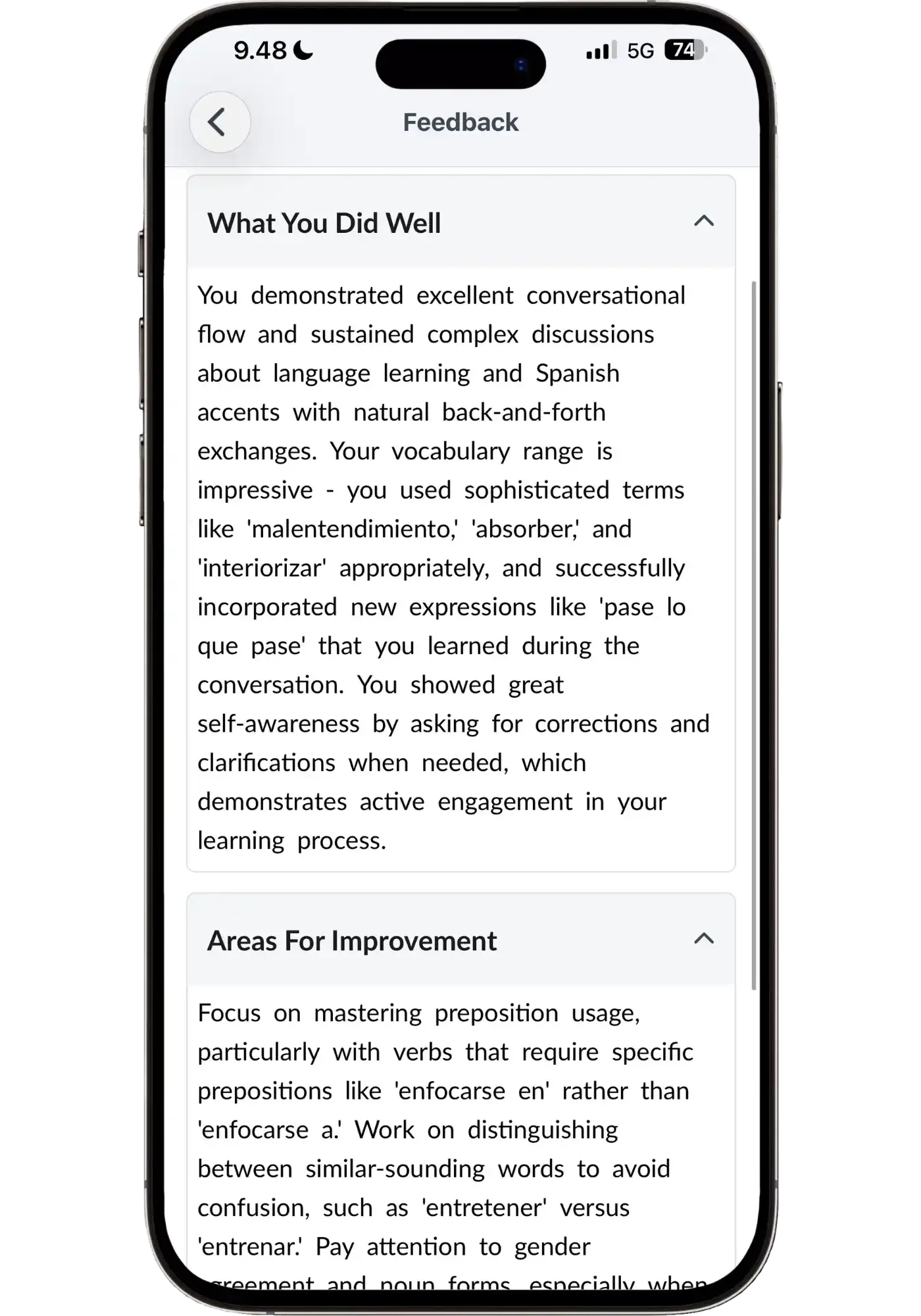
Feedback from Langua’s written report
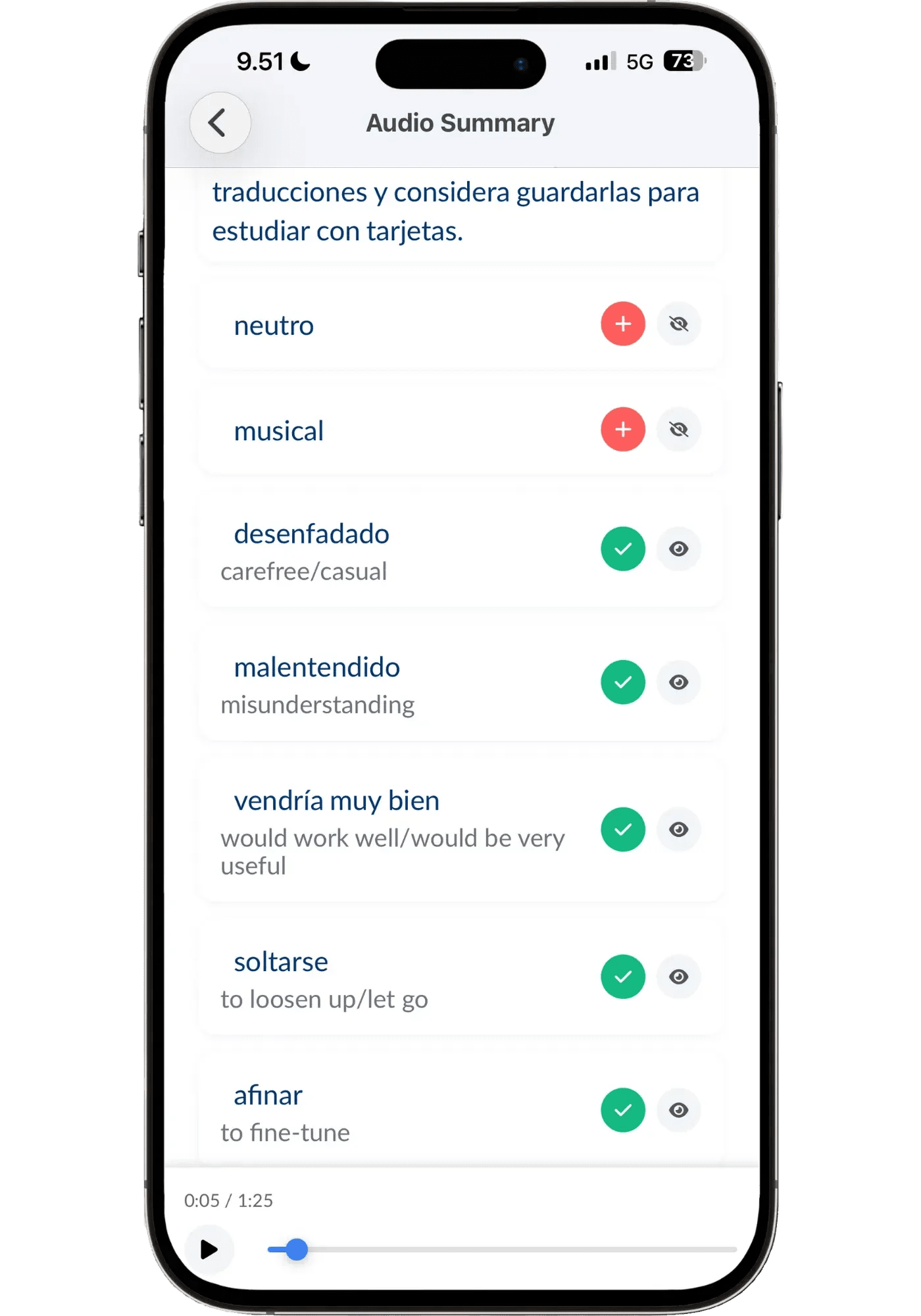
In Audio Reports, Langua will generate 10 words/expressions that you can choose to save to your flashcard deck
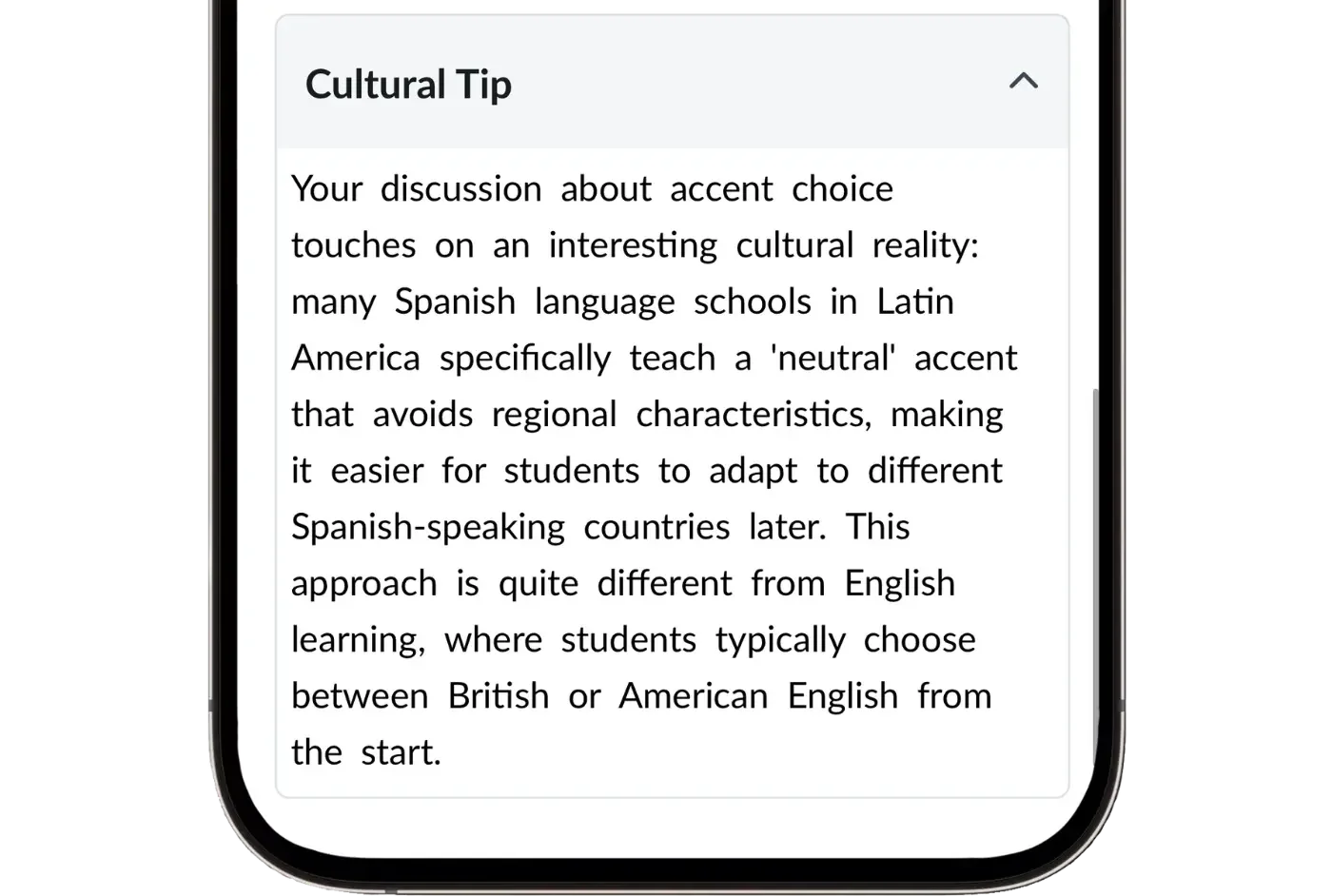
You even get cultural tips in the feedback — like this one, which happens to be relevant to choosing a Spanish dialect.
Pronunciation Help
Some AI apps have a pronunciation scoring tool — but I find these highly inaccurate and not that helpful. Langua helps you in two ways that I find more useful than any score.
First, you can listen back to every single message you send and self-evaluate, which the other apps don't let you do in free conversation. Being able to hear your own voice right after you said something, and compare it to how the AI tutor says it, is one of the best ways to fix your own pronunciation. Much better than chasing some arbitrary number that isn’t even accurate.
Second, Langua transcribes what you actually said, not what you meant to say, more faithfully than any other app I've tried. It's not perfect, but it surfaces real pronunciation problems: if you're saying a sound wrong, you're more likely to see it in the transcript than with other apps, and the AI tutor will often catch it too. That lets you spot issues you were completely unaware of and fix them. And don't worry — the AI still understands you even if your accent isn't perfect. This is just a bonus for catching stuff when you want to.
I go into more detail exactly how I use Langua to improve my accent (including the specific prompts I use) in my post: The Language I Spoke Wrong for 5 Years (and How I Finally Fixed it).
Lastly, you also tend to mimic what you hear, and Langua’s voice models are the most real-sounding — which makes them the best to imitate. That — with the ability to hear yourself back — makes Langua the best AI app for improving pronunciation, and why it’s my go-to to improve my accent.
Pros and Cons
Pros
- Most life-like Spanish voice quality of any app
- Conversations are the most natural-feeling — call mode is incredible
- Widest range of real accents: Castilian, Mexican, Colombian, Argentinian, Chilean, and more
- By far the best vocabulary saving & review ecosystem
- The most useful post-chat feedback of any app — just enough to be helpful without overwhelming or over-correcting
Cons
- Monthly plans are pricier than other apps — but the annual plan brings the cost way down
- There are a lot of features and options, which can feel like a lot the first time you open it — though My Path now gives you somewhere to start.
- Call mode adds a phone-call sound effect that can't be turned off
Who It's For
Langua is the ultimate choice if you want the most life-like, real-sounding AI speaking partner — and the freedom to practice however you like. It's ideal for self-directed learners who want natural, flowing conversation. It’s also very useful for preparing for a job interview, or even rehearsing meeting your in-laws for the first time.
That freedom used to be the trade-off: Langua handed you an open world and left you to build your own path. That’s changed — My Path now lays out a guided route that adapts as you go, so you can follow it when you want direction and ignore it when you’d rather just talk. Speak’s path is clearer and more linear, and Langua’s path is more flexible and evolves with you. So if being told exactly what to do next is what you care about the most, start with Speak. But if it’s rich, engaging conversation you’re after, nothing else comes close to Langua.
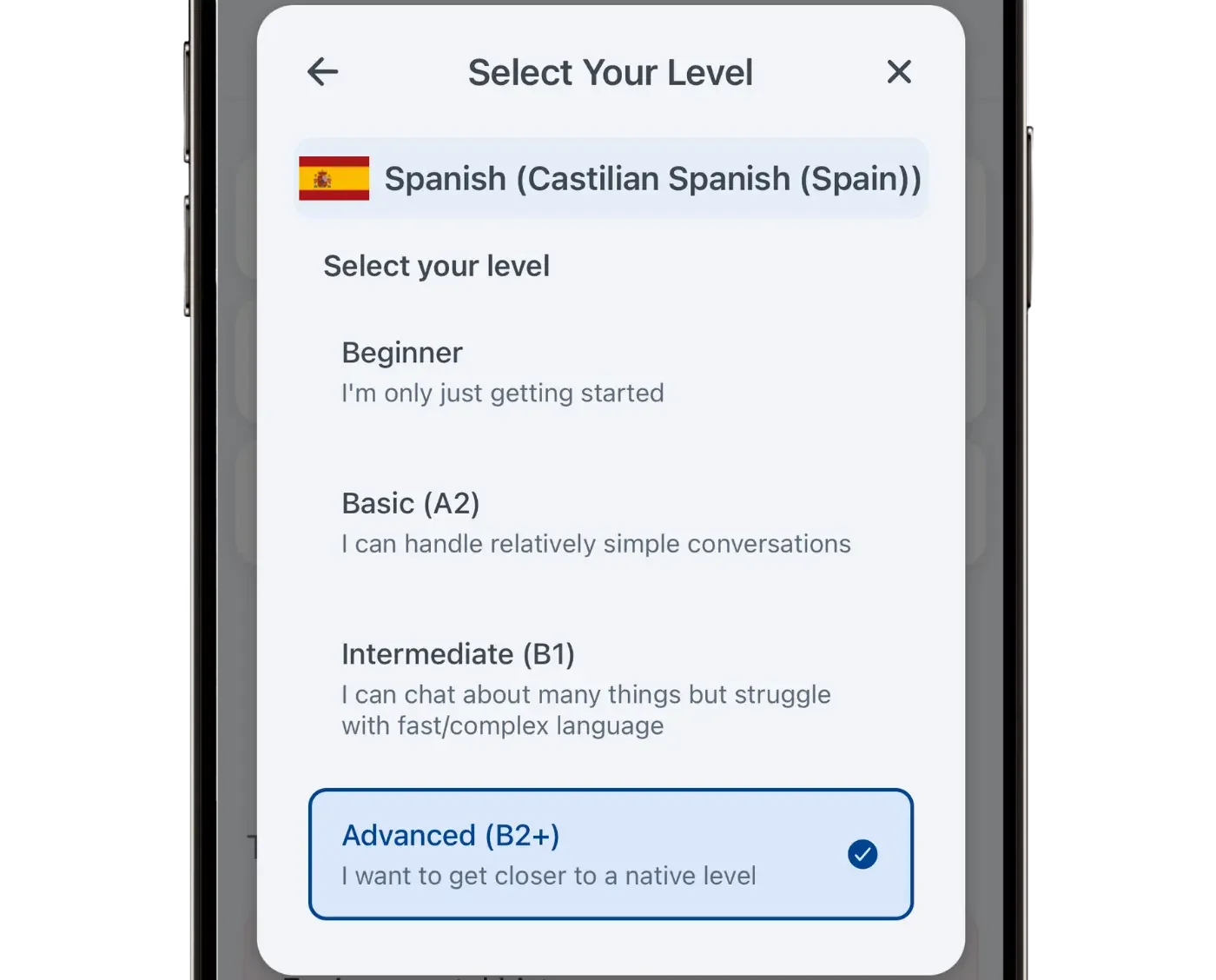
One more thing no other app here offers: Langua gives you access to book lessons with real human teachers on LanguaTalk — you can even try a free 30-minute Spanish lesson.
My recommendation: the Unlimited Annual plan is best for serious learners. With code LING20 it’s only $10 more than the Standard plan and 55% less than the monthly plan.
Free trial: 7 days (annual) or 5 days (monthly). Free plan also available — no credit card required.
Pricing: $19.99–$29.99/month | $149.99–$199.99/year
Lingtuitive discount: Use code LING20 for 20% off the annual Unlimited plan ($199.99 → $159.99).
The code works on the website, not the app, but you can use the app normally after purchase.
Speak — Best Structured Speaking Trainer
🎯 Best for BeginnersThe most effective structured path for beginners, the smartest review system, and the best way to drill natural Spanish patterns into your muscle memory — until correct sentences come out automatically, without thinking.
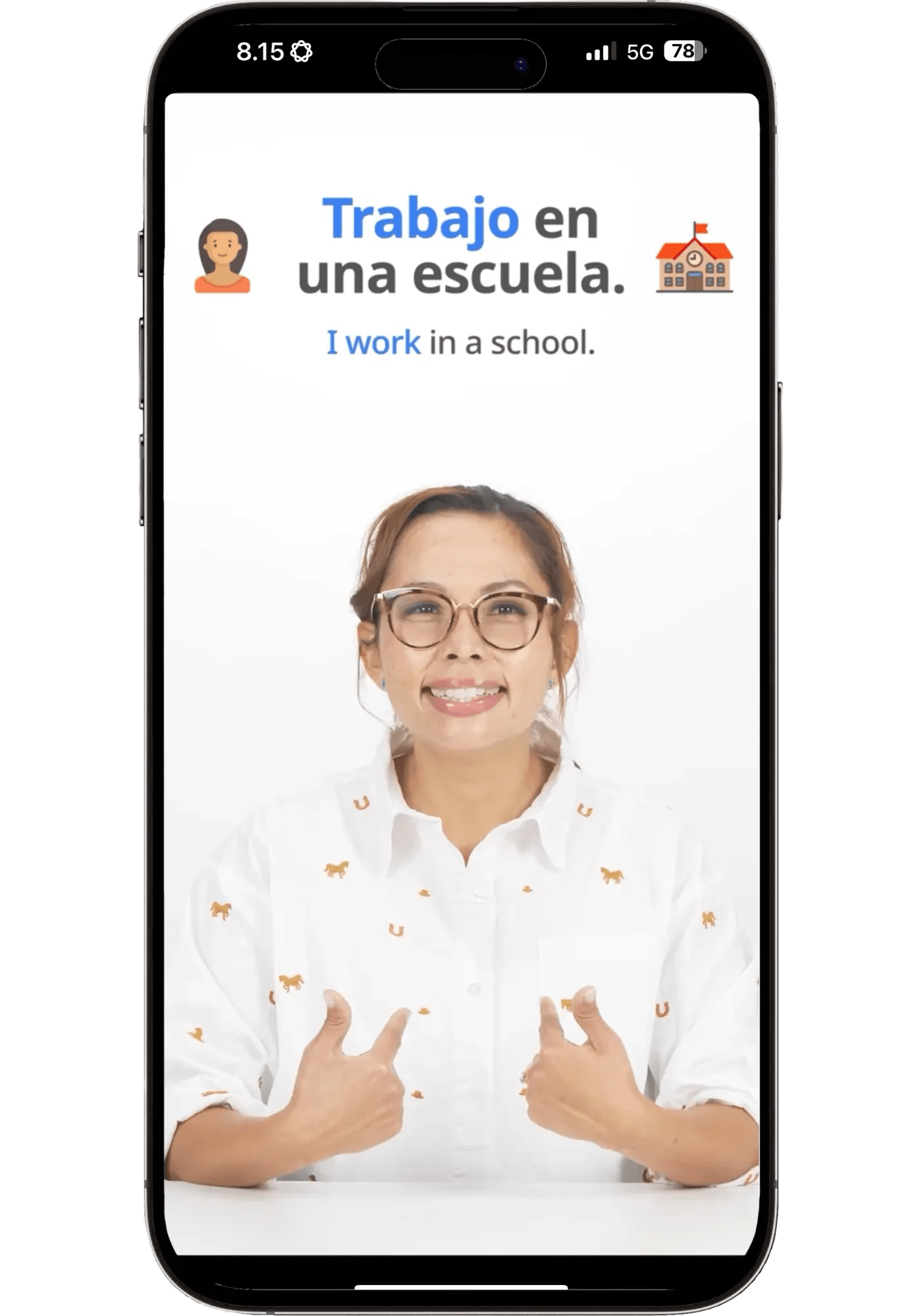
Speak is all about learning natural and useful phrases for everyday conversation in a systematic way. The key thing to know: Speak is a speaking trainer, not a free-form AI conversation partner. Even its so-called Free Chats are scenario-based, goal-driven interactions — more like completing a structured task that cleans up errors and weak points in a conversational setting — not an open “talk about whatever you want” kind of an app. What Speak does instead, better than any other AI app, is drill correct, natural speaking patterns into your muscle memory.
It takes you from zero, on a very clear path, with each activity inching you toward full conversation.
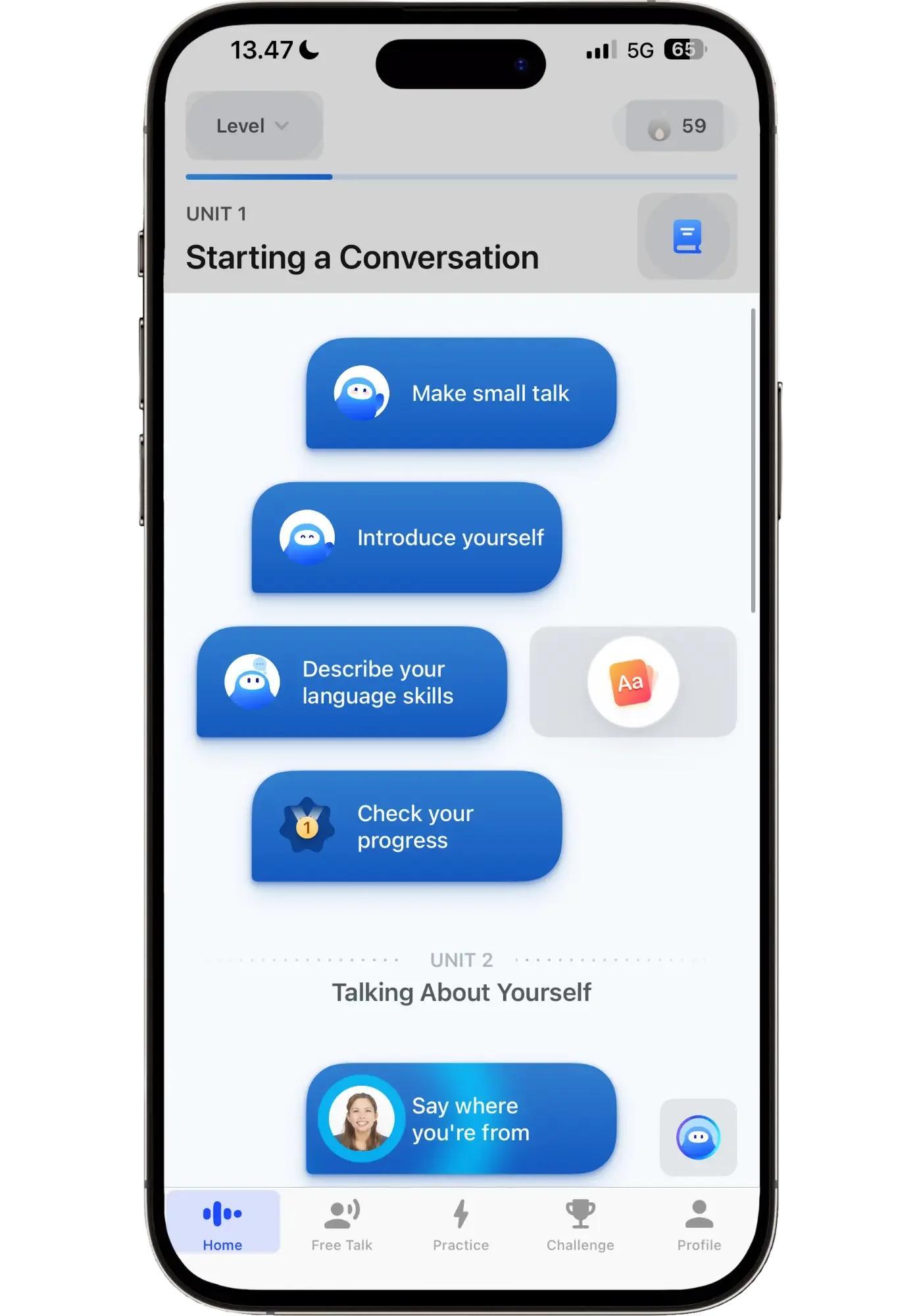
Speak lays out a clear path — you just follow it step by step and it works.
This is why it's my favorite app for Spanish beginners. It feels like a game you're trying to beat — do one lesson, unlock the next — in the same motivating way Duolingo hooks you. But the crucial difference is: with Speak there's no filler. Every single activity is actually effective at building your ability to speak. Nothing is just a points-grab mini game that doesn't move the needle. The lessons are short, give you the repetition you need, build on what you've already learned, and even customize to your own life — so you stay motivated and you actually progress.
I wrote about the five biggest problems with beginner courses, and how Speak solves every one, in my full Speak review.
Here's what a typical lesson cluster on Speak’s beginner path looks like (the exact structure adjusts to what you need at different levels):
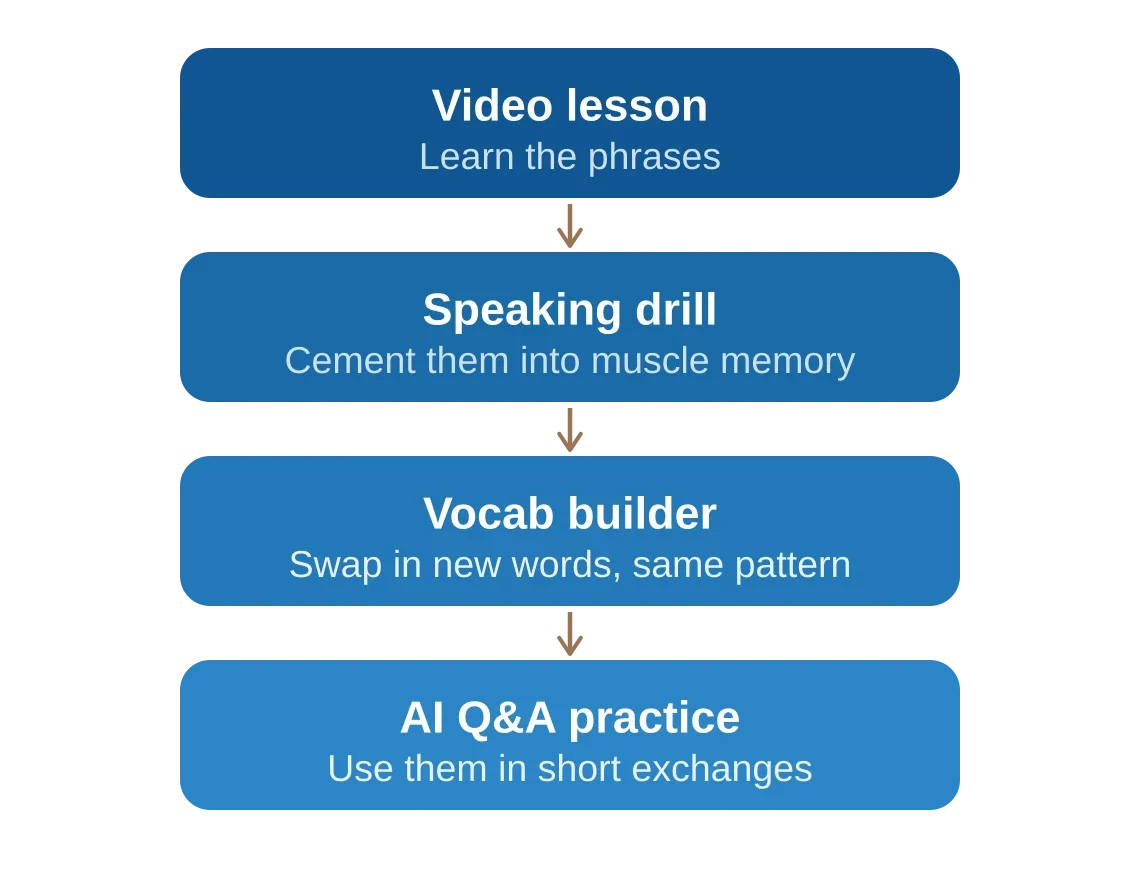
The video lessons aren't passive watching either — they're interactive, with speech recognition, so you're speaking from day one. Plus, the teachers are excellent — professional and to the point, yet warm and friendly.
It's also impressed me with how it teaches useful vocabulary tailored to each language. I've used it in four different languages, and each course is built for what that language specifically needs.
Speak has the least conversation depth of the four AI apps — but it's still one of my two favorites, and I use it daily in Spanish as an upper intermediate. Why? Because of how effectively it trains you, in motivating, bite-size pieces. It's hard to put down because of how fun it is to use — you feel the progress and the path is so clearly laid out.
Dialect Options
Speak offers one accent — closest to Mexican Spanish. The teachers all speak with a native Mexican accent, and the AI is very neutral. There’s occasionally some regional slang in lessons, and you can create your own Free Chats to explore it, but the accent stays neutral throughout, which I think is totally fine as a beginner and even intermediate in many cases.
Voice Quality
Voice quality varies. The speaking drills and short Q&As have voices that are audibly AI — it’s fine, but nothing special (oddly enough, the Korean and Japanese voices sound just like a human in the Q&As). For Free Chats the quality jumps up — not to Langua's level, but better. I'm actually not sure why the better voices aren’t used everywhere, but each works for what the activity needs.
Vocabulary: Learning, Saving, and Reviewing
Speak's whole approach to vocabulary is learning everything in context. The focus is on patterns — full sentences — because that’s the most useful for speaking. You can look up individual words but not save them. However, you can save full sentences (Lines) from drills and lessons to practice separately. Great if you come across one you’d like to especially remember.
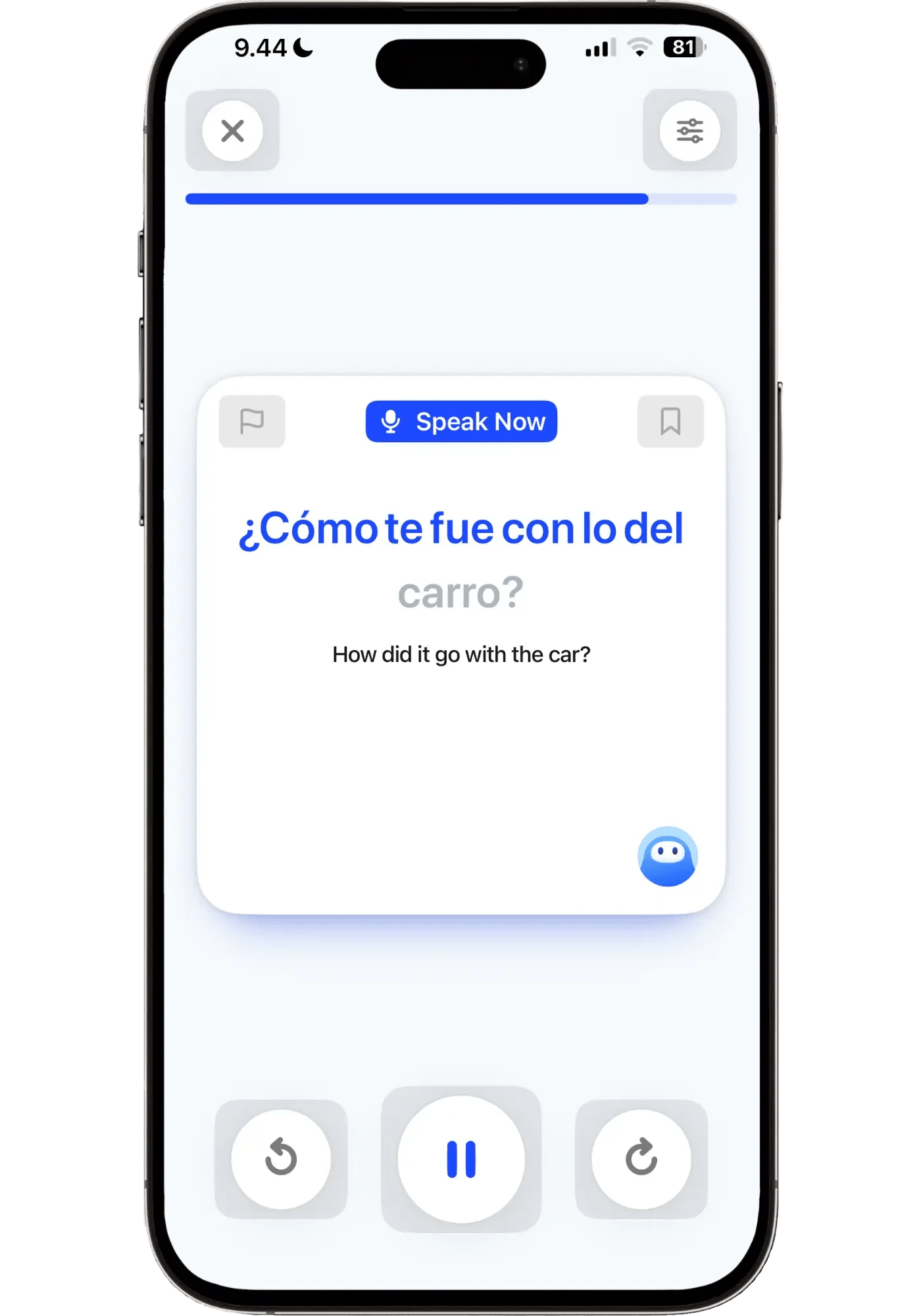
Speak teaches you full sentences based on natural Spanish speaking patterns.
Speak also has a brilliant review system called Smart Review, built around "Concepts" (grammar patterns — which Speak tracks for you). I go deep on it in the grammar section below, since it's the heart of why Speak is such a strong grammar trainer.
How You Get Feedback
Speak is built on listen-repeat drills that train your muscle memory. You speak out loud and get checked by speech recognition, which is fairly lenient — you might still pass if you say "la" instead of "el." That sounds like a flaw, but you immediately hear the sentence said correctly afterward, so you get the feedback either way. And not having to be perfect from day one is important for beginners, otherwise it would get frustrating fast.
What I love about Speak's feedback is that it's visual: the words you said correctly light up, while the ones you missed stay muted. It's an instant way to see exactly where you were off — you then just fill in the gaps without having to repeat the whole sentence.
In a Q&A, if you make a mistake, Speak gives you the right phrase, and prompts you to repeat it after the AI — that way, you get the feel of saying it correctly.
For Free Chats you get a green light if you said it right and orange if you made a mistake somewhere — tap your message to see your sentence next to the correction with a brief explanation. Standard stuff you’ll see in other AI apps but Speak’s visuals stand out. Constant correcting gets draining fast in most apps, but because Speak's interactions are short and targeted, it never feels overwhelming the way checking every sentence in a free-flowing chat does.
Pronunciation Help
Speak offers pronunciation tips in the video lessons, whenever there's something relevant to watch out for. Beyond that, the speaking drills help too: every sentence you speak is recorded, so you can listen back and compare yourself to the AI. It won't teach you a specific accent, but it's effective for getting the sounds and intonation right.
The lenient speech recognition won't punish small imperfections, which is the right call for beginners — chasing perfect pronunciation from day one is counterproductive. Build confidence first, refine later.
While Langua is the strongest for refining pronunciation and accent at intermediate and advanced levels, Speak is the strongest for learning good pronunciation for beginners. There’s an excellent extra course called "The Sounds of Spanish” that’s focused only on pronunciation — video lessons, drills, and more that train you to produce each Spanish sound correctly, in different combinations. Short, clear, and effective, just like everything else on Speak.
Pros & Cons
Pros
- The best gamification of any app I've tried — it works, and it's hard to put down ("just one more!")
- Short, 2-3 minute lessons, makes it feel doable even on the busiest day
- An exceptionally well-thought-out structured Spanish path
- Smart Review takes all the guesswork out of studying — it tracks your weak spots automatically and decides what you need to review, so you just press "start"
- The teachers are fantastic — professional and to the point, yet warm and friendly
Cons
- Not true free-form conversation — even "Free Chats" are scenario-based
- Uneven voice quality — the short Q&A drills sound audibly AI (Free Chats sound much better)
- No regional accents or dialects — everything is in standard Latin American/neutral Spanish
Who It's For
Speak is the clear pick if you're starting Spanish from scratch and want a structured path to follow — it's so far ahead of any other app for beginners that nothing else comes close. Because it systematically puts the building blocks of speaking in place in a way that feels so doable and encouraging. It's also genuinely valuable for intermediate-and-up learners who want to clean up their grammar and speak more accurately — that's why I still use it daily at an upper intermediate level. With lessons that take just 2–3 minutes, it's the app I reach for whenever I get a spare moment. And once you open it, it’s hard to stop.
Keep in mind: Speak is built on drills and repetition, so it's about getting lots of reps in rather than free-flowing conversation. If you can’t stand repetitive practice, you'll likely find Speak tedious — that's where an open-ended app like Langua will fit better. But if you don't mind drilling (or actively like the satisfaction of it like I do), that repetition is exactly what makes the patterns stick — and there's enough variety across the lesson types that it never feels like mindless repetition, but like purposeful reps.
My recommendation: Speak has two tiers — Premium and Premium Plus. For most people starting out, I think Premium is all you need — the extras in Premium Plus (like unlimited custom lessons targeting your mistakes) are useful, but not something you'll miss in your first months. If you want the full breakdown, I compare the two plans in detail in my Speak review.
Free trial: 7 days
Pricing: $83.99/year (Premium) | $164.99/year (Premium Plus)
Praktika — Best AI Lesson Experience
Avatar tutors with genuine personalities you meet day after day — a structured, classroom-style routine that feels like having your own Spanish teacher who actually remembers you.
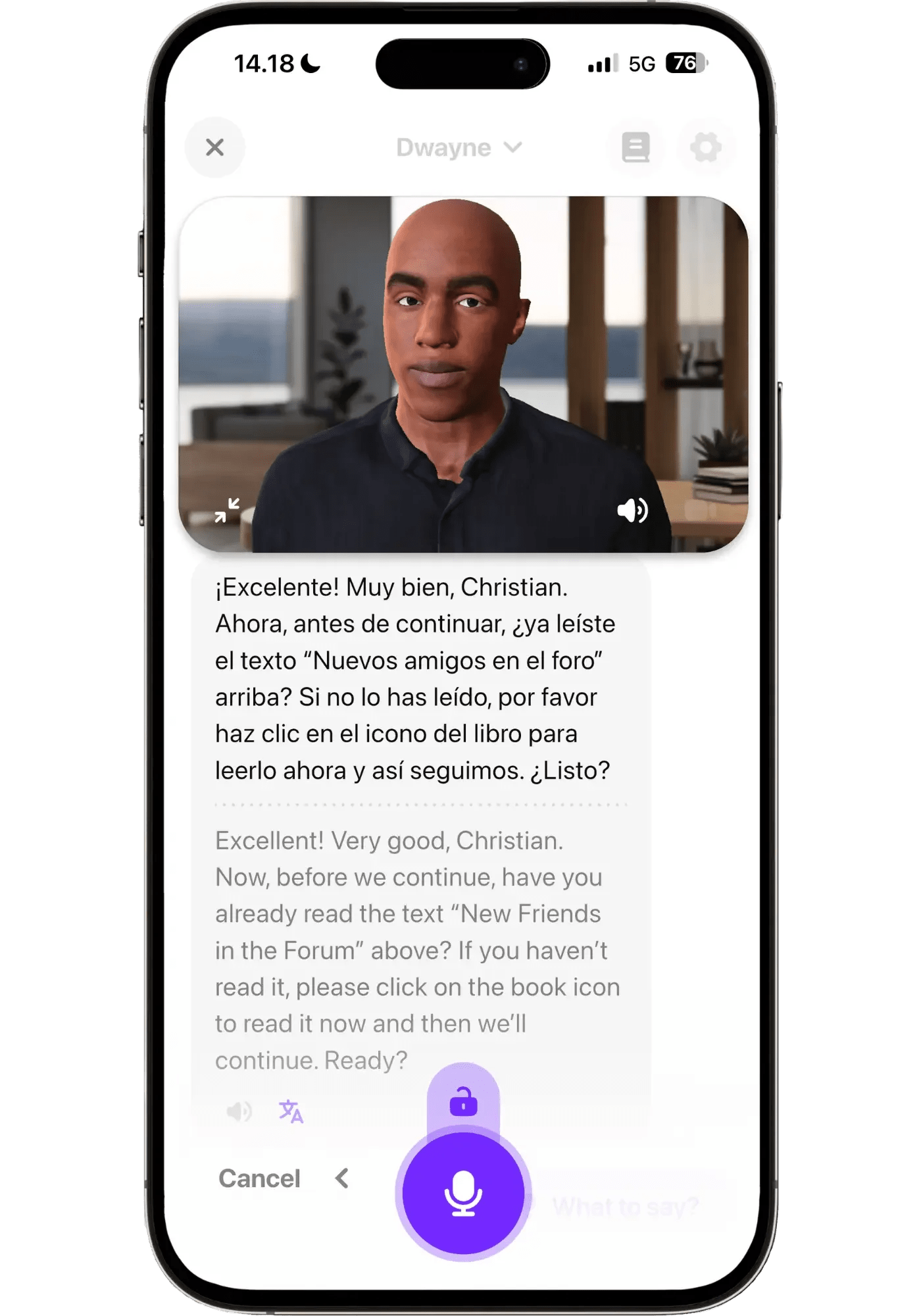
Praktika is the only app that consistently uses animated avatars in every lesson, each with its own personality. You can follow a customized lesson plan, have free chats, or talk about a specific topic. On structure, it sits between Speak and Langua — a daily lesson someone else planned for you, but with room for real conversation inside it. That makes it a good middle option for learners who want the rhythm of showing up for class without the drills.
Praktika's lesson library is vast, but quality varies. The upside is range, plus some refreshingly creative lesson types (speed reading, summarizing a passage you've heard). The downside is that some lessons feel far too rudimentary for intermediate learners (like simple self-introductions). You can always cut a lesson short and move on to the next one though, or just have free chats.
What really sets Praktika apart is consistent personalities. Tama is warm and friendly, Anna is serious and to the point, Dwayne has a hilarious sense of humor. Because of that, the tutors feel like real people with their own traits — rather than just a different voice, or a personality generated on the fly as in Langua. The cartoonish avatar style won't be for everyone (you can minimize them but not turn them off entirely), but it makes the experience more engaging for those who like it — I enjoyed it more than I thought I would.
Dialect Options
Praktika offers quite a few Spanish voices — 16 avatars, the second-most here (behind Langua). There's Standard and Latin American Spanish — the dialect differences between each tutor are quite small. There's no dedicated "Castilian" option, though some of them speak with some Castilian Spanish mixed in. I once pointed this out to a tutor — "it sounds like you’ve got a Spanish accent, you pronounce your C's like in Spain" — and she admitted her accent is a mix and offered to switch to Latin American pronunciation, but then kept using those Castilian C's anyway.
Voice Quality
Like Langua, voice quality varies by avatar — but they’re generally high-quality, the second best here. They don't breathe or inhale, and aren’t as dynamic and real-sounding as Langua, but they’re solid and better than most AI apps.
Vocabulary: Learning, Saving, and Reviewing
Praktika is straightforward: do the next lesson on your path, chat about a specific topic, or have a free chat. You can save unknown words to a vocab list (the "dictionary"), and I appreciate that you can save whole phrases and mark any number of words. But there's no way to actually review those words in the app, other than read through the list. Even simple flashcards would have been great.
How You Get Feedback
After any message, you can tap it to see corrections, with the fixed words in bold — which is standard in an AI app. Praktika does it well, though I found Langua’s approach to how it is written easier and less straining to glance through. No post review feedback reports or tracking of mistakes are available — so getting feedback is confined to the actual lessons and chats.
Pronunciation Help
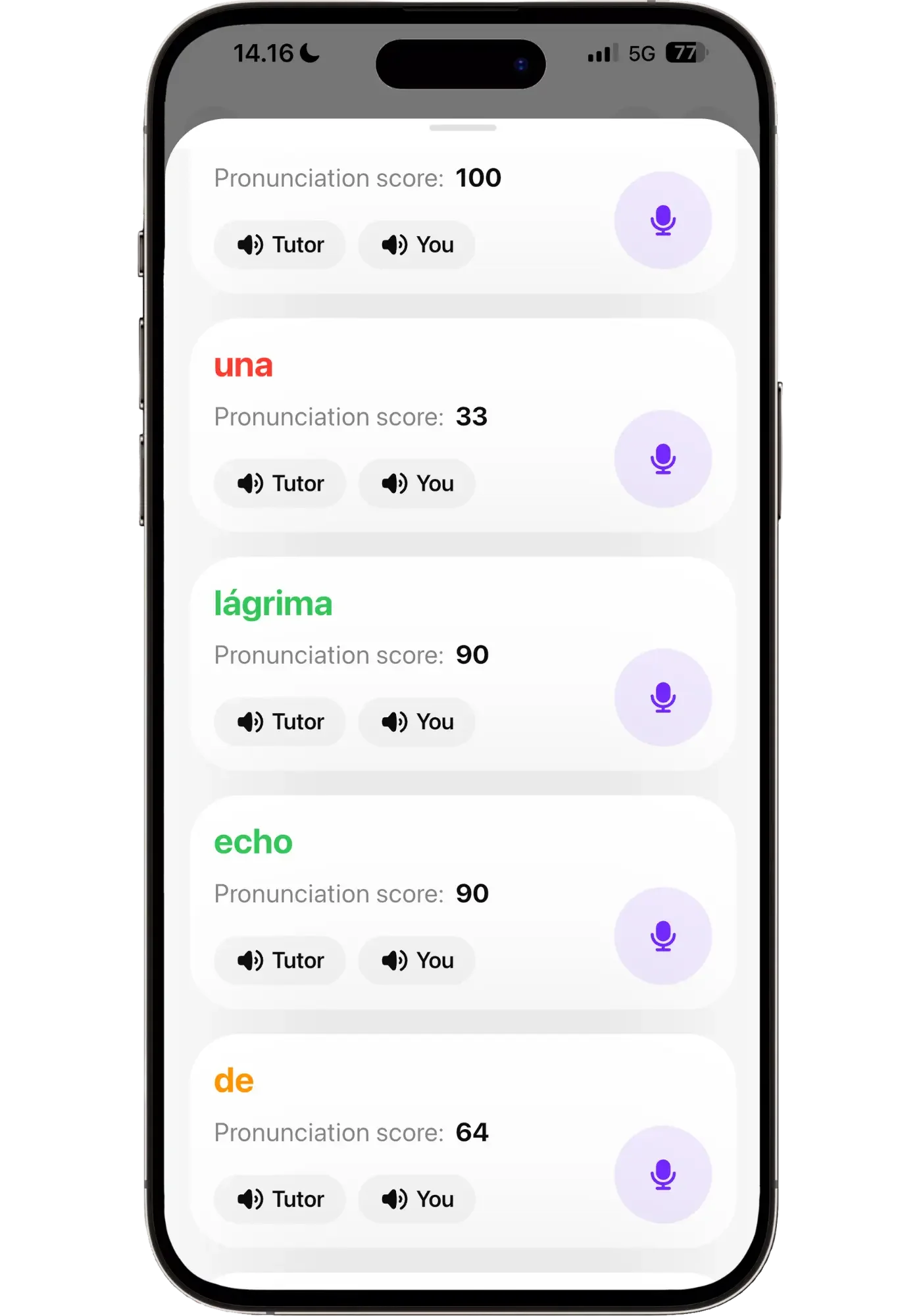
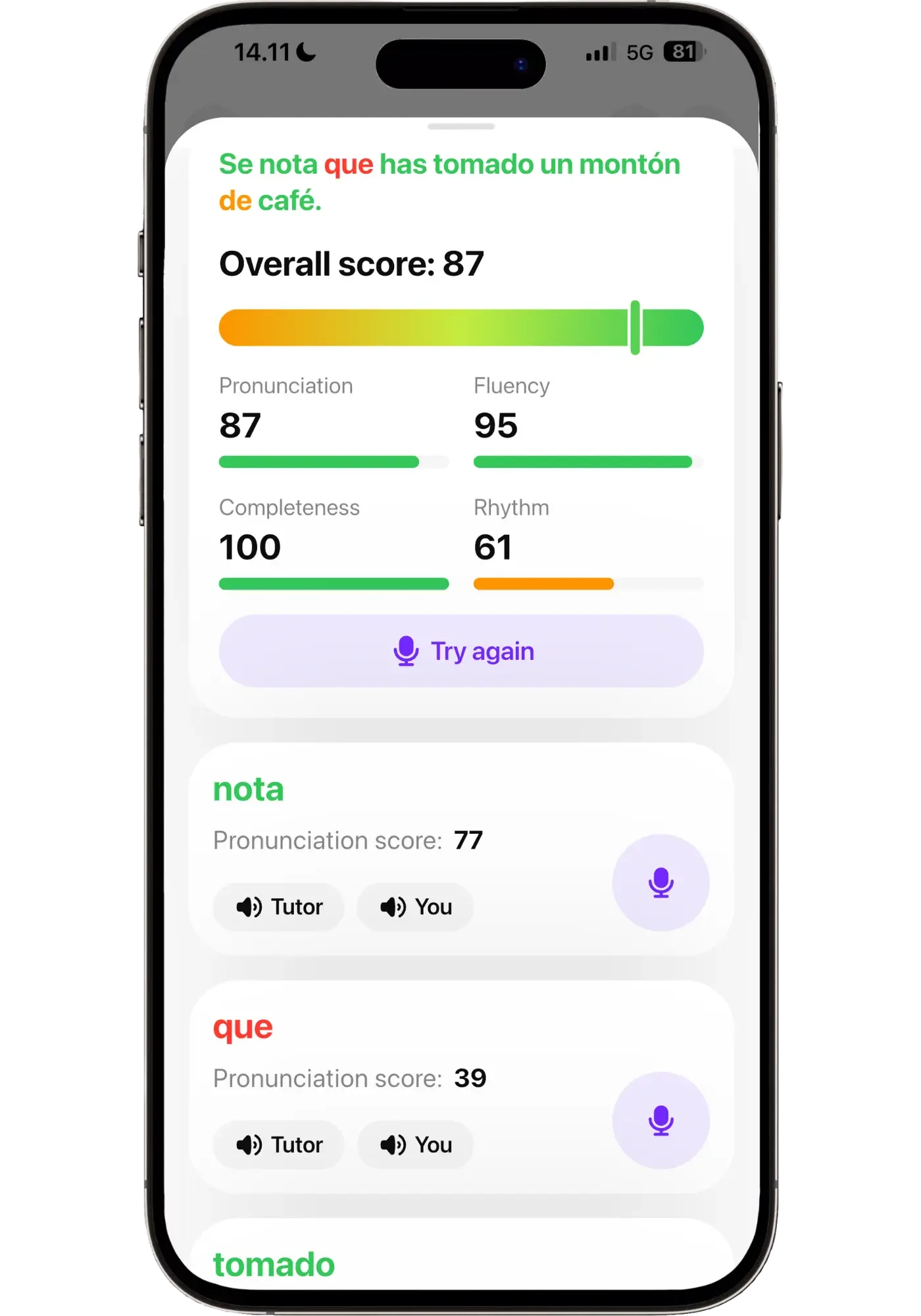
Praktika has the most explicit pronunciation tool of the four. After you speak, you can tap any message and get a 0–100 score on every word color-coded — green (good), orange (okay), red (off). You can listen back to how you said a word, compare it to the AI's version, and re-record for a new score. It caught me pronouncing certain sounds lazily — "eres," "pero" — which was useful.
That said, the scoring isn't reliable. The per-word playback sometimes plays the wrong word, and I'd get low scores on things that sounded, to my ear, nearly identical to the AI — while sloppier attempts scored higher. It's a cool idea, but AI can't yet reliably judge pronunciation, so it becomes more of a gimmick than a tool. It can be useful, but I wouldn't rely on it.
Praktika also gives a fuller summary scoring pronunciation, fluency, completeness, and rhythm. Advanced learners might find it useful, but if you're a beginner or intermediate, I'd ignore the fluency and rhythm scores — you're not meant to have perfect flow yet, and getting marked down on it just because of taking your time to formulate a good response is more discouraging than helpful. A big reason for using AI is to be able to just take your time and get judgment-free feedback — and this one works against that. It's all optional though, so you can just skip it or at least take it with a heavy grain of salt.
Pros & Cons
Pros
- The middle ground — more structure than free conversation, more freedom than a course
- The avatars have distinct personalities that stay consistent — it feels like talking to someone with their own tastes and quirks
- Solid voice quality, with humor and a fast conversation flow
- Creative lesson types like "speed reading" keep things feeling varied
- The most thorough onboarding of any app, building you a customized lesson plan
- Hands-free conversations — put the avatar in full screen and it records and sends automatically
Cons
- Lesson quality and difficulty are uneven
- You can save words — but there's no vocabulary review to help you remember them
- The cartoonish avatars won't be for everyone — you can shrink them, but not turn them off
Who It's For
Praktika offers engaging conversation, in a teacher-student setting — the tutor guides and suggests, so it's freer than Speak's task-completion but still somewhat steered. You can say "let's just have an open conversation," but unlike Langua, that's not the default — it often suggests activities and roleplays. Langua can play this tutor role too, but Praktika is built around it: the daily lesson, and the consistency of meeting the same teacher each day.
Praktika is great for those who find Langua too open but want more real conversation than Speak offers — and who like the routine of a daily lesson. The structure could be better, and sometimes there are questions that feel shallow and not very useful for language learning — but it does its job, serving up practice you wouldn't think to do yourself. Its biggest strength is that continuity: the tutor often remembers and refers back to things you said before. During one lesson, a tutor brought up my favorite movies from a previous chat — a small thing, but it made the whole daily lesson experience feel personal in a refreshing way.
Free trial: Not offered through my link at the moment — you get 50% off your first payment instead.
Pricing: $17.99/month | $47.99/3 months | $119.99/year
Lingtuitive discount: 50% off your first payment applies automatically through my link, no code needed (annual: $119.99 → $59.99).
Univerbal — Best Mission-Based Routine
A calm, mission-based way to practice — gamified conversations built around scenarios and tasks, at a slower, more relaxed pace than any other app here.
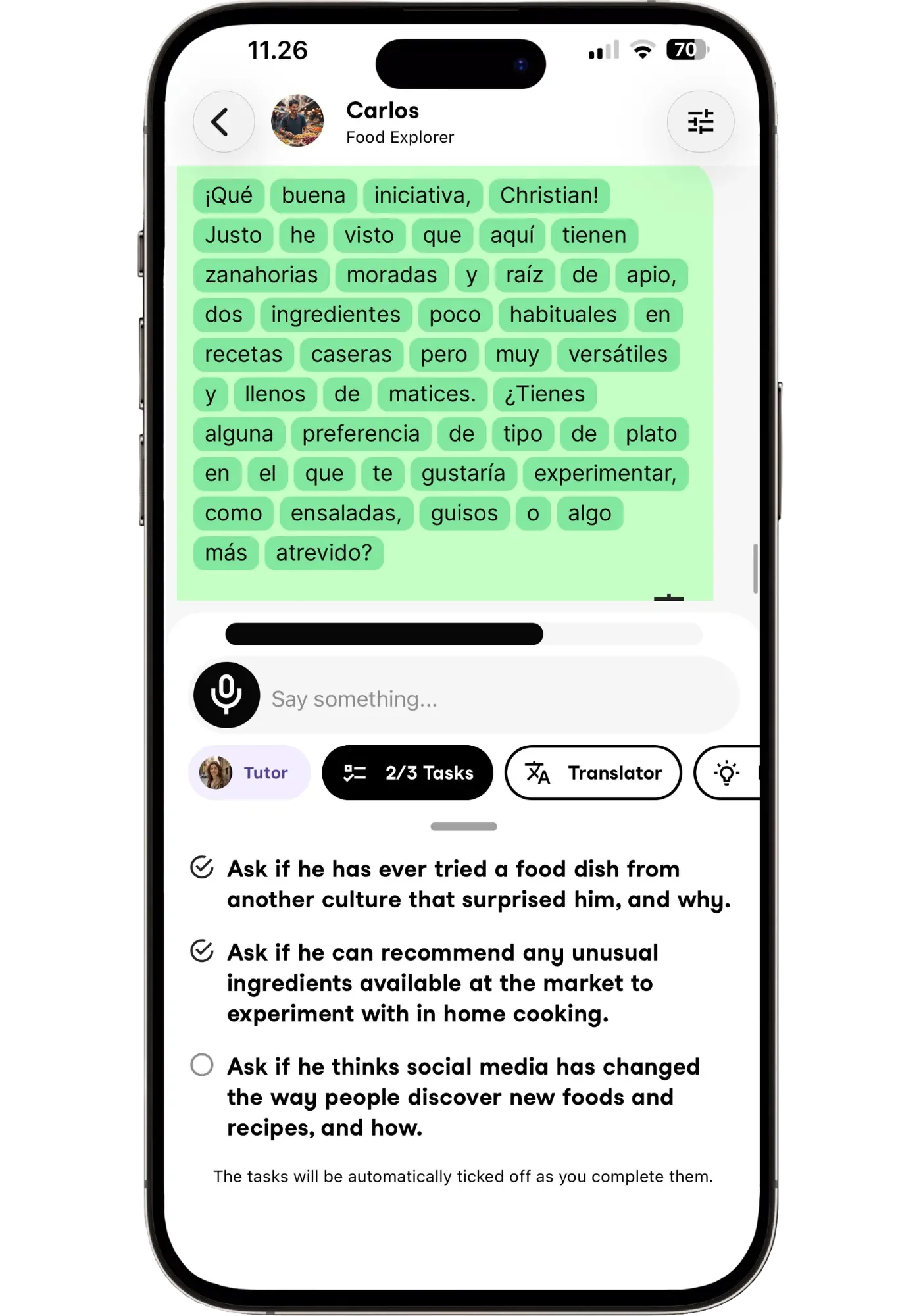
2 out of 3 tasks completed — with a bar indicating how long is left to complete the scenario-based conversation.
Univerbal offers a different experience from the other apps. It has a structured path based on your interests, but the conversations take a mission-based approach: it's free conversation in a sense, but it revolves around specific scenarios, each with three tasks to complete — usually three questions to ask the character you're talking to. It makes conversations gamified and goal-contained while still being somewhat free-form.
Scenarios include things like "Comparing Travel Experiences”, talking about local food, or discussing a song you like. For each, you pick either Conversation (recommended), Exercise, or Vocabulary to earn enough points to finish it. The vocabulary and exercises are simple fill-in-the-blank and multiple-choice questions in Spanish.
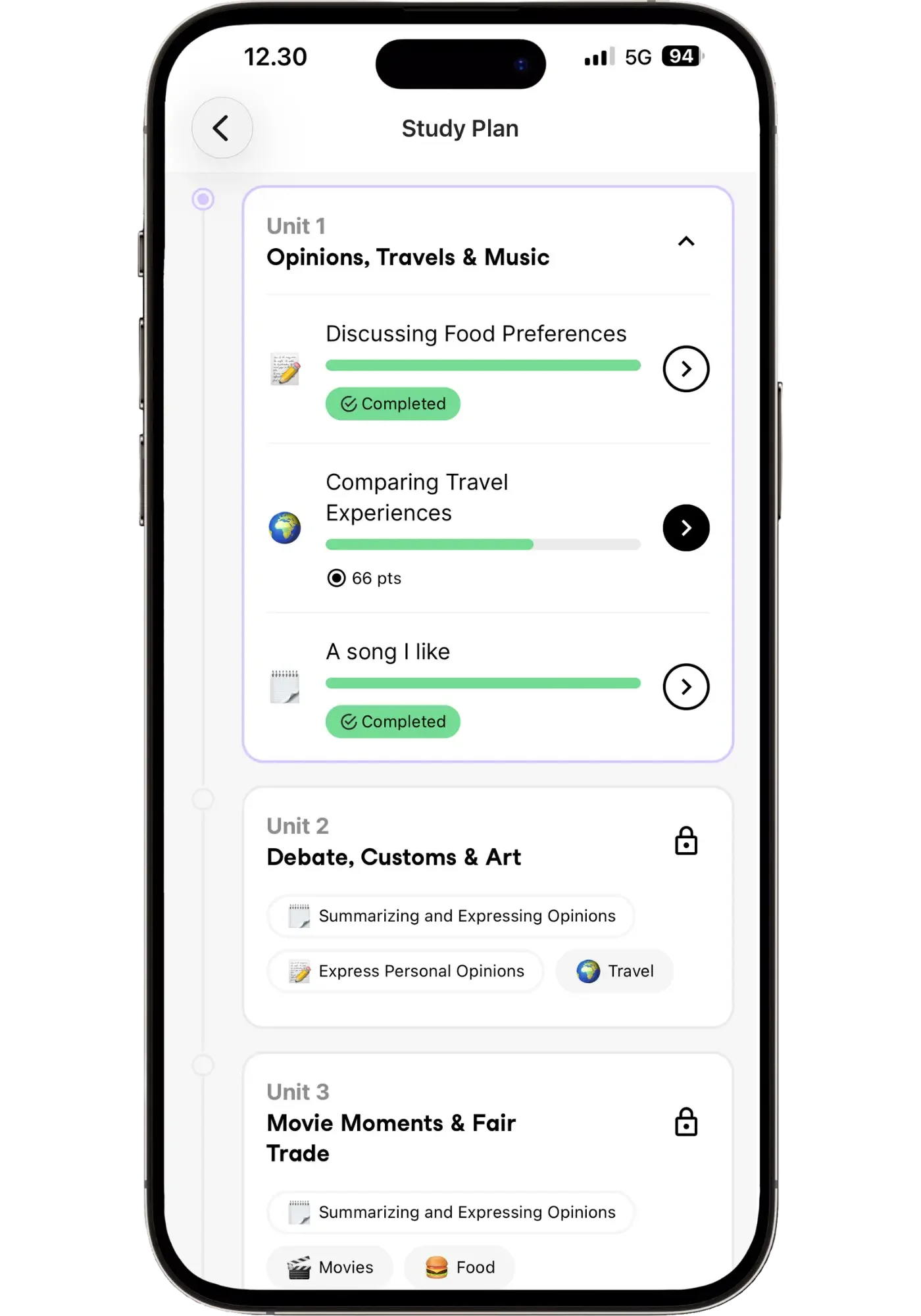
The Study Plan gives conversations a gamified structure — complete missions to unlock the next unit.
Dialect Options
Univerbal offers Castilian and Latin American options — you pick one for your lesson plan. You can’t switch dialects in-path, but you can run a separate path for each if you want both.
Voice Quality
Of the four, Univerbal is the weakest on voice quality — the voices feel stiffer and more audibly AI than the others, with Latin American being a step better than Castilian. The slower delivery might appeal to some, giving conversations a calmer feel. You'll meet different voices across conversations, but unlike Langua and Praktika, you can't choose them yourself.
Vocabulary: Learning, Saving, and Reviewing
You can save vocab as individual words or multiple-word phrases, and there's even mnemonic help to remember them — something no other app here offers. Saved words can be reviewed via flashcards, translation, or fill-in-the-blank. They can also be organized into color-coded lists. Univerbal also adds relevant words automatically after a conversation — handy, though you don't get Langua's control over exactly which words you save.
Conversations range from engaging to a bit forced. One mission had me discussing a movie I'd never seen, so the required questions felt unnatural — it became a bit of a slog of completing tasks just to finish, especially since you must complete all three scenarios in a module to advance (exercises can also earn the points, but I wanted to complete it by conversing).
You can also have free conversations with your own scenarios, though these still have three tasks each — which is why Univerbal sits between Speak and Praktika: freer than Speak, but clearer goals than Praktika (and far less open than Langua of course). Still, that mission structure is a distinct, motivating way to practice that will appeal to some people. And it offers options for vocab review that Praktika doesn’t.
How You Get Feedback
When you respond, a "pling" sound confirms a message was mistake-free. If you make a mistake, it shows what you said wrong and what to say instead. There's also a feature similar to Langua's "Alternative Phrasing" — except instead of an alternative way to say something, Univerbal shows you the corrected version of your whole message, which you speak out loud to get the feel of saying it right.

Univerbal shows you the corrected version of what you said — and has you (optionally) speak the corrected version out loud.
After lessons, you also get feedback on what you did well and what to work on. "Mistakes" and "Relevant suggestions" tabs will give you exercises based on weak points from your conversations — which makes Univerbal noticeably stronger than Praktika for reviewing your mistakes. It also generates a PDF feedback report (your transcript plus notes on mistakes) — one of only two apps to do this, though Langua’s reports go further, having both written and audio options, and more detail (while still being concise and to the point).
It also lets you have a conversation completely hands-free. It’s not a call mode like Langua, but via auto-record and auto-send similar to Praktika. That said, the task-completion format doesn't lend itself to hands-free practice as naturally as Langua’s talk-about-anything format does.
Pronunciation Help
Univerbal is the lightest of the four on pronunciation. There's no dedicated scoring tool or word-level breakdown — feedback is mostly about whether you said the sentence correctly, via the "pling" confirmation and the option to read a corrected version aloud. Combined with the weaker voice quality (which matters, since you learn pronunciation a lot by imitating what you hear), Univerbal is the app I'd reach for least if accent is your main goal.
Pros & Cons
Pros
- A motivating, gamified structure — complete missions to unlock the next unit, with a clear sense of progress throughout
- Clear conversation goals that nudge you to say things you otherwise wouldn't
- A slower, more relaxed pace than other apps
- Good post-lesson review — feedback reports plus automatic "Mistakes" and "Relevant suggestions" tabs
Cons
- Voices sound audibly AI (especially Castilian — Latin American is a bit better)
- Not suited for beginners, even the beginner lessons
- Conversations can feel hit-or-miss — engaging in some scenarios, unnatural in others
Who It's For
Picture a slow Sunday afternoon on the balcony, a cup of coffee, wanting a relaxed way to practice where you can just take your time. That's the feeling Univerbal gives me. It's not that it gives you more time than the other apps (every one lets you take as long as you want to respond), but I think it’s because you're working through tasks with a character rather than holding a conversation. More like a game you're playing, at your own pace, than a life-like chat.
That relaxed feel is tangible and one of the biggest strengths of the app — and if it sounds like you, and top-tier voice quality isn't a dealbreaker, Univerbal delivers a more contemplative way to practice. The gamification of earning points and completing tasks isn't a perfect path, but I really like the format and experience it brings. It gives a sense of progress and keeps you motivated by “leveling up”.
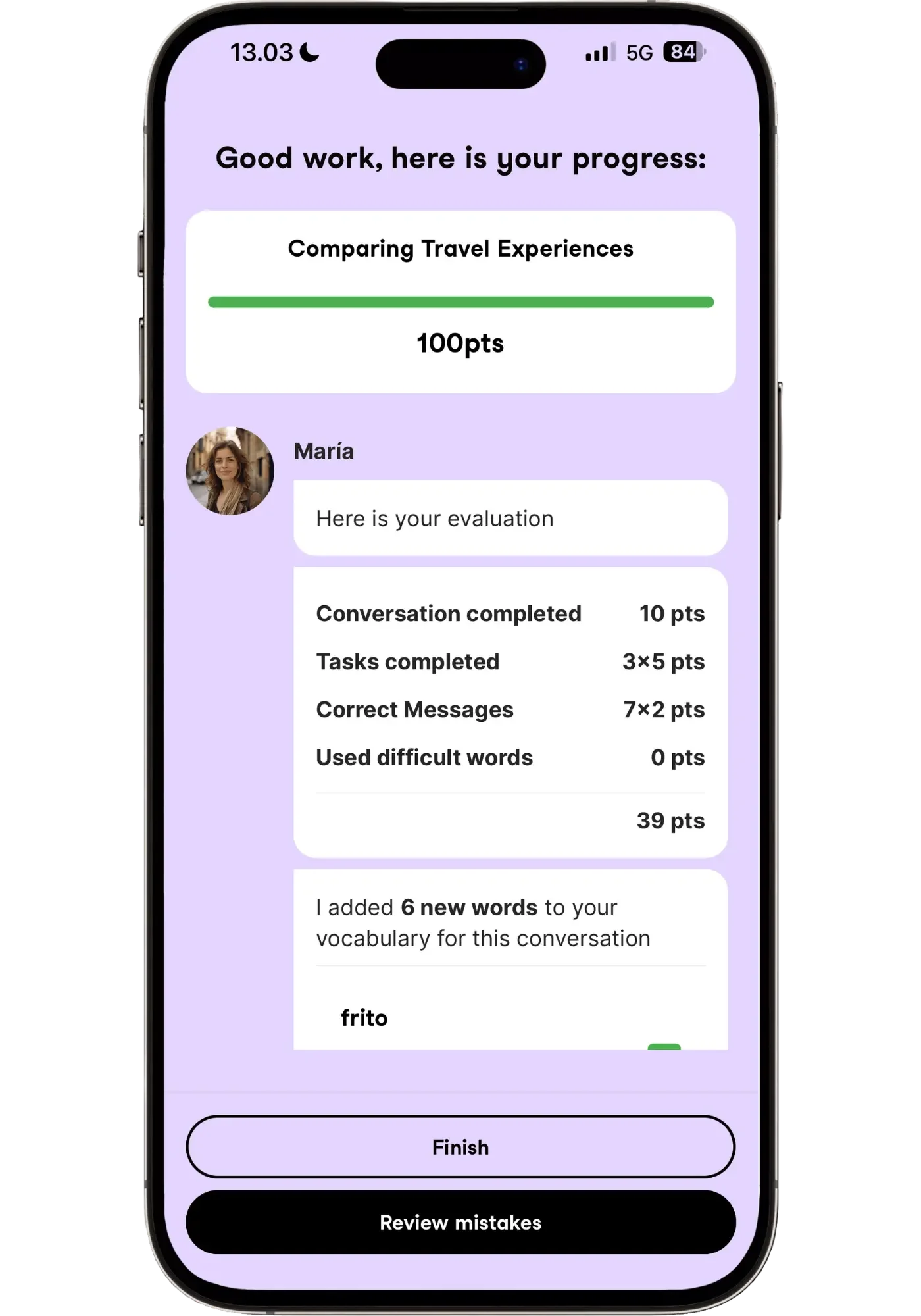
Finish a Univerbal conversation and you get a points breakdown — completing tasks, correct messages, new words. It’s that gamified payoff that makes it feel motivating.
Free trial: 2 days (no credit card required)
Pricing: $14.90/month | $39.90/three months | $120/year
Lingtuitive discount: Use code LINGTUITIVE for 10% off the yearly plan ($120 → $108).
Hear All Four Apps Side by Side
To give you a clear picture of the voice quality, here's the exact same sentence spoken by all four apps:
"La verdad es que me encantaría viajar a Argentina el próximo año, sobre todo para conocer Buenos Aires y probar la comida. ¿A ti también te gustaría ir?"
("The truth is, I'd love to travel to Argentina next year, especially to see Buenos Aires and try the food. Would you like to go too?")
Rather than me describing the voices, just listen and judge for yourself. I aimed for Mexican or neutral Latin American accent for consistency — though Praktika, which describes its voice as neutral, sounds quite Castilian to my ear as their avatars tend to blend accents (they even admit this when you ask).
One thing these clips can't capture: when I had each app repeat the sentence, Univerbal said it identically every time — same emphasis, same rhythm. Langua varied it each time — the way a real person never says a sentence exactly the same way twice. Praktika varied it too, but sounded less natural than Langua. That subtle variation is a big part of why a longer conversation with Langua feels so alive — and it's exactly the kind of dynamic a short side-by-side can't show.
Langua's voice stands out most to me — if it did for you too, you can create a free Langua account and hear them in a real conversation (it lets you try a brief AI chat for free). Prefer one of the other ones? Jump to all four apps.
Spanish Grammar Compared: Which App Helps You Master the Subjunctive and Ser/Estar Best?
Grammar matters a lot for speaking — not just for sounding natural, but for confidence. And knowing you're speaking sentences the way a native would boosts that immensely.
Spanish grammar is fairly straightforward at first but gets trickier the deeper you go. Most learners get stuck in the same places: the subjunctive, ser vs. estar, por vs. para, reflexive verbs, even things like getting "me lo quiero probar" vs. "me la quiero probar" right without having to think. These aren't things you can memorize — they have to become intuitive, so they come out automatically. And for that, you need real practice and lots of reps.
That's exactly what AI trains well — reps in real exchanges, immediate correction, and the opportunity to use one structure five different ways until it moves from your head to your tongue. Any of these apps can help to do that. But one makes grammar genuinely fun and effective to train — without the need for long, complicated explanations.
Here's my ranking for improving grammar — i.e., using natural Spanish patterns correctly when speaking:
Speak — the best trainer. Easy to do, repetition drills patterns in, and it turns grammar into a fun game to "beat." Keeps track of and surfaces your weaker patterns more often for review. Best for beginner to upper-intermediate.
Langua — an excellent #2 (even #1 for some people, in some respects). Also keeps track of your frequent mistakes and surfaces activities to target those in My Path, and it offers the most practice options. Best for dialect-specific grammar, intermediate/advanced learners, and anyone who wants more ways to practice a single weak point.
Univerbal — two useful features: keeps track of some of your mistakes and has you speak corrected sentences out loud.
Praktika — does the least. Just conversation and corrections in-chat.
Why Speak Nails it
Speak is the most enjoyable and effective way to practice Spanish grammar I've ever tried. It builds new concepts bit by bit, giving you enough practice before moving on, and grammar explanations are interspersed where they make sense — never isolated, always tied to actually using the concept. It never feels overwhelming.
Here's an example. I did an intermediate lesson about sharing news about something you have just bought. I got the question “have you showed your new car to your mom yet?” where one answer was "sí, se lo mostré la semana pasada" ("yes, I showed it to her last week").
The explanation: normally you'd use "le" for the person receiving the action, but Spanish changes "le lo" to "se lo" to avoid the awkward sound:
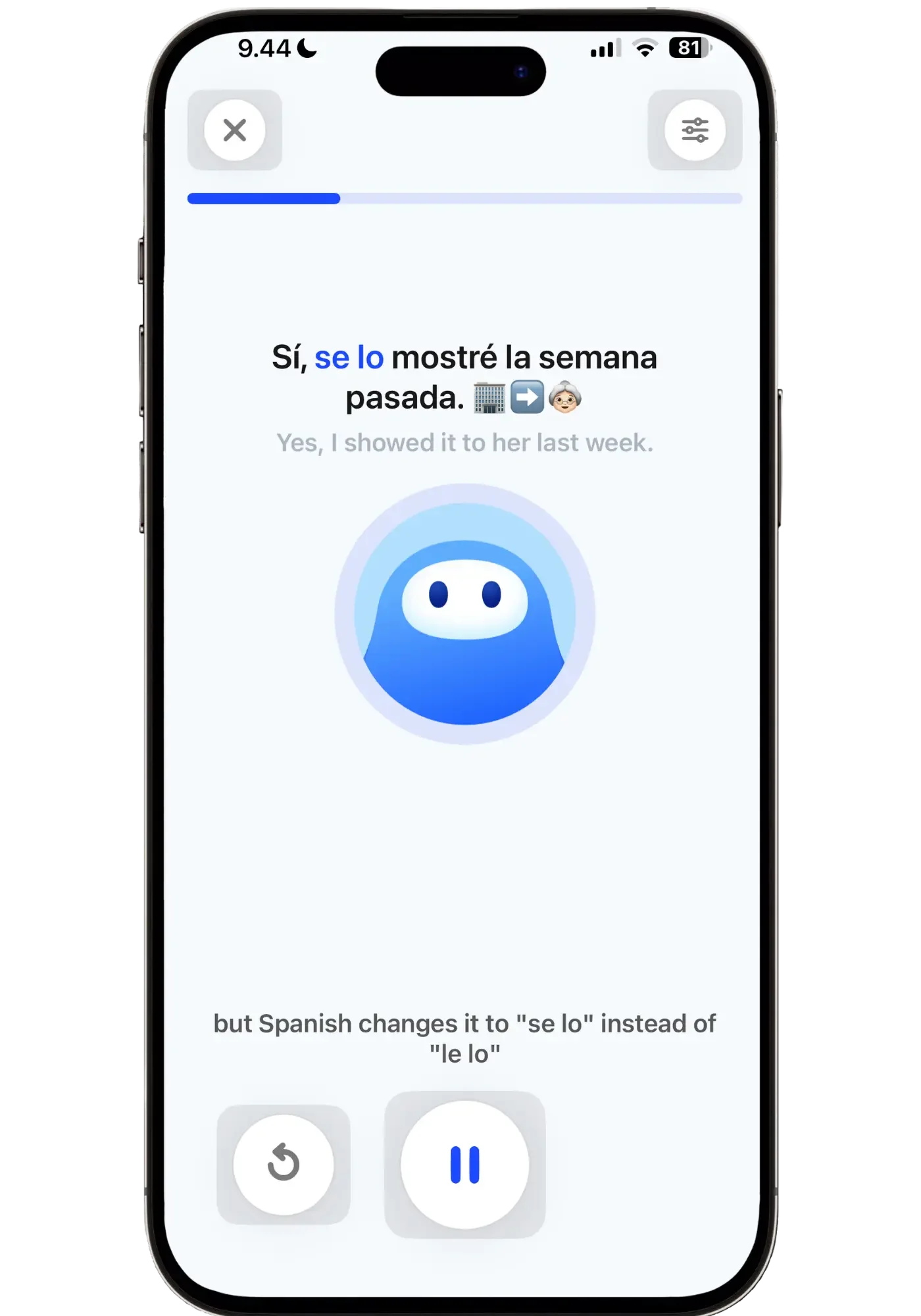
That short, in-context explanation helped me understand ‘se lo’ more clearly than anything I'd heard before — because I was already using the structure by speaking it in different examples, and it was concise enough to digest instantly. It just clicked. And "se lo" had been a question mark I'd ignored for ages, figuring I'd learn it at some point.
Speak's structure also makes asking a grammar question feel low-pressure. When you're drilling one sentence, you can pull up the AI tutor to ask — and the answer is narrow, about that sentence, versus free conversation where a grammar question sometimes feels like a bigger interruption. None of this is exclusive to Speak (every app lets you ask the AI), but its structure lowers the friction, and the sheer repetition makes patterns stick while keeping it approachable the whole time.
And if you make a mistake in a Free Chat or Roleplay, Speak generates an optional lesson targeting exactly that mistake — drills with the correct structure (in several different sentences) right after the chat. It's a convenient, pain-free way to clean up errors right away, because it's the muscle memory of saying it right many times that makes it stick and become automatic.
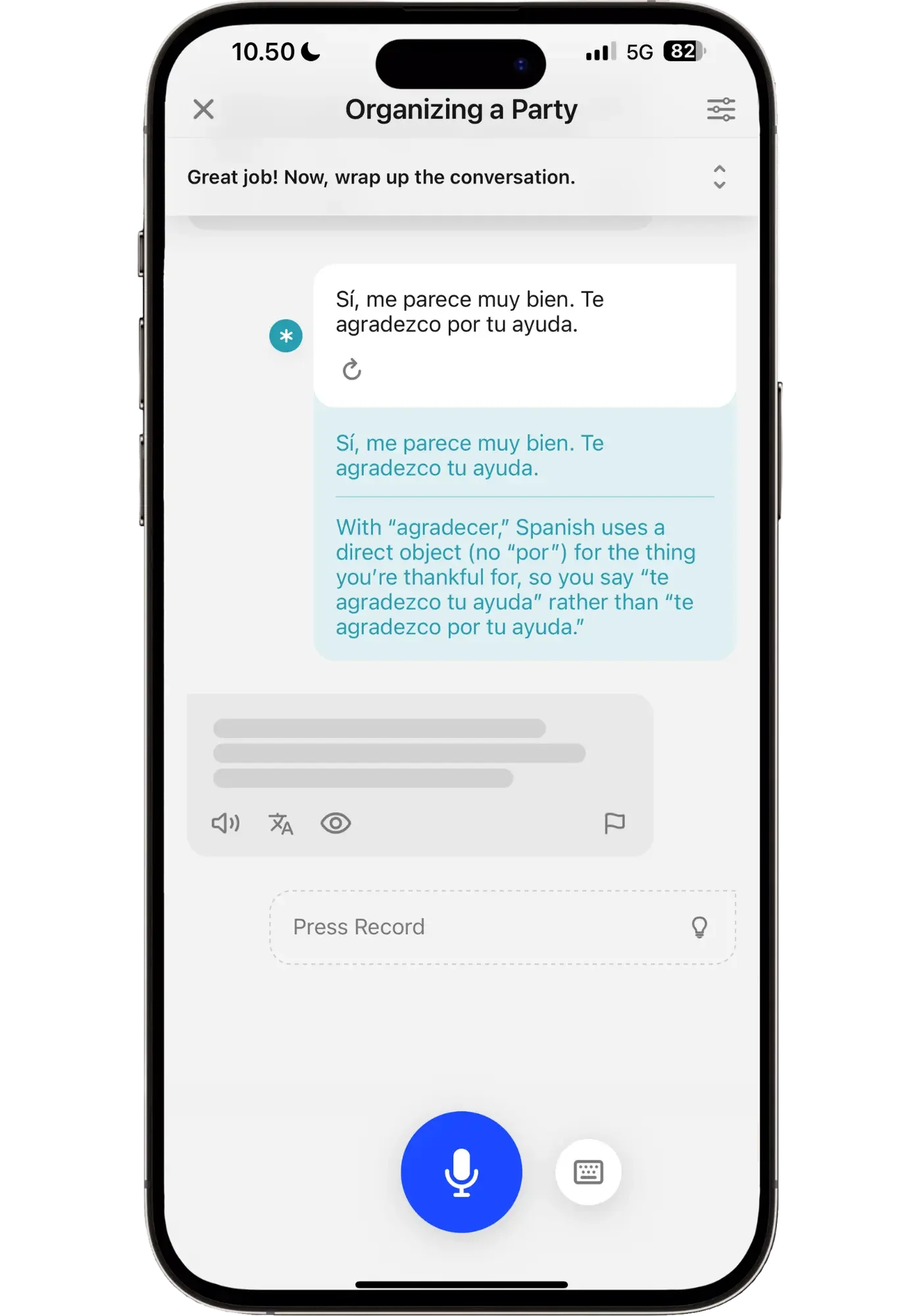
Make a mistake in a chat...
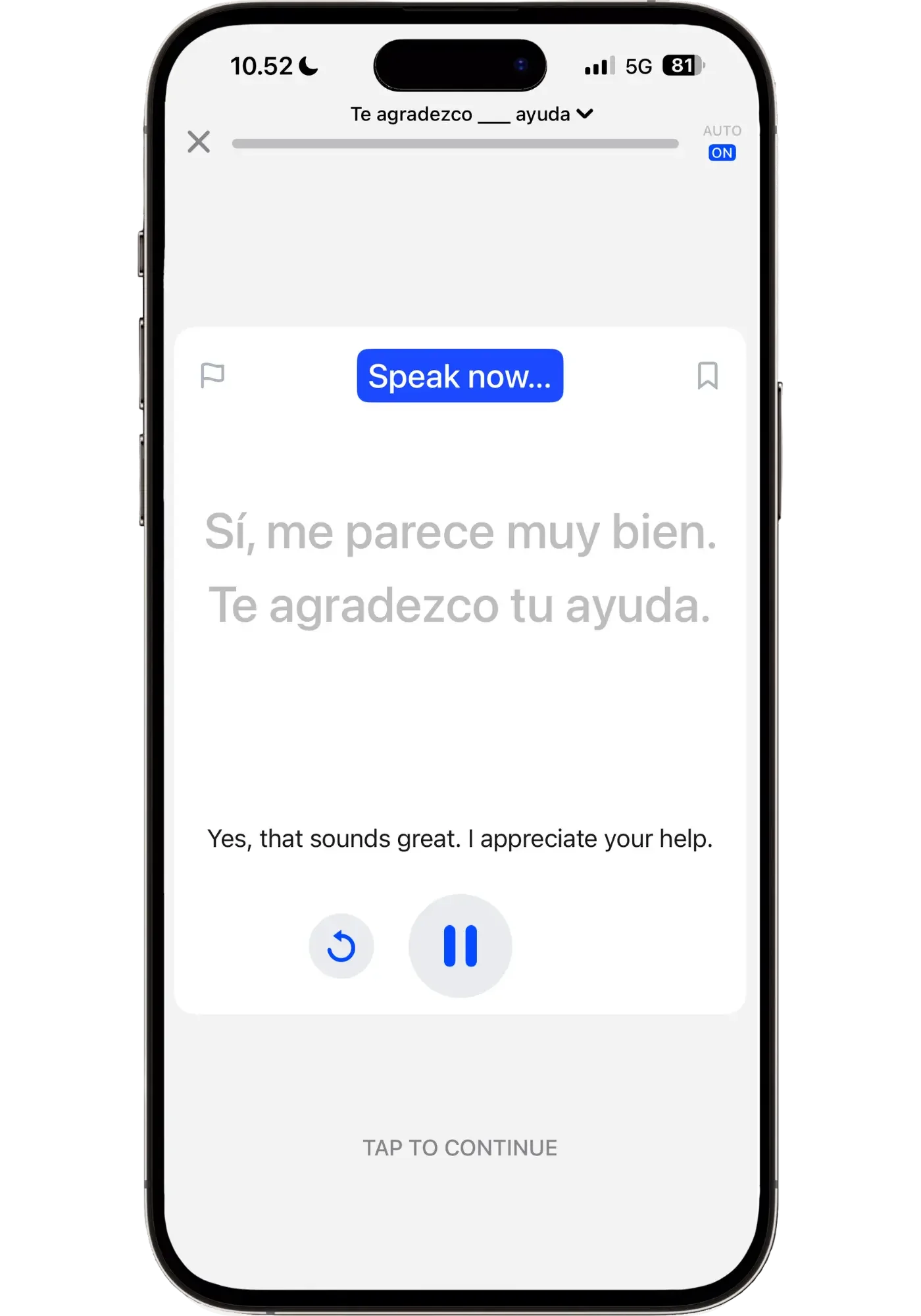
…and Speak builds a drill targeting that exact pattern right after the chat.
Speak is built around "Concepts" — sentence structures — which is the heart of why it's the best app for grammar. Each concept gets a mastery score, and Smart Review surfaces your weakest first, so you never have to decide what to review — you just press start. It even tracks your concepts across every lesson and chat, so using something correctly raises your mastery automatically, while repeated mistakes resurface for extra reps.
(I go deeper on exactly how this works in the Smart Review section of my full Speak review.)
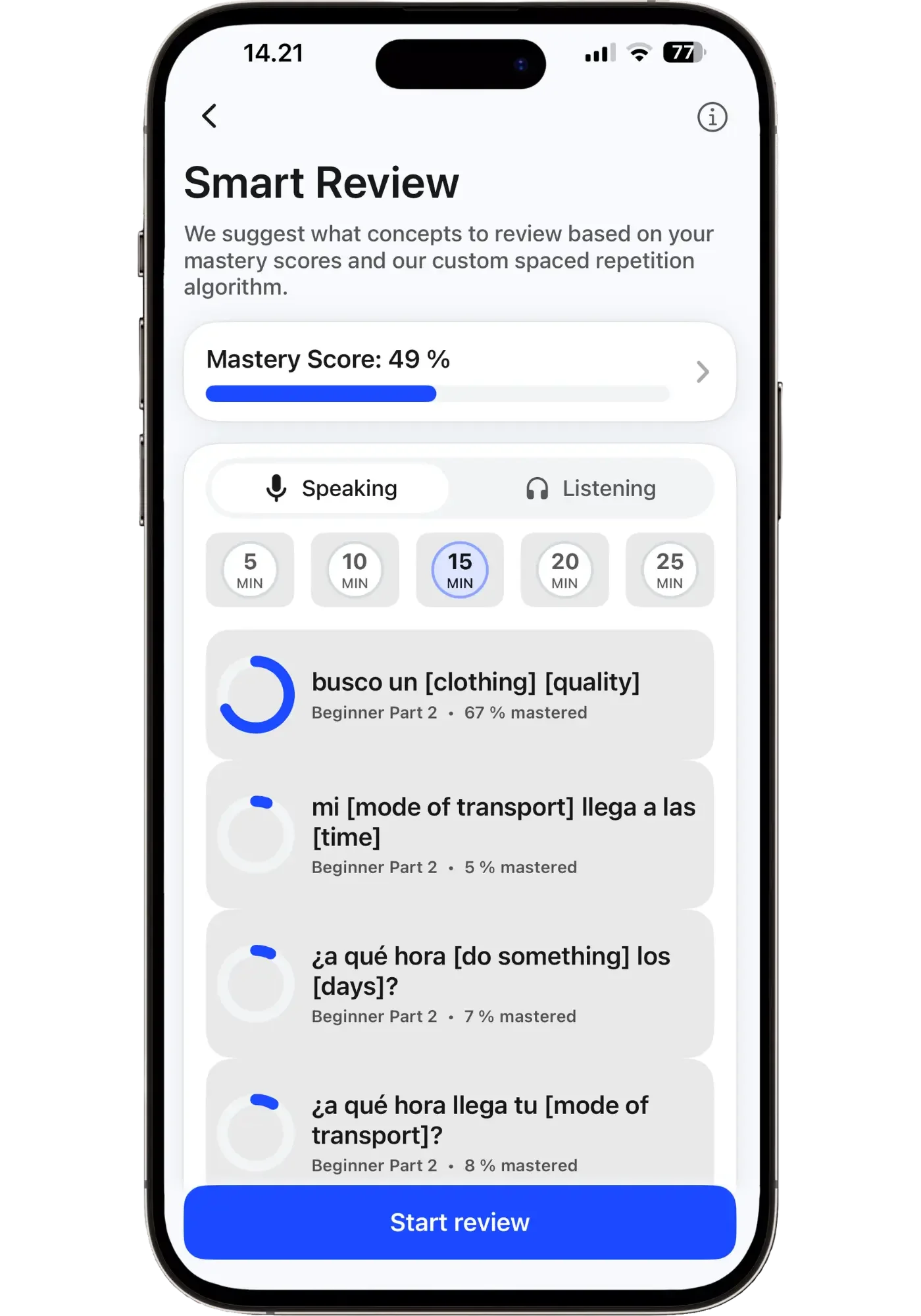
Each grammar concept gets a mastery score — Speak surfaces your weakest ones first, so you never have to figure out what to review.
After seven months of daily Speak, this is where I've seen the biggest jump in my grammar confidence. Speak makes it feel like beating an old Sega Mega Drive game, not doing homework. Early on, with 10 concepts, it's easy to track yourself — but not once you have over 300 like I do now, and it'd be overwhelming long before that. That's what makes Smart Review so valuable: it's like a personal grammar assistant that collects every concept and decides the smartest order to review them, so I never have to. I just decide when and how much to practice.
Try a 7-day free Speak trial to test the approach yourself.
How Langua Offers the Deepest Tools
Langua is the most flexible for practicing grammar, and the best for dialect-specific grammar since it adapts to whichever dialect you've chosen, beyond just Castilian and Latin American. It has dedicated ways to practice: ask questions and get answers in English or Spanish, plus a range of grammar activities organized into categories and games.
The standout is "Recommended for you": Langua watches how you actually speak and surfaces the grammar you're personally weak on — ser vs. estar, gender agreement, pronoun use — ready to drill. It tracks your mistakes much like Speak does, but in an open-ended way without Speak's clear "you're done!" finish line and motivating score.
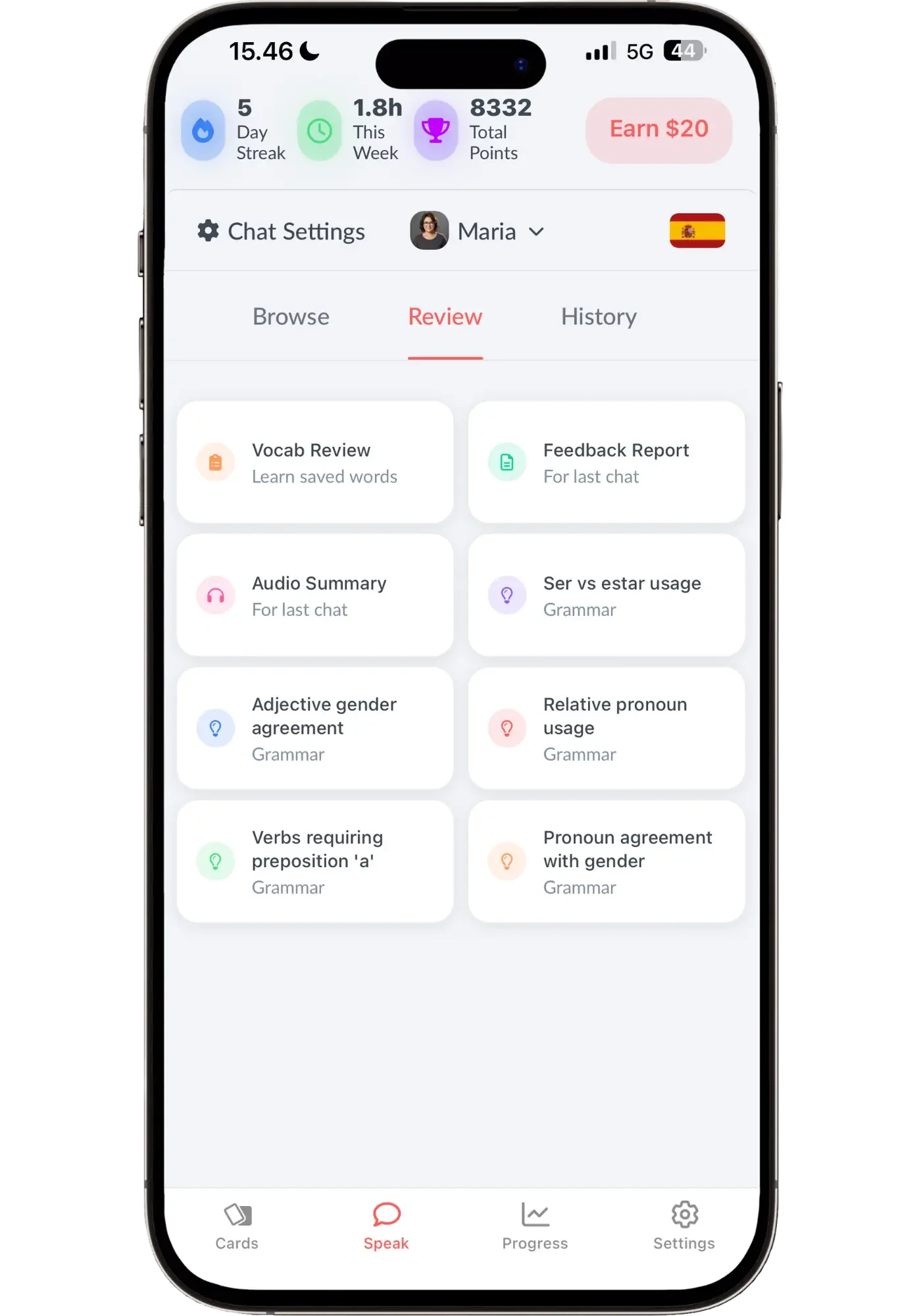
Langua watches how you actually speak and surfaces the grammar you're personally weak on — ser vs. estar, gender agreement, pronoun use — ready to drill.
The strength is in that it offers more options for grammar practice activities — whereas Speak relies on its simple (yet effective) drills. Pick a weak area and Langua opens a whole menu of ways to practice it — explanations, multiple choice, translation both directions, and hands-free shadowing (similar to Speak’s drills, but in an open-ended way).
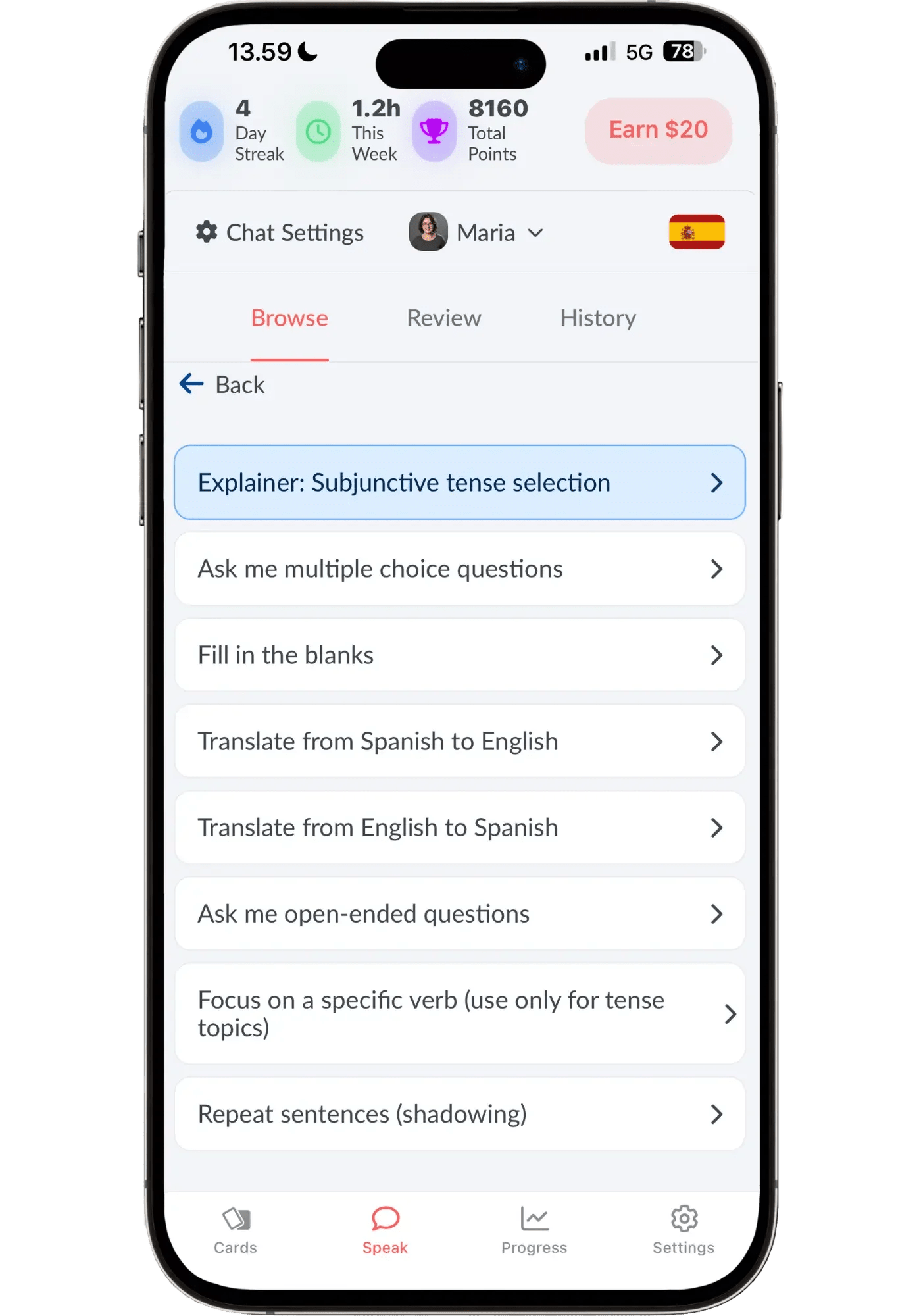
Pick a weak area and Langua opens a whole menu of ways to drill it — explanations, multiple choice, translation both ways, and hands-free shadowing (love this one).
So Langua is genuinely deeper than Speak, with far more options — which some people will prefer. The reason I still put Speak first is that Speak's clear, motivating path makes grammar feel like a game you're winning, whereas Langua's depth is more self-directed. It’s better for those who like that freedom and variety. In short: with Speak — it decides for you. With Langua — you decide. Though with My Path, Langua now automatically bakes in grammar activities based on your most frequent grammar mistakes so there’s a bit of both.
→ Try Langua free (no credit card required for their free account)
Univerbal Grammar Handling
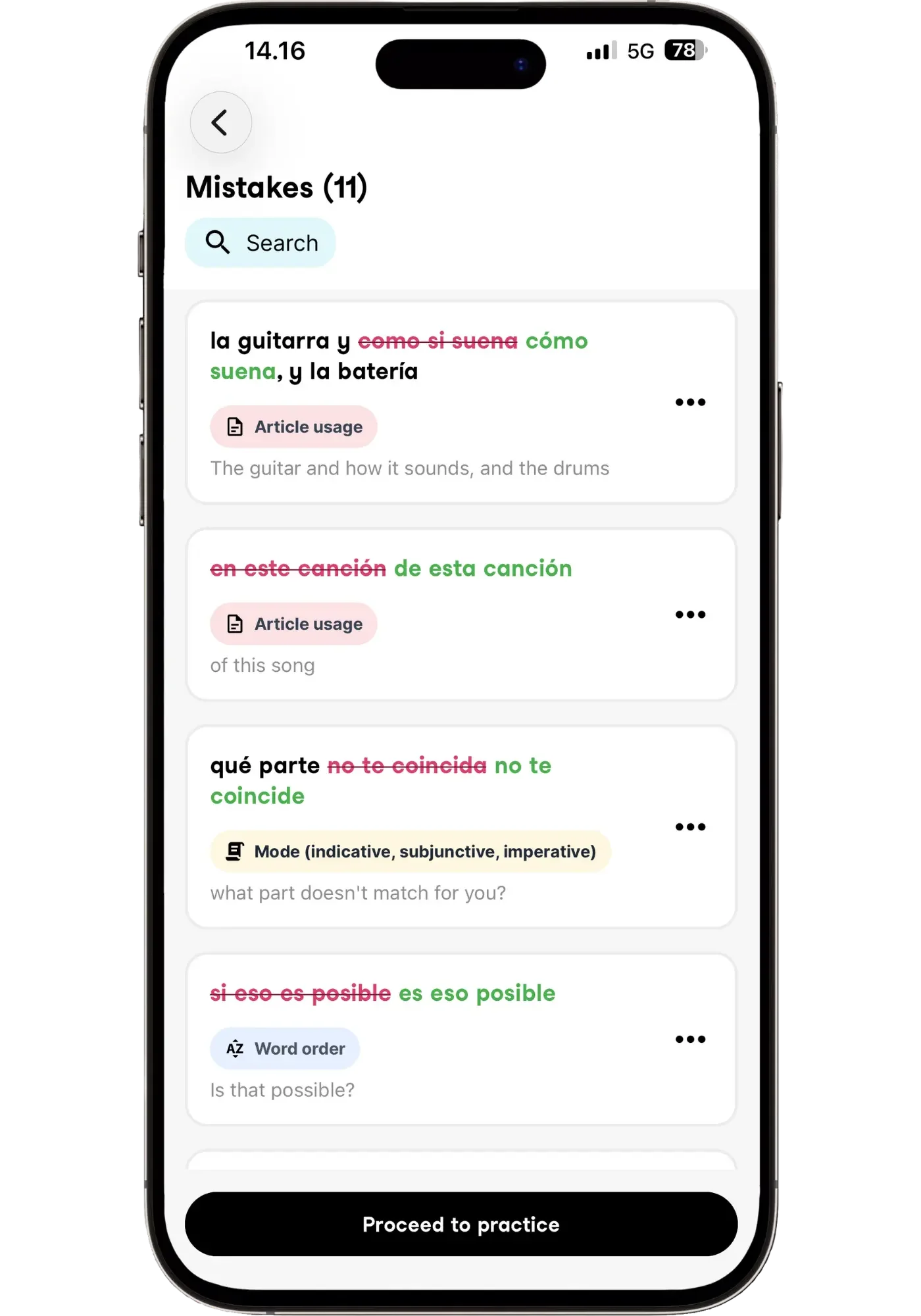
Univerbal has two grammar-helpful features. First, like Speak and Langua, it tracks some of your mistakes, which you can review under a "Mistakes" tab. But rather than drilling general grammar patterns with lots of examples (as Langua does), it has you work on those specific mistakes — the exact sentences you got wrong — through activities like fill-in-the-blank, translation, and flashcards. I find these activities less useful and more generic than Langua's, but they still work.
Second, the in-chat "say it out loud" feature helps with grammar too — you repeat your sentence in its corrected form, reinforcing it by actually speaking it correctly.
Praktika Grammar Handling
Praktika doesn't offer any dedicated ways to improve grammar — beyond just conversation plus correction. That's not necessarily a bad way to improve it, but it's nothing other apps don't also offer, so it brings nothing new to the table.
Which App Fits Your Situation
Spanish learners come to the language for all kinds of reasons. Each benefits from AI a little differently, but here's the quick version of who should pick what:
Beginners → Speak is my number one recommendation — the path is so well-made and the easiest to follow. For those who want a conversational, more flexible approach, Langua is the second best option for beginners.
Heritage learners → Speak early on, but Langua once you start becoming conversational, since matching your family's dialect starts to matter.
Partner from a specific country → same: Speak if you're starting out, Langua once intermediate, when accent and dialect matching genuinely count.
Learning for fun → any of them. Pick by vibe.
Want streaks and progress bars to stay consistent → Speak is the clearest by a distance — every activity has an obvious goal and a bar showing exactly how far through it you are. Univerbal does it well too, with mission progress and a points breakdown at the end. Langua does it differently: no in-chat progress bars, but it counts your minutes and seconds of conversation, and you earn points for messages and flashcard reviews that move you up a leaderboard. Praktika has daily streaks and not much else.
Like the experience of taking a lesson → Praktika — its avatar tutors guide you, suggest what to practice, and give it that "showing up for class" feel.
Want a relaxed, low-pressure pace → Univerbal.
Want truly open conversation → Langua, no contest.
If I was buying an app for a friend starting Spanish from zero — it'd be Speak, every time. It’s that good. It's also the most affordable of the four, though nothing about the experience feels budget.
Still unsure? Take the quiz below.
How to Combine Two AI Apps
You don't need two apps — one is plenty to make real progress, and it's the right call for most people. But if you want to combine, here's what I'd suggest.
For me, it's Speak + Langua, no question. I use Speak to drill and cement patterns until my grammar's clean and they come out naturally, then Langua for real, engaging conversation where I can ask questions in the moment and just talk freely. They pull in opposite directions — one drills, one converses — which is exactly why they work so well together. I wouldn't want to be without either. It's also a natural progression: start with Speak as a beginner to build speaking foundations, then move over to Langua as you're ready to practice having actual conversations.
A few other pairings work too — Speak alongside Praktika or Univerbal, or Univerbal's gamified missions paired with Langua's open conversation. But honestly, Speak + Langua is my favorite combo that I’d point most people to.
Take the Quiz: Find Your Spanish AI App in 30 Seconds
This quick quiz matches you to your best app based on your level, goals, and how you like to practice — giving you a main recommendation plus a secondary option.
One thing worth saying before you take it: Langua comes up a lot, because it's simply the clear winner in most areas for Spanish. But "best overall" and "best for you" aren't the same thing — every app here is the right answer for someone, and the quiz will send you where I'd actually send you if you asked me in person.
Which AI App Is Right
For Your Spanish?
FAQ
Which Spanish dialect should I learn?
The one spoken by the people you'll talk to most, or the country you're most drawn to and likely to visit. If you have family or a partner from a specific country, learn that dialect. If you're unsure, Mexican Spanish is a safe default — it's the most widely understood across Latin America and the most common in media (Europeans might lean Castilian). The dialects are mutually intelligible, and nothing's set in stone: I learned mostly Castilian for my first couple of years and have since mixed in Argentinian and Mexican influences.
Can AI apps really teach me Mexican, Castilian, or Argentinian Spanish specifically?
All of them do Mexican/neutral Latin American, and some do Castilian (Univerbal, and Praktika sort of). Langua is by far the deepest — it also covers Argentina, Colombia, Chile, Peru, Uruguay, and even regional accents like Andalusian, including local slang. If a specific dialect matters to you, that alone is a strong reason to choose Langua.
Can AI replace a Spanish tutor?
In my opinion, no. The connection, accountability, nuanced feedback, and depth of a real human tutor isn't something AI can replace — the fired-up motivation you feel after a lesson with a native is different from what AI can give you. What AI can do is give you daily practice at a fraction of the cost. I'd use AI for daily speaking and connect with a teacher every week or two for the human element (Langua has excellent Spanish teachers built into the platform — click ‘Tutoring’ for access).
How long until I can actually hold a conversation in Spanish?
This is always such a difficult question to answer, because it depends on your starting point and how consistently you practice. The fastest progress I've seen comes from people who practice a little every day rather than long occasional sessions. With consistent daily use, you can hold a simple conversation within a few months — as long as you practice listening too, so you understand the replies.
Do these apps work for heritage speakers who understand but can't speak?
Yes — this might be the single best use case for AI speaking practice. If you understand Spanish but freeze when you try to speak, AI gives you unlimited, judgment-free practice to bridge exactly that gap. Langua is especially good here, since you can often practice in your family's dialect. The barrier for heritage learners is usually confidence and output practice, and that's exactly what this builds — you'll see a difference within weeks of daily practice.
I finished Duolingo — what now?
One of the most common situations I see. You've got vocabulary and some grammar but can't really speak yet — an AI speaking app is the natural next step. Want structure to keep progressing? Speak. Ready to just start talking? Langua. Prefer an AI teacher/student daily lesson experience? Praktika. Want gamified, free-ish conversations on a structured path? Univerbal.
Is there a free AI app for Spanish conversation practice?
None of these four are free, but you can try all of them before paying. Langua has a free account (no credit card needed) with a short AI chat and some of the platform’s features, with no time limit. Univerbal has a 2-day free trial with no credit card, and Speak has a 7-day free trial. Praktika currently gives 50% off your first payment through my link instead of a trial. The app store version has a 7-day trial, but without the discount, so you’d need a new account later to get it.
If you need something free long-term, Talkpal’s free plan gives you 10 minutes of AI chat a day. It didn’t make this list because the other four do Spanish better, but it’s a good budget option. If you want to upgrade later, the code LINGTUITIVE gets you 25% off Talkpal’s 1-year and 2-year plans.
Are AI Spanish apps worth paying for?
Yes, but only if you use them consistently. They're a fraction of the cost of a tutor and available anytime — but an app sitting unused on your phone won't improve your speaking. The best app is the one you'll actually open every day. You can try all four before paying (see the question above), so you can test before committing.
Final Thoughts
The best app is the one you'll actually open — and honestly, a lot of it comes down to vibe, the one you simply enjoy using.
If I had to boil it all down: Speak is my favorite for getting started and giving you the building blocks you need for speaking — imprinting natural patterns into your muscle memory until they come out without thinking. Praktika's avatar tutors have real, consistent personalities and remember what you've told them — it feels like showing up for class with a teacher who actually knows you, and Univerbal's relaxed, mission-based pace and gamified approach is uniquely enjoyable.
But Langua is in a different category. I'll be honest — some days I enjoy Speak more. That gamified structure is hard to beat. The difference is that Speak's value is seasonal: it takes you through a structured arc, and at some point you've gotten most of what it has to give. Langua's value is infinite — open conversation never tops out, and it adapts to whatever you want to practice that day. That freedom used to ask more of you, especially if you’re juggling several languages like I am — My Path takes that weight off, as it’s the easiest way into Langua on a busy day when you just want to be told what to do. And for the thing that matters most — genuine, open conversation — nothing else comes close.
So for me: start with Speak as a beginner to get the building blocks of speaking — but it stays just as useful later for cleaning up your grammar and drilling correct patterns until they come out automatically (that's exactly how I use it as an upper intermediate). Then reach for Langua when you're ready for real conversations.
But whichever you choose, these apps all help prepare you for real conversations, so that when you're actually talking to people, it flows and you can just enjoy it. And the best app for that is, simply, the one you'll keep opening.
Ready to start? Try any of the four free:
The most natural voices, open conversation, and the widest range of Spanish dialects.
The most effective structured path — drills natural speaking patterns into muscle memory.
Avatar tutors with real personalities and a daily-lesson, teacher-led rhythm.
A calm, mission-based routine with gamified, low-pressure conversation practice.
